


OpenAI Realtime is a multi-modal API that enables sub-second, speech-to-speech AI interactions over WebRTC or WebSocket connections. It supports voice-agent, translation, and transcription session types, letting developers build low-latency conversational experiences without stitching together separate STT, LLM, and TTS services. VideoSDK integrates with OpenAI Realtime through its AI Voice Agent SDK, providing room-based media routing and production-grade telephony for real-time AI pipelines. To get started, review the OpenAI Realtime documentation and the VideoSDK AI Agents guide.
A customer calls a support line and speaks in Portuguese. Within 400 milliseconds, an AI agent responds in Portuguese, having understood the query, checked an order database, and formulated a natural reply. No awkward pauses, no "let me think about that," no robotic delay that makes the caller hang up. That is the promise of OpenAI Realtime, and it is reshaping how developers architect voice AI.
Sub-second latency is the threshold where a conversation feels natural rather than mechanical. Anything above 800 milliseconds starts to feel like a walkie-talkie exchange. OpenAI Realtime targets that sub-second window by streaming audio directly to and from the model, eliminating the round-trips that traditional STT-to-LLM-to-TTS pipelines impose.
This article walks through the OpenAI Realtime API from the ground up. You will understand the session types, transport protocols, lifecycle events, production configuration, and real-world deployment patterns. No code snippets, just clear architectural guidance for developers building low-latency AI voice experiences.
What Is OpenAI Realtime?
OpenAI Realtime is defined as a streaming API that processes audio input and generates audio output in real time, maintaining a persistent connection between the client and the model. Unlike batch APIs where you send a request and wait for a complete response, Realtime streams audio chunks bidirectionally, allowing the model to begin generating speech before the user has finished talking.
The API supports three primary session types, each optimized for a distinct interaction pattern. The voice-agent session is the most common: a user speaks, the model listens, processes, and responds with synthesized speech. This is the backbone of AI phone agents, customer support bots, and conversational assistants. The translation session takes audio in one language and outputs translated audio in another, designed for live interpretation scenarios where meaning must transfer across language barriers with minimal delay. The transcription session converts spoken audio to text in real time, useful for live captioning, broadcast subtitles, and accessibility tooling.
OpenAI Realtime works by maintaining a session object on the server side that holds conversation context, configuration parameters, and active audio streams. The model processes incoming audio chunks as they arrive, applies turn detection to determine when the user has finished speaking, and streams response audio back incrementally. Function calling is supported within voice-agent sessions, allowing the model to trigger external tools mid-conversation.
VideoSDK provides OpenAI Realtime integration through its AI Voice Agent SDK, which wraps the Realtime API inside a room-based architecture. This means developers get WebRTC media routing, participant management, and telephony bridging on top of the Realtime session, without building that infrastructure separately.
Choosing the Right Transport: WebRTC vs WebSocket
Transport selection is the first architectural decision every OpenAI Realtime developer faces, and it directly determines latency, complexity, and browser compatibility.
WebRTC is the recommended transport for browser-based and mobile applications where low latency is critical. It handles audio encoding, packet loss recovery, and jitter buffering automatically. The browser's native WebRTC stack manages the peer connection, media tracks, and secure transport. WebRTC connections to OpenAI Realtime use a direct peer connection between the client and OpenAI's media servers, with SDP exchange handled through a signaling step. The downside is that WebRTC adds complexity on the server side if you need to route audio through an intermediary, such as a recording service or a telephony gateway.
WebSocket is the alternative transport, suitable for server-side applications, backend pipelines, and scenarios where you need full control over the audio stream. With WebSocket, raw PCM audio chunks are base64-encoded and sent as JSON messages to the OpenAI endpoint. This approach is simpler to implement in a backend service but introduces higher latency because the audio is not using the optimized media transport that WebRTC provides. WebSocket is also the right choice when your application sits between the user and OpenAI, such as a Python-based agent worker that processes audio before forwarding it.
Here is how the two transports compare architecturally:
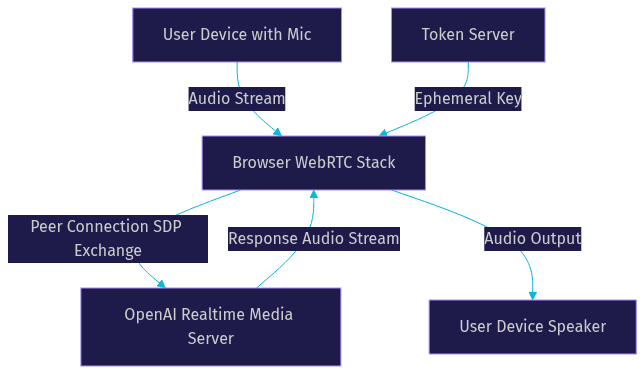
The WebRTC flow shows a direct media path between the user's browser and OpenAI's servers, with a token server providing the ephemeral key for authentication. The browser handles all media encoding and decoding natively.
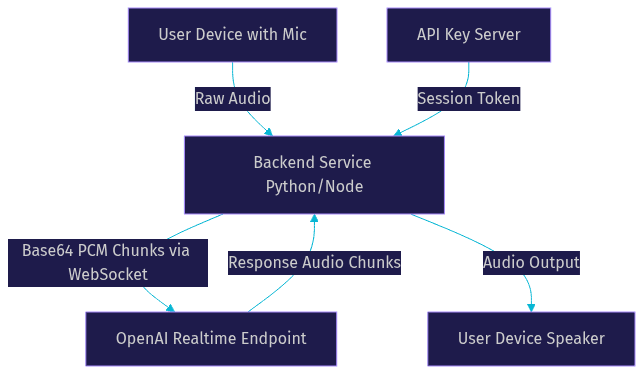
The WebSocket flow routes audio through a backend service that encodes, sends, and decodes audio manually. This adds a hop but gives you full control over processing, recording, and routing.
For production voice agents that connect to phone networks, VideoSDK's telephony integration bridges SIP trunk audio into a VideoSDK room, which then connects to OpenAI Realtime via the agent pipeline. This hybrid approach uses WebRTC internally while accepting SIP inbound calls from traditional phone lines.
Session Lifecycle Overview
Every OpenAI Realtime interaction follows a predictable lifecycle, and understanding these stages is essential for building reliable production systems.
The lifecycle begins with session creation. A client establishes a connection to the OpenAI Realtime endpoint using either WebRTC or WebSocket, authenticated with an ephemeral token. The server responds with a session.created event, which includes a session object containing the default configuration. At this point, the session exists but no audio is flowing.
Next comes configuration. The client sends a session.update event to modify parameters such as voice selection, turn detection mode, output modalities, and tool definitions. This is where you specify whether the session should use semantic VAD (voice activity detection) or server-side VAD, which model variant to use, and what functions the agent can call. Configuration can be updated mid-session, allowing dynamic behavior changes without reconnecting.
Audio streaming begins once the session is configured. The client sends audio input chunks continuously, and the server processes them through the model's turn detection system. When the server detects that the user has finished speaking, it generates a response and streams audio output chunks back to the client. The response.create event marks the start of generation, and response.done marks completion. During this phase, the client may also receive response.audio.delta events containing incremental audio chunks that should be played as they arrive for minimal latency.
Termination occurs when the client disconnects, the session exceeds its maximum duration, or an error forces a close. Graceful termination involves stopping audio streams, closing the connection, and cleaning up any server-side resources.
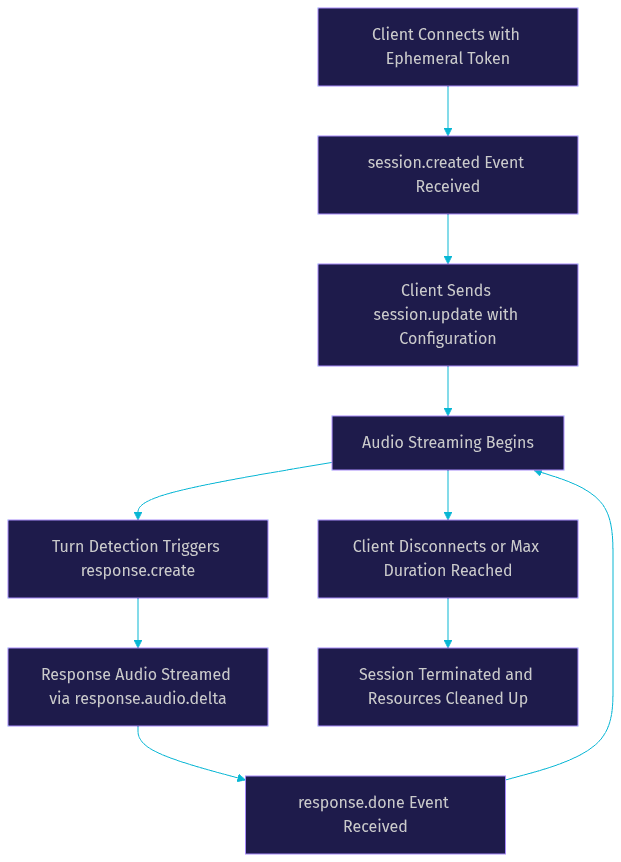
One critical detail: the lifecycle is not strictly linear. After a response completes, the session returns to listening for audio input. This loop continues until termination. Developers must handle reconnection logic for network interruptions, as a dropped connection mid-session requires establishing a new session entirely. The OpenAI Realtime API does not currently support session resumption, so any conversation context lost on disconnect must be reconstructed by the application layer.
VideoSDK's agent architecture addresses this by maintaining session state in the Agent Worker, which can persist conversation context and re-establish the Realtime session if the WebRTC connection drops. This is particularly valuable for phone-based agents where network quality fluctuates.
Configuring a Session for Production
Production configuration is where most OpenAI Realtime implementations go wrong. The defaults are designed for quick prototyping, not for secure, scalable deployments.
Token Security
Never expose your OpenAI API key on the client side. OpenAI Realtime supports ephemeral client secrets, which are short-lived tokens generated server-side and passed to the client for session authentication. The client uses this ephemeral key to establish the WebRTC or WebSocket connection, and the key expires after a defined interval. Your backend should generate a new client secret for each session and never reuse them. Token leakage is the most common security issue in Realtime deployments, and it typically happens when developers hardcode API keys into frontend applications or commit them to version control.
Voice and Turn Detection
Voice selection affects both user experience and latency. OpenAI offers several prebuilt voices with different characteristics. Some voices generate audio faster than others due to model architecture differences. Test multiple voices with your target audience to find the right balance of naturalness and speed.
Turn detection configuration controls how the model decides when a user has finished speaking. Server-side VAD uses simple energy-based detection, which is fast but can misinterpret pauses as turn endings. Semantic VAD uses the model's language understanding to distinguish between a thoughtful pause and a completed thought. Semantic VAD produces more natural conversations but adds slight latency to turn detection. For customer support agents where accuracy matters more than speed, semantic VAD is the better choice. For fast-paced gaming or social apps, server-side VAD may be preferable.
Latency Tuning
The reasoning effort parameter controls how much internal processing the model performs before responding. Lower reasoning effort reduces latency but may produce less thoughtful responses. Higher reasoning effort improves response quality but adds delay. For simple FAQ-style agents, low reasoning effort is sufficient. For agents handling complex queries like loan applications or medical triage, higher reasoning effort is worth the extra latency.
Model selection also impacts latency. According to OpenAI's published documentation, newer model variants may offer improved latency characteristics. Always verify the current model name and its performance profile before deploying.
Common Pitfalls
Session maximum duration is a hard limit that catches many developers off guard. If your use case requires conversations longer than the maximum session length, you must implement session handoff logic that creates a new session and transfers conversation context before the old one expires. Another common issue is failing to handle the case where the model generates no response, which can happen if the audio input is too quiet or if turn detection misfires. Always implement fallback behavior for empty responses.
Practical Use-Case Walkthroughs
Live Multilingual Interpretation
A global conference platform needs real-time translation between speakers of different languages. The translation session type is purpose-built for this scenario.
The developer selects the translation session model and configures the source and target languages. Audio from the speaker enters the session as input chunks. The model processes the speech, translates it, and streams translated audio back in the target language. The key configuration decision here is balancing translation accuracy against latency. More context produces better translations but increases delay. For live interpretation, a latency target of 500 to 800 milliseconds is realistic.
Production considerations include handling code-switching (when a speaker alternates between languages mid-sentence), managing multiple simultaneous translation streams for different language pairs, and implementing fallback to a secondary translation service if the Realtime session drops. VideoSDK's Interactive Live Streaming mode can distribute the translated audio to audience members as separate audio tracks, letting each listener choose their language.
Real-Time Voice Assistant for Customer Support
A telecommunications company wants an AI agent that handles inbound phone calls for account inquiries. The voice-agent session type is the right choice here.
The developer configures the session with a system prompt defining the agent's persona and capabilities, registers function tools for database lookups (account status, billing history, plan changes), and selects a voice that matches the brand. When a call comes in through a SIP trunk, VideoSDK's telephony gateway routes the audio into a VideoSDK room. The agent worker picks up the audio, forwards it to the OpenAI Realtime session, and returns the model's response audio back to the caller.
The agent uses function calling to retrieve customer data mid-conversation. For example, when a caller asks about their bill, the model triggers a function call to the billing API, receives the result, and incorporates it into the spoken response. This requires careful prompt engineering to ensure the model calls functions at the right moments and handles API failures gracefully.
Production considerations include call transfer to human agents when the AI cannot resolve an issue, voicemail detection for outbound calls, and DTMF tone handling for IVR menu navigation. VideoSDK's agent SDK supports call transfer and warm transfer natively, which simplifies the human handoff workflow.
Continuous Transcription for Live Broadcast
A news organization needs real-time captions for a live video broadcast. The transcription session type handles this without generating any audio output.
The developer configures a transcription session and feeds the broadcast audio stream into it as input chunks. The session returns text transcripts incrementally, with partial results that refine as more audio context arrives. The application displays partial transcripts in real time and replaces them with finalized text as the model confirms each segment.
The main production challenge is handling the volume of transcription events. A long broadcast generates thousands of text delta events, and the frontend must update the caption display efficiently without causing rendering jank. Buffering strategies help: accumulate a few seconds of partial results before updating the display, then commit finalized segments to a permanent transcript store.
Network quality is critical for transcription accuracy. Audio dropouts cause the model to miss words, producing incomplete transcripts. Implement reconnection logic that re-sends recent audio buffer contents when the connection is restored. VideoSDK's Python SDK can manage the audio pipeline between the broadcast source and the OpenAI Realtime endpoint, handling buffering and reconnection automatically.
Monitoring, Debugging, and Optimization
Building a working OpenAI Realtime session is only half the battle. Production systems need observability to catch issues before users notice them.
Capturing Latency Metrics
The key latency metric is time-to-first-audio: the interval between when the user stops speaking and when the first audio chunk of the response arrives. Measure this by timestamping the turn detection event and the first response audio delta event. According to Artificial Analysis's Speech Arena benchmark, real-time voice AI systems typically achieve time-to-first-audio between 300 and 600 milliseconds, with OpenAI Realtime performing competitively in this range.
Track this metric across sessions and alert when it exceeds your target threshold. Consistent latency degradation often indicates network issues or model capacity constraints.
Detecting Audio Dropouts
Audio dropouts manifest as gaps in the response audio stream or truncated input audio. On the client side, monitor the audio track for silence gaps that exceed expected inter-chunk intervals. On the server side, log the sequence of audio delta events and flag any missing sequence numbers. Browser developer tools can inspect WebRTC stats, including packets lost and jitter buffer delays, which reveal network quality issues before they become audible.
Adjusting Turn Detection and Reasoning
If users report that the agent interrupts them mid-sentence, switch from server-side VAD to semantic VAD, or increase the VAD silence threshold. If users report that the agent responds too slowly, reduce reasoning effort or switch to a faster model variant. These adjustments should be configurable at runtime through session.update events, allowing you to tune behavior without redeploying.
OpenAI's event logs provide a complete record of session events, including timing data for each stage of the response pipeline. Review these logs regularly to identify patterns. VideoSDK's Pipeline Observability layer adds additional telemetry, capturing STT, LLM, and TTS stage timings for agent sessions that use the full pipeline.
Definitions Glossary
OpenAI Realtime API: A streaming API from OpenAI that processes audio input and generates audio output in real time over WebRTC or WebSocket connections, supporting voice-agent, translation, and transcription session types.
Session Lifecycle: The sequence of stages an OpenAI Realtime session passes through, from creation through configuration, audio streaming, response handling, and termination.
Turn Detection: The mechanism that determines when a user has finished speaking and the model should begin generating a response, available in server-side VAD and semantic VAD modes.
Ephemeral Client Secret: A short-lived authentication token generated server-side from an OpenAI API key, used by clients to establish Realtime sessions without exposing the master API key.
Agent Worker: The Python process in VideoSDK's AI Voice Agent architecture that manages a Realtime session's lifecycle, processes audio, and coordinates STT, LLM, and TTS pipeline stages within a VideoSDK room.
WebRTC Transport: A browser-native real-time communication protocol that handles audio encoding, packet loss recovery, and secure media transport for OpenAI Realtime sessions.
WebSocket Transport: A message-based protocol that sends base64-encoded PCM audio chunks to the OpenAI Realtime endpoint, suitable for server-side applications requiring full control over audio processing.
Key Takeaways
- OpenAI Realtime supports three session types (voice-agent, translation, transcription), and choosing the right one is the first and most important architectural decision.
- WebRTC is the preferred transport for browser and mobile applications due to lower latency and native browser support, while WebSocket suits backend pipelines where you need manual audio control.
- Token security is non-negotiable in production: always generate ephemeral client secrets server-side and never expose your OpenAI API key on the client.
- Turn detection mode and reasoning effort are the two levers that most directly impact conversation naturalness and latency, and both should be configurable at runtime.
- VideoSDK's AI Voice Agent SDK wraps OpenAI Realtime in a room-based architecture with telephony integration, making it possible to build production phone agents without assembling WebRTC and SIP infrastructure from scratch.
Conclusion
OpenAI Realtime has made sub-second, multi-modal AI conversations accessible to developers who previously had to stitch together separate STT, LLM, and TTS services with all the latency that pipeline implies. The API's session types, transport options, and configuration parameters give you fine-grained control over the balance between response quality and speed. The hard part is no longer accessing the model. It is building the production infrastructure around it: secure token handling, telephony bridging, reconnection logic, observability, and scaling.
That is where VideoSDK fits. The AI Voice Agent SDK provides the room architecture, telephony integration, and pipeline observability that production OpenAI Realtime applications need. You can start building today with the VideoSDK free tier, which includes credits for testing and development.
What are you building with OpenAI Realtime? Drop a comment below. I would love to hear whether you are working on a phone agent, a live translation tool, or something entirely different. You can also join the VideoSDK Discord community to connect with other developers building real-time AI voice experiences.
Free $20 Balance for AI Voice Agents & Video Calls
FAQ