


The OpenAI API stream delivers model responses incrementally as Server-Sent Events, so your app renders text as it is generated instead of waiting for the full payload. Setting the stream flag on a chat completion request switches the endpoint from a single JSON response to a sequence of small chunks terminated by a done marker. This guide covers the full pipeline, from request structure and runtime choices to client rendering, error handling, and usage tracking, with the same streaming patterns you can apply when building real-time voice and video AI features with VideoSDK.
Real-time AI experiences have become the default expectation. Users no longer accept staring at a spinner for ten seconds while a model composes a full answer. They want to watch the words appear, the way they do in ChatGPT, and that experience is powered entirely by the OpenAI API stream option. When you enable streaming on a chat completion request, the model's output arrives in small increments as it is produced, cutting perceived latency from seconds to a fraction of a second for the first visible token.
For developers building AI-powered products, this is not a cosmetic improvement. Streaming changes how you architect your server, how your client consumes data, and how you handle errors mid-response. This article walks through the entire streaming pipeline so you can implement it confidently in Node.js, edge functions, or Deno, and avoid the pitfalls that break production apps.
Understanding OpenAI API Streaming
What is streaming?
Streaming is defined as the incremental delivery of a response as a sequence of events, rather than as one complete payload delivered after generation finishes. Without streaming, your server sends a request, waits for the model to generate the entire output, and only then receives a single JSON document containing the full message. With streaming enabled, the server receives a series of small events, each carrying a fragment of the answer, and can forward them to the client as they arrive.
The difference in user experience is dramatic. A non-streaming response to a long question might take eight seconds before anything appears on screen. A streaming response typically shows the first words within a few hundred milliseconds, with the rest following continuously. For chat interfaces, code assistants, and AI agents, that first-token latency is the metric users actually feel.
How the OpenAI chat endpoint supports streaming
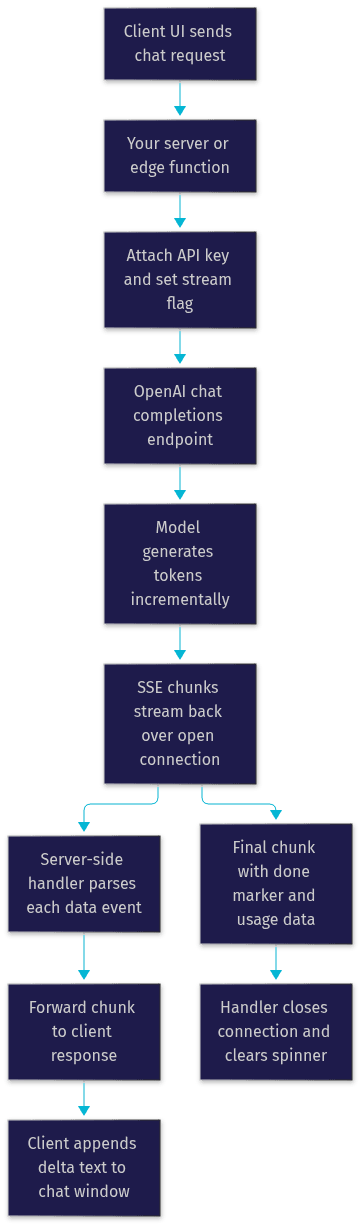
The OpenAI chat completions endpoint supports streaming through a boolean flag included in the request body. When you set the stream option to true, the endpoint responds with a continuous connection using the Server-Sent Events (SSE) format rather than a closed JSON response. Each event begins with a data prefix, followed by a compact JSON object containing the delta, which is the newly generated fragment of the message.
The connection closes with a final event containing a done marker, which signals to your handler that generation is complete and no more chunks will arrive. Each chunk also carries metadata such as the model name, a unique response identifier, and, on the final chunk, the finish reason indicating why generation stopped, whether because the output completed naturally, hit a token limit, or was interrupted by a content filter.
Setting Up Your Environment
Streaming works across every modern JavaScript runtime, but each has slightly different requirements. For Node.js, use version 18 or later, since that release introduced native fetch support and stable web streams, both of which simplify streaming considerably. For Deno, version 1.30 or later provides native TypeScript support and web-standard streams out of the box. Serverless edge platforms such as Vercel Edge Functions and Cloudflare Workers support streaming responses natively, which makes them excellent hosts for streaming proxies.
Secure key handling matters more with streaming than with typical API calls, because streaming endpoints are often exposed directly to client traffic. Store your OpenAI API key in server-side environment variables, never in client bundles or browser-accessible storage. Your server should act as a proxy: it authenticates the user, attaches the key, forwards the request to OpenAI, and pipes the response back. This pattern keeps the key invisible to the browser while still giving users the real-time experience.
Core Concepts and Workflow
Request payload and the stream flag
A streaming request looks almost identical to a standard chat completion request. You send a JSON body containing the model identifier, an array of messages representing the conversation, and parameters such as temperature and maximum output length. The single critical difference is the stream flag set to true, which instructs the endpoint to keep the connection open and emit events as tokens are produced.
Model selection affects streaming behavior in practice. Larger reasoning models may pause longer before the first token while they plan internally, while smaller models tend to start emitting almost immediately. If first-token latency is your priority, test how your chosen model behaves under streaming before committing to it in production.
Response format: SSE chunks
The response body is a sequence of Server-Sent Events. Each event consists of a line beginning with the data prefix, followed by a JSON object. Inside that object, the delta field carries the incremental content: a few characters or a word of the generated message. Your handler accumulates these deltas in order, and the concatenated result is identical to what a non-streaming request would have returned.
The stream terminates with a final data event containing only the done marker. Your code must treat this as the end-of-stream signal and close any client connections, clear loading indicators, and finalize the accumulated message. Missing this marker is a common source of hung connections and memory leaks in early implementations.
Managing tokens and usage data
By default, a streaming response does not include token usage statistics, because the counts are only known once generation completes. OpenAI addresses this with an optional stream options parameter that, when enabled, appends a final chunk containing prompt token count, completion token count, and total tokens used.
These usage metrics matter for two reasons. First, they let you bill or meter per-user consumption accurately, since you know exactly what each request cost. Second, they feed token budgeting logic: if a user is approaching their allocation, you can refuse or degrade their next request before it starts. Teams building AI agent platforms, such as those using VideoSDK's AI agent infrastructure, rely on exactly this pattern to meter voice agent minutes and model spend.
Implementing Streaming in Different Runtimes
Node.js (Express and Next.js)
In a Node.js server, the streaming workflow has four phases. First, your route handler receives the client request and validates authentication. Second, it constructs the chat completion request with the stream flag enabled and sends it to the OpenAI endpoint using the runtime's fetch capability. Third, the handler reads the response body as a web ReadableStream, iterating over each chunk as it arrives. Fourth, it forwards each chunk to the client response while setting the appropriate content type for Server-Sent Events and disabling any buffering middleware or proxies that might batch the chunks.
The buffering point is where most Node.js implementations stumble. Reverse proxies and compression layers often buffer responses to optimize throughput, which silently destroys the streaming effect. You need to ensure the entire path from your handler to the browser is unbuffered, and that the response headers indicate an event stream so intermediaries pass data through immediately.
In Next.js, the same pattern applies inside route handlers, and the framework's streaming support means the response reaches the client incrementally as long as you run the handler on a compatible runtime.
Edge Functions (Vercel, Cloudflare)
Edge functions are arguably the best home for streaming proxies. Because they run close to users geographically and support fetch natively, the implementation is a lightweight pass-through: receive the request, attach the API key from environment configuration, forward to OpenAI, and return the upstream stream directly as the function's response.
Two details deserve attention. The response headers must declare the Server-Sent Events content type so the browser and any CDN treat the connection as a live stream rather than a downloadable file. And execution time limits differ per platform, so long generations that stream for minutes may need chunked forwarding or a platform tier with extended limits.
Deno
Deno handles streaming with full web-standard APIs and native TypeScript. The approach mirrors Node.js: send the request with fetch, then consume the response body as an async iterable, processing each decoded chunk as it arrives. Deno's permission model adds a security benefit, since network access to specific hosts must be explicitly granted, reducing the blast radius of a compromised dependency.
The following diagram shows the complete streaming data flow, from the initial client request through the OpenAI API and back to the user interface:
Handling Streamed Data on the Client
Reading the ReadableStream
On the browser side, the fetch response body is a ReadableStream, and you have two main ways to consume it. The first is the reader pattern: acquire a reader from the response body, then repeatedly request the next chunk, decoding each byte fragment to text and processing complete lines. The second is async iteration, looping over the stream asynchronously and receiving decoded chunks directly, which tends to produce cleaner logic for line-based parsing.
Either way, your parsing layer must split the incoming text on line boundaries, strip the data prefix from each line, and ignore empty keep-alive lines. When a parsed payload equals the done marker, you stop reading and release the stream. Robust parsers also handle the case where a chunk boundary splits a line in half, buffering partial lines until the next chunk completes them.
Updating UI in real time
Rendering streamed text well is its own craft. The basic pattern is to append each delta to the message element as it arrives, so the text grows continuously. For chat interfaces, keep the newest message scrolled into view, but avoid hijacking the scroll position if the user has deliberately scrolled up to reread earlier context.
Cursor placement and reflow matter for perceived polish. A blinking caret at the end of the streaming text reassures users that generation is active. If you render markdown, consider deferring full formatting until the stream completes, since partially received markdown can flicker between invalid intermediate states.
Dealing with partial messages and finish reason
Every chunk except the last carries a null finish reason. The final content chunk carries the actual reason: a natural stop when the model completed its answer, a length stop when the token limit was reached, or a filter stop when content was blocked. Your client should watch for this field to transition from null to a value, and use it to close the UI loading state.
The finish reason also drives follow-up logic. A length stop means you may want to offer a continue action or automatically request the remainder. A filter stop means you should show a graceful message rather than silently truncating. Handling these cases explicitly is what separates a production chat interface from a demo.
Common Pitfalls and Best Practices
Error handling and reconnection
Streams fail differently from regular requests. A connection can drop mid-generation after several seconds of successful streaming, leaving you with a partial answer and no clean error object. Your handler needs three strategies: detect abnormal stream termination, decide whether the partial content is usable, and optionally retry.
For retry logic, a practical pattern is to resume rather than restart: send the accumulated partial output back as context and ask the model to continue, which preserves the user's perceived progress. Always surface a visible error state in the UI when a stream dies, because a frozen half-sentence with no explanation reads as a bug, not a network hiccup.
Rate limits and token budgeting
Streaming does not exempt you from OpenAI's per-minute rate limits on requests, tokens, or both, depending on your tier. A burst of concurrent streams from many users can exhaust a token-per-minute ceiling even when each individual request is small. Track the usage data from your final chunks, aggregate it per user and per minute, and throttle proactively before OpenAI returns limit errors.
Token budgeting also protects your margins. Set maximum output lengths per request, and consider hard caps per user session so a single runaway conversation cannot consume your daily allocation.
Security: protecting API keys
The non-negotiable rule: the OpenAI API key never reaches the browser. Every streaming architecture in this article uses a server-side proxy for exactly this reason. Beyond storage in environment variables, rotate keys regularly, scope monitoring alerts to unusual usage spikes, and validate that your proxy authenticates users before forwarding requests, otherwise your endpoint becomes an open relay that anyone can bill to you.
Advanced Features
Using stream options to include usage
The stream options parameter is the official way to receive usage data in a streaming response. When enabled, the stream appends one additional chunk after the done marker, containing prompt tokens, completion tokens, and total tokens for the request. This costs nothing in latency, since it arrives after generation completes, and it gives you the exact accounting data needed for metering, billing, and budget enforcement.
Token-level versus raw streaming
There are two conceptual modes for consuming a stream. Token-level streaming treats each delta as a meaningful unit of generated content, which is what chat UIs want: append, render, repeat. Raw streaming treats the response as an undifferentiated byte flow, which suits use cases where you forward the stream elsewhere without inspecting it, such as a pass-through proxy or a logging pipeline.
Choose token-level when your application interprets the content, and raw when it merely transports it. Mixing the two, parsing deltas in a component that should just forward bytes, adds unnecessary processing per chunk and can become a bottleneck at scale.
Performance Considerations
Latency, bandwidth, and chunk size
Perceived speed in a streaming app is dominated by time-to-first-token and chunk arrival cadence. Network conditions between the client, your server, and OpenAI all contribute. Placing your proxy on an edge network close to users reduces the first leg. Avoiding buffering at every hop ensures chunks arrive as generated rather than in delayed bursts.
Chunk size is mostly outside your control, since OpenAI emits deltas as the model produces them, but your forwarding layer controls whether those deltas reach the client promptly or get coalesced. A stream that arrives in large, infrequent bursts feels slower than the same total data arriving in a smooth trickle, even when total time is identical.
Monitoring and logging
Instrument your streaming path with per-chunk timing and size logs. Record when the first token arrived, the interval between subsequent chunks, total stream duration, and final token counts from the usage chunk. These four numbers diagnose most streaming complaints: a long first-token time points to model or prompt issues, irregular inter-chunk intervals point to buffering somewhere in your pipeline, and total duration against token count reveals throughput problems.
Aggregate these metrics per endpoint and per runtime. Teams running AI features inside real-time applications, such as voice agents built on VideoSDK's agent infrastructure, apply the same discipline to their speech pipelines, because a stalled stream inside a live conversation is far more disruptive than one in a text chat.
Definitions Glossary
OpenAI API stream: The mode of the chat completions endpoint where responses are delivered incrementally as Server-Sent Events instead of as a single JSON payload, enabled by setting the stream flag to true in the request body.
Server-Sent Events (SSE): A web standard for pushing text events from a server to a client over a single long-lived HTTP connection, using a content type of text/event-stream and data-prefixed lines.
Delta: The incremental fragment of generated content carried in each streaming chunk, which the client accumulates in order to reconstruct the full message.
Done marker: The final event in an OpenAI streaming response, signaling that generation is complete and the connection should be closed by the handler.
Finish reason: The field on the final content chunk explaining why generation stopped, such as natural completion, reaching the token limit, or content filtering.
ReadableStream: The web-standard object representing a stream of byte data, consumed via a reader or async iteration, used on both server and client to process streaming responses.
Key Takeaways
- The OpenAI API stream delivers responses incrementally over Server-Sent Events, cutting perceived latency to the first few hundred milliseconds instead of full generation time.
- Every streaming implementation needs a server-side proxy so the API key never reaches the browser, with the key stored in environment variables and rotated regularly.
- Correctly handling the done marker, the finish reason, and the usage chunk separates production-grade streaming code from fragile demos.
- Node.js 18+, Deno, Vercel Edge, and Cloudflare Workers all support streaming natively, but you must eliminate buffering at every hop to preserve the incremental experience.
- Enabling the stream options parameter gives you exact token accounting per request, which powers metering, billing, and proactive rate-limit management.
Conclusion
Streaming is no longer optional for AI-powered products; it is the baseline users expect. The OpenAI API stream option, combined with Server-Sent Events, careful client parsing, and unbuffered delivery through a secure proxy, gives you the real-time response experience that defines modern AI interfaces. Start with a simple pass-through proxy on your preferred runtime, instrument your first-token and inter-chunk timings, and iterate from there. When you are ready to extend streaming text into streaming voice and video, explore VideoSDK's AI agent documentation and the quickstart guides. What are you building with streaming responses? Drop a comment, I'd love to hear what kind of real-time AI use case you're working on.
Free $20 Balance for AI Voice Agents & Video Calls
FAQ