


An AI noise cancellation audio software SDK is a development toolkit that uses machine-learning models to remove background noise from audio streams in real time, typically adding only a few milliseconds of latency. Unlike traditional filters, these SDKs distinguish speech from noise at the signal level, making them essential for video conferencing, live streaming, and voice AI applications. VideoSDK, for example, ships built-in noise suppression alongside its video and audio calling SDKs, so developers get clean audio without wiring a separate denoising pipeline.
Remote work, live streaming, and voice AI have one thing in common: users forgive a blurry video far faster than they forgive unintelligible audio. A dog barking, a keyboard clacking, or an open-plan office hum can derail a sales call or make a voice assistant mishear every command. That is why AI noise cancellation has moved from a nice-to-have feature to a core requirement in modern communication products.
This article explains how AI noise cancellation works, what separates an SDK-grade solution from a consumer app, and how to evaluate the leading options in 2026. You will also find an integration workflow, best practices, and a decision framework for choosing the right SDK for your deployment environment.
What Is AI Noise Cancellation?
AI noise cancellation is defined as the use of machine-learning models to separate human speech from unwanted background sound in an audio signal. Instead of relying on fixed frequency filters, the model learns the statistical characteristics of speech and noise, then suppresses everything that does not look like speech.
Traditional approaches, such as high-pass filters or spectral subtraction, apply static rules. They can cut steady hums but fail badly on non-stationary noise like keyboard typing, street traffic, or a colleague's conversation. AI-driven approaches work by analyzing each audio frame, estimating a noise profile, and reconstructing a clean speech signal, often through spectral masking or time-domain denoising.
Developers care because audio quality directly drives engagement and comprehension metrics. For a video calling app, poor audio forces users to repeat themselves and abandon calls. For a voice AI agent, noisy input degrades speech-to-text accuracy and cascades into worse LLM responses. An SDK-grade solution packages the model, inference runtime, and APIs so you can embed this capability into your own product rather than depending on a consumer tool like a standalone noise cancelling app.
Core Technologies Behind AI Noise Cancellation SDKs
Every AI noise cancellation SDK is built on three technical pillars: the model itself, the real-time inference pipeline, and the deployment target. Understanding these helps you evaluate vendor claims instead of taking marketing at face value.
Machine-Learning Models
Most production SDKs use compact neural networks trained on paired clean and noisy speech corpora. Two architectures dominate. Spectral masking models convert audio into a time-frequency representation, predict a mask that separates speech bins from noise bins, and apply that mask before reconstructing the signal. Time-domain denoising models operate directly on raw waveform samples, learning to output a cleaned waveform end to end. Spectral approaches tend to be lighter and faster; time-domain approaches often preserve more natural-sounding speech at the cost of extra compute. Some vendors, such as Picovoice with its Koala engine, publish benchmark comparisons against open-source baselines like RNNoise to quantify the improvement.
Real-Time Processing
Real-time denoising means frame-level inference. Audio arrives in small frames, often 10 to 20 milliseconds, and the model must process each frame before the next one lands. For live conversation, the total latency budget, including capture, inference, and playback, needs to stay well under 500 milliseconds, and ideally under 50 milliseconds, or participants start talking over each other. This constraint pushes vendors toward small models, quantized weights, and hardware acceleration. On mobile, that means ARM-optimized runtimes; in the browser, WebAssembly with SIMD instructions.
Platform Compatibility
Deployment splits into two camps. On-device execution runs the model directly on the user's phone, laptop, or browser, keeping audio private and adding no network latency. Cloud-based audio cleaning sends audio to a server, which enables heavier models but introduces transport latency, bandwidth costs, and privacy considerations. Leading SDKs increasingly offer both, plus WebAssembly builds for browser-first products. Cross-platform coverage matters: check for native bindings on Android, iOS, Windows, macOS, and Linux before committing.
Key Features to Look For
Evaluating an AI noise cancellation audio software SDK comes down to five features that separate production-ready tools from research demos.
Low Latency (Sub-500 ms)
Latency is the single most important metric for live communication. Anything above roughly 500 milliseconds of round-trip audio delay breaks conversational flow. Top-tier engines, such as Krisp's VIVA models, report algorithmic latency in the tens of milliseconds, leaving plenty of headroom for network transport. Always ask vendors for measured, end-to-end numbers rather than model inference time alone.
On-Device vs Cloud Execution
On-device execution wins on privacy, offline operation, and zero per-minute cost, but it limits model size and drains battery on mobile. Cloud execution allows larger, more accurate models and centralizes updates, but it adds transport latency and per-minute pricing. For video conferencing and voice assistants, on-device is usually the right default. For batch processing of recorded files, cloud makes more sense.
Multi-Language Bindings
A developer-friendly audio SDK ships bindings for the languages your team actually uses: Python for AI pipelines, JavaScript and Node for web apps, C or C++ for embedded and high-performance paths, and Rust for modern systems work. Check whether bindings are first-class or community-maintained wrappers, because that difference shows up in update cadence and bug responsiveness.
Customizability & Extensibility
Look for the ability to swap models, tune suppression strength, and hook into the processing chain. Some SDKs expose voice activity detection, echo removal, and speech enhancement as composable stages. Extensibility matters when your use case sits between categories, for example a live-streaming app that also needs automatic gain control.
Licensing & Pricing Models
Pricing structures vary widely: free tiers with monthly minute quotas, per-minute usage pricing, and perpetual enterprise licenses. A free tier is usually enough for prototyping, but model your production costs against real usage before committing. Also verify redistribution terms if you ship the SDK inside a desktop or mobile binary.
Top AI Noise Cancellation SDKs in 2026
The following five SDKs represent the strongest options across different deployment targets and budgets. All latency and size figures are vendor-reported and should be validated against your own audio conditions.
Krisp VIVA SDK
Krisp's VIVA SDK bundles voice isolation, turn-taking cues, and voice activity detection models alongside its core noise cancellation. Reported algorithmic latency sits around 20 milliseconds, which makes it suitable for real-time calling. Its strength is breadth: the same SDK covers meetings, call centers, and voice AI pipelines, with SDK availability across desktop and mobile platforms.
ai-coustics SDK
ai-coustics focuses on speech enhancement rather than pure noise removal, restoring clarity in degraded audio. It offers voice activity detection and audio analysis alongside enhancement, with cross-platform binaries for native and web deployment. It is a strong fit for content creation workflows and any product where recorded speech needs to sound studio-quality.
Picovoice Koala Noise Suppression
Koala is an on-device noise suppression engine that Picovoice benchmarks at a 17.3 times quality improvement over RNNoise. It runs fully offline, which makes it a natural choice for privacy-sensitive and embedded applications. Picovoice provides bindings across a wide set of languages, and its per-device licensing model suits products that cannot depend on cloud connectivity.
Audio-Effects SDK (WebAssembly)
For browser-first products, WebAssembly-based audio SDKs bring real-time AI denoising, equalization, and compression into the web audio graph without server round trips. This category is ideal for web-based video calling and podcasting tools where users should not have to install anything.
FastEnhancer-Web
FastEnhancer-Web compiles a C denoising model to WebAssembly with SIMD support, achieving a tiny 124 KB footprint and sub-2 millisecond inference per frame. For developers who need to bundle denoising into a web app without bloating page weight, it demonstrates how small production-grade models have become.
How to Choose the Right SDK for Your Project
Choosing well means matching the SDK to your use case, deployment environment, performance envelope, and budget, in that order.
Define Your Use-Case
Video conferencing demands sub-50 millisecond denoising and robust handling of multi-speaker environments. Live streaming tolerates slightly more latency but needs consistent quality across hours of audio. Voice assistants need denoising that improves speech-to-text accuracy rather than just sounding pleasant. Batch processing of recordings has no latency constraint at all, so accuracy should dominate.
Deployment Environment
A browser product points toward WebAssembly builds. A mobile app needs ARM-optimized native SDKs with attention to battery impact. Server-side pipelines favor C, C++, or Python bindings with GPU acceleration. Edge devices need small quantized models, which is where engines like Koala shine.
Performance vs Size Trade-offs
Larger models generally deliver better suppression, especially on non-stationary noise, but cost CPU, memory, and battery. Measure the SDK's CPU usage on your lowest supported hardware, not your development machine. A model that runs comfortably on a modern laptop may struggle on a three-year-old mid-range Android phone.
Cost & Licensing Fit
Start with free tiers for prototyping, then model production cost against your real concurrent-user counts. Per-minute cloud pricing scales linearly and can dominate infrastructure costs for high-volume calling products. On-device licensing shifts cost to a fixed per-seat or perpetual model, which usually wins at scale.
Integration Workflow Overview
Integrating a noise cancellation SDK follows a consistent pattern regardless of vendor: set up access, initialize the engine, route audio through it, and verify the output. Here is how the pieces fit together.
Server-Side Setup
For SDKs that require authentication, you generate an access token server-side using your API key, never embedding credentials in the client. If the SDK loads models dynamically, you configure model loading at startup so the first audio frame does not stall on initialization. Server-side pipelines also handle room or session management when denoising is tied to a communication platform, such as a VideoSDK room where noise suppression runs as part of the audio track processing.
Client-Side Integration
On the client, you initialize the SDK with your chosen configuration, typically sample rate, frame size, and suppression level. You then feed raw microphone frames into the processing API and receive cleaned frames back, which you route to your output destination: a WebRTC track, a recording buffer, or a speech-to-text pipeline. The critical detail is keeping the frame pipeline continuous, because gaps in the audio stream cause artifacts that sound worse than the original noise.
Testing & Optimization
Test with realistic noise, not clean studio recordings. Measure end-to-end latency from microphone capture to cleaned output, and compare speech-to-text accuracy with and without denoising if you are feeding a voice AI pipeline. Adjust sample rate to match the SDK's native rate to avoid resampling overhead, and test drop-out behavior when the CPU is under load.
The overall flow looks like this:
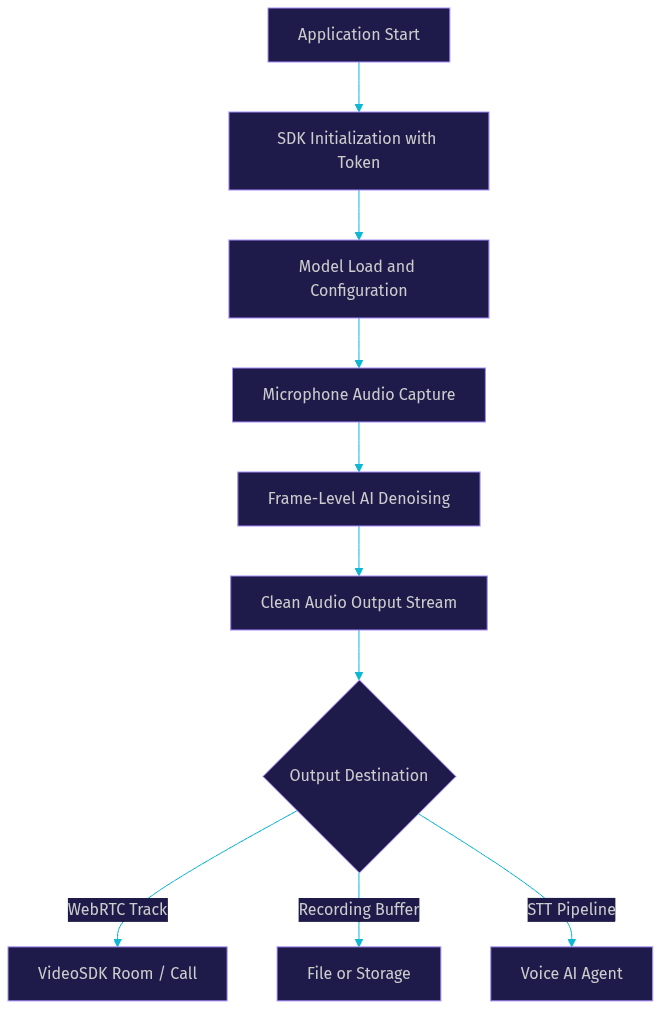
If you are building on a communication platform rather than wiring a standalone SDK, VideoSDK's audio and video calling SDKs include built-in noise suppression on the media tracks, so the denoising stage above is handled inside the room pipeline automatically. You can explore this in the VideoSDK JavaScript quickstart or the React SDK guide.
Best Practices for Optimal Noise Cancellation
A few engineering habits separate clean-sounding production audio from a denoising feature that users quietly disable.
Sample-Rate & Frame Size Selection
Every model is trained and optimized for a specific sample rate, commonly 16 kHz for speech. Feeding audio at a different rate forces resampling, which adds CPU cost and can introduce artifacts. Match your capture pipeline to the SDK's native rate, and choose frame sizes that align with the model's expected input so you avoid partial-frame buffering.
Model Configuration
Most SDKs expose a suppression strength setting. Maximum suppression can make speech sound robotic, especially for speakers with softer voices, while adaptive modes adjust aggressiveness based on detected noise levels. In practice, adaptive mode is the safer default for consumer products; static high suppression suits call-center environments where background noise is severe and consistent.
Edge Cases Handling
Sudden loud bursts, like a door slamming, can cause brief audio ducking or artifacts; test how your chosen SDK recovers. Multi-speaker scenarios are harder, because the model must decide which voice is speech and which is noise, so verify behavior if your product expects side-by-side participants. Finally, handle microphone permission failures gracefully: if the user denies access, fall back to clear messaging rather than a silent, dead audio stream.
Future Trends in AI Noise Cancellation
Three trends are reshaping this space. First, dedicated edge AI chips in phones and laptops are making on-device models larger and more accurate without battery penalties, pushing cloud-based audio cleaning toward niche batch workloads. Second, multi-modal models are merging noise cancellation, echo removal, dereverberation, and speaker separation into single adaptive engines, simplifying integration. Third, federated and on-device personalization is emerging, where models learn a user's specific noise environment over time without uploading raw audio, improving suppression for the exact conditions each user actually faces.
Definitions Glossary
Spectral Masking: A denoising technique where a neural network predicts a per-frequency-band mask that separates speech from noise in a time-frequency representation of audio. Most lightweight real-time SDKs use this approach.
Voice Activity Detection (VAD): An algorithm that determines whether a given audio frame contains human speech. VAD gates denoising and turn-taking logic in SDKs like Krisp's VIVA and VideoSDK's AI agent pipeline.
WebAssembly (WASM): A binary instruction format that runs near-native speed in browsers, enabling on-device AI noise cancellation in web apps without server round trips.
On-Device Noise Cancellation: Running the denoising model locally on the user's hardware, preserving privacy and avoiding network latency, at the cost of model size and battery constraints.
Noise Suppression in VideoSDK: A built-in capability of VideoSDK's audio and video calling SDKs that removes background noise from participant audio tracks as part of the room media pipeline, requiring no separate denoising integration.
Key Takeaways
- AI noise cancellation SDKs use trained neural networks to separate speech from noise, outperforming traditional static filters on real-world, non-stationary noise.
- Latency is the decisive metric for live use cases: target sub-50 millisecond denoising for calls and streaming, and validate vendor claims with your own end-to-end measurements.
- On-device execution wins on privacy and per-minute cost, while cloud processing suits batch workloads and heavier models; WebAssembly brings on-device quality to browser apps.
- Leading 2026 options span the spectrum: Krisp VIVA for real-time voice isolation, Picovoice Koala for offline on-device use, ai-coustics for speech enhancement, and WASM-based SDKs for browser-first products.
- If you are building a calling or streaming product, VideoSDK's audio and video calling SDKs include built-in noise suppression, removing the need for a separate denoising integration.
Conclusion
AI noise cancellation has become table stakes for any product that touches a microphone, from video conferencing to voice AI agents. The right AI noise cancellation audio software SDK depends on your latency budget, deployment target, and cost model, and the 2026 landscape offers strong options for every combination. Prototype with a free tier, measure on real hardware with real noise, and choose the engine that fits your constraints rather than the one with the loudest benchmark claims. If your product is a calling or streaming app, start with VideoSDK's documentation to see how built-in noise suppression works inside a full communication pipeline, and grab a free API key at app.videosdk.live to test it today. What are you building with clean audio? Drop a comment, I'd love to hear what kind of noise cancellation use case you're working on.
Free $20 Balance for AI Voice Agents & Video Calls
FAQ