


AI noise cancellation uses neural networks to identify and suppress unwanted sounds in real-time, offering better handling of complex, non-stationary noise than traditional DSP. It enables clearer voice communication in video calls, streaming, and hearing-assist devices, with latency low enough for live interaction. VideoSDK includes built-in noise suppression in its video calling SDK, so developers can ship cleaner audio without training custom models. Learn how to choose a model, deploy it on edge hardware, and avoid common pitfalls below.
You are on a video call. The person on the other end is typing on a mechanical keyboard, their dog is barking, and a siren wails outside their window. You catch every third word. This scenario plays out millions of times daily across remote work, online tutoring, telehealth appointments, and live streams. Background noise is not just annoying. It degrades comprehension, increases cognitive load, and makes communication feel exhausting.
AI noise cancellation attacks this problem with machine learning models that distinguish human speech from everything else in an audio signal. Unlike traditional digital signal processing, which relies on fixed filters and spectral subtraction, AI models learn patterns from thousands of hours of noisy and clean audio pairs. They generalize to noises they have never explicitly encountered and adapt to changing acoustic conditions in real-time.
This guide covers the core technologies, benefits, challenges, selection criteria, and implementation path for AI noise cancellation. Whether you are building a video calling app, a streaming platform, or an embedded audio device, you will understand how neural denoising works and how to deploy it effectively.
What Is AI Noise Cancellation?
AI noise cancellation is defined as the use of machine learning models, typically deep neural networks, to remove unwanted acoustic noise from an audio signal while preserving human speech. The model takes a noisy audio waveform or spectrogram as input and produces a cleaned version as output, all within a time budget tight enough for live communication.
AI noise cancellation works by training a neural network on paired datasets of clean speech and noisy speech. During inference, the model processes incoming audio frame by frame, predicting which components belong to speech and which belong to noise, then suppressing the noise components. This differs fundamentally from classic DSP-based noise suppression, which uses statistical estimates of noise floors and spectral gating. DSP methods struggle with non-stationary sounds like keyboard clicks or sirens because those sounds do not maintain a consistent spectral profile. Neural models, by contrast, learn the temporal and spectral characteristics of speech itself and can separate it from arbitrary interference.
VideoSDK provides built-in noise suppression as part of its video calling SDK, leveraging AI-driven processing to clean audio streams without requiring developers to integrate separate denoising models.
Core Technologies Behind AI Noise Cancellation
Deep Neural Networks for Audio
Several neural network architectures power modern AI noise cancellation systems. Convolutional neural networks excel at extracting local spectral patterns from spectrograms, making them effective for identifying noise signatures in frequency-domain representations. Recurrent neural networks, particularly long short-term memory networks, capture temporal dependencies in audio, allowing the model to use context from previous frames to make better predictions about the current frame.
Transformer-based models have recently gained traction for audio denoising. Self-attention mechanisms let transformers weigh the importance of different time-frequency regions simultaneously, producing high-quality speech enhancement. However, transformers carry higher computational costs, which creates tension with real-time latency requirements. Hybrid architectures that combine convolutional feature extraction with recurrent temporal modeling offer a practical middle ground, balancing quality against inference speed.
Most production denoising models operate on short-time Fourier transform representations rather than raw waveforms, though end-to-end waveform models like Demucs and FullSubNet have demonstrated competitive results. The choice between spectral and waveform approaches depends on your latency budget, hardware constraints, and quality requirements.
Real-Time Inference Engines
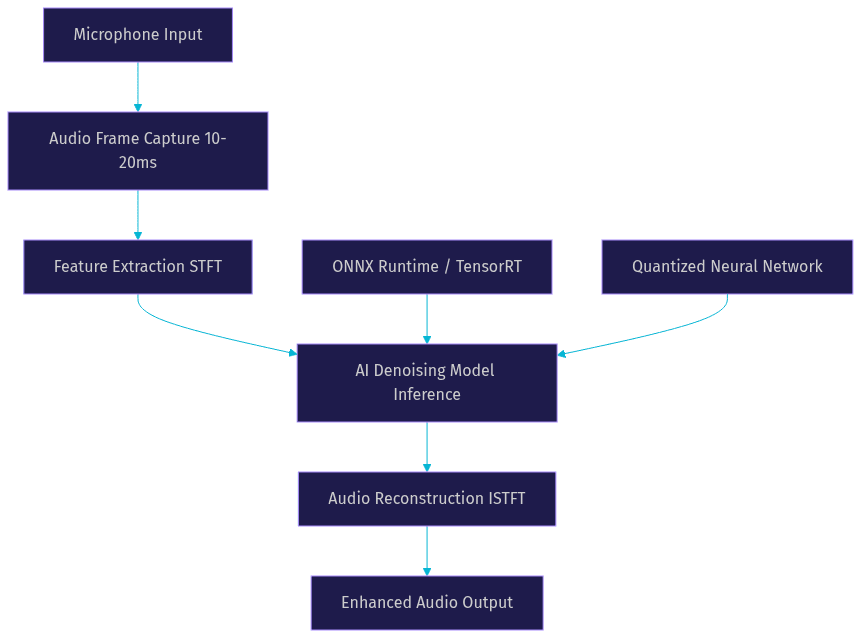
Running a neural denoising model in real-time demands an inference pipeline that processes audio frames within strict latency budgets. For live communication, total algorithmic latency should stay under 20 milliseconds, with 10 milliseconds or lower being ideal for natural conversation. This budget includes frame capture, feature extraction, model inference, and audio reconstruction.
Edge CPU deployment is the most common path for real-time AI noise cancellation. Frameworks like ONNX Runtime and TensorFlow Lite optimize models for CPU inference using quantization, which reduces model precision from 32-bit floating point to 8-bit integers with minimal quality loss. GPU acceleration via NVIDIA TensorRT or CUDA can handle larger models with lower latency, but GPU availability is not guaranteed on end-user devices like laptops and phones.
The inference pipeline must also handle audio buffering carefully. Frames arrive at fixed intervals, typically 10 or 20 milliseconds, and the model must process each frame before the next one arrives to avoid buffer underruns and audible glitches.
Benefits of AI-Powered Noise Cancellation
Neural denoising models handle non-stationary noise dramatically better than traditional DSP methods. Keyboard clicks, door slams, barking dogs, and passing sirens have complex, rapidly changing spectral signatures that defeat spectral subtraction and Wiener filtering. AI models trained on diverse noise datasets recognize these patterns as non-speech and suppress them, even when they overlap with speech frequencies.
Many AI noise cancellation systems perform joint processing, combining noise suppression with acoustic echo cancellation and dereverberation in a single model. Traditional approaches treat these as separate pipeline stages, each adding latency and potential artifacts. A unified neural model can address all three simultaneously, producing cleaner output with lower overall latency and fewer cumulative distortions.
Adaptivity is another significant advantage. DSP filters require manual tuning for different environments and can degrade when conditions change. Neural models generalize across acoustic environments because they learn speech characteristics rather than environment-specific noise profiles. A model trained on diverse data performs well in a quiet home office, a noisy cafe, or a moving vehicle without reconfiguration.
The practical impact spans multiple domains. Remote workers join calls from unpredictable environments and need reliable voice clarity. Live streamers broadcast from bedrooms and convention floors alike. Hearing-assist device users benefit from AI denoising that separates speech from ambient noise in real-time, improving comprehension in challenging listening situations. VideoSDK addresses the video calling use case directly by embedding noise suppression into its SDK, so developers building telehealth, edtech, or collaboration apps get cleaner audio without bolting on third-party processors.
Common Challenges and How to Overcome Them
Latency and Real-Time Requirements
Latency is the single hardest constraint in real-time AI noise cancellation. For conversational applications, the ITU-T G.114 recommendation specifies that one-way algorithmic delay should stay below 150 milliseconds, but perceptual quality degrades well before that threshold. Audio processing latency above 20 milliseconds starts to feel noticeable in full-duplex conversation. Below 10 milliseconds, listeners perceive the audio as natural and immediate.
Meeting this budget requires aggressive optimization. Model pruning removes neurons and connections that contribute least to output quality, shrinking the model and reducing inference time. Quantization converts model weights from 32-bit floating point to 8-bit integers, cutting memory bandwidth requirements and accelerating computation on hardware that supports integer operations. Knowledge distillation trains a smaller student model to mimic a larger teacher model, preserving most of the quality at a fraction of the compute cost. Frame size selection also matters: smaller frames reduce latency but increase the relative overhead of model inference per frame.
Model Size vs. Performance Trade-offs
There is a direct tension between model quality and deployment feasibility. A 50-million-parameter transformer might produce studio-quality speech enhancement but cannot run in real-time on a mid-range laptop CPU. A 2-million-parameter convolutional recurrent model might run comfortably on a mobile phone but leave some residual noise during complex interference.
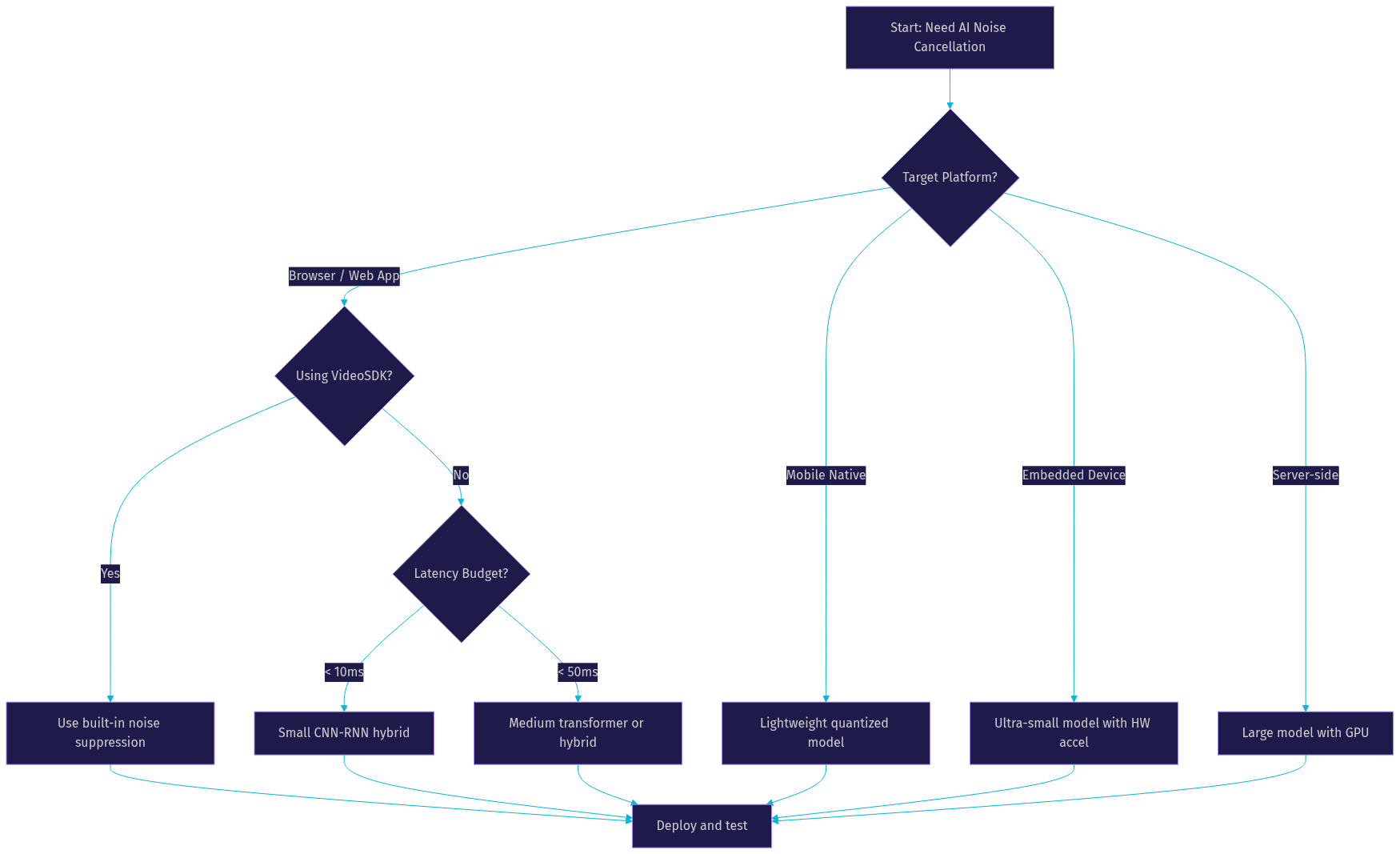
Edge deployment forces you to pick a point on this trade-off curve. For browser-based video calling applications, models in the 1 to 10 million parameter range typically strike the right balance, processing 20-millisecond frames in under 5 milliseconds on modern CPUs. For server-side processing, where GPU resources are available, larger models become viable. For embedded devices like hearing aids, models must fit within extreme power and memory budgets, sometimes requiring custom hardware accelerators.
Data Requirements and Generalization
Training data diversity determines how well a model generalizes to unseen noise types and acoustic conditions. Models trained exclusively on synthetic noise mixtures may fail on real-world recordings with reverberation, multiple overlapping speakers, or low-frequency HVAC rumble. The best datasets combine real noisy recordings with artificially mixed pairs, covering diverse languages, accents, microphone types, and noise categories.
Selecting the Right AI Noise Cancellation Solution
Choosing an AI noise cancellation approach requires evaluating several factors in sequence. First, identify your target hardware. Browser-based applications face different constraints than native mobile apps or embedded devices. A model that runs smoothly in Chrome on a desktop may struggle on an older Android phone.
Next, define your latency budget. Telephony and video calling demand sub-20-millisecond processing. Pre-recorded content processing can tolerate higher latency and larger models. Streaming applications fall somewhere in between, depending on whether the stream is interactive.
Consider integration complexity. If you are building a video calling app with VideoSDK, the built-in noise suppression eliminates the need for a separate denoising pipeline. If you need custom denoising for a specialized use case like hearing aids or automotive cabins, you will need to select or train a model and build the inference pipeline yourself.
Budget matters too. Open-source models like DeepFilterNet, RNNoise, and FullSubNet are free but require engineering effort to integrate and optimize. Commercial SDKs offer polished implementations with support but carry licensing costs. Cloud-based processing offloads compute but adds network latency and per-minute charges.
Implementation Guide Overview
Building a real-time AI noise cancellation pipeline involves five sequential steps. Each step has specific technical considerations that determine whether your final system meets its latency and quality targets.
Step 1: Choose a Model. You can start with a pre-trained open-source model or train a custom one. Pre-trained models like RNNoise, DeepFilterNet, and FullSubNet cover common noise scenarios and are ready for integration. Custom training makes sense when your use case involves unusual noise types or specific acoustic conditions that general models handle poorly. Evaluate candidate models using metrics like signal-to-noise ratio improvement, perceptual evaluation of speech quality scores, and echo return loss enhancement for echo cancellation scenarios.
Step 2: Set Up the Inference Runtime. Select an inference framework that matches your deployment target. ONNX Runtime provides broad platform support and hardware acceleration through execution providers. TensorFlow Lite targets mobile and embedded devices. TensorRT maximizes GPU throughput for server-side deployments. Convert your chosen model to the framework's format, applying quantization to reduce model size and inference time. Verify that the converted model produces output quality comparable to the original.
Step 3: Capture the Microphone Stream. Your application must capture audio from the microphone at a consistent sample rate, typically 16 or 48 kilohertz. The capture mechanism depends on your platform. Web applications use the browser's media device APIs. Native applications use platform-specific audio frameworks. The critical requirement is consistent frame timing, because variable frame sizes break the model's temporal assumptions and cause quality degradation.
Step 4: Apply the Model in Real-Time. For each captured audio frame, convert the time-domain samples to the frequency domain using a short-time Fourier transform with an appropriate window size and hop length. Feed the spectral features into the model. The model outputs a mask or enhanced spectrogram. Convert the output back to the time domain using an inverse transform with overlap-add reconstruction to avoid artifacts at frame boundaries. The entire process must complete before the next audio frame arrives.
Step 5: Output Cleaned Audio. Route the enhanced audio to your application's output path. In a video calling app, this becomes the outgoing audio stream. In a recording application, this becomes the saved audio track. In a streaming application, this becomes the broadcast audio.
Several common pitfalls trip up developers during implementation. Sample-rate mismatch between the microphone, the model, and the output causes pitch shifting and quality loss. Always resample to the model's expected rate before inference and back to the output rate after. Buffer underruns occur when inference takes longer than the frame interval, producing silence or glitches. Profile your inference time under realistic load and keep a safety margin. Token or frame size mismatch between the audio capture API and the model's expected input shape causes silent failures or distorted output. VideoSDK developers can sidestep most of these issues by relying on the SDK's built-in audio processing, which handles capture, processing, and output as an integrated pipeline.
For model repositories, explore the VideoSDK code samples and open-source audio AI projects on GitHub. The ONNX Model Zoo and Hugging Face Hub also host pre-trained denoising models ready for integration.
Real-World Case Studies
Video Conferencing App with Lightweight Model. A remote collaboration platform integrated a 4-million-parameter convolutional recurrent network for real-time denoising. The model runs on-device in the browser using ONNX Runtime with 8-bit quantization, processing 20-millisecond frames in approximately 3 milliseconds on a mid-range laptop CPU. The team reported a measurable reduction in user complaints about background noise and a 12% increase in average call duration, suggesting that better audio quality encouraged longer, more productive conversations.
Automotive Cabin Active Noise Control. An automotive manufacturer combined traditional active noise control for low-frequency engine rumble with a neural network for mid and high frequency speech enhancement during hands-free calls. The neural model handles wind noise, road noise, and passenger conversations that traditional ANC cannot address. The system runs on the vehicle's infotainment processor with a latency budget of 15 milliseconds, meeting the requirements for natural hands-free communication.
Hearing Aid Prototype. A research team developed a hearing-assist device prototype using a compressed speech enhancement model running on a dedicated audio DSP chip. The model occupies under 500 kilobytes of memory and consumes less than 1 milliwatt of power, fitting within the extreme constraints of in-ear devices. Testing showed significant improvements in speech intelligibility scores for users in noisy environments compared to traditional hearing aid processing.
Future Trends in AI Noise Cancellation
Multimodal models represent the next frontier. Audio-visual noise cancellation uses camera input to identify when a person's lips are moving, helping the audio model distinguish speech from background sounds that share spectral characteristics. This approach is particularly powerful for video calling, where camera data is already available.
On-device training and federated learning are emerging as ways to personalize denoising models without sending raw audio to the cloud. A model could adapt to a user's specific acoustic environment, like their home office or car, while preserving privacy by keeping training data local.
Integration with AI voice agents is another growing trend. VideoSDK's AI voice agent pipeline processes speech through STT, LLM, and TTS stages. Clean input audio directly improves transcription accuracy, which cascades into better LLM responses and more natural agent interactions. As voice agents handle more complex conversations, high-quality input denoising becomes a critical component of the overall pipeline rather than an optional enhancement.
Definitions Glossary
AI Noise Cancellation: The application of machine learning models to remove unwanted sounds from audio signals while preserving speech, operating in real-time for live communication scenarios.
Acoustic Echo Cancellation (AEC): The process of removing echo caused by audio from a remote participant being captured by a local microphone, often combined with noise suppression in unified neural models.
Short-Time Fourier Transform (STFT): A mathematical technique that converts time-domain audio into a time-frequency representation, serving as the input format for most spectral-domain denoising models.
Quantization: The process of reducing a neural network's weight precision from 32-bit floating point to lower bit depths like 8-bit integers, decreasing model size and accelerating inference with minimal quality loss.
Network-Adaptive Streaming: VideoSDK's automatic adjustment of audio and video bitrate based on real-time bandwidth conditions, complementing noise suppression to maintain call quality on poor connections.
Key Takeaways
- AI noise cancellation uses neural networks to separate speech from non-stationary noise, outperforming traditional DSP methods on complex sounds like keyboard clicks and sirens.
- Real-time deployment requires keeping total processing latency under 20 milliseconds, achieved through model pruning, quantization, and efficient inference runtimes like ONNX Runtime and TensorRT.
- Model size and quality trade-offs depend on target hardware, with browser applications favoring 1 to 10 million parameter models and embedded devices requiring ultra-compact architectures.
- VideoSDK includes built-in noise suppression in its video calling SDK, letting developers ship cleaner audio without integrating separate denoising models or managing inference pipelines.
- Multimodal audio-visual denoising and on-device personalization are emerging trends that will further improve real-time audio quality in video calling, streaming, and AI voice agent applications.
Conclusion
AI noise cancellation has moved from research papers to production systems that millions of people rely on daily. The shift from fixed DSP filters to adaptive neural models means clearer calls, better streams, and more accessible communication for people in noisy environments. The technology is not without trade-offs: latency budgets are tight, model selection requires careful evaluation, and deployment targets vary wildly in their compute capabilities. But the tools are mature, the open-source ecosystem is rich, and platforms like VideoSDK now bundle noise suppression directly into their video calling SDK, reducing the barrier to entry for developers building real-time communication apps. If you are building a product that involves live audio, explore VideoSDK's free tier at app.videosdk.live/login and test the built-in noise suppression in your next video calling integration. What are you building with VideoSDK? Drop a comment below, I would love to hear what kind of audio experience you are working on.
Free $20 Balance for AI Voice Agents & Video Calls
FAQ