


An AI noise cancelation audio software SDK is a development toolkit that uses machine learning models to remove background noise from audio streams in real time. VideoSDK includes built-in noise suppression capabilities, allowing developers to deliver clean audio in video calling applications without managing separate inference engines. You can integrate these tools on the client side or server side depending on your latency and compute requirements.
Building a real-time communication application means dealing with unpredictable acoustic environments. Users join calls from coffee shops, moving vehicles, and echoey home offices. Standard echo cancellation and noise gates are no longer enough to deliver professional audio quality. Developers now rely on AI-driven solutions to filter out non-stationary noise like keyboard typing, dog barks, and street traffic.
This guide breaks down what an AI noise cancelation audio software SDK does, how to evaluate one, and how to architect it into your application pipeline. We will cover deployment strategies, performance benchmarks, and the exact steps to ship production-ready audio enhancement.
Understanding AI Noise Cancelation Audio Software SDKs
An AI noise cancelation audio software SDK is a set of libraries and tools that apply deep learning models to audio streams. The goal is to isolate human speech and suppress everything else. Unlike traditional digital signal processing (DSP) that relies on static frequency thresholds, AI models learn the spectral patterns of noise and speech. This allows them to adapt to dynamic environments that ruin standard noise gates.
A typical SDK consists of three core components. First, the model itself, which is usually a compact neural network trained on thousands of hours of noisy and clean audio pairs. Second, an inference engine that runs the model efficiently on the target hardware, whether that is a browser using WebAssembly or a mobile CPU using native binaries. Third, an API layer that lets developers route audio buffers into the model and receive cleaned audio back.
Developers need these SDKs because audio quality directly impacts user retention in real-time applications. If participants cannot hear each other clearly, the application fails its primary purpose. Integrating an AI noise cancelation audio software SDK ensures consistent speech intelligibility across all user environments.
Core Features of Modern AI Noise Cancelation SDKs
Modern audio enhancement SDKs go beyond simple noise gates. They provide a suite of features designed for low-latency, real-time communication. Evaluating these features helps you understand the trade-offs between processing speed and audio fidelity.
Real-time processing & latency
Real-time processing is the ability to clean audio as it is captured, without introducing noticeable delay. In a video calling or live streaming scenario, any added latency degrades the conversational flow. A high-quality AI noise cancelation audio software SDK processes audio in small chunks, typically 10 to 20 milliseconds. The inference engine must complete its calculations within this window. If processing takes longer than the chunk size, audio breaks up, and the user experience suffers. Look for SDKs that guarantee sub-30 millisecond processing latency on standard consumer hardware.
On-device vs cloud inference
On-device inference runs the noise suppression model directly on the user's phone or laptop. This approach minimizes latency and preserves privacy because audio never leaves the device. However, it consumes battery and CPU resources. Cloud inference sends the audio stream to a server for processing. This offloads the compute burden from the client but introduces network latency and requires server infrastructure. For real-time communication, on-device inference is almost always the preferred path. VideoSDK handles this efficiently by offering built-in noise suppression that runs directly on the client device, ensuring zero added network latency.
Model formats & WebAssembly support
For web applications, WebAssembly (WASM) is the standard for running high-performance AI models in the browser. A modern SDK should provide optimized WASM models that load quickly and execute efficiently. ONNX (Open Neural Network Exchange) is another common format that allows models to run across different operating systems and hardware accelerators. The SDK should abstract away the complexity of loading these models and managing the inference runtime.
Adaptive bitrate & sample-rate handling
Audio hardware varies wildly across devices. Some microphones capture audio at 16kHz, while others use 48kHz. A robust SDK handles sample-rate conversion internally. You should not have to manually resample audio before passing it to the noise suppression engine. Additionally, the SDK should adapt its processing based on the available network bandwidth and CPU load, reducing the model complexity dynamically if the device struggles to keep up.
Benefits of AI Noise Cancelation Audio Software SDK for Real-Time Applications
Integrating an AI noise cancelation audio software SDK delivers measurable improvements across several dimensions of your application. The most immediate benefit is improved speech intelligibility. Users no longer have to ask others to mute themselves or repeat what they said. The AI model isolates the primary speaker's voice and drops background interference.
Cleaner audio also translates to lower bandwidth usage. When an SDK removes background noise, the resulting audio stream compresses much more efficiently. Codecs like Opus, which are standard in WebRTC, spend fewer bits encoding silence and static. This is particularly valuable for users on mobile networks or in regions with limited bandwidth.
Another major benefit is better speech-to-text (STT) accuracy. If your application includes real-time transcription or post-call summaries, feeding clean audio into your STT provider dramatically reduces word error rates. AI noise suppression acts as a crucial pre-processing step for any conversational AI pipeline.
Finally, cross-platform consistency matters. OS-level noise suppression varies significantly between Windows, macOS, iOS, and Android. By embedding a dedicated SDK, you control the audio quality regardless of the user's operating system settings. VideoSDK provides this consistency by integrating noise suppression directly into its video calling SDK, ensuring all participants experience the same audio clarity.
Choosing the Right SDK: Key Evaluation Criteria
Selecting an AI noise cancelation audio software SDK requires looking beyond marketing claims. You need to evaluate how the SDK performs under real-world constraints. Here are the core criteria to guide your decision.
Model size & compute budget
Every AI model has a size and a compute footprint. A large model might deliver superior noise suppression but could drain a mobile battery in thirty minutes. Check the model size in megabytes and the required RAM. Evaluate the CPU usage on low-end devices. The best SDKs offer multiple model tiers, allowing you to choose a lightweight model for mobile devices and a heavier, more accurate model for desktop applications.
Platform coverage (Web, mobile, desktop)
Your application likely runs on multiple platforms. An SDK that only works on web browsers is useless if you also need an Android application. Look for comprehensive platform coverage. VideoSDK supports React, React Native, Android, iOS, Flutter, and JavaScript, meaning you can maintain consistent audio processing across your entire user base. Ensure the SDK provides native bindings for mobile platforms rather than relying solely on web technologies wrapped in a webview.
Licensing & offline capability
Understand the licensing model. Some SDKs charge per minute of audio processed, while others offer a flat subscription or an open-source license. If your application needs to function offline, verify that the SDK supports fully on-device inference without requiring periodic cloud authentication. Offline capability is essential for applications used in remote areas or secure environments.
Community & support
Audio processing is notoriously difficult to debug. When an SDK introduces an echo or a distortion, you need responsive support. Check the SDK's GitHub repository for issue resolution times. A strong developer community and comprehensive documentation are invaluable. VideoSDK maintains an active Discord community and extensive documentation to help developers troubleshoot audio pipeline issues quickly.
Integration Architecture Overview
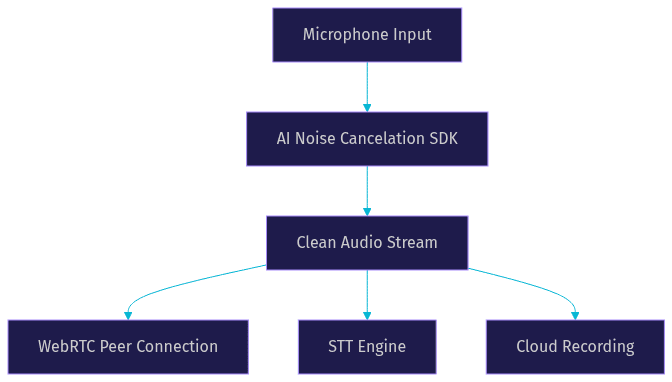
Integrating an AI noise cancelation audio software SDK requires careful placement within your audio pipeline. The SDK must intercept raw audio from the microphone, process it, and forward the cleaned stream to the downstream consumers. These consumers could be a WebRTC peer connection, a recording module, or a speech-to-text engine.
The architecture typically follows a linear flow. The operating system captures audio from the microphone and delivers it to the application. The SDK takes these raw audio frames, runs them through the neural network, and outputs enhanced audio frames. You then route these enhanced frames to their final destination.
Server-side vs client-side deployment options
You have two primary deployment options. Client-side deployment runs the SDK on the user's device. This is the standard approach for real-time communication because it eliminates network latency. The user gets immediate feedback, and the audio is clean before it ever touches the network. VideoSDK uses this approach for its built-in noise suppression.
Server-side deployment involves sending the raw audio to a media server, processing it there, and then routing it to participants. This is useful for applications like podcast recording or AI voice agents where you want to offload compute from the client. However, it adds complexity and latency. For standard video calling applications, client-side processing is the only viable path.
Step-by-Step Integration Guide
Integrating an AI noise cancelation audio software SDK involves several distinct phases. While the exact implementation varies by platform, the logical steps remain the same. Here is how to approach the integration without writing a single line of code.
1. Select the appropriate SDK package for your platform
First, identify the target platform for your application. If you are building a web application, you need the WebAssembly package. For a React Native app, you need the native iOS and Android bindings. Download the correct package from the provider and add it to your project dependencies. Ensure the version matches your framework version to avoid compatibility issues.
2. Load the model and initialize the engine
Before you can process audio, the SDK must load the AI model into memory. This step is critical for performance. If you load the model synchronously when the user joins a call, you will freeze the application. Instead, initialize the engine asynchronously when the application starts or when the user navigates to the pre-call setup screen. The SDK will fetch the model file, allocate memory, and prepare the inference runtime. Once initialization completes, you can enable the noise suppression feature.
3. Connect the SDK to the audio pipeline
Next, you must route audio through the SDK. In a web browser, this involves creating an AudioWorklet that processes audio frames. On mobile platforms, you configure the audio recorder to pass buffers to the SDK before encoding them. If you are using a comprehensive solution like VideoSDK, this step is handled automatically. You simply enable the noise suppression feature in the SDK configuration, and VideoSDK intercepts the microphone stream, applies the AI model, and routes the clean audio to the room participants.
4. Configure suppression level and latency trade-offs
Most SDKs allow you to adjust the aggressiveness of the noise suppression. A higher suppression level removes more noise but might introduce artifacts into the speech. A lower level preserves speech fidelity but lets more background noise through. Find the right balance for your use case. For a telehealth application, you might want maximum suppression to ensure doctor-patient communication is clear. For a social audio room, a moderate level might feel more natural. Configure the latency buffer based on the device capability. If the device struggles with processing, you might need to increase the buffer size slightly to avoid audio glitches.
5. Test with real-world background noise scenarios
Do not test your integration in a quiet room. Create a test matrix of noisy environments. Play sounds of keyboard typing, vacuum cleaners, crying babies, and street traffic through speakers while testing the application. Record the output audio and listen for artifacts. Check the CPU usage monitor during these tests. If the CPU spikes to 100 percent on a mid-range device, you need to switch to a lighter model or increase the processing buffer.
6. Deploy to production
When deploying to production, ensure your web application is served over HTTPS. Browsers restrict access to microphones on non-secure origins. Configure CORS headers correctly if your SDK loads model files from a CDN. Set up performance monitoring to track audio quality metrics in production. VideoSDK provides session analytics that let you monitor audio bitrate and packet loss, helping you identify when noise suppression is struggling under poor network conditions. You can explore these capabilities in the VideoSDK REST API reference.
Common Pitfalls and How to Avoid Them
Integrating an AI noise cancelation audio software SDK is not without challenges. Developers frequently encounter the same set of issues. Knowing these pitfalls ahead of time saves hours of debugging.
Model loading delays
A common mistake is waiting to load the AI model until the user clicks the join call button. This causes a noticeable delay and can lead to users joining a meeting with unprocessed audio for the first few seconds. Always preload the model during the application initialization phase or on a pre-call device setup screen. This ensures the noise suppression is active the moment the microphone turns on.
CPU spikes on low-end devices
AI models are computationally expensive. On low-end Android devices or older laptops, running a heavy noise suppression model can cause the CPU to spike. This not only drains the battery but can also cause the device to throttle, leading to audio breakage. To avoid this, implement device capability detection. If the device has limited CPU resources, fall back to a lighter model or disable the AI suppression in favor of standard DSP noise gating.
Inconsistent sample-rate conversion
Audio APIs on different operating systems often default to different sample rates. If your SDK expects 16kHz audio but receives 48kHz audio without proper resampling, the model will produce distorted output. Ensure your SDK handles sample-rate conversion internally, or explicitly resample the audio before passing it to the inference engine. VideoSDK manages this automatically, normalizing all incoming audio streams to a consistent rate before processing.
Permission handling on browsers
Browsers require explicit user permission before accessing the microphone. If your application tries to initialize the audio pipeline before the user grants permission, the SDK will fail silently or throw cryptic errors. Always implement a clear permission flow. Prompt the user for microphone access, handle the granted and denied states gracefully, and only initialize the noise suppression SDK after permission is secured.
Performance Benchmarks & Real-World Results
When evaluating an AI noise cancelation audio software SDK, look at independent benchmark data rather than vendor marketing. Two reliable sources for audio processing benchmarks are the Microsoft Deep Noise Suppression (DNS) Challenge and the Artificial Analysis Speech Arena.
The Microsoft DNS Challenge provides standardized datasets of noisy speech. SDKs that perform well on this dataset generally handle real-world noise effectively. According to the DNS Challenge results, top-tier AI models achieve a Perceptual Objective Listening Quality Analysis (POLQA) score improvement of over 0.5 points compared to baseline noisy audio. This translates to a massive leap in subjective audio quality.
Latency is the other critical metric. A well-optimized SDK running on a mid-range CPU should process audio with less than 20 milliseconds of added latency. This is imperceptible to the human ear and does not disrupt conversational flow. CPU usage should remain under 5 percent on modern hardware. If an SDK consumes 15 percent of your CPU for noise suppression, it is not optimized for production real-time applications.
In terms of speech intelligibility, AI noise suppression significantly outperforms OS-level solutions. Standard OS noise suppression often fails with non-stationary noise like keyboard typing. AI models trained on diverse noise datasets can reduce the Short-Time Objective Intelligibility (STOI) degradation by up to 30 percent compared to native OS processing. This means users can understand each other clearly even in chaotic environments. For developers building AI voice agents, feeding this clean audio into an STT engine can reduce word error rates by 15 to 20 percent, according to benchmarks from providers like Deepgram.
Future Trends in AI-Driven Audio Processing
The landscape of AI noise cancelation audio software SDKs is evolving rapidly. One major trend is the shift toward multimodal models. Future SDKs will not rely solely on audio inputs. They will use camera data to identify when a user's mouth is moving, helping to separate speech from background noise even more accurately. This is particularly relevant for video calling applications.
Another trend is the integration of on-device large language models (LLMs) with audio processing pipelines. Instead of just cleaning the audio, the SDK will provide real-time context. It will identify the speaker, transcribe the conversation locally, and adjust noise suppression based on the semantic content. Edge-AI accelerators like Apple's Neural Engine and dedicated NPUs on Android devices are making this possible without draining battery life.
Finally, expect to see more personalized noise suppression profiles. Models will learn a user's specific voice signature and environment, creating a custom suppression curve that offers superior clarity compared to generalized models. VideoSDK is actively monitoring these trends to integrate cutting-edge audio capabilities into its interactive live streaming and video calling products.
Definitions Glossary
AI Noise Cancelation Audio Software SDK: A development toolkit that uses machine learning models to remove background noise from audio streams in real time.
WebAssembly (WASM): A binary instruction format that enables high-performance applications like AI inference engines to run directly in web browsers.
Voice Activity Detection (VAD): An algorithm used to detect the presence or absence of human speech in audio streams, often used as a pre-processing step for noise suppression.
AudioWorklet: A web API that allows developers to process audio in a separate thread with low latency, essential for real-time audio processing in browsers.
Non-stationary noise: Background sounds that change rapidly over time, such as keyboard typing or dog barks, which traditional DSP filters struggle to remove.
Key Takeaways
- An AI noise cancelation audio software SDK uses deep learning to isolate speech and remove dynamic background noise, improving real-time communication quality.
- On-device inference is the preferred deployment model for real-time apps because it eliminates network latency and preserves user privacy.
- VideoSDK includes built-in noise suppression, handling model loading, sample-rate conversion, and audio pipeline routing automatically across all supported platforms.
- Always preload AI models before joining a call and implement device capability detection to avoid CPU spikes on low-end hardware.
- Feeding AI-cleaned audio into speech-to-text engines can reduce word error rates by up to 20 percent, making it a critical step for AI voice agent pipelines.
Conclusion
Integrating an AI noise cancelation audio software SDK is no longer a luxury for real-time applications. It is a necessity for delivering professional, clear, and accessible communication. By understanding the architecture, evaluating performance benchmarks, and following a structured integration process, you can significantly elevate your application's audio quality. VideoSDK simplifies this entire process by providing built-in, cross-platform noise suppression that runs efficiently on the client device. You can focus on building your core features while VideoSDK handles the complexities of the audio pipeline. Ready to experience clean audio in your application? Sign up for a free account at app.videosdk.live/login and explore the VideoSDK documentation to get started. What are you building with VideoSDK? Drop a comment below, I would love to hear what kind of audio challenges you are solving.
Free $20 Balance for AI Voice Agents & Video Calls
FAQ