


iOS VoIP CallKit is Apple's native framework that gives third-party calling apps the same incoming-call UI, lock-screen behavior, and system integration as the Phone app. CallKit must be paired with PushKit, which delivers high-priority VoIP push notifications that wake your app in the background so it can report an incoming call. Together they handle the full call lifecycle, and since iOS 13, Apple requires every VoIP push to result in a reported call or the app is terminated. For the media itself, developers typically pair CallKit with a real-time communication SDK such as VideoSDK.
Building a VoIP app on iOS is unforgiving in a way few other features are. If your push arrives late, the call rings into silence. If you report a call after the system's deadline, iOS kills your process and the user sees nothing. And if you send a VoIP push without reporting a call, Apple throttles or rejects your pushes entirely. These are not edge cases; they are the daily reality of shipping calling features.
This guide walks through the complete flow: registering for VoIP pushes, reporting incoming calls with CallKit, managing the call lifecycle, and staying compliant with Apple's policies. Everything is explained in plain language, so you understand the intent of each step and what the system expects your app to do.
Understanding iOS VoIP CallKit
CallKit is defined as Apple's framework that displays the native calling interface and manages call state on behalf of your app. It works by acting as a broker between your app and iOS system services: your app tells CallKit when a call starts, changes, or ends, and CallKit in turn drives the native UI, the lock-screen presentation, the system call directory, and the audio session lifecycle.
PushKit is the companion framework, and the two are inseparable in practice. PushKit delivers high-priority VoIP push notifications that wake your app in the background even when it is fully suspended. The moment your app receives a VoIP push, it is expected to process the call signaling payload and immediately report an incoming call to CallKit. PushKit handles delivery; CallKit handles presentation and lifecycle. Your own signaling layer, or a communication SDK like VideoSDK's iOS SDK, handles the actual media.
SiriKit adds a third surface: users can say "Call Sarah on MyApp" and Siri will route the request through your app's call-handling extension, provided you declare the VoIP intent support. It is optional but strongly recommended for any consumer calling app.
Prerequisites and Project Setup
Before touching call logic, your project needs the right capabilities declared, because missing entitlements are the single most common cause of silent failures.
Your checklist looks like this:
- Xcode and iOS target: use a current Xcode release and target iOS 13 or later at minimum, since modern VoIP push behavior and throttling rules assume it.
- Push Notifications capability: enables APNs registration and the push environment configuration.
- Background Modes: enable the Voice over IP background mode so the system grants your app background execution time when a VoIP push arrives.
- unrestricted-voip entitlement: starting with iOS 16, apps that need to send VoIP pushes that do not always result in a reported call must request this entitlement from Apple with a justification. Without it, stick to the strict report-a-call-per-push rule.
- Apple Developer Portal: create an APNs key (preferred over certificates for modern apps) and associate it with your app's bundle identifier.
One thing that bites people here: the Background Modes toggle alone is not enough. The capability must appear in your provisioning profile, so regenerate profiles after enabling it.
Registering for VoIP Pushes
VoIP push registration is the handshake that makes everything else possible. Your app asks PushKit for a VoIP-specific device token, which is distinct from the general remote-notification token. You then forward this token to your backend, which stores it alongside the user's identity so it can target them when a call comes in.
The token can change between launches, so your app should re-register on every launch and update the backend whenever the token differs from the stored value. Treat token refresh as routine, not exceptional.
On the backend side, you need valid APNs credentials for the environment you are pushing to. Development and production use separate credentials, and a mismatch is the classic cause of "pushes work in Xcode but not in TestFlight." Verify which environment your build is signed for before debugging anything else.
The overall flow looks like this:
A practical pattern used by production teams: store tokens in a dedicated table keyed by user ID and device ID, not user ID alone. This matters because a user with an iPhone and an iPad will have two tokens, and you want to ring both devices for the same call.
Reporting an Incoming Call with CallKit
When a VoIP push arrives, your app has a short, strictly enforced window to act. The required sequence is: create or reuse a call provider, describe the call with a call update object, and report the new incoming call to the system.
The call update tells iOS who is calling and what kind of call it is. You supply the caller's display name (or a hashed identifier if privacy rules apply), whether the call includes video, and a unique call identifier (a UUID) that ties this call to all future actions on it. The UUID is your anchor: answering, ending, and holding all reference the same identifier, so generate it once and keep it consistent between your signaling layer and CallKit.
Ringtone and UI presentation are largely handled by the system. You can customize the ringtone per-call if your app supports distinct sounds for different call types, but the lock-screen and full-screen incoming-call UI are native and not skinnable. That constraint is deliberate: Apple wants every calling app to feel like the Phone app so users never wonder whether an incoming call is trustworthy.
The critical compliance rule: every VoIP push must result in a reported call. If your push payload says "incoming call" but your app fails to report it, iOS terminates the app and, after repeated violations, the system stops delivering your VoIP pushes entirely. If you need pushes that carry data but no call, such as missed-call notifications, send those as regular remote notifications instead.
Managing Call Lifecycle
Once the call is reported, CallKit owns the user's actions and your app owns the media. The system sends your app callbacks when the user answers, ends, holds, mutes, or switches audio routes, and your job is to react to each one by driving your audio and media layer accordingly.
The single most important rule: all audio session activation and deactivation must happen inside CallKit's callbacks. If your app activates the audio session on its own schedule, you get audio glitches, dropped calls, and conflicts with other apps. CallKit negotiates with the system for the audio session and hands it to you at exactly the right moment.
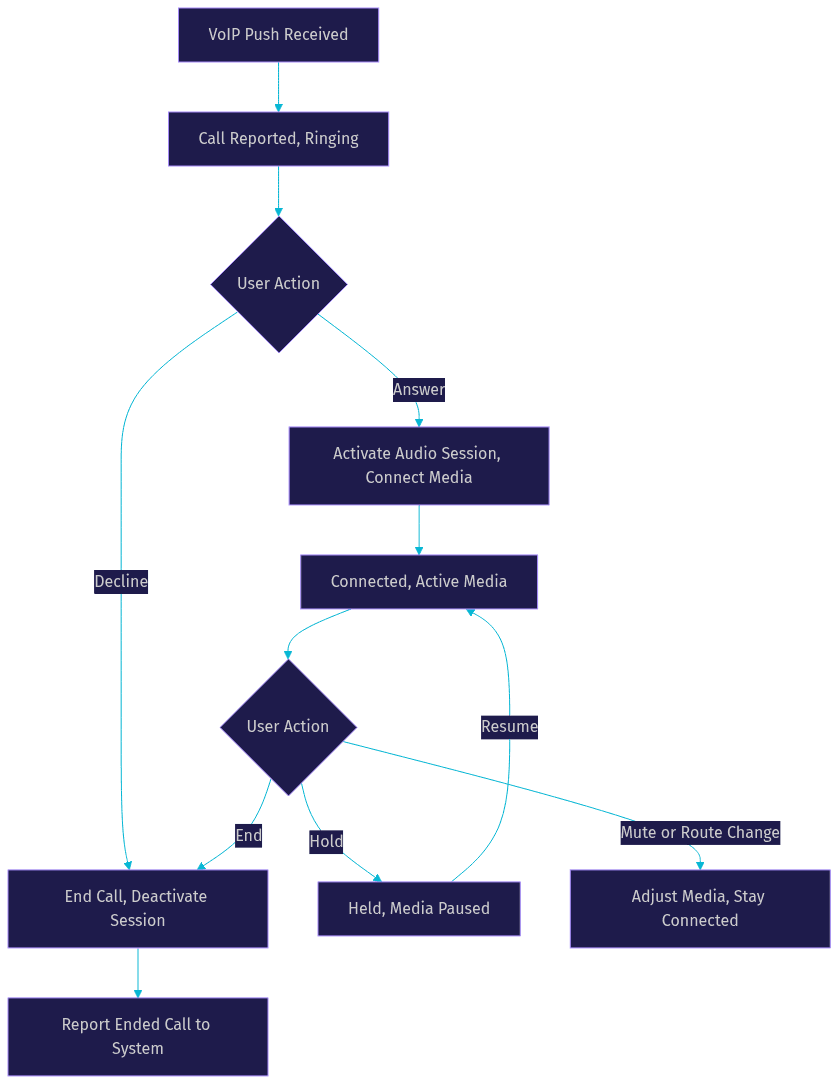
Answering deserves special attention. The answer callback is where you connect your media, whether that is a raw WebRTC peer connection or a VideoSDK room join. If your signaling handshake takes time, keep the user informed through CallKit's native UI rather than blocking the answer action. Ending is symmetric: tear down media, deactivate the audio session, and report the call as ended so the system UI dismisses cleanly.
Holding and muting are provider-level actions in CallKit. When the user taps hold, the system asks your app to pause media for that call; when they mute, you silence the outgoing track. Multi-call scenarios, such as placing one call on hold to answer a second, are supported but require careful state tracking on your side.
Edge Cases and Compliance
Real calls rarely follow the happy path, and Apple's policies are strict about how your app behaves when they do not.
Call cancellation: if the caller hangs up before the callee answers, your app must report the incoming call as ended. A ringing call that never resolves is a compliance violation and a terrible user experience. Your backend should send a cancellation signal, and the app should dismiss the native UI immediately.
Multiple devices: when a user has an iPhone and an iPad, your backend rings both. If one device answers, the other must stop ringing. Your signaling layer needs to broadcast the answered state so every device reports its call as ended. This is a backend responsibility, not a CallKit one, and it is the most commonly missed piece in first implementations.
Rejected calls: a declined call should be reported to your backend so the caller sees a busy state, and the event should be recorded for missed-call notifications later.
Push throttling: since iOS 13, the system actively penalizes apps that send VoIP pushes without reporting calls. Repeated violations lead to pushes being delivered as regular notifications or dropped entirely. The rule is simple: VoIP push means a call is happening. Everything else, including pre-call data sync and missed-call alerts, travels over regular remote notifications.
The unrestricted-voip entitlement: for iOS 16 and later, Apple offers this entitlement for apps with legitimate reasons to send VoIP pushes outside the strict call-per-push model, such as call-directory updates. You must request it from Apple with a justification during review. Most apps should not need it; design around the strict rule first.
Testing and Debugging Strategies
Testing VoIP flows is easier when you lean on the tools Apple already ships. The Xcode console logs every PushKit and CallKit event, so a missing report or a failed entitlement shows up there first. You can simulate incoming pushes on the simulator using Xcode's command-line simulator tooling, which lets you trigger a VoIP push payload without a real backend.
Verify entitlement status early: a missing Background Mode or Push Notifications capability produces silent failures that look like network problems. And always test the lock-screen presentation on a physical device, because the simulator does not faithfully reproduce the system call UI.
Common pitfalls worth checking first: forgetting to report the incoming call within the deadline, enabling the wrong background mode, and using development APNs credentials against a production build.
Production Considerations
App Store review for VoIP apps is stricter than average. Reviewers check that your push behavior matches Apple's policies, that the unrestricted-voip entitlement is justified if requested, and that the calling experience is reliable. Document your calling flow in your review notes; it reduces rejection cycles.
On the backend, monitor push delivery health. Track token validity, APNs error responses, and the ratio of pushes sent to calls reported. A rising push-to-call gap usually means a client bug or throttling. For high-volume deployments, queue VoIP pushes separately from other notifications so a marketing blast can never delay a ringing phone.
Finally, consider where your media layer comes from. Building signaling, media transport, and reconnection handling from scratch is a large engineering investment. SDKs like VideoSDK's iOS calling SDK handle the room, media, and reconnection layers while your app focuses on the CallKit integration, and VideoSDK's REST APIs can trigger and manage calls from your backend.
Quick Recap
- PushKit registers for and receives high-priority VoIP pushes that wake your app in the background.
- CallKit reports incoming calls, renders the native UI, and drives the call lifecycle through callbacks your app must honor, including audio session activation.
- Your signaling and media layer, whether hand-built or an SDK like VideoSDK, connects the actual conversation and must stay synchronized with CallKit's call state at every step.
Further Reading
For the authoritative details, read Apple's CallKit and PushKit documentation, watch the WWDC sessions on VoIP best practices, and follow the VideoSDK iOS quickstart plus the VideoSDK code samples for working calling implementations.
Definitions Glossary
CallKit: Apple's iOS framework that displays the native calling interface and manages call state, acting as a broker between your app and system services like the lock screen and audio session.
PushKit: Apple's framework for registering and receiving high-priority VoIP push notifications that wake an app in the background so it can report an incoming call.
VoIP push: A special APNs notification type that must always result in the app reporting a call to CallKit, or the system penalizes the app with throttling or termination.
Call UUID: The unique identifier your app assigns to each call, used to tie all CallKit actions such as answering, holding, and ending to the same call.
unrestricted-voip entitlement: An Apple-granted capability, introduced with iOS 16, that permits limited VoIP push use outside the strict call-per-push rule, requiring justification during App Store review.
Audio session: The iOS resource that controls audio routing and playback; with CallKit, it must only be activated and deactivated inside CallKit's callbacks.
Key Takeaways
- Every VoIP push must result in a reported CallKit call, or iOS will terminate your app and eventually throttle your pushes.
- CallKit owns the UI and call state, PushKit owns delivery, and your media layer, such as the VideoSDK iOS SDK, owns the actual conversation.
- All audio session activation must happen inside CallKit's callbacks to avoid glitches and system conflicts.
- Multi-device ringing requires backend coordination so unanswered devices dismiss their calls when one device answers.
- Test on physical devices with the correct APNs environment, since entitlement and environment mismatches fail silently.
Conclusion
Integrating iOS VoIP CallKit is less about writing call UI and more about respecting a strict contract: PushKit wakes your app, CallKit presents the call, and your media layer connects the conversation inside the callbacks the system gives you. Get that contract right and your calling experience feels native; get it wrong and the system will let you know. If you want to skip building the signaling and media layers yourself, VideoSDK's iOS SDK handles rooms, media, and reconnection so you can focus on the CallKit integration. Start free at app.videosdk.live/login. What are you building with iOS VoIP CallKit? Drop a comment, I'd love to hear what kind of calling use case you're working on.
Free $20 Balance for AI Voice Agents & Video Calls
FAQ