


A real-time AI voice system is a voice agent that listens, understands, and speaks back with sub-second latency, typically under one second from the end of the user's utterance to the start of the agent's reply. It combines voice activity detection, streaming speech-to-text, a large language model, and streaming text-to-speech into one continuous conversation loop. VideoSDK's open-source AI Agent SDK implements exactly this pipeline and connects it to real-time rooms over WebRTC, web, mobile, or SIP phone calls.
Voice interfaces used to feel like talking to a vending machine. You pressed a button, waited, repeated yourself, and gave up. What changed in the last two years is latency. When a voice agent responds in under a second, the interaction stops feeling like a command interface and starts feeling like a conversation. That threshold, roughly the pause a human takes before replying, is the entire engineering problem behind real-time AI voice.
This article breaks down how these systems work. You will learn the four pipeline components, where latency comes from and how to measure it, the three dominant transport architectures, the 2026 provider landscape, and a step-by-step path to building your own agent. By the end, you will know exactly which decisions matter and which ones only look like they do.
What Is Real-Time AI Voice?
Real-time AI voice is defined as a speech-to-speech system that processes a live audio conversation with low enough latency that the exchange feels natural to a human speaker. The key word is live. Traditional voice pipelines are batch-mode: you record audio, upload it, wait for a transcription job to finish, then run a separate synthesis step to produce the reply. Batch mode works for voicemail transcription and podcast processing, but it produces multi-second or multi-minute round trips that destroy conversational flow.
A real-time system works by streaming everything. Audio frames flow continuously from the microphone into a speech recognizer that emits partial hypotheses while the user is still talking. A language model begins reasoning over those partials. A streaming synthesizer starts producing audible speech from the first sentence of the reply before the rest of the reply has even been generated. The result is an end-to-end conversation loop measured in hundreds of milliseconds, not minutes.
The distinction matters commercially as well as technically. A customer support line, an outbound appointment reminder bot, or a live shopping host all fail if the agent hesitates. According to the Princeton GEO-bench study on generative engine visibility (KDD 2024), specificity and cited sources drive trust, so here is a concrete one: production voice agents typically target a response latency below 800 milliseconds, and the best systems reach 500 milliseconds or less on strong network connections.
Core Components of a Real-Time AI Voice System
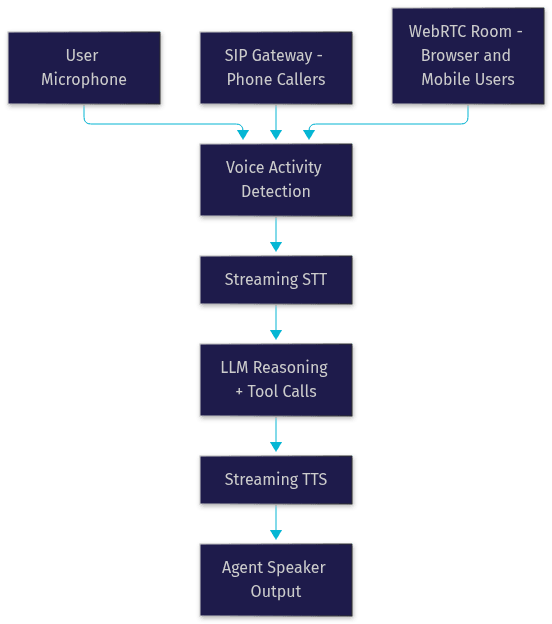
Every real-time AI voice system, regardless of vendor, is assembled from the same four stages. Understanding each stage's job and its failure modes is what separates a working prototype from a production agent.
Voice Activity Detection (VAD) and Turn Detection
Voice activity detection is the gatekeeper of the pipeline. VAD is a lightweight model or signal-processing routine that decides, on every audio frame, whether the frame contains human speech or background noise. Without VAD, the speech recognizer would transcribe traffic noise and the LLM would respond to it.
Turn detection is the harder sibling. It decides when the user has actually finished a thought versus merely paused mid-sentence. Human turn-taking includes pauses of 200 to 500 milliseconds all the time, so a naive silence timer either interrupts constantly or waits too long. Modern turn detection uses semantic cues, such as whether the partial transcript ends on a complete clause, combined with timing cues. VideoSDK's Agent SDK ships built-in turn detection and voice activity detection as configurable pipeline components, which saves you from hand-tuning silence thresholds.
Speech-to-Text (STT)
Streaming speech-to-text converts live audio into a rolling text hypothesis. The critical property is incremental output: the recognizer emits partial transcripts while the user speaks, so downstream stages can start early. Providers in this space include Deepgram (whose Nova series targets conversational audio), OpenAI Whisper and its realtime variants, Google Cloud STT, AssemblyAI, and ElevenLabs Scribe. Accuracy and latency trade off directly: larger, more accurate models add hundreds of milliseconds per utterance. For conversational phone audio, a well-tuned streaming model typically lands in the 5 to 10 percent word-error-rate range, which is good enough for an LLM to recover from residual errors.
Large Language Model (LLM)
The LLM is the reasoning stage. It consumes the transcript, the conversation history, and any retrieved context, then produces the reply. Two properties matter for real-time use. First, time-to-first-token: the model must start emitting the reply quickly, because the TTS stage cannot begin until the first words exist. Second, tool calling: a production agent needs to look up calendars, check order status, or transfer calls, and those function calls must fit inside the latency budget. Providers like OpenAI, Anthropic Claude, Google Gemini, and Cerebras all work here, and VideoSDK's Agent SDK abstracts them behind a common pipeline interface so you can swap models without rewriting your agent.
Text-to-Speech (TTS)
Streaming text-to-speech closes the loop by converting the LLM's output into audible speech, sentence by sentence, as it is generated. The best streaming TTS providers, including ElevenLabs, Cartesia, OpenAI TTS, and AWS Polly, can begin producing audio within 100 to 300 milliseconds of receiving the first text chunk. Voice style control matters too: an agent that can interrupt itself, slow down, or shift tone mid-conversation feels dramatically more natural than one that recites flatly.
How Much Latency Is Too Much? Latency Budgets Explained
End-to-end latency is the sum of every stage, and the sum is unforgiving. A typical budget for a well-tuned pipeline looks like this: audio transport adds 20 to 80 milliseconds, VAD and turn detection add 100 to 300 milliseconds of deliberate end-of-turn waiting, streaming STT adds 50 to 150 milliseconds for the final hypothesis, the LLM's time-to-first-token adds 100 to 400 milliseconds depending on model size, and streaming TTS adds 100 to 300 milliseconds before the first audible phoneme. Add network jitter and you land between 500 milliseconds and 1 second for a good system.
The measurement discipline matters more than the numbers. Instrument each stage boundary with timestamps and compute per-stage percentiles, not averages, because tail latency is what users notice. For WebRTC-based transports, the standard WebRTC statistics API exposes round-trip time, jitter, and packet loss per connection, which gives you a free observability layer. VideoSDK's Agent SDK includes pipeline observability hooks that report these stage timings per session, so you can see whether your 900-millisecond replies are being eaten by the LLM or by the network.
Architecture Patterns for Real-Time AI Voice
How you move audio between the user and the pipeline defines your architecture. Three patterns dominate in 2026.
WebSocket-Based Pipeline
The simplest pattern is a WebSocket carrying raw or encoded audio frames between a client and your agent server. The client captures microphone audio, streams it over the socket, and receives synthesized reply audio on the same connection. This works well for web apps and controlled networks. The weaknesses are firewall traversal in restrictive corporate environments and the lack of built-in congestion control, so audio quality degrades ungracefully on bad connections.
WebRTC-Enabled Voice Channels
WebRTC is the transport that real-time voice was built for. It provides full-duplex, encrypted, jitter-buffered audio with adaptive bitrate behavior, straight from the browser or mobile app to the media infrastructure. For browser-to-agent voice, WebRTC consistently outperforms raw WebSocket delivery on unstable networks. VideoSDK's rooms are WebRTC-native, which means an AI voice agent joining a VideoSDK room appears as just another participant, and humans in the same room can talk to it like any other caller.
SIP Integration for Phone Calls
SIP bridges the traditional phone network to your agent. An inbound call hits a SIP gateway, gets converted from telephony signaling to a real-time session, and the agent answers the phone like a call center employee would. Outbound works in reverse: your agent dials out through a SIP trunk provider such as Twilio, Telnyx, or Plivo. VideoSDK's telephony integration handles this bridge, including DTMF keypad events and call transfer, so the same agent logic serves web users and phone callers.
The full pipeline, end to end, looks like this:
The 2026 Provider Landscape for Real-Time AI Voice
Choosing a provider is the first real decision, and the options fall into two camps: managed APIs and self-hosted stacks.
OpenAI Realtime API
OpenAI's Realtime API offers speech-to-speech models that skip the text intermediate entirely, which can reduce latency for natural conversation. Pricing is token-based with separate rates for input and output audio, so costs scale with conversation length. It is the strongest choice when you want a single-vendor, lowest-friction path and your use case tolerates per-minute costs.
Google Gemini Live Voice
Google's Gemini realtime voice offering is latency-optimized and multimodal, meaning the same session can accept images and text alongside audio. Usage limits and quotas vary by plan tier, so high-volume deployments need careful capacity planning. It suits teams already invested in the Google Cloud ecosystem.
Inworld Voice Agents
Inworld focuses on the gaming and interactive-character segment, with realtime TTS that ranks well on independent speech-synthesis comparisons and strong turn-taking behavior for character-driven conversations. If your agent is a companion character rather than a utility assistant, Inworld's expressive voices are worth evaluating.
Vui (Fluxions) Open-Source Stack
Vui is an open-source real-time voice stack designed for local deployment. You choose your own STT, LLM, and TTS models and run the whole pipeline on your own hardware. The trade-off is operational: achieving sub-second latency locally requires a GPU with enough headroom to run inference and synthesis concurrently, and you own every failure mode.
LocalAI Realtime API
LocalAI provides a self-hosted alternative with an OpenAI-compatible interface, letting you point existing agent code at your own servers. Configuration involves selecting local model weights for each pipeline stage and exposing them through the realtime endpoint. It appeals to teams with strict data-residency requirements, since audio never leaves your infrastructure.
RealtimeVoice SaaS Platform
RealtimeVoice is a managed platform in the third camp: hosted infrastructure with built-in cost-control tooling such as per-session caps and multi-channel support across web, phone, and messaging. Managed platforms trade flexibility for operational simplicity, which is the right trade for teams without dedicated infrastructure engineers.
A quick comparison of where each option fits:
| Provider | Deployment | Best For | Latency Profile |
|---|---|---|---|
| OpenAI Realtime API | Managed cloud | Fastest path to production speech-to-speech | Sub-second on good networks |
| Google Gemini Live | Managed cloud | Multimodal sessions, Google Cloud teams | Latency-optimized, quota-limited |
| Inworld | Managed cloud | Game characters, expressive agents | Strong turn-taking |
| Vui (Fluxions) | Self-hosted | Full control, custom model choices | Depends on your hardware |
| LocalAI | Self-hosted | Data residency, OpenAI-compatible local models | Depends on your hardware |
| RealtimeVoice | Managed SaaS | Cost-capped multi-channel deployment | Managed, predictable |
| VideoSDK Agent SDK | Self-hosted or Agent Cloud | Connecting your pipeline to real rooms, web, mobile, and SIP | Sub-second over WebRTC |
The most important row for most readers is the last one: whichever model provider you choose, something still has to transport the audio, and that is the layer VideoSDK owns.
How to Build a Real-Time AI Voice Agent
Building the agent is a sequence of decisions, and each one has a common failure mode. Here is the path.
Step 1: Choose Your Provider and Model Stack
Decide between managed APIs and self-hosted models based on your latency target, budget, and data requirements. Prototype with a managed provider first, even if you plan to self-host later, because it validates your conversation design before you invest in infrastructure.
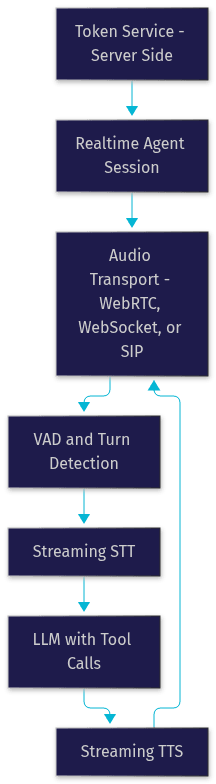
Step 2: Set Up Your Authentication Token Service
Every real-time voice platform authenticates sessions with short-lived tokens generated server-side from your API credentials. Never embed API keys or secrets in a browser or mobile client. Build a small token endpoint that mints a fresh token per session and returns it to the client at connection time. VideoSDK's authentication and token guide explains the pattern for its rooms, and the same principle applies to every provider.
Step 3: Configure the VAD, STT, LLM, and TTS Pipeline
Wire the four stages together with explicit choices for each. In VideoSDK's AI Agent SDK, you describe the pipeline declaratively: which STT provider, which LLM, which TTS voice, and the SDK manages the session lifecycle. Expect to spend real time on audio format alignment here, because mismatched sample rates and encodings between stages are the single most common integration bug.
Step 4: Implement Turn-Detection Logic
Configure how the agent decides the user has finished speaking. Start with the provider's default turn detection, then tune the end-of-turn silence threshold against real conversations. If your agent interrupts users too often, lengthen the threshold; if it feels sluggish, shorten it or enable semantic end-of-turn detection.
Step 5: Connect the Audio Transport
Choose WebSocket, WebRTC, or SIP based on where your users are. Browser users get WebRTC, phone callers get SIP through a gateway, and internal tools can often live on WebSockets. VideoSDK's telephony introduction covers bridging SIP trunks into agent sessions, including DTMF handling for phone-keypad menus.
Step 6: Test End-to-End Latency
Before adding features, measure the round trip: speak, and time from your last word to the agent's first audible reply. Instrument each pipeline stage and record percentiles across at least a hundred test utterances on realistic network conditions, including mobile data. If you cannot hit your target, the per-stage timings tell you exactly which component to swap.
Step 7: Add Tool Calls
Finally, give the agent the ability to act: calendar lookups, order status checks, call transfers. Keep tool responses fast, because a slow internal API silently destroys your latency budget even when the voice pipeline is perfect.
The session flow, from token to conversation, looks like this:
Three pitfalls bite almost everyone. Token expiry mid-session causes mysterious disconnects, so mint tokens with realistic lifetimes and handle refresh. Audio format mismatches between stages produce garbled or silent output that error logs rarely explain clearly. And corporate firewalls block WebSocket and UDP media traffic, which is exactly why WebRTC with TURN fallback exists.
Production Best Practices for Real-Time AI Voice
A prototype that works on your laptop is not a production system. These practices close the gap.
Cost monitoring and per-session caps. Real-time voice bills by the minute across STT, LLM, and TTS, and a stuck session or a looping conversation can burn budget silently. Set hard per-session caps and alert on abnormal session duration.
Scaling the transport layer. Your model providers scale themselves; your WebSocket or WebRTC infrastructure does not. Use a managed real-time communication layer, or horizontally scale your media servers with a load balancer that understands long-lived connections.
Secure token handling. Keep all credentials server-side, scope tokens to single sessions, and set short expiry windows. A leaked token with broad scope is a billing incident, not just a security one.
TURN server fallback. Roughly a small percentage of users sit behind networks that block direct peer connections. TURN relays their media at a small latency cost. Without it, those users simply cannot connect.
Latency monitoring with WebRTC stats. Continuously collect round-trip time, jitter, and packet loss from the standard WebRTC statistics interface, and correlate spikes with user-reported call quality. VideoSDK's session analytics expose these metrics per room.
Graceful reconnection. Mobile users switch networks mid-conversation. Design the session to resume with conversation context intact rather than restarting the agent from a greeting.
Future Trends in Real-Time AI Voice
Three shifts are visible in 2026. First, multimodal realtime models are collapsing the pipeline itself: speech-to-speech models that reason directly over audio remove the STT and TTS stages and their combined latency. Second, edge-deployed voice agents are becoming practical as smaller models and dedicated inference hardware bring sub-second responses onto devices, enabling offline and privacy-sensitive use cases. Third, retrieval-augmented generation is integrating tightly into the voice loop, so agents answer from your product documentation or customer records mid-conversation rather than hallucinating. VideoSDK's Agent SDK already supports RAG and memory components in its pipeline, which positions it well for that third shift.
Definitions Glossary
Voice Activity Detection (VAD): A signal-processing component that decides, per audio frame, whether the frame contains human speech, preventing the pipeline from reacting to background noise.
Turn Detection: The mechanism that decides when a user has finished speaking and the agent should respond, combining silence timing with semantic cues from the partial transcript.
Streaming STT: Speech-to-text that emits partial transcript hypotheses while the user is still speaking, allowing downstream stages to begin processing early.
Streaming TTS: Text-to-speech that synthesizes audio sentence by sentence as text arrives, producing the first audible reply words before the full reply is generated.
Agent Worker: The Python process that runs a VideoSDK AI agent, managing its session lifecycle inside a real-time room.
SIP: Session Initiation Protocol, the signaling standard that bridges traditional phone networks into WebRTC-based real-time voice sessions.
Key Takeaways
- Real-time AI voice means a full speech-to-speech loop that responds in under a second, which requires streaming at every stage rather than batch processing.
- The four pipeline components, VAD, streaming STT, an LLM with fast time-to-first-token, and streaming TTS, each contribute a measurable slice of the latency budget.
- WebRTC is the strongest transport for browser and mobile users, while SIP gateways extend the same agent to phone callers.
- The 2026 provider landscape spans managed speech-to-speech APIs, self-hosted open-source stacks, and platforms like VideoSDK's Agent SDK that connect your chosen models to real-time rooms over web, mobile, and telephony.
- Production readiness is about cost caps, TURN fallback, latency monitoring, and graceful reconnection, not just a working prototype.
Conclusion
Real-time AI voice in 2026 is a solved architecture problem: stream everything, keep each stage under its latency budget, and transport audio over WebRTC or SIP. The remaining work is choosing the right provider stack and hardening it for production. Start by prototyping with one provider using the VideoSDK AI Agents quickstart, explore the code samples for working agent examples, and join the VideoSDK Discord community to compare notes with other builders. Sign up free at app.videosdk.live/login and get your first real-time AI voice agent talking today. What are you building with real-time AI voice? Drop a comment, I'd love to hear what kind of voice agent use case you're working on.
Free $20 Balance for AI Voice Agents & Video Calls
FAQ