


Noise remover AI is a technology that uses deep learning models to isolate and remove unwanted background sounds from audio recordings. Unlike traditional filters that rely on static frequency cutoffs, AI audio enhancement analyzes the spectral characteristics of speech and noise in real-time or batch processing. You can use these tools to clean up podcast audio, video calls, and field recordings directly in your browser or through dedicated SDKs like VideoSDK.
Background noise is the persistent enemy of clear communication. Whether you are recording a podcast in an untreated room, taking a video call from a busy coffee shop, or capturing field audio on a windy day, unwanted sounds degrade the quality of your work. Poor audio quality causes audience drop-off faster than low video resolution. Viewers and listeners will tolerate a blurry picture, but they will not tolerate unintelligible speech. Traditional noise reduction tools often leave audio sounding robotic, submerged, or artificially processed. They rely on static frequency thresholds that cannot adapt to dynamic noise environments. Noise remover AI changes this paradigm by using deep learning to distinguish between human speech and background interference. In this guide, you will learn how AI audio enhancement works, the types of noise it can eliminate, and how to choose the right tool for your needs. We will also cover best practices for cleaning audio without degrading voice quality and explore how developers can integrate these capabilities directly into their applications.
What Is Noise Remover AI?
Noise remover AI is defined as a software system that leverages machine learning models to separate vocal tracks from non-vocal noise. Classic noise reduction relies on spectral subtraction and manual frequency gating. These methods require a noise profile and subtract those frequencies from the entire track. If the noise overlaps with vocal frequencies, traditional tools damage the voice. They also struggle with non-stationary noise like crowd chatter or sudden impacts. AI audio enhancement works differently. Models like DeepFilterNet and Demucs train on thousands of hours of clean and noisy audio pairs. They learn the complex patterns of human speech and predict the clean signal. This approach preserves the natural timbre of the voice while effectively removing background chatter, hums, and hisses. Some advanced systems use generative adversarial networks to synthesize missing speech frequencies that were masked by noise. VideoSDK integrates similar AI-driven noise suppression directly into its real-time communication SDKs, ensuring clear audio for video calls without requiring external post-processing. This built-in capability means developers do not need to build custom audio processing pipelines from scratch.
How Noise Remover AI Works
AI noise removal operates through a multi-stage signal processing pipeline. First, the system captures the raw audio input and converts it into a visual representation called a spectrogram. This conversion uses a Fast Fourier Transform to break the complex audio waveform into its constituent frequencies. The spectrogram shows the amplitude of different frequencies over time, creating a visual fingerprint of the sound. Next, the AI model analyzes the spectrogram to identify patterns that match noise versus patterns that match speech. The model treats this as an image segmentation task, where it identifies which pixels represent speech and which represent noise. The model then generates a mask or filter that isolates the speech signal. Finally, the system reconstructs the audio from the cleaned spectrogram back into a waveform using an inverse transform.
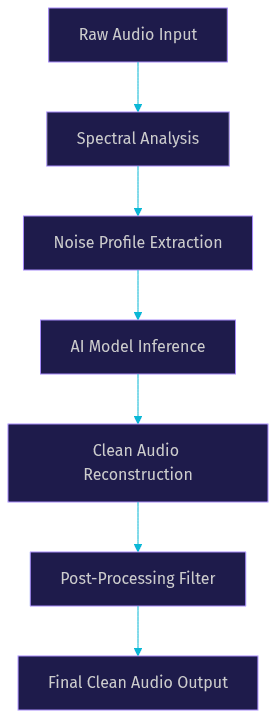
Audio processing can occur in the time domain or the frequency domain. Time-domain processing analyzes the raw waveform directly. This approach is faster but less precise for complex noise. Frequency-domain processing, which involves the spectrogram, is more computationally intensive but yields superior results. Most modern noise remover AI systems use a hybrid approach. They analyze the frequency domain for noise identification and apply filters in the time domain to minimize artifacts. This dual approach ensures high fidelity while maintaining the low latency required for real-time communication. VideoSDK handles real-time audio processing efficiently, offering built-in noise suppression for developers building communication apps. The platform manages the entire signal flow, from capture to processing to playback, ensuring low latency and high audio quality.
Key Components of the AI Pipeline
The effectiveness of noise remover AI relies on three core components working in harmony. Noise profiling identifies the specific acoustic characteristics of the interference. Unlike static profiles, AI profiling adapts to changing noise floors. If an air conditioner turns on mid-recording, the AI detects the new noise pattern and adjusts its filter accordingly. Neural network inference applies the trained model to separate speech from noise. This step requires significant computational power, especially for real-time processing. Modern AI models are optimized to run efficiently on consumer hardware, including mobile devices. Voice-preserving post-filters ensure the final output sounds natural and free of digital artifacts. These filters smooth out any harsh transitions caused by the AI mask and apply gentle compression to maintain consistent volume levels. These components work together to maintain low-latency audio processing while delivering studio-quality results.
Types of Noise It Can Eliminate
AI audio enhancement tools excel at removing a wide variety of disruptive sounds. Here are the most common types of noise and how to handle them.
Wind and outdoor gusts create low-frequency rumbles that mask speech. The physical impact of wind on a microphone diaphragm generates broadband noise that is difficult to block with physical windscreens alone. AI models handle wind noise effectively by targeting broad low-frequency bands while preserving the higher frequencies of human speech. Use a medium to aggressive strength setting for heavy wind.
Electrical hum and 50/60 Hz buzz come from grounding issues or nearby power lines. This noise is persistent and predictable. Traditional EQ can fix this, but AI models remove the hum and its harmonics without affecting the voice. A light strength setting is usually sufficient because the frequency is distinct from speech.
Fan, AC, and HVAC noise produce consistent broadband hiss and low rumble. This is the most common noise in home office recordings. AI tools easily identify this steady-state noise. A medium setting removes the hiss while preserving voice clarity. If the HVAC system is loud, you may need an aggressive setting.
Crowd chatter and background speech are the hardest for traditional filters. AI models trained on voice isolation can distinguish the primary speaker from background voices. This requires a model trained specifically on speaker separation. For crowd chatter, the challenge is that background speech shares the same frequency characteristics as the primary speaker. The AI must use spatial cues and temporal patterns to differentiate the target voice from interfering voices. This is known as the cocktail party problem in audio processing. Advanced models use beamforming techniques or multi-channel inputs to improve separation, but single-channel AI models rely entirely on learned patterns to solve this issue. Use an aggressive setting, but monitor for artifacts. The AI might accidentally remove parts of your speech if it mistakes them for background noise.
Clicks, pops, and vinyl crackle are transient noises. These sharp, short-duration sounds are common in old recordings or when handling microphones. AI models detect these sharp peaks and interpolate the missing audio. Light to medium settings work best to avoid glitchy artifacts.
Echo and reverb occur when sound bounces off hard surfaces. This is a major issue for video calls in empty rooms. Advanced AI models can reduce reverb by modeling the room acoustics and canceling the reflected sound waves. This requires aggressive processing, which may slightly alter the voice tone. VideoSDK includes acoustic echo reduction as part of its real-time audio processing suite.
Choosing the Right Noise Remover AI Tool
Selecting the right tool depends on your specific needs. Privacy is a major concern for many users. Browser-based tools that process audio locally protect sensitive data from being uploaded to external servers. Format support matters if you work with high-resolution audio files. Free tier limits dictate how much you can process without paying. Speed and UI simplicity affect your workflow efficiency.
| Tool Name | Processing Type | Best For | Privacy Level |
|---|---|---|---|
| NoiseReducerAI | Cloud | High-quality batch processing | Medium |
| NoiseRemover.net | Browser (Local) | Quick, privacy-first edits | High |
| Timbrica | Cloud | Professional audio restoration | Medium |
| VideoSDK Noise Suppression | SDK (Local) | Real-time video call audio | High |
For developers building applications, integrating an SDK with built-in noise suppression is the most efficient route. VideoSDK provides native noise suppression features, eliminating the need for third-party audio processing libraries. This integration ensures that audio is cleaned before it is transmitted to other participants, reducing bandwidth usage and improving the overall call quality. You can explore the VideoSDK audio calling guide for more details on implementing these features.
Step-by-Step Guide to Clean Audio with a Browser-Based Noise Remover AI
Cleaning audio with a browser-based tool is straightforward. Follow these steps for the best results.
Step 1: Prepare a Clean Source File
Always start with the best possible recording. The AI can only work with what you give it. Record in a quiet environment and set your microphone gain correctly. Avoid clipping by keeping your peak levels below minus six decibels. A good source file makes the AI job easier and yields better results. Use a pop filter to reduce plosives and position the microphone close to your mouth to maximize the signal-to-noise ratio.
Step 2: Upload the File
Open your chosen browser-based noise remover AI tool. Upload your audio file. Most tools support common formats like WAV, MP3, and AAC. Some advanced tools support FLAC and OGG. Check the file size limits before uploading. If your file is too large, consider splitting it into smaller segments or using a tool that supports chunked uploading.
Step 3: Select a Noise Profile
Some tools let you select a specific noise profile, such as wind, hum, or chatter. If your tool has this feature, choose the profile that matches your recording. If not, let the AI auto-detect the noise. Auto-detection works well for mixed noise environments. The AI will sample a section of the audio to identify the dominant noise characteristics.
Step 4: Adjust Strength and Preview
Start with a light strength setting. Preview the cleaned audio and compare it to the original. Gradually increase the strength to medium or aggressive if the noise persists. Always use A/B previewing to ensure the voice does not sound artificial. Listen carefully for artifacts, especially in the quiet parts between words. If the background noise returns during speech, you may need a higher setting or a different noise profile.
Step 5: Export the Cleaned File
Once satisfied, export the cleaned audio. Choose a lossless format like WAV for further editing, or a compressed format like MP3 for final distribution. Select the highest quality bitrate available to preserve the improved audio fidelity. Name your file clearly to avoid confusing it with the original noisy version.
Common Pitfalls and How to Avoid Them
Over-aggressive reduction is the most common mistake. Setting the strength too high causes an "underwater" or robotic voice. The AI removes too much information, leaving gaps in the speech that sound unnatural. If you hear artifacts, reduce the strength. Ignoring sample-rate mismatches can also cause issues. Ensure your project and export sample rates match to avoid sync problems or pitch shifts. Finally, always check the artifact track if your tool provides one. This track contains the noise the AI removed. If you hear voice in the artifact track, your settings are too aggressive and you are losing important speech data.
Enhancing the Result Further
AI denoising is the first step in audio cleanup. Post-processing enhances the final result. Apply a gentle EQ to remove muddy low frequencies and boost vocal clarity. A high-pass filter around 80 Hz removes low-end rumble, while a slight boost around 3 kHz improves intelligibility. Use a compressor to even out the volume levels. A compression ratio of 3:1 with a slow attack preserves the natural dynamics of speech. Apply loudness normalization to meet broadcast standards, targeting around minus 16 LUFS for web content. Combine AI denoising with manual editing tools for professional results. VideoSDK handles real-time enhancement, but for post-production, dedicated audio software provides finer control over the final sound.
Privacy and Security Considerations
When using cloud-based noise remover AI tools, your audio is uploaded to a remote server. Read the data retention policies carefully. Some services store your files for model training, which could expose sensitive information. For sensitive recordings, use privacy-first audio processing tools that run locally in your browser. WebAssembly and Web Audio API enable powerful local processing without uploading data. This ensures your audio never leaves your device. VideoSDK processes audio locally on the device, ensuring user privacy during real-time calls. This local processing approach is critical for telehealth, legal consultations, and other sensitive communication scenarios.
Future Trends in AI Noise Removal
The future of AI noise removal is moving toward real-time, multi-modal processing. Real-time denoising for live streams and video calls is becoming standard. Multi-modal models will analyze both audio and video to better isolate speech in noisy environments. For example, the AI could use lip movements to help separate speech from background noise. Edge-device inference will bring powerful noise suppression to smartphones and IoT devices without relying on cloud processing. This reduces latency and improves privacy. VideoSDK is actively developing advanced real-time AI features to meet these evolving demands. The platform's architecture is designed to support future AI models as they become available, ensuring developers can always offer the latest audio enhancement capabilities.
Definitions Glossary
Noise Remover AI: A software system using deep learning to separate and remove unwanted background sounds from audio recordings.
Spectral Subtraction: A traditional noise reduction method that estimates a noise profile and subtracts those frequencies from the audio signal.
DeepFilterNet: A deep learning model designed for low-complexity, real-time speech enhancement.
Voice Isolation: The process of separating a primary vocal track from background music or noise.
Noise Suppression: A feature in communication SDKs, like VideoSDK, that actively filters out background noise during live audio transmission.
Key Takeaways
- Noise remover AI uses deep learning models to effectively separate speech from background noise without degrading audio quality.
- Browser-based tools offer privacy-first audio processing by running models locally via WebAssembly.
- Over-aggressive strength settings cause unnatural, underwater-sounding voice artifacts.
- Real-time denoising is essential for live video calls, and SDKs like VideoSDK provide built-in noise suppression.
- Combining AI denoising with post-processing techniques like EQ and compression yields professional-grade audio.
Conclusion
Noise remover AI is an essential tool for creators, educators, and remote workers who need clear audio. By understanding how deep learning models process sound, you can choose the right tool and apply the best settings for your recordings. Always start with a clean source file, preview your adjustments, and prioritize privacy when handling sensitive audio. For developers building real-time communication apps, integrating an SDK with native noise suppression saves time and ensures high-quality user experiences. Try a privacy-first browser tool today and experiment with strength settings to hear the difference. What are you building with audio processing? Drop a comment and share your noise removal challenges. You can explore more about real-time audio features in the VideoSDK documentation or join the VideoSDK Discord community to discuss with other developers.
FAQ