



Background noise removal AI uses neural networks to isolate human speech and suppress unwanted ambient sounds in audio streams. Unlike traditional filters, these models learn from noisy-speech datasets to deliver clean audio without manual editing. VideoSDK includes built-in noise suppression for real-time video and audio calling, enabling developers to ship crystal-clear communication apps without integrating a separate AI service.
Noisy audio recordings are a nightmare for developers, podcasters, and remote workers. A passing siren, a humming fan, or a barking dog can ruin an otherwise perfect take or disrupt a critical video call. Traditionally, fixing this required tedious manual editing in a digital audio workstation or settling for subpar noise gates that often clipped the speaker's voice. Background noise removal AI is changing this dynamic entirely. By leveraging deep learning, modern tools can distinguish between speech and noise with remarkable accuracy, cleaning audio in real time or offline. This guide breaks down how background noise removal AI works, the technologies driving it, and how you can integrate it into your own applications.
What is Background Noise Removal AI?
Definition
Background noise removal AI is defined as the application of machine learning models to separate human speech from unwanted ambient sounds in an audio signal. Traditional noise reduction relies on spectral subtraction or simple frequency gates, which often struggle with non-stationary noises like keyboard typing or street traffic. AI-driven noise removal, however, uses trained neural networks to recognize the complex patterns of human speech and suppress everything else. This approach delivers significantly cleaner audio without introducing the metallic artifacts common in older filters.
How AI Models Work
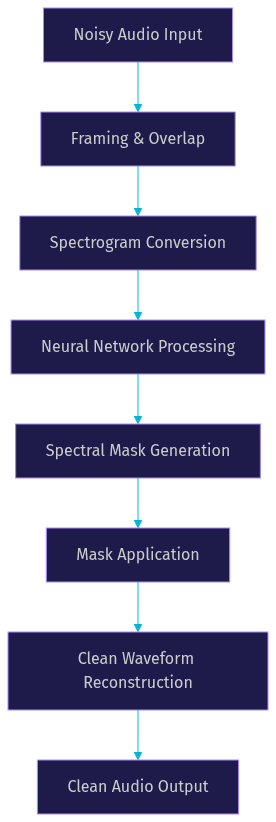
AI noise removal models work by analyzing audio in short overlapping segments, typically 20 to 30 milliseconds long, converting them into a time-frequency representation called a spectrogram. The neural network then generates a mask that predicts which parts of the spectrogram contain speech and which contain noise. By applying this mask to the original audio, the model suppresses the noise while preserving the vocal frequencies. These models are trained on massive datasets of noisy speech, learning to generalize across countless noise types, from HVAC hums to crowded cafes. Advanced architectures like U-Net or recurrent neural networks are often used to capture temporal dependencies, ensuring the model understands the context of the speech over time.
Benefits of Using AI for Noise Removal
Improved Speech Intelligibility
AI noise reduction dramatically improves speech intelligibility, which is critical for both human listeners and automated systems. For human listeners, removing background noise reduces cognitive load, making long calls or podcasts less fatiguing. For automated systems, clean audio directly boosts speech-to-text accuracy after noise removal. Transcription engines and voice assistants rely on clear input to function correctly. By feeding denoised audio into a speech-to-text pipeline, developers can significantly reduce word error rates, even in acoustically hostile environments.
Time Savings vs Manual Editing
Before AI, cleaning audio meant spending hours in a digital audio workstation, manually highlighting noise profiles and applying reduction filters across individual clips. AI background sound elimination automates this entirely. An AI voice cleaner can process an hour-long podcast in seconds. For developers building audio pipelines, this means you can offer users a one-click cleanup feature instead of requiring them to learn complex audio engineering software. The time savings are substantial, turning a post-production chore into an automated background process.
Key Technologies Behind Modern AI Noise Removal
Neural Networks and Spectral Masking
Modern AI audio cleanup performance relies on deep learning architectures like convolutional neural networks and, increasingly, transformer-based models. These networks process audio spectrograms and generate spectral masks. A mask acts as a dynamic filter that attenuates frequencies identified as noise while boosting those containing speech. Some advanced models perform end-to-end mapping, directly outputting a clean waveform from a noisy input without an intermediate spectrogram step. This neural speech enhancement approach allows the model to handle complex, overlapping sounds that traditional filters cannot distinguish. Transformers, in particular, excel at capturing long-range dependencies in audio, making them highly effective at maintaining natural speech rhythms even in fluctuating noise environments.
Real-Time vs Offline Processing
AI denoising operates in two modes: real-time and offline. Real-time background noise suppression is essential for live applications like video calling, live streaming, and interactive voice response systems. This mode requires low-latency processing, typically adding no more than 20 to 50 milliseconds of delay. To achieve this, models must be lightweight and optimized for speed, often trading a small amount of accuracy for responsiveness. Offline processing is used for post-production tasks like cleaning podcast recordings or archived lectures. Without latency constraints, offline models can use larger context windows, analyzing the entire audio file to make more accurate denoising decisions. They can also afford to use heavier, more computationally intensive architectures that yield superior audio quality.
Choosing the Right Background Noise Removal AI Tool
Evaluation Criteria
Selecting the best AI background noise remover requires evaluating several technical and business factors. Model latency is paramount for real-time applications. If you are building a calling app, the denoising process must not introduce noticeable delay. Supported audio formats and sample rates dictate how easily the tool fits into your existing pipeline. Privacy is another critical concern. If your audio contains sensitive information, you need a provider that processes data securely or offers on-device inference. Finally, evaluate pricing models and API rate limits to ensure the service scales with your user base without unexpected costs.
Comparison of Popular Services
Developers have access to several AI noise removal services, each with distinct strengths. Here is a comparison of popular options for integrating AI-powered audio preprocessing into your applications.
| Service | Best For | Latency | Deployment | Key Feature |
|---|---|---|---|---|
| NVIDIA Broadcast | Real-time PC apps | Ultra-low | Local GPU | Hardware acceleration |
| Adobe Podcast | Offline podcast cleanup | N/A | Cloud | Deep restoration |
| VideoSDK | Real-time video/audio calls | Low | Cloud SDK | Built-in SDK feature |
| Deepgram | Voice analytics & STT | Low | Cloud API | Combined STT + denoising |
[LINKABLE ASSET — comparison table]
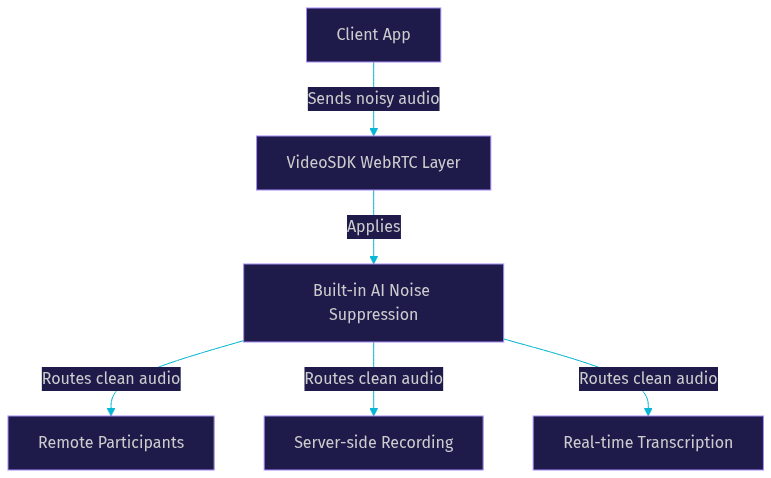
VideoSDK stands out for communication apps because the noise suppression is built directly into the video and audio calling SDK, eliminating the need to route audio through a separate third-party API.
Practical Workflow for Cleaning Audio
Preparing Your Audio
Before running audio through an AI audio filter, ensure the source material is optimized. Use a consistent sample rate, typically 16 kHz or 48 kHz, depending on whether your model is optimized for voice or full-bandwidth audio. Avoid severe clipping, as distorted peaks cannot be reconstructed by denoising models. If you are working with compressed formats like MP3, be aware that compression artifacts can sometimes be amplified by AI models. Uncompressed WAV or FLAC files yield the best results for offline processing.
Uploading and Configuring
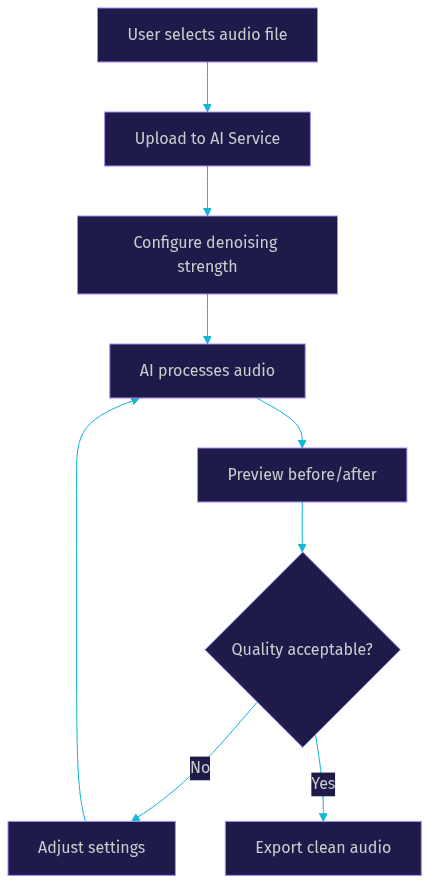
When using a web-based background noise remover tool, the workflow is straightforward. First, upload your prepared audio file to the platform. Most services provide a configuration panel where you can select the denoising strength or choose a specific profile, such as voice or podcast. If you are using an API, the process involves sending an authenticated request containing the audio payload or a URL to the file. The service processes the audio and returns a job ID or the cleaned file directly. Always start with the default strength setting to avoid over-processing.
Reviewing and Exporting Results
Once the AI process completes, review the results carefully. Most platforms offer an A/B toggle to compare the before and after audio. Listen for artifacts, such as robotic-sounding speech or unnatural silence between words. If the audio sounds over-processed, reduce the denoising strength and re-run the job. When you are satisfied with the clean audio, export the file in your desired format. For developers building this into an app, provide users with a similar preview capability before finalizing the download.
Common Challenges and How to Mitigate Them
Over-Suppression and Artifacts
One of the most frequent issues with AI noise removal is over-suppression, which makes speech sound robotic or watery. This happens when the neural network is too aggressive, mistakenly classifying parts of the human voice as noise and removing them. To mitigate this, avoid maxing out the denoising strength slider. Some modern models offer adaptive strength, automatically adjusting based on the noise floor. If you hear artifacts, try a different model or reduce the intensity. Troubleshooting AI audio cleaning artifacts often involves finding the right balance between noise reduction and voice preservation.
Handling Music or Multi-Speaker Content
AI models trained primarily on single-speaker speech can struggle with music or multi-speaker content. If you feed a music track into a speech enhancement AI model, it will likely attempt to remove the instruments, resulting in a muffled, distorted vocal. Similarly, overlapping speakers in a busy conference room can confuse the model, causing it to drop parts of the conversation. For these scenarios, look for models specifically trained for source separation or multi-speaker scenarios, rather than general background noise removal.
Integrating AI Noise Removal into Applications
API Integration Overview
Integrating an AI noise removal API involves a standard request-response flow. First, you authenticate with the provider using an API key, usually passed in the request header. You then send the audio data, either as a binary payload or via a URL pointing to the file. The API processes the audio and returns the cleaned file or a webhook notification when the job is done. For real-time applications, the integration uses WebSockets or WebRTC, streaming audio chunks to the server and receiving clean audio back with minimal delay.
Real-World Use Cases
AI noise removal powers several critical real-world applications. Live captioning systems use it to ensure the speech-to-text engine receives clean input, improving accuracy in noisy environments. Podcast pipelines automate the cleanup of remote interviews, where participants record in untreated rooms. Call-center recordings are denoised before being analyzed for quality assurance and sentiment analysis. For developers building real-time communication apps, VideoSDK provides built-in noise suppression, so calls are automatically cleaned without routing audio through an external API.
Future Trends in AI-Driven Audio Enhancement
The future of AI-driven audio enhancement points toward larger, multimodal models and edge computing. Upcoming models are expected to combine audio and video analysis, using visual cues from a webcam to identify and isolate the active speaker in a noisy room. Edge-device inference is also improving rapidly. As mobile GPUs and neural processing units become more powerful, complex neural speech enhancement models will run locally on phones and laptops, ensuring zero-latency, private noise removal without relying on cloud servers. This shift will make real-time background noise suppression standard across all communication devices.
Definitions Glossary
Spectral Masking: A technique where a neural network generates a filter to attenuate noise frequencies while preserving speech frequencies in an audio spectrogram.
Real-Time Background Noise Suppression: The process of removing unwanted sounds from an audio stream with minimal latency, essential for live video calls and interactive streaming.
Speech Enhancement AI: A branch of machine learning focused on improving the clarity and intelligibility of human speech in noisy recordings.
Audio Denoising Neural Network: A deep learning model trained on pairs of clean and noisy audio to automatically separate speech from background noise.
Key Takeaways
- Background noise removal AI uses neural networks to distinguish speech from noise, outperforming traditional filters.
- Real-time processing is critical for live communication apps, while offline processing offers higher accuracy for recorded content.
- Over-suppression can cause robotic artifacts, so balancing denoising strength is essential.
- VideoSDK includes built-in noise suppression, allowing developers to ship clean audio experiences without external APIs.
- Future trends point toward multimodal audio-video cleaning and on-device edge inference.
Conclusion
Background noise removal AI has transformed audio cleaning from a manual chore into an automated, intelligent process. By understanding how neural networks handle spectral masking and real-time processing, developers can build applications that deliver crystal-clear audio. Whether you are cleaning podcast recordings or building a live communication platform, integrating AI noise reduction is now a baseline expectation. If you are building a real-time video or audio calling app, explore VideoSDK's built-in noise suppression and ship a polished audio experience today. What are you building with VideoSDK? Drop a comment below.
Free $20 Balance for AI Voice Agents & Video Calls
FAQ