


Video calling software enables real-time audio and video communication over the internet, typically powered by WebRTC. Developers evaluate these platforms based on latency, scalability, and SDK availability. VideoSDK provides a robust video calling API with sub-300ms latency, multi-platform SDKs, and a Prebuilt UI Kit for rapid deployment.
The demand for reliable video calling software has surged, driven by the permanent shift toward remote work, virtual events, and digital customer support. Businesses now require more than just a basic video connection. They need secure, high-quality, and scalable real-time communication embedded directly into their applications. For developers, this means evaluating video calling APIs and SDKs rather than just downloading off-the-shelf apps. You need infrastructure that handles network variability, participant management, and compliance. By the end of this guide, you will understand the core architecture, key features, and integration considerations necessary to choose the right video calling software for your specific use case.
What Is Video Calling Software?
Video calling software is defined as a technology platform that facilitates real-time, face-to-face communication over the internet. It works by capturing audio and video from a user's device, compressing it, and transmitting it to one or more remote participants via a media server. Most modern video calling software relies on WebRTC, an open-source project that provides web browsers and mobile applications with real-time communications via simple application programming interfaces.
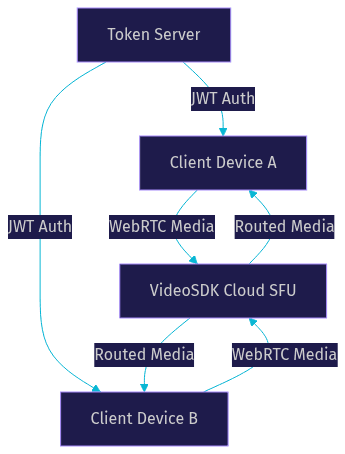
Unlike standalone video conferencing platforms designed for end-users, developer-grade video calling software provides APIs and SDKs that let you embed communication directly into your own product. VideoSDK provides this capability through a rooms-based architecture where participants join a room, share media streams, and communicate over WebRTC with sub-300ms latency. This approach gives developers full control over the user experience while offloading the heavy lifting of media routing and network traversal to a managed cloud infrastructure.
Core Features to Look For
HD Video & Audio Quality
High-definition video and clear audio are non-negotiable. Look for video calling software that supports HD and Full-HD video resolutions. The platform should offer network-adaptive streaming, which automatically adjusts the bitrate and resolution based on real-time bandwidth detection. This ensures the call remains stable even on poor 3G connections. Built-in noise suppression is also critical to filter out background noise and ensure voice clarity.
Security & Encryption
Security is paramount, especially for enterprise and healthcare use cases. Your video calling software must support end-to-end encryption (E2EE) to protect media streams from interception. Token-based authentication is essential to control room access. VideoSDK uses JWT tokens generated server-side to authenticate participants. Additionally, verify compliance with standards like HIPAA for healthcare or GDPR for data privacy.
Cross-Platform Compatibility
Your users are on different devices. The video calling software you choose must offer broad SDK support. Look for platforms providing SDKs for web (JavaScript, React), mobile (iOS, Android, React Native, Flutter), and even niche platforms like Unity or IoT. A Prebuilt UI Kit, like the one VideoSDK offers, allows you to embed a working video call interface with a single component, saving development time.
Popular Deployment Options
Cloud SaaS vs. Self-Hosted
Cloud SaaS video calling software handles the infrastructure for you. This means the provider manages media servers, TURN/STUN servers, and scaling. It offers faster time-to-market and reduces maintenance overhead. Self-hosted solutions give you complete data control and privacy but require significant engineering resources to maintain and scale. For most businesses, a managed cloud solution is the better choice unless strict data residency laws require on-premise hosting.
Open-Source Solutions
Open-source video calling software like Jitsi Meet or MiroTalk SFU provides a starting point for developers who want to build custom solutions without vendor lock-in. These projects rely on community contributions and offer basic WebRTC capabilities. However, they often lack the polish, dedicated support, and advanced features (like real-time transcription or custom video tracks) found in commercial offerings. You will need to invest heavily in infrastructure and maintenance to make them production-ready.
Evaluating Top Video Calling Software
Choosing the right platform requires comparing the top contenders. Here is a side-by-side comparison of leading video calling software options for developers.
| Platform | Latency | Max Participants | SDK Breadth | Security | Pricing |
|---|---|---|---|---|---|
| VideoSDK | Sub-300ms | High | 10+ platforms (React, Flutter, Unity, IoT) | E2EE, Token Auth | Free tier, pay-as-you-go |
| Zoom Video SDK | Low | High | Web, Mobile, Desktop | E2EE | Per-minute, seat-based |
| Microsoft Teams | Medium | High | Limited SDK | E2EE | Enterprise licensing |
| Jitsi Meet | Variable | Medium | Web, Mobile | TLS/SRTP | Free (self-hosted) |
| MiroTalk SFU | Variable | Low | Web | Basic | Free (self-hosted) |
VideoSDK stands out for developers due to its broad SDK coverage and developer-friendly REST APIs. It provides the infrastructure needed for both standard video calls and interactive live streaming.
Integration Considerations
API & SDK Availability
A video calling API is only as good as its SDKs. You need multi-platform support to reach all your users. VideoSDK offers SDKs for React, JavaScript, React Native, Android, iOS, Flutter, Unity, C++, IoT, and Python. This breadth ensures you can embed video calling into any application. Additionally, a Prebuilt UI Kit allows for zero-code embedding, letting you ship a working interface in minutes.
Token Authentication & Room Management
Never expose your API secret on the frontend. Always generate tokens server-side. VideoSDK uses token-based authentication where a backend server generates a JWT using your API key and secret. This token is passed to the frontend SDK to authenticate a participant. REST APIs are then used for server-side orchestration, such as creating rooms, managing participants, and controlling recordings programmatically.
Network Adaptivity & Bandwidth Optimization
Network conditions fluctuate. Your video calling software must handle this gracefully. VideoSDK employs network-adaptive streaming that automatically adjusts bitrate and resolution based on available bandwidth. It also utilizes TURN servers as a fallback when direct peer-to-peer connections fail due to firewall traversal issues. This ensures reliable connectivity in low-bandwidth environments.
Cost & Pricing Models
Understanding the pricing structure of video calling software is critical. Common models include free tier limits, per-minute usage billing, and seat-based licensing. VideoSDK offers a free tier with credits to get started, transitioning to a pay-as-you-go model. Be aware of hidden costs. Some providers charge extra for TURN server usage, recording storage, or premium support. Always calculate the total cost of ownership, including the engineering hours required for maintenance if you choose a self-hosted route.
Real-World Use Cases
Video calling software powers diverse industries. In telehealth, doctors conduct secure virtual consultations using E2EE and waiting rooms. Edtech platforms use interactive live streaming for online tutoring, allowing hosts to promote students to active speakers. Remote teams rely on video calling for daily standups and collaborative whiteboarding. Live-shopping platforms use low-latency streaming to host real-time auctions and product demonstrations, engaging viewers with polls and Q&A.
Choosing the Right Video Calling Software for Your Business
Selecting the right video calling software requires a clear decision framework. First, assess your security needs. If you are in healthcare or finance, E2EE and compliance are mandatory. Second, evaluate your participant volume. Standard video calls work for meetings, but large-scale events require interactive live streaming capabilities. Third, check platform support. Ensure the provider offers SDKs for all the platforms your users are on. Finally, consider your budget and engineering capacity. If you want to ship quickly, a managed cloud service with a Prebuilt UI Kit is ideal. VideoSDK fits this profile perfectly, offering comprehensive features without the infrastructure burden.
Definitions Glossary
Room: A VideoSDK meeting room that participants join and share media streams within, identified by a unique room ID.
Participant: A user or AI agent connected to a VideoSDK room, with their own audio and video streams.
WebRTC: An open-source project that provides web browsers and mobile applications with real-time communications via simple APIs.
Meeting Token: A JWT that authenticates a participant's access to a VideoSDK room, generated server-side.
Prebuilt UI Kit: VideoSDK's drop-in video calling interface that requires zero custom UI code.
Key Takeaways
- Video calling software relies on WebRTC and media servers to facilitate real-time communication.
- Security features like E2EE and token-based authentication are critical for enterprise applications.
- Cross-platform SDKs and Prebuilt UI Kits significantly reduce development time.
- Cloud SaaS solutions offer faster time-to-market compared to self-hosted alternatives.
- VideoSDK provides a comprehensive video calling API with sub-300ms latency and broad SDK support.
Conclusion
Choosing the right video calling software is a critical decision that impacts your application's reliability, security, and user experience. By understanding the underlying architecture, evaluating key features, and considering your specific use case, you can select a platform that meets your needs. VideoSDK offers a powerful, developer-friendly solution with extensive SDK support and robust features. You can start building today by visiting the VideoSDK documentation or signing up at app.videosdk.live/login. What are you building with VideoSDK? Drop a comment below to share your video calling use case.
Free $20 Balance for AI Voice Agents & Video Calls
FAQ