


A video chat app with Twilio WebRTC is built by connecting a client-side SDK to a Twilio video room through a server-generated access token, with Twilio handling signaling, media routing, and TURN traversal. One critical caveat for 2026: Twilio announced the end-of-life of its Programmable Video product, with full shutdown completed in late 2024, so new builds should evaluate alternatives like VideoSDK before committing. This guide walks through the complete Twilio WebRTC architecture, then compares it against modern RTC providers so you can choose with full information.
Real-time video chat has moved from a nice-to-have to table stakes. Telehealth platforms, tutoring marketplaces, and customer support tools all lose users when latency creeps past a second. Building this from raw WebRTC means solving signaling, ICE negotiation, TURN infrastructure, and media routing yourself, which is why most teams reach for a managed provider.
Twilio WebRTC, through its Programmable Video product, was one of the most popular choices for exactly this reason. It abstracted the hard parts of WebRTC behind clean SDKs and a global media infrastructure. However, Twilio announced in December 2023 that Programmable Video would be sunset, and the product reached end-of-life in December 2024. If you are maintaining an existing Twilio video integration or planning a migration, understanding its architecture remains valuable, and this article covers it fully. If you are starting fresh, the comparison section will help you pick a provider with a long-term roadmap.
By the end of this article, you will understand the complete architecture of a video chat app with Twilio WebRTC, how token-based security works, how to scale and control costs, and how Twilio stacks up against VideoSDK, Agora, Daily.co, and Jitsi in 2026.
What Is Twilio WebRTC for a Video Chat App?
A video chat app with Twilio WebRTC is defined as an application that uses Twilio's managed WebRTC infrastructure to establish real-time audio and video sessions between participants. Twilio WebRTC worked by letting clients exchange media through Twilio's cloud media servers, while Twilio handled the signaling layer, SDP negotiation, and ICE candidate exchange that raw WebRTC requires developers to implement themselves.
The core building blocks were the Programmable Video SDKs (available for JavaScript, iOS, Android, and React Native), room-based media routing, and Twilio's global TURN and STUN infrastructure for firewall and NAT traversal. The Conversations API complemented video rooms with in-meeting text chat, and Network Quality APIs exposed per-participant connection health.
Twilio's key abstraction was the room. Developers created rooms server-side, generated scoped access tokens, and clients joined with those tokens. All media negotiation, reconnection, and dominant speaker detection happened inside the SDK. That model, room plus token plus SDK, is now the standard architecture across the entire RTC provider market, including VideoSDK's Rooms-based architecture, which is why learning it through the Twilio lens transfers directly to other providers.
Why Choose Twilio for a Video Chat App?
Twilio's appeal rested on four pillars that remain the evaluation criteria for any RTC provider today.
First, global low-latency reach. Twilio operated media servers across multiple regions, so participants in different continents connected to nearby edge infrastructure rather than crossing oceans for every packet. Second, security was built in: all signaling and media ran over TLS and SRTP, and Twilio offered end-to-end encryption options for regulated use cases like telehealth.
Third, the pricing model scaled with usage, charging per participant-minute rather than flat fees, which kept early-stage costs low. Fourth, and most distinctively, video integrated with the rest of the Twilio product family. A support app could send an SMS invite, verify the caller's identity with Twilio Verify, and escalate a chat to a video call without leaving one vendor ecosystem.
That integration story was Twilio's genuine differentiator. For teams already deep in Twilio Voice and SMS, adding video was a natural extension. The 2024 sunset of Programmable Video changed the calculus entirely, which is why the comparison section later in this article matters more now than it did when most Twilio video tutorials were written.
Core Architecture of a Video Chat App With Twilio WebRTC
Every Twilio WebRTC video chat app followed the same three-tier architecture: a client SDK in the browser or mobile app, a token server you controlled, and Twilio's cloud handling signaling and media. The token server was the only backend component you were required to run, because access tokens must be signed with your API secret and that secret must never ship to a client.
The room lifecycle worked in four phases. Your server created a room (or used Twilio's auto-created default rooms). A client requested a token scoped to that room and to a specific identity. The client SDK then joined the room, published local audio and video tracks, and subscribed to remote participants' tracks. On leaving, the SDK cleaned up subscriptions and the room either emptied or persisted depending on its configured lifetime.
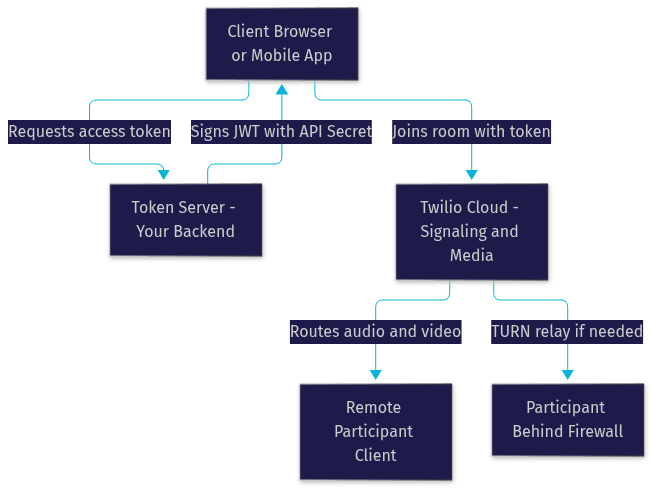
The diagram above shows the full request path. Notice that your backend never touches media. It only mints tokens. All audio and video flows between clients and Twilio's media servers, which is what keeps your server costs flat regardless of how many participants join.
Setting Up the Development Environment
A Twilio video project needed three layers of tooling: a JavaScript runtime for the token server, the Twilio CLI for account management and local testing, and your preferred frontend framework for the client.
For the token server, Node.js with npm or yarn was the standard choice, since Twilio's server-side helper library handled JWT signing cleanly. The Twilio CLI let you inspect rooms, list participants, and test webhooks from your terminal without opening the Console. On the frontend, any framework worked, though React paired naturally with the JavaScript SDK's event-driven model.
The project structure separated cleanly into three parts: a frontend folder containing your UI components, a server folder containing token generation logic, and shared configuration holding environment variables for your Twilio account credentials. Keeping credentials in environment variables from day one prevents the most common security mistake in RTC apps, which is accidentally shipping an API secret into a client bundle.
Token Generation and Security
Access tokens are the security backbone of every Twilio video app. A token is a signed JSON Web Token that binds three things together: your Twilio account, a specific participant identity, and a specific room. The video SDK refuses any join attempt without a valid token, and Twilio's cloud rejects expired or tampered tokens.
The setup flow in the Twilio Console involved creating an API key and secret pair, distinct from your account credentials, specifically for token signing. Best practice was to keep token lifetimes short, typically under an hour, so that a leaked token has a narrow window of usefulness. Tokens should always be generated server-side, scoped to a single room, and delivered over HTTPS to the client only at the moment of joining.
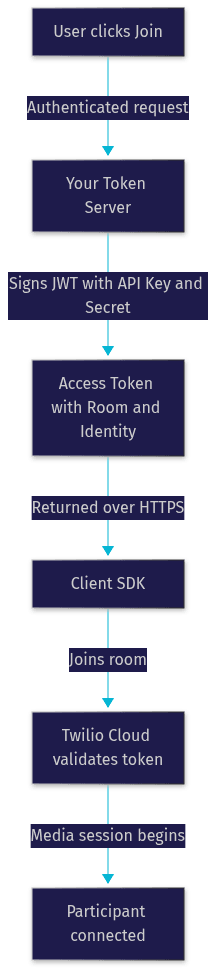
This token pattern is universal across the RTC market. VideoSDK uses the identical model, with tokens generated server-side from your API key and secret as described in its authentication and token guide. If you migrate providers, your token server architecture carries over almost unchanged.
Connecting Clients to a Video Room
Once a client holds a token, the SDK takes over the connection sequence. The client connects to Twilio's signaling layer, negotiates media transport, and then publishes local tracks, the audio and video streams from the device's microphone and camera.
Four concepts governed the connected state. Local tracks are the media you publish. Remote participants each carry their own set of subscribed tracks. Dominant speaker detection fired events identifying who is currently talking, which drives UI highlighting in grid layouts. The Network Quality API reported per-participant connection health, letting you warn users before their call degrades.
Optional features layered on top of the basic session. Screen sharing published a second video track from the display capture API. Data tracks carried arbitrary low-latency messages alongside media, useful for custom chat, shared cursors, or in-app signaling. On the UI side, a pre-join preview screen letting users check their camera before entering consistently reduced failed joins in production deployments.
Enhancing the User Experience
The difference between a functional video app and one users trust comes down to UI details around the media session.
Start with a pre-join experience: a preview screen where users select their camera and microphone, confirm their name, and see themselves before entering. Device selection matters more than most teams expect, especially on machines with multiple cameras or virtual devices. Clear mute and camera-off controls should always be visible, never buried in menus.
Real-time indicators build trust during the call. Highlighting the dominant speaker helps in multi-party grids. Showing network quality warnings before audio breaks up lets users move closer to their router instead of blaming your app. For text chat, Twilio's Conversations API integrated alongside video rooms, giving participants a persistent channel for sharing links and files without leaving the call.
Modern providers bundle most of these UX elements. VideoSDK's Prebuilt UI Kit, for example, ships a complete video calling interface with pre-join setup, device selection, chat, and screen share built in, which removes weeks of UI work from a launch timeline.
Scaling, Performance, and Cost Management
Twilio supported two room topologies. Peer-to-peer rooms routed media directly between participants for small sessions, typically two to four people, minimizing server hops and cost. Group rooms routed media through Twilio's SFU (Selective Forwarding Unit) infrastructure, scaling to dozens of participants with server-side mixing and simulcast support.
Performance monitoring relied on the standard WebRTC statistics interface, where the SDK exposed per-track metrics including bitrate, packet loss, and round-trip time. Watching these metrics in production, and alerting when packet loss crosses thresholds, is how mature teams catch regional network issues before support tickets arrive.
Cost scaled with participant-minutes plus data transfer. A realistic estimation exercise: a tutoring platform running 10,000 thirty-minute two-person sessions per month consumed 600,000 participant-minutes, and at Twilio's published per-minute rates that dominated the infrastructure bill. Cost reduction levers included capping published video resolution, dropping audio-only participants out of video billing where the plan allowed, and ending rooms promptly when they empty rather than letting idle rooms linger.
Deployment Options
The fastest deployment path for a Twilio video app was Twilio Serverless, which hosted your token generation functions inside Twilio's own infrastructure with zero server management. For teams needing more control, self-hosting the token server on AWS, GCP, or Azure behind a load balancer was standard, with the token server being lightweight enough that the smallest instance class handled thousands of token requests.
Two production rules applied regardless of host. First, the token server must serve over HTTPS, because browsers block camera and microphone access on insecure origins. Second, environment-based credential storage, not hardcoded secrets, must carry through from development to production.
For CI/CD, the frontend and token server deployed independently. The frontend bundle could ship to any static host or CDN, while the token server needed a rolling deployment strategy since long-lived video sessions should never be interrupted by a mid-call server restart.
Common Pitfalls and Troubleshooting
Four failure modes accounted for most production incidents in Twilio video apps.
Token expiration errors surfaced when calls outlived token lifetimes. The fix was proactive refresh: renewing tokens before expiry during long sessions rather than waiting for the SDK to fail. TURN connectivity issues appeared behind corporate firewalls, where direct media paths were blocked and relay fallback was required. Testing from restricted networks before launch, not after, caught these early.
Browser permission prompts caused silent failures when users denied camera access and the app did not handle the denial gracefully. Always detect the denied state and show recovery instructions rather than a black video tile. Finally, participant disconnects required explicit handling: the SDK fired leave events, and robust apps distinguished voluntary leaves from network drops, offering one-tap reconnection in the latter case.
All of these pitfalls apply equally to every WebRTC-based provider, including VideoSDK, whose troubleshooting guidance covers the same categories. The underlying browser and network constraints are identical across vendors.
How Does Twilio WebRTC Compare With Other RTC Providers?
Comparing Twilio honestly in 2026 requires acknowledging its video sunset first, then evaluating the alternatives on the criteria that mattered all along.
| Provider | Best For | Key Strength | Key Trade-off |
|---|---|---|---|
| Twilio Video | Legacy integrations, migration planning | SMS, Voice, and Verify ecosystem integration | Programmable Video reached end-of-life in 2024 |
| VideoSDK | New builds needing speed and breadth | 10+ platform SDKs, Prebuilt UI Kit, sub-second ILS streaming | Smaller brand recognition than Twilio |
| Agora | Large-scale live streaming | Massive concurrency track record | Pricing complexity at scale |
| Daily.co | Quick browser-based embeds | Excellent React support and simplicity | Fewer native mobile options |
| Jitsi | Budget-sensitive, self-hosted teams | Fully open source, no vendor lock-in | You operate the media infrastructure yourself |
Twilio excelled for teams already inside its communications ecosystem, where video sat alongside SMS notifications and voice callbacks in one billing relationship. That integration advantage is gone for new video builds. VideoSDK wins for teams that want the fastest path from signup to a working video chat app, since its Prebuilt UI Kit delivers a complete calling interface without custom UI code, and its SDK coverage spans React, Flutter, React Native, Android, iOS, JavaScript, Unity, and Python. Jitsi remains the answer when budget is the primary constraint and you have operations capacity to self-host.
If you are migrating an existing Twilio video app, the room-plus-token architecture means your migration is mostly a client SDK swap plus a token server update, not a rebuild.
Real-World Use Cases
Video chat apps built on this architecture power four dominant categories: telehealth consultations, where HIPAA-aligned security and reliable connections are non-negotiable; online tutoring, where screen share and whiteboard features drive engagement; virtual events, where multi-party rooms scale to hundreds of attendees; and customer support, where video escalation resolves issues that chat cannot.
A typical pattern: a health-tech startup needing video consults in under six weeks chose a managed RTC provider over raw WebRTC, shipped a working patient-to-doctor calling flow in three weeks using a prebuilt UI, and spent the remaining time on HIPAA compliance work instead of media infrastructure. That trade, buying media infrastructure so your engineers can focus on your product, is the entire value proposition of managed WebRTC.
Definitions Glossary
Room: A server-managed session that participants join to exchange audio and video, identified by a unique ID and governed by a configurable lifetime. Both Twilio and VideoSDK build their video calling model around rooms.
Access Token: A signed JWT that authenticates a specific participant identity to a specific room, generated server-side and never exposed in client code. Short token lifetimes limit the damage of any leak.
TURN/STUN Servers: Infrastructure that lets WebRTC media traverse firewalls and NATs. STUN helps clients discover their public address; TURN relays media when direct connections are blocked.
Dominant Speaker Detection: An SDK feature that identifies which participant is currently speaking, used to drive UI highlighting in multi-party video layouts.
SFU (Selective Forwarding Unit): A media server that receives each participant's stream once and forwards it selectively to others, enabling group calls to scale beyond what mesh peer-to-peer allows.
Key Takeaways
- A video chat app with Twilio WebRTC follows a three-tier architecture: client SDK, server-signed access tokens, and cloud-managed signaling and media routing.
- Twilio's Programmable Video product reached end-of-life in December 2024, so new builds should evaluate alternatives like VideoSDK, Agora, Daily.co, or self-hosted Jitsi before committing.
- Token security rules are universal across providers: generate server-side, keep lifetimes short, scope tokens to a single room, and never ship your API secret to a client.
- The most common production failures are token expiry, TURN traversal behind firewalls, unhandled permission denials, and ungraceful disconnect handling, and all four are preventable with explicit design.
- VideoSDK offers the fastest path for new builds, with a Prebuilt UI Kit, 10+ platform SDKs, and the same room-plus-token architecture covered in this guide.
Conclusion
Building a video chat app with Twilio WebRTC taught a generation of developers the canonical RTC architecture: a token server, a client SDK, and cloud-managed rooms. That architecture outlived Twilio's video product itself, and it is exactly what modern providers implement today. If you are starting a new build or migrating off Twilio, VideoSDK's quickstart gets you from signup to a working video call in minutes, with a free tier to begin experimenting. Sign up at app.videosdk.live/login, follow the architecture diagram above, and start building. What are you building with real-time video? Drop a comment, I'd love to hear what kind of video chat use case you're working on.
Advanced Features and Capabilities of Twilio WebRTC
Twilio WebRTC doesn't stop with the limit of simple real-time communication, but it goes a step ahead to provide a wider suite that comprises advanced features for sophisticated development needs. Here are the details of some of the advanced capabilities from Twilio WebRTC:
Data Channel for Real-Time Data Exchange
WebRTC, through Twilio, supports the building of data channels that transmit all types of data bidirectionally and in real time between peers. This is very key when dealing with applications that require voice and video as well, and to be able to allow exchange of textual data, files, or even gaming elements between the same two peers.
That implies, from now on, developers will be able to expand the interactivity scope of applications by these data channels. For example, in a video conference, they would be able to incorporate facilities for file sharing or chat messages.
JavaScript
1// Example: Establishing a data channel
2const dataChannel = peerConnection.createDataChannel("myDataChannel");
3dataChannel.onmessage = function(event) {
4    console.log("Data received: " + event.data);
5};
6dataChannel.send("Hello, peer!");
Utilizing STUN/TURN Servers for Network Traversal
Handling network constraints is a major challenge in real-time communications. Twilio WebRTC utilizes STUN (Session Traversal Utilities for NAT) and TURN (Traversal Using Relays around NAT) servers to facilitate communication across different types of networks and firewalls.
These servers help in discovering the public IP addresses and managing the connections needed for direct peer-to-peer communication, thus ensuring connectivity stability and reliability.
Scalability and Session Management
Twilio WebRTC provides scalable solutions that adapt to varying loads, which is crucial for applications expecting a high number of users.
Session management is streamlined, with robust APIs that handle sessions efficiently, ensuring smooth user experiences even during high-traffic periods.
Integrating with Other Twilio Services
Twilio's ecosystem offers various services that can be seamlessly integrated with WebRTC to create more dynamic and versatile applications:
Programmable SMS and Voice
Integrate Twilio Programmable SMS to send alerts or notifications directly from your WebRTC app, enhancing the communication capabilities beyond the browser.
Twilio’s Programmable Voice can be incorporated to allow WebRTC applications to connect with traditional phone systems, bridging internet-based and standard telephony communication.
JavaScript
1// Example: Sending an SMS from a WebRTC app
2const client = require('twilio')(accountSid, authToken);
3client.messages
4  .create({
5     body: 'Meeting starts in 5 minutes',
6     from: '+12345678901',
7     to: '+10987654321'
8   })
9  .then(message => console.log(message.sid));
Twilio Studio
Twilio Studio can be used to build visual workflows that enhance the WebRTC application’s logic, enabling non-developers to design complex call flows and interaction sequences.
This integration allows for the addition of interactive voice responses (IVRs) and automated workflows directly within the WebRTC interface, making it incredibly powerful for customer service applications.
These advanced features and integrations highlight Twilio WebRTC’s capabilities not just as a tool for simple video or voice calls but as a comprehensive platform for building complex, interactive, and highly scalable communication solutions.
In the next section, we will explore real-world applications and case studies to see how various industries leverage these technologies to enhance their operations and provide exceptional user experiences.
Real-world Applications and Case Studies of Twilio WebRTC
Twilio WebRTC has that flexibility, making its use across many industries enhance better communication and operational effectiveness. The following illustrative case studies show how Twilio WebRTC is applied across various industries.
Health services
Telemedicine has transformed the provision of health services, especially in patient outreach services. With Twilio WebRTC, clinics can provide live video consultation from the patient to the health service provider. This kind of integration allows making both the prescription management with immediate medical advice and follow-up visits without the actual necessity to travel physically, therefore ensuring the chance for continued care even from a distance.
Education
The educational platforms use Twilio WebRTC in the powering of their virtual classroom. This enables students taking their lessons and teachers offering their services to feel in one room as the educational lesson sessions take place. It includes features like real-time data channels to allow sharing educational materials and getting instant feedback on assignments to make learning even better.
Customer Service
Many businesses use Twilio WebRTC to enable interactions for the customer service face to face. This human touch can make a big difference in the obtained increased level of customer satisfaction and loyalty by faster problem resolution and service delivery.
Financial Services
Banks and financial institutions use Twilio WebRTC to make easier and secure the remote interaction process in customer-related activities, like opening new accounts or availing themselves of financial advice through video calling. This technology offers customers the convenience and security standard compliances.
Conclusion
A technology that can easily befit the organizational systems and favorite-rated by most organizations ready to improve their effectiveness in digital interaction. Businesses and organizations continue to explore effective, reliable, and scalable communication solutions. Twilio WebRTC is proving to be a game-changing technology, rather universal in its adaptation across industries for their different needs and challenges.
Whether it's frictionless patient experiences in healthcare, interactive classroom environments in education, or world-class customer service in retail, Twilio WebRTC puts the capability in business' hands to win in a digital-first world.
In adopting Twilio WebRTC, companies are deploying not just the new technology but, in essence, investing in a future where communications are dynamic, real-time, and central to the digital experience. It's these kinds of technologies that are sure to be at the center stage in shaping the next generation of digital communication.
Free $20 Balance for AI Voice Agents & Video Calls
FAQ