



Introduction to Jitter in VoIP
In the world of modern communications, Voice over Internet Protocol (VoIP) has become the backbone of business and personal voice calls. However, one of the most disruptive forces to VoIP call quality in 2025 remains jitter. Jitter in VoIP refers to the variation in packet arrival times, resulting in dropped, delayed, or garbled audio. Since VoIP relies on consistent, real-time delivery of voice packets, excessive jitter can severely degrade call experiences. Understanding, measuring, and reducing jitter is crucial for network engineers, system administrators, and anyone maintaining high-quality VoIP communications.
What is Jitter in VoIP?
Understanding Jitter and Packet Delay Variation
Jitter, in the context of VoIP, is the inconsistency in packet arrival times as voice data traverses a network. Ideally, each packet should arrive at perfectly spaced intervals, but network congestion, hardware, and routing can introduce packet delay variation. This unpredictability is what we call VoIP jitter.
How VoIP Calls Work: Packets, RTP, and UDP
VoIP converts voice into digital packets, usually transmitted using the Real-Time Transport Protocol (RTP) over the User Datagram Protocol (UDP). Unlike TCP, UDP is connectionless and favors speed over reliability. Each voice packet must arrive in the correct order and at the right time for seamless audio.
RTP Packet Structure Example
Below is a simplified example of an RTP packet structure in C:
1struct rtp_packet {
2    unsigned char version:2;
3    unsigned char padding:1;
4    unsigned char extension:1;
5    unsigned char csrc_count:4;
6    unsigned char marker:1;
7    unsigned char payload_type:7;
8    unsigned short sequence_number;
9    unsigned int timestamp;
10    unsigned int ssrc_identifier;
11    unsigned char payload[0]; // Voice data payload
12};
13
Causes of Jitter in VoIP Networks
Network Congestion and Bandwidth Issues
Network congestion is a primary cause of jitter in VoIP. When too many devices compete for limited bandwidth, voice packets can be delayed, buffered, or dropped. Insufficient bandwidth for VoIP traffic leads to unpredictable arrival times, increasing jitter and reducing call quality.
Wireless vs Wired Connections
Wireless networks are generally more prone to jitter than wired ones. Wi-Fi signals can suffer from interference, signal loss, and variable latency due to environmental factors. Wired Ethernet connections offer more consistent packet delivery, reducing jitter and improving VoIP reliability.
Router/Firewall Configuration and Hardware Factors
Improper router or firewall settings can introduce delays or prioritize other types of traffic over VoIP. Outdated or overloaded hardware may lack the processing capacity to handle voice packets efficiently, further aggravating jitter.
Mermaid Diagram: Packet Flow and Jitter Points
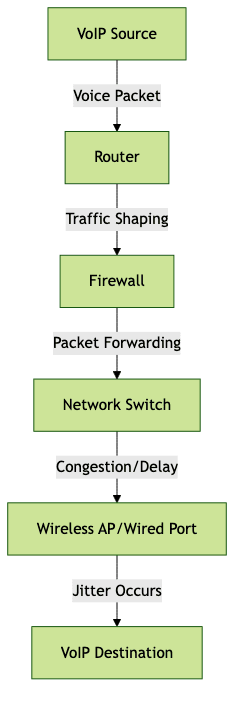
Impact of Jitter on VoIP Call Quality
Symptoms of High Jitter
High jitter manifests as choppy audio, missing words, echo, or moments of silence during VoIP calls. Participants may experience robotic or distorted voices, making conversations difficult to understand.
Acceptable Jitter Levels for VoIP
In professional networks, acceptable jitter levels typically range from 20ms to 30ms. Consistently exceeding 30ms can degrade VoIP call quality. Best practice in 2025 is to keep jitter as low as possible, ideally below 20ms for premium communications.
How to Measure Jitter in VoIP Networks
Jitter Measurement Tools
A variety of tools can measure jitter in VoIP networks, including Wireshark, SolarWinds VoIP & Network Quality Manager, and PRTG Network Monitor. These tools analyze packet streams, calculate packet delay variation, and identify jitter issues.
How to Use Ping and RTCP Stats
Ping can provide a basic measurement of packet delay, though it doesn’t directly measure jitter. More advanced methods use RTCP (Real-Time Control Protocol) statistics to monitor RTP jitter in real time.
Example: Using Ping and Interpreting Results
1ping -i 0.2 -c 20 voip.example.com
2# Look for variation in time= values:
3# time=20.8 ms
4# time=22.1 ms
5# time=35.2 ms (spike indicates jitter)
6
Understanding Jitter Buffer Metrics
A jitter buffer temporarily stores arriving packets to minimize the effects of jitter. By monitoring jitter buffer depth, discard rates, and packet sequencing statistics, engineers can assess how well the buffer compensates for delay variations.
Strategies to Reduce and Prevent Jitter in VoIP
Quality of Service (QoS) Implementation
Implementing Quality of Service (QoS) ensures that voice packets receive priority over less time-sensitive data. By configuring QoS on your routers and switches, you can tag VoIP traffic (using DSCP or VLANs) to guarantee minimal delay and consistent delivery, reducing jitter.
Using Jitter Buffers Effectively
Jitter buffers can be configured dynamically or statically. Dynamic jitter buffers adjust their size based on network conditions, providing a balance between delay and packet loss. Proper buffer configuration ensures smooth audio while minimizing latency and jitter artifacts.
Network Design and Best Practices
Optimizing your network for VoIP includes segmenting VoIP from other traffic, using wired connections wherever possible, and maintaining up-to-date hardware. Avoid network devices that introduce excessive hops, and ensure switches/routers can handle real-time traffic efficiently.
Mermaid Diagram: Network Setup for Optimal VoIP

Practical Tips for Home and Businesses
- Use wired Ethernet for desk phones or softphones
- Upgrade routers to support VoIP prioritization
- Separate VoIP and data traffic using VLANs
- Regularly monitor network health and jitter statistics
Troubleshooting Jitter VoIP Issues
Step-by-Step Diagnostic Process
- Identify affected endpoints and call scenarios
- Use network monitoring tools to check for congestion or packet loss
- Measure jitter using Wireshark or VoIP-specific tools
- Verify router and firewall configuration for QoS and VoIP prioritization
- Inspect hardware for overload, faults, or outdated firmware
- Test with both wired and wireless connections
- Adjust jitter buffer settings on VoIP endpoints
When to Contact Your ISP or VoIP Provider
If you have ruled out local network and hardware issues but still experience high jitter, it may be time to contact your ISP or VoIP provider. Persistent jitter may be due to upstream congestion, misconfigured trunks, or backbone routing issues best addressed by your provider’s technical support team.
Conclusion: Maintaining High-Quality VoIP Calls
Jitter remains a critical challenge in VoIP communications in 2025. By understanding what causes jitter, how to measure it, and implementing effective reduction strategies, IT professionals can ensure high-quality, reliable voice calls. Ongoing monitoring, network optimization, and proactive troubleshooting are key to keeping jitter at bay and delivering great VoIP experiences.
FAQ