



Constant bit rate (CBR) is an encoding method where the bitrate remains fixed throughout the entire media stream, ensuring predictable bandwidth usage. VideoSDK leverages constant bit rate principles to maintain stable real-time video calls, preventing network congestion and buffering. Developers use CBR when consistent streaming quality and bandwidth predictability are critical.
Bitrate control is one of the most critical levers a developer can pull when optimizing real-time video applications. Whether you are building a telehealth platform, a live broadcasting service, or a social audio room, the way you manage data transmission directly impacts user experience. Constant bit rate encoding provides a predictable, steady stream of data that simplifies network planning and buffer management. In this guide, we will explore how constant bit rate works, why it matters for live streaming, and how VideoSDK utilizes bitrate control to deliver sub-300ms latency in real-time communication applications.
What is Constant Bit Rate (CBR)?
Definition and Core Principle
Constant bit rate (CBR) is defined as a rate control mode in digital media encoding where the output bitrate is kept strictly constant regardless of the complexity of the video content. In a CBR stream, the encoder allocates the same number of bits per second to both high-motion scenes and static scenes. This consistency makes CBR ideal for scenarios where bandwidth is strictly limited or highly predictable, such as live video conferencing and real-time communication.
VideoSDK provides real-time communication infrastructure that benefits from predictable bitrate management. By maintaining a steady data flow, VideoSDK ensures that media streams do not suddenly spike and overwhelm the receiver's network capacity. The core principle of CBR is stability over efficiency. While it might waste bits on simple scenes or starve complex scenes of needed data, it guarantees that the stream size remains exactly as planned. As of 2026, CBR remains a staple in WebRTC media servers because it prevents the unpredictable packet bursts that cause jitter.
How CBR Differs from Variable Bit Rate (VBR)
Variable bit rate (VBR) is an alternative encoding method where the bitrate fluctuates based on the complexity of the video content. VBR allocates more bits to complex, high-motion scenes and fewer bits to static scenes, optimizing overall visual quality at a lower average file size. However, this variability makes VBR difficult to stream over networks with strict bandwidth ceilings, as a sudden spike can exceed the available throughput.
The main difference between constant bit rate and VBR lies in predictability. CBR produces a stream with a known, fixed size, making it easy to allocate network resources. VBR produces a stream with an unknown size at any given second, which can lead to sudden network congestion if the bitrate spikes beyond the available bandwidth. For real-time communication, where latency spikes cause noticeable call degradation, CBR is often preferred for its strict adherence to bandwidth limits.
Why Use Constant Bit Rate in Streaming?
Predictable Bandwidth and Buffer Management
Predictable bandwidth is the primary advantage of using constant bit rate in streaming applications. When an encoder outputs a fixed amount of data per second, the network can allocate the exact necessary resources without over-provisioning. This predictability simplifies buffer management on the client side. The player or VideoSDK client knows exactly how much data to expect, allowing it to maintain a stable buffer that prevents playback interruptions.
In real-time communication, buffer management is a delicate balance. If the buffer overflows, frames are dropped, causing video stutter. If the buffer underflows, the video freezes. By using a constant bit rate, VideoSDK helps developers avoid these extremes. The steady data flow ensures that the jitter buffer remains stable, directly contributing to the sub-second latency required for interactive video calls. This stability also simplifies capacity planning for servers handling multiple concurrent streams.
Compatibility with Hardware Decoders and Live Ingest
Hardware decoders, especially those in mobile devices and older set-top boxes, often rely on strict timing and predictable data rates to function efficiently. Constant bit rate encoding ensures that the decoder receives a steady stream of data, preventing timing mismatches that can cause hardware-level frame drops. This compatibility is crucial for developers building applications that run on a wide range of devices, from high-end desktops to low-end Android phones.
Live ingest pipelines also benefit from CBR. When sending a stream to a media server or CDN, a constant bit rate prevents sudden bursts of data that could trigger rate limiting or packet loss. VideoSDK handles this by managing the media stream's bitrate before it hits the network, ensuring smooth ingest and reducing the likelihood of mid-call degradation. This is particularly important for Interactive Live Streaming (ILS), where a stable ingest feed is necessary before converting to adaptive formats for large audiences.
Constant Bit Rate in VideoSDK
How VideoSDK Implements CBR for Real-Time Calls
VideoSDK implements constant bit rate principles through its network-adaptive streaming engine. While VideoSDK is capable of dynamic bitrate adjustment based on network conditions, the underlying encoder configuration uses strict rate control to prevent sudden data bursts. When a participant joins a VideoSDK room, the SDK negotiates the optimal bitrate based on the participant's network capacity and device capabilities.
During the call, VideoSDK maintains a steady bitrate to ensure the media stream does not exceed the negotiated bandwidth. If the network conditions change, VideoSDK adjusts the target bitrate to a new fixed level rather than allowing wild fluctuations. This approach combines the predictability of constant bit rate with the flexibility of adaptive streaming. The result is a stable, low-latency experience where the video quality remains consistent without overwhelming the network.
Configuring CBR Conceptually in VideoSDK
Configuring constant bit rate in VideoSDK involves setting the desired resolution and bitrate parameters when initializing or joining a room. Developers do not need to manually tune encoder settings. Instead, VideoSDK exposes high-level configuration options that map to underlying WebRTC encoder constraints. By specifying a target bitrate, you instruct VideoSDK to cap the media stream at that data rate.
To implement this, you would first generate a VideoSDK token on your server. Then, on the client side, you pass the token and media constraints to the VideoSDK room initialization method. If you are using the Prebuilt UI Kit, VideoSDK automatically manages the bitrate based on the selected quality profile. For custom implementations, you can define the maximum bitrate, and VideoSDK will enforce that ceiling, effectively creating a constant bit rate stream that prevents network congestion.
Trade-offs and When to Choose VBR or Adaptive Bitrate
Quality vs. Efficiency
The primary trade-off when using constant bit rate is quality efficiency. Because CBR allocates the same number of bits to every second of video, it cannot adapt to scene complexity. A static video call where two people are talking will use the same bitrate as a scene where someone is rapidly moving or sharing a high-motion screen. This means CBR often wastes bandwidth on simple scenes and produces artifacts on complex scenes.
Variable bit rate solves this by allocating bits dynamically, offering better visual quality at a lower average bitrate. However, for real-time communication, the predictability of CBR usually outweighs the efficiency of VBR. The slight quality reduction on complex scenes is a fair trade-off for avoiding network congestion and latency spikes. VideoSDK mitigates this by using advanced codecs like VP8 and H.264, which compress video efficiently even under constant bit rate constraints.
Scenarios Favoring VBR or ABR
There are specific scenarios where variable bit rate or adaptive bitrate (ABR) is preferable. Video on demand (VOD) platforms almost exclusively use VBR or multi-bitrate ABR ladders because they can afford to buffer content ahead of time. Since VOD is not real-time, sudden bitrate spikes are absorbed by the buffer, and the viewer experiences higher quality.
For live streaming to large audiences via HLS, adaptive bitrate streaming is the standard. VideoSDK supports ILS with RTMP output, allowing developers to broadcast to platforms like YouTube and Twitch. In these cases, VideoSDK handles the real-time CBR connection with the host, while the downstream CDN handles the ABR conversion for the audience. This hybrid approach leverages CBR for the low-latency ingest and ABR for the high-latency distribution.
Practical Tips for Managing CBR
Selecting the Right Bitrate for Your Audience
Selecting the right constant bit rate depends on your audience's average network capacity and the resolution of your video. For a standard 720p video call, a bitrate of 1.5 to 2.5 Mbps is generally sufficient. For 1080p, you might target 3 to 5 Mbps. If your audience primarily uses mobile devices on cellular networks, targeting a lower bitrate, such as 800 kbps for 480p, ensures the stream remains stable without consuming excessive data.
VideoSDK allows you to set these parameters based on the use case. For a telehealth application where clarity is critical, you might prioritize a higher constant bit rate. For a social audio room with optional video, a lower bitrate suffices. The key is to match the bitrate to the lowest common denominator of your expected network conditions to prevent mid-call drops.
Monitoring and Adjusting in Production
Even with a well-chosen constant bit rate, network conditions fluctuate. Monitoring your stream in production is essential. VideoSDK provides real-time stats and analytics through its REST APIs. Developers can track packet loss, jitter, and round-trip time to assess whether the chosen bitrate is sustainable.
If you notice consistent packet loss, it may indicate that your constant bit rate is too high for the user's current network. While VideoSDK's network-adaptive streaming will attempt to downscale the resolution and bitrate automatically, understanding these metrics helps you set better default configurations. Regularly reviewing session analytics allows you to refine your bitrate profiles and ensure optimal performance across your user base.
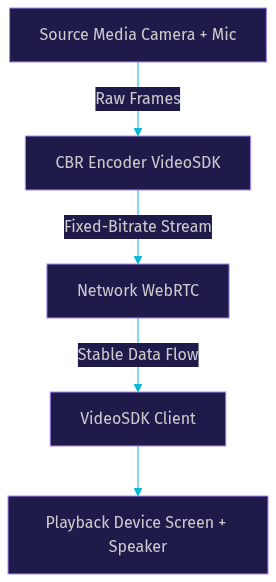
Diagram: CBR Streaming Flow
Here is a visual representation of how a constant bit rate stream flows through a VideoSDK architecture.
Definitions Glossary
Constant Bit Rate (CBR): An encoding method where the bitrate remains fixed throughout the entire media stream, ensuring predictable bandwidth usage and stable buffer management.
Variable Bit Rate (VBR): An encoding method where the bitrate fluctuates based on the complexity of the video content, optimizing quality and file size but creating unpredictable network demands.
Adaptive Bitrate (ABR): A streaming technique that dynamically adjusts the video quality and bitrate in real-time based on the viewer's network conditions, commonly used in HLS delivery.
Network-Adaptive Streaming: VideoSDK's automatic bitrate and resolution adjustment feature that maintains a steady connection by responding to real-time network changes.
Jitter Buffer: A buffer used in real-time communication to smooth out packet arrival times, ensuring continuous playback despite network jitter.
Key Takeaways
- Constant bit rate (CBR) provides predictable bandwidth usage by maintaining a fixed data rate throughout the stream.
- CBR simplifies buffer management and ensures compatibility with hardware decoders and live ingest pipelines.
- VideoSDK leverages CBR principles to maintain stable, low-latency real-time video calls without sudden network congestion.
- While VBR offers better quality efficiency, CBR is preferred for real-time communication due to its strict bandwidth predictability.
- Developers can configure bitrate parameters in VideoSDK to match their audience's network capacity and use case requirements.
Conclusion
Constant bit rate remains a foundational concept for developers building reliable real-time video applications. By prioritizing predictable bandwidth over variable quality, CBR ensures that streams remain stable and latency stays low. VideoSDK handles the complexities of bitrate control and network adaptation, allowing you to focus on building great user experiences. Ready to implement stable, high-quality video calling? Explore the VideoSDK documentation and start building for free at app.videosdk.live/login. What are you building with VideoSDK? Drop a comment, I'd love to hear what kind of streaming use case you're working on.
Free $20 Balance for AI Voice Agents & Video Calls
FAQ