


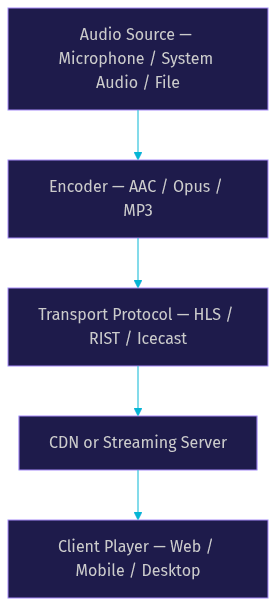
Audio for streaming is the process of encoding live or recorded sound and delivering it to listeners over the internet in real time or on demand. The core pipeline involves capturing an audio source, encoding it with a codec like AAC or Opus, transporting it via a protocol such as HLS or RIST, and playing it back through a client application. VideoSDK offers WebRTC-based audio calling and voice rooms that deliver sub-second latency for interactive audio streaming without traditional server infrastructure.
Introduction
Live audio streaming has grown explosively. According to Edison Research's Infinite Dial report, over 76 million Americans listen to live audio streams weekly, and podcast consumption has surpassed 100 million monthly listeners in the US alone. The barrier to entry for streaming audio has dropped dramatically, but the technical decisions you make about protocols, codecs, and infrastructure still determine whether your audience hears crystal-clear sound or a garbled, buffering mess.
Choosing the right audio for streaming approach matters because it directly impacts quality, latency, and reach. A live DJ set needs sub-second latency to feel interactive. A podcast archive needs reliable playback on every device. A voice chat app needs real-time bidirectional audio. Each scenario demands a different combination of encoding format, transport protocol, and delivery infrastructure.
This guide walks through the full audio streaming stack, from protocol selection to production deployment, so you can build a pipeline that matches your audience's needs.
What Is Audio for Streaming?
Audio for streaming is defined as the real-time or on-demand delivery of encoded audio content over a network to a client player. Unlike file downloads, streaming sends audio in continuous chunks, allowing playback to begin before the full file arrives.
Audio streaming works by capturing sound from a source (microphone, system audio, or file), converting it to a compressed digital format via an encoder, transporting the encoded data across a network using a streaming protocol, and decoding it on the client side for playback.
Live streaming sends audio as it happens, prioritizing low latency. On-demand streaming serves pre-recorded content, prioritizing reliability and quality. Both share the same core components: source, encoder, transport, and player. VideoSDK provides real-time audio streaming through its audio calling SDK, which uses WebRTC to deliver voice with sub-300ms latency for interactive use cases.
Core Audio Streaming Protocols
The protocol you choose determines your latency ceiling, compatibility footprint, and infrastructure complexity. Each protocol trades off these factors differently, and understanding those tradeoffs is the first step in building a reliable audio pipeline.
Icecast and SHOUTcast
Icecast and SHOUTcast are the veterans of internet audio streaming. SHOUTcast launched in 1998, and Icecast followed shortly after as an open-source alternative. Both protocols stream audio over HTTP using a continuous connection, making them compatible with virtually every media player ever built.
Icecast remains widely used for internet radio and live music streaming. Its workflow is straightforward: an encoder (typically running on a server or local machine) connects to the Icecast server, sends a continuous stream of encoded audio, and listeners connect to the server to receive that stream. Icecast supports multiple mount points, letting you broadcast several streams from one server.
The main limitation is latency. Icecast typically introduces 10 to 30 seconds of delay, making it unsuitable for interactive scenarios but perfectly fine for one-to-many broadcasts where real-time interaction is not required. According to the Icecast documentation, the protocol excels at continuous broadcasting with minimal server overhead.
RIST (Reliable Internet Stream Transport)
RIST is a modern protocol designed to address the shortcomings of traditional streaming over unreliable networks. It uses UDP for transport with built-in reliability mechanisms, including packet recovery and retransmission, making it resilient to packet loss without the overhead of TCP-based protocols.
RIST delivers significantly lower latency than HLS or Icecast, typically in the range of 200 to 500 milliseconds. It also supports encryption, making it suitable for secure contribution feeds where audio travels from a remote source to a central distribution point. The VSF RIST specification defines three profiles (Simple, Main, and Advanced) that scale from basic point-to-point transmission to complex multi-path delivery.
HLS and AAC over HTTP
HTTP Live Streaming (HLS) has become the default delivery method for mobile and web-based audio consumption. Apple developed HLS, and it works by breaking audio into small segments delivered over standard HTTP. This means any CDN can cache and distribute HLS streams without specialized infrastructure.
HLS with AAC encoding is the combination most modern streaming platforms default to. The protocol is universally supported across iOS, Android, web browsers, and smart speakers. Its main drawback is latency: standard HLS introduces 6 to 30 seconds of delay. Low-Latency HLS (LL-HLS) reduces this to roughly 2 seconds, but it requires CDN support and careful segment sizing.
Choosing the Right Encoding Format
Your codec choice affects audio quality, bandwidth consumption, latency, and licensing costs. There is no universally best codec; the right choice depends on your target devices, latency requirements, and budget.
MP3 vs. AAC vs. Opus
MP3 is the most universally compatible audio codec. Every browser, phone, and media player supports it. However, MP3 is technically outdated: it requires higher bitrates than modern codecs to achieve the same perceived quality, and its latency profile is poor for real-time communication. MP3 is royalty-free as of 2017, which removes the licensing concern that once plagued it.
AAC (Advanced Audio Coding) is the modern successor to MP3 and the default codec for HLS streaming. AAC achieves better quality than MP3 at the same bitrate, typically delivering transparent audio at 128 kbps for stereo music. AAC is supported natively on iOS, Android, and all major browsers. It does carry patent licensing requirements, though most streaming infrastructure includes AAC support without additional per-stream fees. AAC-LD (Low Delay) variants reduce encoding latency for real-time use cases.
Opus is the codec of choice for real-time audio. Developed by the Xiph.Org Foundation and standardized by the IETF, Opus handles both speech and music with excellent quality at bitrates as low as 32 kbps. Its key advantage is latency: Opus can operate with frame sizes as low as 2.5 milliseconds, making it ideal for interactive streaming, voice chat, and live collaboration. Opus is royalty-free and open, and it is the default codec used by WebRTC implementations including VideoSDK's audio rooms. According to the Opus codec specification, it outperforms competing codecs across the full bitrate spectrum in independent listening tests.
When to Use Lossless
Lossless encoding (FLAC, ALAC) preserves the original audio data without any quality loss. For streaming, lossless is rarely necessary in real-time scenarios because the bandwidth requirements are substantial and the latency is high.
Lossless streaming makes sense for archival podcasts where listeners download episodes for offline playback, high-fidelity music platforms targeting audiophiles, and studio monitoring feeds where quality is non-negotiable. For live interactive audio, lossless is impractical. Stick with Opus for real-time and AAC for broadcast-style delivery.
Building a Simple Audio-for-Streaming Pipeline
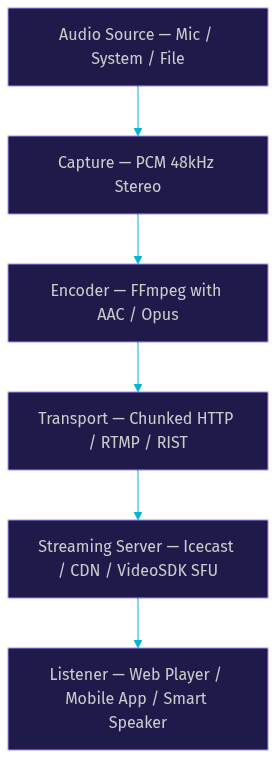
Building an audio streaming pipeline involves four stages: capturing the source, encoding the audio, transporting it to a server, and serving it to listeners. Each stage has specific configuration decisions that affect the final output.
Capture the Audio
Your audio source can be a physical microphone, system audio output (like a desktop audio loopback), or a pre-recorded file on disk. For live podcasting, a USB or XLR microphone connected through an audio interface provides the cleanest source signal. For streaming system audio (like a DJ set or game audio), you need a virtual audio device that captures the system's output as an input stream.
The capture stage's goal is to deliver a clean, consistent PCM audio signal to the encoder. Sample rate, channel count, and input gain all matter here. A 48 kHz stereo signal at 16-bit depth is the standard starting point for most streaming pipelines.
Encode with FFmpeg
FFmpeg is the most widely used audio encoding tool in streaming pipelines. It takes raw PCM audio from your capture source and compresses it using your chosen codec. The encoding process involves selecting a codec (AAC, Opus, or MP3), setting a target bitrate (typically 64 to 128 kbps for stereo audio), choosing a container format compatible with your transport protocol, and configuring any codec-specific parameters like profile or frame size.
For HLS delivery, you configure FFmpeg to output AAC-encoded segments at a fixed duration (usually 2 to 6 seconds). For RIST or Icecast, you configure a continuous output stream. The encoder's job is to balance quality and bandwidth: higher bitrates sound better but require more network capacity. The FFmpeg documentation covers all codec-specific options in detail.
Stream via Chunked Transfer or RTMP
Once encoded, the audio data needs to reach your streaming server. Two common approaches are chunked HTTP transfer (used by Icecast and HLS) and RTMP (used by many streaming platforms for ingest).
Chunked transfer sends encoded audio in small, continuous pieces over an HTTP connection. The server receives each chunk and immediately forwards it to connected listeners. RTMP, originally developed by Macromedia for Flash, remains a popular ingest protocol because many CDN providers support it for live streaming. For modern pipelines, HLS ingest and RIST are increasingly replacing RTMP.
Host on a Streaming Server
Your streaming server receives the encoded feed and distributes it to listeners. Options range from self-hosted Icecast servers to cloud-based streaming platforms. For low-latency interactive audio, WebRTC-based solutions like VideoSDK's audio rooms eliminate the need for a traditional streaming server entirely, routing audio directly between participants through a cloud SFU.
Production-Ready Considerations
Moving from a working prototype to a production audio streaming system introduces a new set of challenges around reliability, security, and scalability that separate hobbyist setups from professional deployments.
Bandwidth and Adaptive Bitrate
Production audio streams must handle variable network conditions. Adaptive bitrate streaming adjusts the audio quality in real time based on the listener's available bandwidth. HLS supports this natively through multiple variant playlists at different bitrates. The player selects the appropriate stream based on current network conditions.
For live audio, monitor your origin server's outbound bandwidth and set up fallback streams at lower bitrates. CDN caching is essential for large audiences: a single origin server cannot handle thousands of concurrent connections, but a CDN can cache your stream at edge locations worldwide. VideoSDK handles this automatically through its network-adaptive streaming, which adjusts bitrate based on real-time bandwidth detection.
Security and Access Control
Securing your audio stream prevents unauthorized access and piracy. Common approaches include token-based URLs that expire after a set time, TLS encryption for both ingest and delivery, geo-fencing to restrict access by region, and authentication at the streaming server level.
For premium content, consider DRM (Digital Rights Management) integration, though this adds complexity. For most developer use cases, signed URLs with short expiry windows provide sufficient protection without the overhead of full DRM.
Monitoring and Analytics
Real-time monitoring lets you catch issues before your audience notices. Track listener count and geographic distribution, buffer events and reconnection rates, origin server CPU and bandwidth usage, and end-to-end latency from encoder to player.
Most streaming servers provide basic listener statistics. For deeper analytics, integrate a telemetry layer that collects player-side metrics and correlates them with server-side health data.
Redundancy and Failover
A single origin server is a single point of failure. Production setups use multiple origin servers with automatic failover. If the primary origin goes down, the CDN or load balancer redirects traffic to the backup. For critical broadcasts, run geographically distributed origins and use DNS-based failover to route listeners to the nearest healthy server.
Common Pitfalls and How to Avoid Them
Even well-designed audio streaming pipelines encounter recurring problems. Knowing these issues in advance saves hours of debugging and listener complaints.
Clock drift occurs when the encoder and server run on slightly different clocks, causing the stream to drift out of sync over time. The fix is to use a common time reference (like NTP) on all servers and to include timestamps in your encoded segments.
Packet loss is the most common cause of audio dropouts. On unreliable networks, TCP-based protocols retransmit lost packets but add latency. UDP-based protocols like RIST handle loss more gracefully with configurable recovery buffers. If you are using HLS, ensure your segment duration is long enough to absorb brief network interruptions.
Codec mismatches happen when the encoder outputs a format the player does not support. Always test your stream on the actual target devices. AAC is the safest universal choice for HTTP-based delivery. Opus is best for WebRTC-based real-time audio but is not universally supported in legacy HLS players.
Buffer underruns occur when the player consumes audio faster than the network delivers it. Increase the player's buffer size for on-demand content, or reduce your encoding bitrate for live streams on constrained networks. VideoSDK's audio SDKs handle buffer management automatically, adapting to network conditions without manual intervention.
Case Study: Live Podcast with RIST and AAC HLS
Consider a podcast network that produces a weekly live show with remote co-hosts in different cities. The production team needed low-latency audio between hosts for natural conversation, plus a high-quality HLS feed for thousands of listeners.
The team chose RIST for the contribution path: each host's audio traveled from their home studio to the central production server via RIST with 300ms latency, enabling real-time conversation. The production server mixed the incoming feeds and encoded the output as AAC at 128 kbps. The mixed feed was then segmented into 4-second HLS chunks and distributed through a CDN.
The results were strong. Hosts reported natural conversation flow with no noticeable delay. Listeners experienced reliable playback across mobile and desktop with average startup time under 2 seconds. The team monitored listener counts and buffer events in real time, adjusting segment duration during a network congestion event to prevent dropouts.
For the interactive Q&A segment, the team used VideoSDK's audio rooms to bring audience members into the conversation with sub-second WebRTC latency, something traditional HLS could not support. This hybrid approach (RIST for contribution, HLS for distribution, WebRTC for interaction) gave the team the best of all three protocol worlds.
Quick Reference Checklist
Here is a concise checklist for any audio-for-streaming project:
- Define your latency requirement (sub-second for interactive, 2 to 30 seconds for broadcast)
- Choose your codec based on use case (Opus for real-time, AAC for broadcast, MP3 for maximum compatibility)
- Select your transport protocol (WebRTC for interaction, RIST for contribution, HLS for distribution, Icecast for internet radio)
- Set up your capture source with clean PCM audio at 48 kHz
- Configure your encoder with the appropriate bitrate and container format
- Deploy your streaming server or use a cloud-based SFU
- Configure CDN caching for large audiences
- Implement security with signed URLs and TLS
- Set up monitoring for listener counts, buffer events, and latency
- Plan redundancy with multiple origins and automatic failover
- Test on real target devices before going live
Definitions Glossary
Audio for Streaming: The process of encoding live or recorded sound and delivering it to listeners over the internet in real time or on demand, using a pipeline of capture, encode, transport, and playback.
Icecast: An open-source streaming server protocol that delivers continuous audio over HTTP, widely used for internet radio with typical latency of 10 to 30 seconds.
RIST (Reliable Internet Stream Transport): A modern UDP-based streaming protocol with built-in packet recovery and encryption, delivering 200 to 500ms latency for secure contribution feeds.
HLS (HTTP Live Streaming): Apple's segment-based streaming protocol that delivers audio over standard HTTP, universally supported on mobile and web with 6 to 30 seconds of standard latency.
Opus: A royalty-free, open-source audio codec optimized for real-time communication, capable of excellent quality at bitrates as low as 32 kbps with frame sizes as low as 2.5 milliseconds.
Adaptive Bitrate Streaming: A technique that adjusts audio quality in real time based on the listener's available bandwidth, ensuring uninterrupted playback across varying network conditions.
WebRTC: A real-time communication protocol that enables sub-second audio streaming directly between peers or through a cloud SFU, used by VideoSDK for interactive audio rooms.
Key Takeaways
- Audio for streaming requires matching your protocol, codec, and infrastructure to your specific latency and quality requirements.
- Opus is the best codec for real-time interactive audio, while AAC is the standard for broadcast-style HLS delivery to mobile and web audiences.
- RIST bridges the gap between traditional streaming and real-time needs, offering 200 to 500ms latency with reliability and encryption for contribution feeds.
- Production audio streaming demands adaptive bitrate, CDN distribution, security, monitoring, and redundancy planning.
- VideoSDK's WebRTC-based audio rooms provide sub-300ms latency for interactive audio streaming without traditional streaming server infrastructure, making them ideal for live podcasts, voice chat, and social audio applications.
Conclusion
Audio for streaming is not a one-size-fits-all problem. The right combination of protocol, codec, and infrastructure depends entirely on what your audience needs. A live podcast needs low latency for natural conversation. A music platform needs high fidelity and universal compatibility. A voice chat app needs real-time bidirectional audio. Each scenario points to a different stack.
Traditional protocols like Icecast and HLS remain valuable for one-to-many broadcasting. RIST fills the gap for secure, low-latency contribution. But for truly interactive audio experiences where listeners become participants, WebRTC-based solutions like VideoSDK's audio calling SDK deliver sub-300ms latency with built-in network adaptation, recording, and transcription, all without managing streaming servers. You can explore the full capabilities in the VideoSDK documentation or try it free at app.videosdk.live/login.
What are you building with audio streaming? Drop a comment, I'd love to hear what kind of audio use case you're working on.
Free $20 Balance for AI Voice Agents & Video Calls
FAQ