



Python Socket.IO is a Python implementation of the Socket.IO protocol that provides real-time, bidirectional communication between clients and servers, with automatic WebSocket upgrade and long-polling fallback. It works with both synchronous and asynchronous Python code and is fully compatible with the popular JavaScript Socket.IO ecosystem. This guide walks you through setup, server and client design, framework integration, and production scaling.
Real-time features have moved from nice-to-have to expected. Chat apps, live dashboards, collaborative editors, multiplayer games, and notification systems all depend on the same foundation: the server pushing data to clients the instant it changes, without the client asking first.
Plain HTTP was never designed for this. Polling wastes requests and adds latency, and raw WebSockets leave you to solve reconnection, fallback, and message framing on your own. That is the gap Socket.IO fills. It wraps real-time transport in a protocol that handles connection lifecycle, automatic fallback, and event-based messaging for you.
Python Socket.IO brings that ecosystem to Python. It implements both the server and client sides of the protocol, which means your Python backend can talk to JavaScript, Python, or mobile Socket.IO clients out of the box. By the end of this article you will understand how the library works, how to choose between its synchronous and asynchronous flavors, how to embed it in Flask, Django, or FastAPI, and how to scale it in production.
What Is Python Socket.IO?
Socket.IO is defined as a real-time communication protocol layered on top of transport mechanisms such as WebSockets and HTTP long-polling. It is not a transport itself. Instead, it adds a handshake, a session layer, an event-based message format, and automatic reconnection logic on top of whatever transport is available. If a WebSocket connection cannot be established, for example behind a restrictive corporate proxy, the protocol transparently falls back to long-polling so the application keeps working.
Python Socket.IO works by implementing both sides of this protocol in pure Python. The library, maintained by Miguel Grinberg and documented at python-socketio.readthedocs.io, provides a server component that accepts connections from any Socket.IO client, and a client component that can connect to any Socket.IO server. Under the hood it delegates transport handling to Engine.IO, the lower-level transport layer of the protocol.
Compatibility is a major reason teams choose it. The Python implementation tracks the JavaScript Socket.IO protocol versions, so a JavaScript client running in the browser connects to a Python server without adapters or translation layers. The library's documentation includes a compatibility matrix showing which JavaScript client versions pair with which Python server releases, and checking that matrix before upgrading either side saves hours of debugging.
Here is how a typical interaction flows from client to server and back:
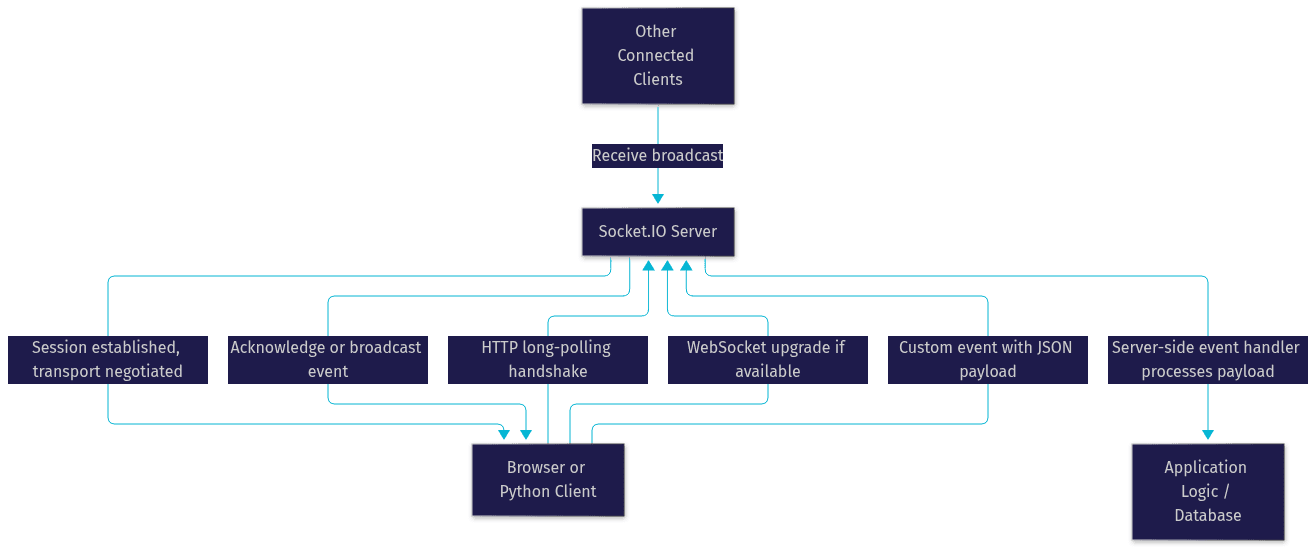
The key insight from this flow: after the initial handshake, both sides can initiate messages at any time. That bidirectional capability is what separates real-time communication from request-response HTTP.
Installing and Setting Up
Python Socket.IO ships as a single package with optional extras for asynchronous operation. Installing the base package gives you the synchronous server and client, which run on any supported Python version (3.8 or newer as of 2026). Installing the package with its async extra additionally pulls in the aiohttp library, which the asynchronous classes use for their networking layer.
The dependency picture is worth understanding before you install. The core library depends on the Engine.IO Python package, which handles the actual transport negotiation. For the synchronous server you will typically pair it with a concurrency framework such as eventlet or gevent, since a plain synchronous server can otherwise serve only one client at a time. For the asynchronous server, aiohttp covers both HTTP and WebSocket needs. None of these are required at install time for the base package, so you choose the concurrency model that fits your stack.
A typical installation tree looks like this:
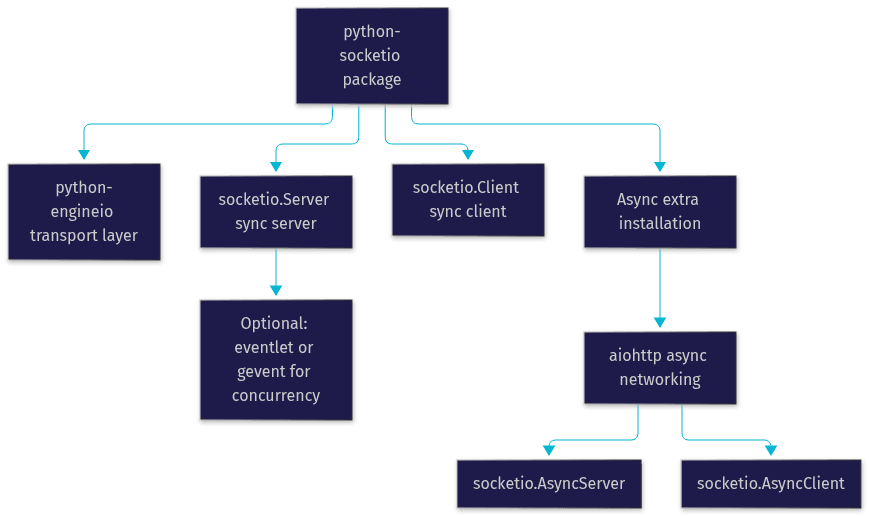
After installation, verify it by importing the library in a Python session and printing its version string. If the import succeeds and reports a current release number, the package and its Engine.IO dependency are correctly installed. If the async classes fail to import, the aiohttp dependency is missing and you should reinstall with the async extra.
Server vs Client: Core Classes Explained
The library exposes four primary classes, and choosing among them is the first architectural decision you make. On the server side, the synchronous Server class implements the synchronous model: event handlers run in worker threads or greenlets, and each handler blocks until it returns. Its counterpart, the AsyncServer class, implements the asynchronous model: handlers are coroutines scheduled on an event loop, and thousands of connections can be served concurrently from a single process.
On the client side the split repeats. The synchronous Client class connects synchronously and is convenient for scripts, background workers, and test harnesses. The AsyncClient class uses the asyncio event loop and fits naturally into asynchronous applications, such as a bot or an IoT gateway that manages many simultaneous connections.
The synchronous model is simpler to reason about. Handlers look like ordinary functions, debugging is straightforward, and integration with synchronous libraries (database drivers, legacy SDKs) is painless. The asynchronous model wins on concurrency: a single event loop can hold tens of thousands of open connections where a thread-per-connection model would exhaust memory. The trade-off is that every handler must be non-blocking, and calling a blocking library inside a coroutine stalls every other connection on that loop.
| Aspect | Synchronous classes | Asynchronous classes |
|---|---|---|
| Server class | socketio.Server | socketio.AsyncServer |
| Client class | socketio.Client | socketio.AsyncClient |
| Execution model | Threads or greenlets | asyncio event loop |
| Concurrency ceiling | Hundreds to low thousands per process | Tens of thousands per process |
| Best for | Scripts, legacy codebases, simple services | High-connection services, IoT, real-time dashboards |
| Blocking calls allowed | Yes, inside handlers | No, they freeze the event loop |
| Web server pairing | Gunicorn with eventlet/gevent workers | Uvicorn or Daphne (ASGI) |
The most important row is the blocking-calls row. Teams migrating to the async classes most often hit failures because a synchronous database call inside a coroutine halts all other connected clients until it returns.
Choosing Between Standard and Async Implementations
Pick the asynchronous classes when connection count matters or when your stack is already async, such as a FastAPI service. Pick the synchronous classes when your codebase is built on Flask, Django views, or blocking libraries that would be expensive to rewrite.
Migrating between the two is mostly mechanical. Event handler names and payload formats stay identical; what changes is that handlers become coroutines and any blocking calls must be replaced with async equivalents or delegated to a thread pool. Because the wire protocol is the same, you can also migrate one side at a time, for example moving the server to async while JavaScript clients continue connecting unchanged.
A practical rule from production experience: start synchronous if you are prototyping, and commit to async before your connection count per process exceeds a few hundred. Retrofitting async later is easier than untangling a stalled event loop in production.
Integrating with Web Frameworks
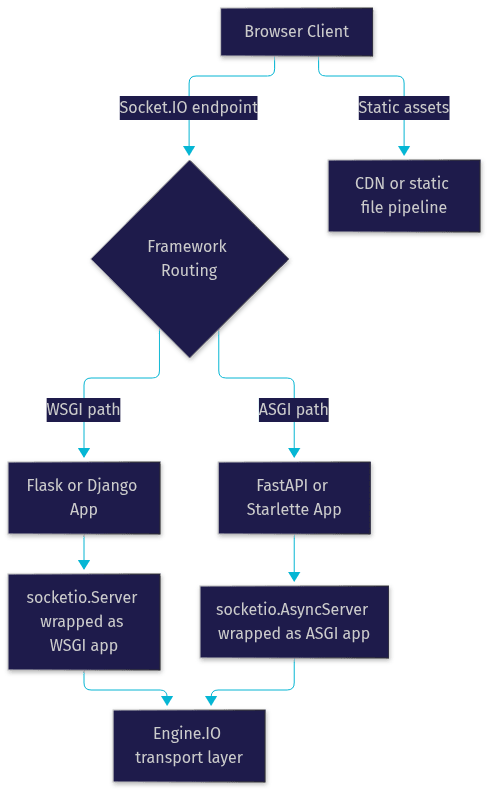
Python Socket.IO does not force you into a standalone server. It ships wrapper classes that mount it inside the web framework you already use, so Socket.IO endpoints and regular HTTP routes live in the same application.
Embedding in Flask and Django (WSGI)
For Flask and Django, both WSGI frameworks, the pattern is the same: create your Socket.IO server instance, then wrap it with the library's WSGI application wrapper. The wrapper produces a WSGI callable that handles Socket.IO traffic on its endpoint path while delegating everything else to your framework's WSGI app. In Flask you mount the wrapped application so that your existing routes and the real-time endpoint coexist. In Django you attach the wrapped application as an additional WSGI entry point, typically served alongside your main application.
One WSGI caveat matters: a standard WSGI server handles one request at a time per worker. For real-time traffic you must run Gunicorn (or uWSGI) with eventlet or gevent worker classes so each worker can hold many concurrent connections. Without that, your chat app will serialize every message.
Embedding in FastAPI and Starlette (ASGI)
For FastAPI and Starlette, both ASGI frameworks, the library provides an ASGI wrapper. You create an asynchronous server instance, wrap it with the ASGI application class, and mount it at a path in your FastAPI or Starlette application. Because ASGI is natively asynchronous, no special worker configuration is needed; the event loop handles concurrency for both your HTTP routes and Socket.IO connections. This is the cleanest integration path if you are starting a new project in 2026.
Serving Client Assets
The browser client library is a static JavaScript file. You can serve it from a CDN, bundle it with your frontend build, or let the server expose it at a well-known path. For production, most teams serve it through their existing static file pipeline or CDN rather than through the Socket.IO server itself.
Managing Events and Namespaces
Socket.IO communication is event-driven. Instead of raw byte streams, both sides exchange named events carrying JSON-serializable payloads. The protocol defines built-in connection and disconnection events, and your application registers handlers for its own custom event names, such as a chat message event or a dashboard update event.
You can register handlers with decorators applied to functions, which reads cleanly in small applications, or with explicit registration calls, which suits larger codebases where handlers are organized across modules. Both approaches produce identical behavior; choose based on your project's structure.
Namespaces provide logical separation on a single connection endpoint. Each namespace is a distinct path, and a client can connect to several of them simultaneously. A common pattern is one namespace per feature area: a chat namespace, a notifications namespace, and an admin namespace, each with its own handlers and its own connection and disconnection logic. This keeps handler registries small and makes per-feature authorization straightforward, since the connect handler on each namespace can validate credentials for that feature independently.
For payload design, a few practices hold up well in production. Keep payloads small and flat, since every byte crosses the wire on every connected client for broadcast events. Validate payloads at the handler boundary before acting on them, because clients, including your own JavaScript clients, will eventually send malformed data. And version your custom event names or payload shapes if you expect long-lived clients, so an older browser tab does not crash a newer server.
Scaling and Deployment Considerations
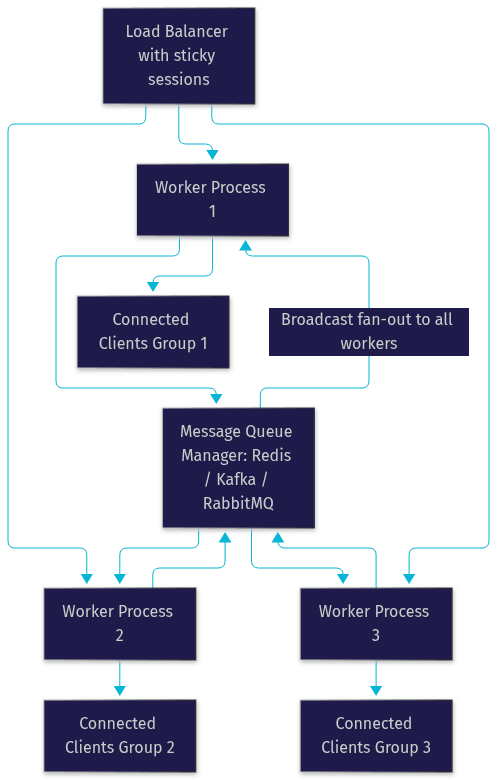
A single Socket.IO server process holds connections in its own memory. The moment you run a second process, a message emitted by process one will not reach clients connected to process two. The fix is a message queue manager. The library supports Redis, Kafka, RabbitMQ, and other brokers through its message queue interface: every process publishes events to the broker, and the broker fans them out to all processes, so every client receives every broadcast regardless of which worker holds its connection.
Server choice follows your execution model. Synchronous deployments pair with Gunicorn or uWSGI using eventlet or gevent workers. Asynchronous deployments pair with Uvicorn or Daphne, the standard ASGI servers. In both cases, run multiple worker processes behind a load balancer for CPU parallelism, with the message queue keeping them coordinated.
Load balancing needs one specific configuration: sticky sessions. Because a Socket.IO session begins with a long-polling handshake before upgrading to WebSocket, the initial requests must reach the same backend process. Most load balancers support this through cookie-based or IP-based session affinity. Without it, handshakes fail intermittently and clients fall back to polling permanently.
For security, terminate TLS at your load balancer or reverse proxy in the standard pattern, and treat the Socket.IO endpoint like any other authenticated surface: validate credentials in the connection handler, scope tokens per namespace where needed, and keep your API secrets server-side.
Common Pitfalls and Debugging Tips
The single most common failure is version mismatch between the Python server and a JavaScript client. Socket.IO protocol versions are not cross-compatible across major releases, so a v3-era JavaScript client cannot talk to a server speaking the v5 protocol. Check the compatibility matrix in the python-socketio documentation before upgrading either side.
Transport issues show up as connections that work but feel slow, or connections that never upgrade from polling. Enable the library's debug-level logging during development, which prints the full handshake and transport negotiation, and you will immediately see whether the WebSocket upgrade is being rejected by a proxy.
Reconnection loops usually indicate a server that accepts the handshake but drops the session immediately, often an exception inside your connection handler. Handle exceptions in every handler, log them with full context, and the loop will point you at the failing code. For clients, the built-in reconnection logic already uses exponential back-off; resist the urge to build your own.
If you are building real-time features and want managed infrastructure rather than protocol plumbing, VideoSDK's real-time communication SDKs handle rooms, participants, recording, and adaptive streaming across ten-plus platforms, so you can focus on your application instead of transport negotiation.
Definitions Glossary
Socket.IO: A real-time communication protocol layered on top of WebSockets and HTTP long-polling, adding sessions, events, and automatic reconnection to raw transports.
Engine.IO: The lower-level transport layer used by Socket.IO that negotiates between WebSocket and long-polling based on what the network allows.
Namespace: A logical subdivision of a Socket.IO server endpoint, allowing separate handlers and authorization per feature area on the same port.
ASGI: The asynchronous server gateway interface for Python web applications, the foundation for frameworks like FastAPI and Starlette and for the asynchronous server class in Python Socket.IO.
Message Queue Manager: A broker such as Redis or Kafka that coordinates multiple Socket.IO server processes so broadcasts reach clients on every worker.
Sticky Sessions: A load balancer configuration that routes all requests from one client to the same backend worker, required for Socket.IO's polling-to-WebSocket handshake.
Key Takeaways
- Python Socket.IO implements both server and client sides of the Socket.IO protocol and is wire-compatible with JavaScript Socket.IO clients.
- Choose the synchronous classes (Server and Client) for simplicity and legacy stacks, and the asynchronous classes (AsyncServer and AsyncClient) for high connection counts and ASGI frameworks like FastAPI.
- Framework integration uses WSGI or ASGI wrapper classes, so real-time endpoints live inside your existing Flask, Django, or FastAPI application.
- Scaling requires a message queue manager such as Redis plus sticky sessions at the load balancer; without both, broadcasts silently fail across workers.
- Version compatibility between Python and JavaScript Socket.IO releases is the most common source of connection failures, so verify the compatibility matrix before upgrading.
Conclusion
Python Socket.IO gives Python developers a direct bridge into the real-time communication ecosystem that the JavaScript world has refined for over a decade. You now know how the protocol layers on WebSockets with polling fallback, how to pick between synchronous and asynchronous classes, how to embed the server in Flask, Django, or FastAPI, and how to scale with a message broker and sticky sessions. The best next step is small: add one real-time feature, such as a live notification or a chat room, to your next Python project and grow from there. Start with the official python-socketio documentation, browse the GitHub repository, and if you want managed real-time infrastructure with rooms, recording, and multi-platform SDKs, explore VideoSDK's docs or try the free tier at app.videosdk.live. What are you building with Python Socket.IO? Drop a comment, I'd love to hear what kind of real-time use case you're working on.
Conclusion and Future Trends
Python Socket IO provides a powerful and versatile solution for building real-time applications. By understanding the concepts and techniques discussed in this guide, you can create robust and engaging real-time experiences for your users. As real-time applications continue to grow in popularity, Socket.IO and similar technologies will play an increasingly important role in the development landscape.
Further Reading:
- Learn more about Socket.IO: Dive deeper into the world of Socket.IO and its capabilities.
- Explore the official Python SocketIO documentation: Consult the comprehensive documentation for detailed information and advanced usage.
Free $20 Balance for AI Voice Agents & Video Calls
FAQ