


SIP voice is real-time voice communication that uses the Session Initiation Protocol (SIP) to set up, manage, and tear down calls over IP networks instead of the traditional phone network. SIP handles the signaling (who is calling whom), while RTP carries the actual audio. Developers building modern communication apps can bridge SIP voice with WebRTC and AI voice agents using platforms like VideoSDK, which connects traditional SIP telephony to real-time web and mobile rooms.
Every day, millions of business calls travel over SIP voice without anyone noticing. The receptionist's desk phone, the contact center queue, the sales rep's softphone on a laptop, and increasingly the AI agent answering an inbound call all rely on the same decades-old protocol: the Session Initiation Protocol. Despite its age, SIP remains the connective tissue between the traditional phone network (PSTN) and modern internet-based communication.
For developers, that creates a real problem. You can build a beautiful WebRTC application, but the moment a customer wants to call from a regular phone, or your company wants to connect its existing PBX, you are dealing with SIP. Understanding how SIP voice works, where it breaks, and how to bridge it into modern stacks is now a core skill for anyone building communication products.
By the end of this article, you will understand the full SIP voice call flow, how to set it up in an application, how to secure and troubleshoot it, and how platforms like VideoSDK let you combine SIP voice with WebRTC rooms and AI voice agents without building the gateway infrastructure yourself.
What Is SIP Voice?
SIP voice is defined as voice communication where the Session Initiation Protocol handles call signaling over an IP network. SIP itself does not carry audio. It is a text-based signaling protocol, modeled on HTTP, that negotiates who wants to talk, who is available, and how the media should be exchanged. Once the parties agree, the actual voice packets travel over RTP (Real-time Transport Protocol), usually with SRTP encryption in production.
A complete SIP voice system has four core components. The SIP user agent is the endpoint, which can be a hardware desk phone, a softphone application, or a server-side agent. The SIP proxy server routes signaling messages between endpoints. The registrar accepts registration requests and maintains the mapping between a user's SIP address of record (AOR) and their current IP location. Finally, media servers and gateways handle the RTP audio stream and bridge calls to and from the PSTN.
SIP voice differs from a traditional PSTN call in one fundamental way: separation of signaling and media. In the PSTN, the phone network itself sets up a dedicated circuit and carries the voice. With SIP voice, the signaling path (SIP) and the media path (RTP) can travel through entirely different servers and network routes. This separation is what makes SIP voice flexible enough to power everything from a two-person desk call to a cloud contact center routing thousands of concurrent calls, and it is also why SIP troubleshooting requires looking at both paths independently.
SIP Voice Call Flow Explained
Every SIP voice call follows a predictable sequence of signaling messages, and understanding this flow is the foundation for debugging anything SIP-related. The flow starts long before the phone rings, with registration.
First, the user agent sends a REGISTER message to the registrar, binding its SIP address of record to its current network location. The registrar responds with an authorization challenge, and the user agent replies with credentials, typically using Digest authentication. Once registered, the endpoint is reachable for inbound calls.
When a call is placed, the caller's user agent sends an INVITE message toward the callee's address, routed through the proxy server. The INVITE carries the Session Description Protocol (SDP) payload, which proposes the media details: which audio codecs the caller supports, the RTP port it will listen on, and its IP address. The callee's phone rings, and when answered, it returns a 200 OK response containing its own SDP answer, selecting a codec and port. The caller confirms with an ACK, and at that moment RTP audio begins flowing directly between the two endpoints (or through a media server if one is in the path). When either party hangs up, a BYE message is sent and confirmed, tearing down the session.

The critical insight for developers: the media almost never follows the signaling path. Your SIP proxy might be in one region while RTP audio flows peer-to-peer or through a separate media relay. When you debug "no audio" issues, this is the first place to look.
SIP Registration and Authentication
Registration is how a SIP voice endpoint announces where it can be reached. The user agent periodically sends REGISTER messages that bind its SIP address of record, something like a phone number or username at a domain, to its current IP address and port. Registrations expire, so endpoints must re-register at an interval negotiated with the registrar, typically every few minutes.
Authentication usually follows the Digest challenge-response pattern: the registrar rejects the first REGISTER with a nonce, and the endpoint retries with a hashed credential derived from that nonce, proving it knows the shared secret without sending it in the clear. For stronger protection, SIP over TLS (SIPS) wraps the entire signaling channel in encryption, protecting credentials and call metadata from interception. Most production deployments in 2026 require TLS for signaling and treat unencrypted SIP registration as a compliance failure.
Media Negotiation and Codecs
Codec negotiation happens inside the SDP exchange carried by the INVITE and its 200 OK response. The caller's SDP lists supported codecs in priority order, and the callee picks the first mutually supported one. If no codec overlaps, the call fails with an error response before any audio flows.
The codec choice directly shapes voice quality and bandwidth. PCMU (the G.711 μ-law variant common in North America) is universally supported and delivers toll-quality voice at 64 kbps. G.722 offers wideband HD voice at the same bitrate, noticeably improving clarity for human speech. OPUS, borrowed from the WebRTC world, is the most adaptive option, adjusting bitrate to network conditions and delivering excellent quality even on poor connections. For any modern SIP voice deployment, supporting OPUS alongside PCMU gives you the best of both worlds: wide compatibility and adaptive quality.
Setting Up SIP Voice in an Application
Building SIP voice into an application means assembling three layers: a SIP account or trunk that gives you a real phone identity, a client or library that speaks SIP, and a network path that lets both signaling and media through. The first decision is whether to use a hosted SIP provider or self-host a PBX such as Asterisk or FreeSWITCH. Self-hosting gives maximum control but means you own security, scaling, and PSTN connectivity. For most product teams, a hosted provider or a managed platform is the pragmatic choice.
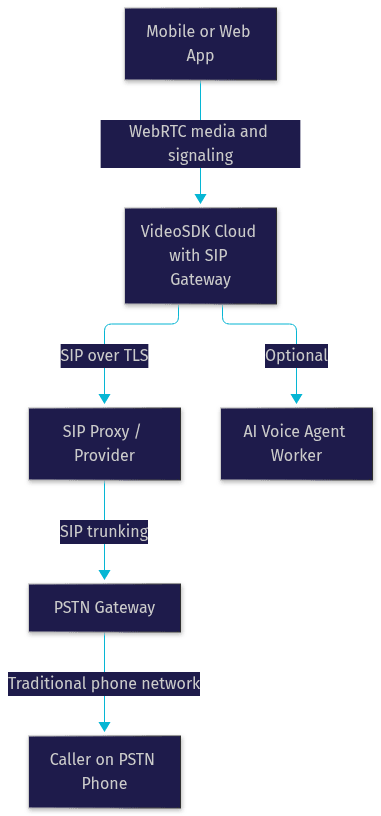
On the client side, you need a softphone library or SDK for your platform. On Android, the platform historically exposed a SIP API for basic voice calls, though most production apps now use higher-level VoIP SDKs for better codec support and reliability. On the web, browsers do not speak SIP natively, so the standard pattern is a SIP-to-WebRTC gateway: the browser joins a WebRTC session, and a server-side gateway translates between WebRTC media and SIP voice signaling toward the phone network.
Production considerations matter more than the happy path. Signaling and media must traverse NAT and firewalls, which means STUN and TURN infrastructure for media relay, keep-alive packets to keep NAT bindings open, and HTTPS/TLS everywhere for signaling. This is exactly the layer that platforms like VideoSDK's telephony integration remove from your plate: VideoSDK provides inbound and outbound SIP gateways, routing rules, DTMF event handling, and call transfer, while your application connects over WebRTC on the web or mobile side.
Choosing the Right SIP Provider
Picking a SIP provider comes down to five factors. Codec support: confirm the provider supports OPUS and G.722, not just legacy G.711, if voice quality matters to your product. Security: TLS for signaling and SRTP for media should be standard, with IP whitelisting available. Pricing: compare per-minute rates for the countries you actually call, plus monthly trunk fees, since these vary widely by destination. Global coverage: verify the provider has local coverage or low-latency points of presence in your users' regions. Finally, reliability: look for a published uptime SLA and a trial period so you can test real call quality before committing.
Handling NAT and Firewall Issues
NAT traversal is the number one cause of broken SIP voice in development. The problem is that a device behind NAT does not know its public IP address, so the address it places inside SIP and SDP messages is a private, unroutable one. The standard fix is STUN, which lets the endpoint discover its public address, combined with TURN as a fallback media relay when direct peer-to-peer RTP is blocked. Keep-alive packets sent at regular intervals prevent the NAT binding from expiring mid-call, which otherwise causes one-way audio or dropped calls. Some deployments also use SIP ALG features on routers, but these frequently corrupt SIP messages and are better disabled in favor of proper STUN/TURN configuration.
Enhancing SIP Voice Quality and Security
Voice quality on a SIP voice system is measurable, and the industry standard metric is MOS (Mean Opinion Score), a 1-to-5 scale of perceived quality. The three network factors that drag MOS down are jitter (variation in packet arrival time), packet loss, and latency. A jitter buffer on the receiving end smooths out arrival variation at the cost of a small delay, and packet loss concealment techniques interpolate over missing audio so brief losses stay inaudible. Aim for round-trip latency under 150 ms and packet loss under 1 percent for business-grade quality.
Security in 2026 is not optional. Enable SIP over TLS so signaling, including registration credentials and dialed numbers, is encrypted. Enable SRTP so the RTP media itself is encrypted end to end. Restrict your SIP exposure with IP whitelisting and geo-fencing where your provider supports it, and use strong per-endpoint credentials, since SIP endpoints are constantly scanned by attackers attempting toll fraud.
For monitoring, capture MOS, jitter, and packet loss statistics per call and alert on degradation. Most enterprise SIP platforms expose these metrics through APIs or webhooks, and treating them as first-class application telemetry is what separates a production voice product from a demo. The most common pitfall is testing only on a fast office network: always validate your SIP voice setup on constrained mobile networks and through corporate firewalls before launch.
SIP Voice Use Cases
Enterprise VoIP phone systems remain the largest SIP voice use case, replacing legacy PBX hardware with software-based phone systems where every desk phone is a SIP user agent registering against a central server. Customer support call centers build on the same foundation, adding queueing, routing rules, and CRM integration, with SIP trunking connecting the center to the PSTN.
The fastest-growing use case is AI voice agents. An inbound SIP call is answered by a gateway that bridges the phone caller into a real-time session with an AI agent built on a pipeline of speech-to-text, an LLM, and text-to-speech. VideoSDK's AI voice agents support exactly this pattern: a phone call arrives over SIP, the telephony gateway bridges it into a VideoSDK room, and a Python-based agent worker processes the conversation in real time, with support for call transfer, DTMF events, and voicemail detection.
Remote work and unified communications tie it together, with softphones on laptops and mobile devices registering from anywhere, and hybrid teams joining the same SIP voice system whether they are at a desk or on a hotel network.
Troubleshooting Common SIP Voice Issues
Registration failures are the most common first problem. Check that credentials and domain are correct, that the registrar is reachable, and that the registration interval has not expired. If registration works locally but fails in production, a firewall or SIP ALG is usually mangling the signaling.
One-way audio, where one party hears the other but not vice versa, is almost always a NAT or media path issue. The SDP inside the call setup likely advertised a private IP address, or a firewall is blocking the RTP port range in one direction. Compare the media addresses in the signaling with the actual packet flow to confirm.
Call drops and latency spikes usually trace to expired NAT bindings (missing keep-alives), codec renegotiation failures, or genuine network congestion. The debugging toolkit is straightforward: SIP message logs from your proxy or client show the signaling conversation, and packet captures of the RTP stream reveal whether media is flowing, which codec is active, and where loss and jitter occur. Debug signaling and media as two separate systems, because they fail independently.
Future Trends for SIP Voice
SIP voice is not being replaced; it is being absorbed into AI-native communication stacks. The clearest trend of 2026 is SIP as the on-ramp for AI voice agents: businesses keep their phone numbers and SIP trunks, but the entity answering the call is an LLM-powered agent with deterministic conversation flows, such as those built with VideoSDK's Conversational Graph for structured interactions like appointment booking or claims intake.
Cloud-native SIP services are replacing self-hosted PBX deployments, with routing rules, gateways, and analytics offered as managed APIs. Meanwhile, WebRTC-only architectures are growing for pure app-to-app communication, but the PSTN bridge keeps SIP essential: as long as customers dial phone numbers, SIP voice remains the protocol that connects them to your software.
Definitions Glossary
Session Initiation Protocol (SIP): A text-based signaling protocol that sets up, modifies, and tears down voice (and video) sessions over IP networks. VideoSDK's telephony integration uses SIP to bridge traditional phone calls into its WebRTC rooms.
SIP trunking: A service that connects a private phone system to the public phone network over the internet, replacing physical phone lines with a virtual SIP connection.
SIP address of record (AOR): The permanent public identity of a SIP user, similar to a phone number, to which devices register their current network location.
RTP (Real-time Transport Protocol): The protocol that carries the actual audio media in a SIP voice call, traveling separately from the SIP signaling path.
SRTP and SIP over TLS: Encryption layers for SIP voice, where TLS protects the signaling channel and SRTP encrypts the media stream.
MOS (Mean Opinion Score): A 1-to-5 scale of perceived voice quality, derived from measurements of jitter, packet loss, and latency.
Key Takeaways
- SIP voice separates signaling (SIP) from media (RTP), which is why calls can route intelligently and why signaling and media must be debugged independently.
- The core call flow is REGISTER, INVITE with SDP codec negotiation, 200 OK, ACK, RTP media exchange, and BYE teardown.
- NAT traversal is the leading cause of broken SIP voice in development; STUN, TURN, and keep-alives are mandatory production infrastructure.
- TLS for signaling and SRTP for media are baseline security requirements in 2026, alongside IP whitelisting to prevent toll fraud.
- Platforms like VideoSDK bridge SIP voice into WebRTC rooms and AI voice agents, handling gateways, DTMF, and call transfer so you can focus on your application.
Conclusion
Mastering SIP voice means understanding one protocol that still connects every phone network on the planet to modern software. You now know the full call flow, the components, the quality and security levers, and the traps that catch most teams in production. If you are ready to bridge SIP voice into your application, explore VideoSDK's telephony and SIP integration docs and start a free trial at app.videosdk.live. What are you building with SIP voice? Drop a comment, I'd love to hear what kind of voice use case you're working on.
Free $20 Balance for AI Voice Agents & Video Calls
FAQ