


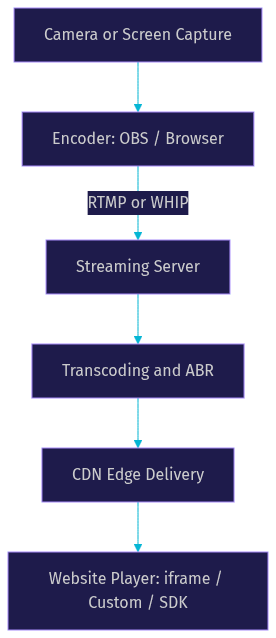
To stream live video to a website, you capture video, ingest it via RTMP or WebRTC, distribute through a CDN, and embed a player on your page. VideoSDK provides prebuilt UI and SDKs that handle ingestion, adaptive bitrate, and player integration in minutes.
Businesses and creators increasingly need to stream live video directly on their own websites rather than relying solely on platforms like YouTube or Twitch. Owning the player means controlling the viewer experience, capturing first-party analytics, and keeping traffic on your domain where it converts. The end-to-end flow follows four stages: capture the video, ingest it to a streaming server, distribute through a CDN, and embed a player on your web page. By the end of this article, you will understand each stage, know which protocols and tools to choose, and be ready to embed a working live stream on your site using either a managed service or a pre-built SDK like VideoSDK's Interactive Live Streaming.
Understanding the Core Components of Live Video Streaming
Live video streaming is the real-time transmission of video content from a source to viewers over the internet, with no pre-recorded file involved. Every second of video is captured, encoded, transmitted, and played back within seconds of the event occurring, which creates a pipeline where latency, reliability, and quality are constantly in tension.
What Is Live Video Streaming?
Live video streaming is defined as the process of capturing video and audio in real time, encoding it into a streamable format, and delivering it to viewers as it happens. The key difference from on-demand streaming is that there is no complete file to serve. VideoSDK provides live streaming through its Interactive Live Streaming (ILS) mode, which keeps latency low enough for real-time audience interaction rather than the 10 to 30 second delay typical of traditional HLS delivery.
Key Protocols: RTMP, WebRTC, HLS, and LL-HLS
Three protocol families dominate live video streaming today, each with distinct latency and use-case profiles.
RTMP (Real-Time Messaging Protocol) is the ingestion workhorse. It runs over TCP and is supported by virtually every encoder, including OBS, Wirecast, and hardware encoders. RTMP typically introduces 2 to 5 seconds of latency and is used to send video from the source to the streaming server, not directly to viewers.
WebRTC is the browser-native protocol for real-time communication. According to the W3C WebRTC specification, it enables sub-second latency by using UDP transport and peer-to-peer or SFU architectures. WebRTC is ideal for interactive streams where viewers need to respond, vote, or join the conversation. VideoSDK's ILS mode is built on WebRTC, delivering sub-second latency for audience interaction.
HLS (HTTP Live Streaming) is Apple's delivery protocol that segments video into small files served over standard HTTP. Traditional HLS has 10 to 30 seconds of latency, making it suitable for one-to-many broadcasts where interaction is not required. LL-HLS (Low-Latency HLS) reduces this to 2 to 5 seconds by using partial segments and a shorter playlist refresh interval.
Choosing the Right Ingestion Method to Stream Live Video to Website
The ingestion method you choose determines your latency floor, your encoder options, and how interactive your stream can be. Each method trades off reliability, latency, and complexity differently.
RTMP Ingest with OBS or Other Encoders
RTMP remains the most widely supported ingestion protocol because it works with virtually every encoding tool. The setup follows a predictable pattern: configure your encoder (typically OBS Studio) with the streaming server's RTMP URL and a unique stream key, start encoding, and the server receives the video feed. RTMP is reliable because TCP guarantees delivery, but it adds buffering that results in 2 to 5 seconds of latency before the video even reaches the distribution layer. For most broadcast-style streams where viewer interaction is limited to chat, RTMP ingestion is the pragmatic choice.
WebRTC and WHIP for Ultra-Low Latency Streaming
WebRTC ingestion, increasingly standardized through the WHIP (WebRTC HTTP Ingestion Protocol) specification, lets you capture video directly from a browser or mobile app and send it to the streaming server with sub-second latency. This is the approach VideoSDK uses for its ILS mode. The advantage is immediacy: viewers see the stream within hundreds of milliseconds, enabling real-time interaction. The trade-off is that WebRTC is more sensitive to network conditions than RTMP, and not all streaming servers support WHIP ingestion yet. For live shopping, auctions, gaming, and any scenario where viewer response time matters, WebRTC ingestion is the right choice.
Hybrid Ingestion Approaches
Some platforms combine both protocols: RTMP for the primary feed to ensure reliability, with WebRTC for interactive viewer participation. This hybrid model lets you broadcast a stable primary stream while allowing selected viewers to join as active speakers via WebRTC. VideoSDK supports this pattern natively through its role-based architecture, where viewers can be promoted to speakers using the SDK's mode-switching capability without reconnecting or changing the player.
Setting Up a Streaming Server for Live Video
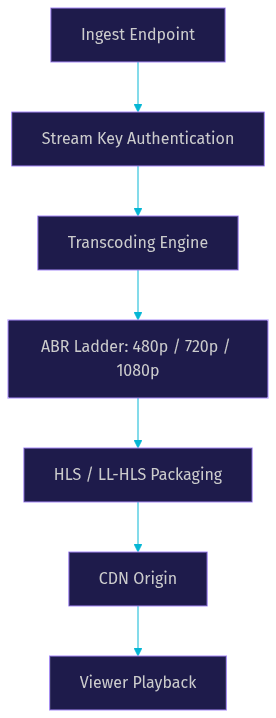
The streaming server is the bridge between your encoder and your viewers. It receives the ingest feed, transcodes it into multiple quality levels, packages it for delivery, and serves it through a CDN.
Managed Services vs Self-Hosted Streaming Servers
Managed streaming services like AWS IVS, Mux, and Agora handle the server infrastructure for you. You send them an RTMP or WHIP feed, and they handle transcoding, packaging, CDN distribution, and player delivery. This reduces operational burden significantly but comes with per-viewer or per-minute pricing that can scale costs quickly for large audiences.
Self-hosted options like MediaMTX and Nginx-RTMP give you full control over the server with no per-viewer costs. The trade-off is that you are responsible for transcoding, CDN integration, scaling, and maintenance. For small audiences or development environments, self-hosted servers work well. For production at scale, managed services are almost always more cost-effective when you factor in engineering time.
VideoSDK offers a middle path: its REST APIs let you create and manage streaming rooms programmatically, while the infrastructure is fully managed. You get the control of API-driven room creation without the operational burden of running your own media server.
Core Server Configuration Concepts
Regardless of which server you choose, four configuration concepts matter most.
Stream key generation is your first line of access control. A stream key is a unique identifier that tells the server which stream you are publishing to. Treat it like a password: anyone with the key can publish to your server. Generate keys server-side, rotate them regularly, and never expose them in client-side code.
Authentication ensures only authorized encoders can publish and only authorized viewers can watch. Most servers support token-based authentication, where each viewer receives a time-limited token that grants access to the stream. VideoSDK uses JWT-based token authentication generated server-side from your API key and secret.
Latency settings control the trade-off between buffering and delay. Lower latency means less buffering room, which means any network hiccup is more likely to cause a visible stutter. Most servers offer preset latency modes: low (2 to 5 seconds), normal (5 to 10 seconds), and ultra-low (sub-second via WebRTC).
Adaptive bitrate (ABR) profiles define the quality ladder your server produces. A typical ABR ladder includes 480p at 1 Mbps, 720p at 2.5 Mbps, and 1080p at 5 Mbps. The player switches between these rungs based on the viewer's available bandwidth.
How to Embed a Live Video Stream on Your Website
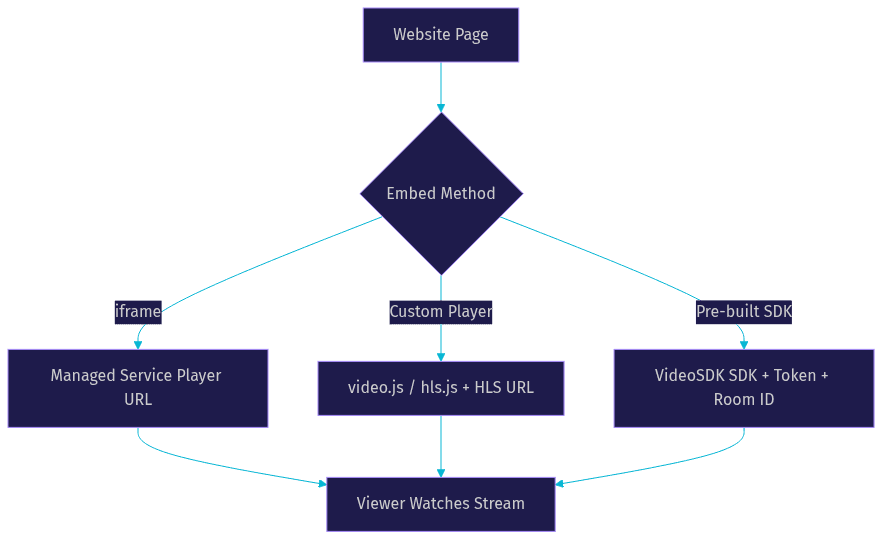
Once your stream is live on a server, the final step is embedding a player on your website. Three approaches cover the spectrum from simplest to most customizable.
Simple iframe Embed
An iframe embed is the fastest way to get a live player on your page. Most managed services provide a shareable URL that renders a player with default controls when loaded in an iframe. This approach works well when you need a stream live quickly and do not need custom branding or analytics. The limitation is that you have little control over the player's appearance, behavior, or event handling. If the service changes its player UI, your embed changes too.
Custom Player with video.js or hls.js
For more control, use an open-source player library like video.js or hls.js. These libraries let you build a player with custom controls, branding, and event listeners. You configure the player with your HLS or LL-HLS playback URL, set parameters for autoplay and mute (browsers require muted autoplay), and handle events like play, pause, and error. The advantage is full design control. The trade-off is more development effort and the responsibility for handling edge cases like codec support and fallback behavior across browsers.
Using a Pre-built SDK to Stream Live Video to Website
A pre-built SDK like VideoSDK's Prebuilt UI Kit gives you the best of both worlds: a working player with minimal setup, plus the ability to customize when needed. The SDK handles token authentication, adaptive bitrate switching, participant management, and analytics out of the box. VideoSDK supports 10+ platforms including React, React Native, Flutter, Android, iOS, JavaScript, and Unity, giving you the broadest SDK coverage in the market.
When using VideoSDK, the authentication flow works as follows. You generate a token server-side using your VideoSDK API key and secret. The token is a JWT that authenticates a participant's access to a specific room. Never expose your API secret on the frontend. Always generate tokens on your backend and pass them to the SDK on the client. The VideoSDK authentication guide covers this flow in detail for each supported SDK.
In practice, developers integrating VideoSDK for live streaming consistently find that the prebuilt SDK eliminates the most time-consuming parts of streaming setup: token management, player configuration, and adaptive bitrate handling. The VideoSDK GitHub repository provides open-source code samples and quickstart repos for each supported platform.
The SDK also handles mode switching between broadcast and interactive modes. In ILS mode, viewers start as passive audience members and can be promoted to active speakers, all controlled through the SDK without changing the player or reconnecting.
Optimizing Performance When You Stream Live Video to Website
Performance optimization is what separates a stream that buffers constantly from one that plays smoothly across devices and network conditions.
Adaptive Bitrate and CDN Edge Delivery
Adaptive bitrate streaming works by encoding multiple quality levels of the same stream and letting the player switch between them in real time. When a viewer's bandwidth drops, the player requests a lower-quality segment to prevent buffering. When bandwidth improves, it steps back up. This happens seamlessly without interrupting playback.
A CDN (Content Delivery Network) is essential because it caches your stream segments at edge locations close to your viewers. Without a CDN, every viewer pulls video from your origin server, which quickly becomes a bottleneck. With a CDN, thousands of concurrent viewers can watch the same stream with minimal origin load. Most managed streaming services include CDN delivery. If you self-host, you need to configure your own CDN origin, which adds complexity.
Reducing Latency in Live Video Streaming
Latency reduction depends on where in the pipeline you can afford to cut buffering. The keyframe interval (also called the GOP size) is the most impactful setting. Shorter keyframe intervals mean smaller segments, which means lower latency but higher encoding overhead. A 2-second keyframe interval is common for LL-HLS, while WebRTC uses much shorter frame intervals.
Switching from traditional HLS to LL-HLS can cut latency from 20 seconds to 3 seconds. Switching to WebRTC can cut it to under 500 milliseconds. The choice depends on your use case: broadcast-style content tolerates a few seconds of delay, while interactive streams need WebRTC-class latency.
Monitoring and Analytics for Live Streams
Three metrics matter most for live stream health. Bitrate stability tells you whether your encoder is maintaining a consistent output. Viewer count and concurrency tell you whether your CDN is handling the load. Error rate (the percentage of playback sessions that fail) tells you whether viewers are experiencing problems. VideoSDK provides session analytics through its REST API, letting you pull post-stream data on participant count, duration, and quality metrics.
Security and Access Control for Live Video Streams
Security is often an afterthought in streaming setups, but it is critical for paid events, internal broadcasts, and any stream where access should be restricted.
Token-based authentication ensures only authorized viewers can access your stream. Each viewer receives a time-limited token tied to their session. VideoSDK generates these tokens server-side using your API key and secret, and the SDK validates them when a viewer joins a room.
Signed URLs add another layer by appending a cryptographic signature to the playback URL. The CDN verifies the signature before serving the segment, preventing unauthorized sharing of the raw stream URL.
Geo-fencing lets you restrict playback to specific countries or regions, which is useful for licensing compliance or content restrictions. VideoSDK supports geo-fencing as part of its room configuration.
To prevent unauthorized re-streaming, most platforms support DRM (Digital Rights Management) integration or stream watermarking. While DRM adds complexity, it is the most effective way to prevent viewers from capturing and redistributing your content.
Common Pitfalls When You Stream Live Video to Website
Even with a solid architecture, live streaming has sharp edges. Here are the most common issues developers encounter.
Latency spikes often result from a keyframe interval that is too long or a CDN cache miss on the first segment. If your stream suddenly jumps from 3 seconds to 15 seconds of delay, check your encoder's keyframe setting and ensure it matches your segment duration.
Stream key leaks happen when keys are committed to public repositories or embedded in client-side code. If an unauthorized publisher connects to your server, regenerate the key immediately and audit your codebase for exposed credentials.
Firewall and port issues arise because RTMP uses port 1935 and WebRTC uses a range of UDP ports. Corporate firewalls often block these. Using a CDN for delivery (which serves over standard HTTPS port 443) solves the viewer-side problem. For ingestion behind a firewall, WHIP over HTTPS is the best option since it uses standard web ports.
Player compatibility issues surface when you use codecs that some browsers do not support. H.264 video with AAC audio is the safest combination for broad compatibility. If you use AV1 or HEVC, test across all target browsers before going live.
Here is a quick diagnostic checklist for a broken stream: verify the encoder is connected to the server, confirm the stream key is valid, check that the server is packaging segments, verify the CDN is serving the playlist, and test the playback URL in a standalone player before debugging your embed.
Real-World Example: From Capture to Embedded Player
Consider a small fitness studio that wants to stream live classes on their own website to avoid the 30 percent revenue cut charged by third-party platforms.
They start with OBS on a laptop, capturing video from a USB camera and audio from a wireless microphone. They configure OBS with an RTMP URL pointing to Mux, a managed streaming service, and a stream key generated in the Mux dashboard. OBS encodes the video at 720p, 2.5 Mbps, with a 2-second keyframe interval for low-latency HLS delivery.
Mux receives the RTMP feed, transcodes it into an ABR ladder (480p, 720p, and 1080p), packages it as LL-HLS segments, and distributes through its CDN. The studio receives a playback URL from Mux.
On their website, the studio uses video.js as the player. They configure it with the Mux playback URL, set autoplay to muted (required by browser policies), and add custom branding that matches their site. They also add an event listener that displays a "class started" banner when the stream begins playing.
The result is a live stream on their own domain, with their own branding, capturing first-party analytics, and keeping 100 percent of their revenue. The total setup time was under two hours, and the ongoing cost scales with actual usage rather than a fixed monthly fee.
If the studio later wants to add interactive features like live Q&A or viewer-to-instructor video, they could migrate to VideoSDK's ILS, which supports viewer-to-speaker promotion natively without changing the embedding approach. The VideoSDK code samples page provides ready-to-use examples for this exact scenario.
Definitions Glossary
RTMP (Real-Time Messaging Protocol): A TCP-based protocol for ingesting live video from encoders like OBS to a streaming server, typically adding 2 to 5 seconds of latency before distribution begins.
WebRTC: A browser-native protocol defined by the W3C that enables sub-second latency video streaming using UDP transport, ideal for interactive live streaming where audience response time matters.
HLS (HTTP Live Streaming): Apple's protocol that segments video into small files delivered over standard HTTP, with traditional latency of 10 to 30 seconds and LL-HLS reducing this to 2 to 5 seconds.
Adaptive Bitrate (ABR): A technique where the server encodes multiple quality levels and the player dynamically switches between them based on the viewer's available bandwidth to prevent buffering.
Interactive Live Streaming (ILS): VideoSDK's low-latency streaming mode built on WebRTC, where viewers can be promoted to active speakers with sub-second latency using the SDK's mode-switching capability.
Key Takeaways
- To stream live video to a website, you need four components: a capture source, an ingestion protocol, a streaming server with CDN delivery, and an embedded player on your page.
- RTMP is the most reliable ingestion protocol for broadcast-style streams, while WebRTC delivers sub-second latency for interactive experiences.
- Managed streaming services reduce operational burden, while self-hosted servers give you full control at the cost of engineering time.
- VideoSDK's Prebuilt UI Kit and ILS mode handle token authentication, adaptive bitrate, and player integration across 10+ platforms, letting you embed a live stream in minutes rather than days.
- Security measures like token-based authentication, signed URLs, and geo-fencing are essential for protecting paid or restricted content.
Conclusion
Start with the VideoSDK quick-start guide to embed a live stream today.
Streaming live video to your website follows a clear pipeline: capture, ingest, transcode, distribute, and embed. The choices you make at each stage, from RTMP versus WebRTC ingestion to iframe versus SDK embedding, determine your latency, scalability, and viewer experience. VideoSDK simplifies this pipeline by combining ingestion, adaptive bitrate streaming, and player integration into a single SDK with prebuilt UI components and REST APIs for server-side orchestration. Whether you choose a managed service or build your own stack, the key is to start with a clear use case, pick the protocol that matches your latency requirements, and embed a player that gives you the control you need. Try it yourself by signing up at app.videosdk.live/login and streaming your first live video to your website today. What are you building with VideoSDK? Drop a comment below, I would love to hear what kind of live streaming use case you are working on.
Free $20 Balance for AI Voice Agents & Video Calls
FAQ