


RTP streaming is the process of delivering real-time audio and video data using the Real-Time Transport Protocol, the foundational standard for time-sensitive media delivery over IP networks. VideoSDK leverages RTP under the hood in its WebRTC-based video calling SDK to handle packetization, jitter buffering, and adaptive bitrate streaming automatically. To build robust real-time communication apps without managing raw RTP packets, explore the VideoSDK documentation.
Introduction
Real-time media delivery powers everything from global video conferencing to live surveillance feeds, and the Real-Time Transport Protocol (RTP) remains the undisputed backbone of these systems. Since its standardization in 1996, RTP has evolved into the default mechanism for transmitting time-sensitive audio and video over IP networks. Developers building modern communication applications need a deep understanding of how RTP streaming works, from packet structure to congestion control. By the end of this guide, you will understand the architecture of RTP streams, how companion protocols manage quality, and how platforms like VideoSDK abstract these complexities to deliver sub-second latency in production applications.
What Is RTP Streaming?
RTP streaming is defined as the real-time transmission of multimedia data using the Real-Time Transport Protocol, standardized by the IETF in RFC 3550. RTP works by packaging encoded media frames into packets with specific headers that allow receivers to reconstruct the stream accurately, manage timing, and detect packet loss.
RTP is independent of the underlying transport layer and application-level protocols, though it almost always runs over UDP to avoid the latency introduced by TCP retransmissions. VideoSDK provides real-time communication capabilities through its SDKs, which utilize WebRTC and underlying RTP streams to ensure media reaches participants with minimal delay. By managing the RTP session internally, VideoSDK allows developers to focus on application features rather than network protocol engineering.
RTP Header Basics
Every RTP packet begins with a fixed 12-byte header, though this can be extended. This header contains critical fields that enable synchronization and loss detection across the network. The key fields include the version, payload type, sequence number, timestamp, and synchronization source identifier (SSRC).
The sequence number increments by one for each transmitted packet, allowing the receiver to detect missing packets and reconstruct the original order. The timestamp reflects the sampling instant of the first octet in the payload, which is crucial for jitter buffering and media synchronization. The SSRC uniquely identifies the source of the stream, preventing confusion when multiple media flows share the same network session. The marker bit often indicates the end of a video frame, signaling the decoder that a complete frame can be processed.
RTCP: The Companion Control Protocol
While RTP handles the media payload, the RTP Control Protocol (RTCP) monitors the quality of service and provides feedback to the sender. RTCP works by periodically transmitting control packets to all participants in the session. The bandwidth allocated to RTCP is typically limited to 5% of the session bandwidth to prevent control traffic from overwhelming the media stream.
Typical RTCP packet types include Sender Reports (SR) and Receiver Reports (RR), which convey statistics like packet counts, cumulative lost packets, and inter-arrival jitter. Other types like Source Description (SDES) and Bye (BYE) packets manage session metadata and participant departure. This feedback loop is essential for adaptive bitrate streaming, as it allows senders to adjust their encoding parameters based on real-time network conditions.
Common RTP Streaming Use Cases
RTP streaming is highly versatile and supports a wide range of real-time applications. Developers rely on RTP for simple multicast audio conferences where a single sender transmits to multiple receivers efficiently. In audio-video conferencing, RTP forms the media transport layer for WebRTC, handling the simultaneous delivery of voice and video tracks.
IP camera streaming frequently uses RTP through ONVIF profiles, transmitting surveillance footage over local networks. Live broadcasting often involves converting RTSP streams to RTP for ingestion into media servers or using WHIP (WebRTC-HTTP Ingestion Protocol) to push RTP media directly to CDN endpoints. In an RTSP to RTP conversion, a media server pulls the RTSP stream from a camera, extracts the RTP packets, and forwards them to web clients via WebRTC. VideoSDK handles these complexities by providing a unified interactive live streaming API that manages the underlying RTP delivery.
Multicast vs Unicast Delivery
Choosing between multicast and unicast delivery models depends on your network environment and scale requirements. Multicast sends a single stream to a group address, allowing routers to replicate packets only where necessary. This model is highly efficient for large internal broadcasts but is rarely supported across the public internet.
Unicast establishes a separate RTP session for each receiver. This approach works universally across the internet and allows personalized adaptive bitrate streaming, though it consumes more bandwidth as the audience grows. VideoSDK uses unicast delivery combined with an SFU (Selective Forwarding Unit) architecture to scale real-time video calls efficiently without requiring multicast support.
RTP Multiplexing and Layered Encodings
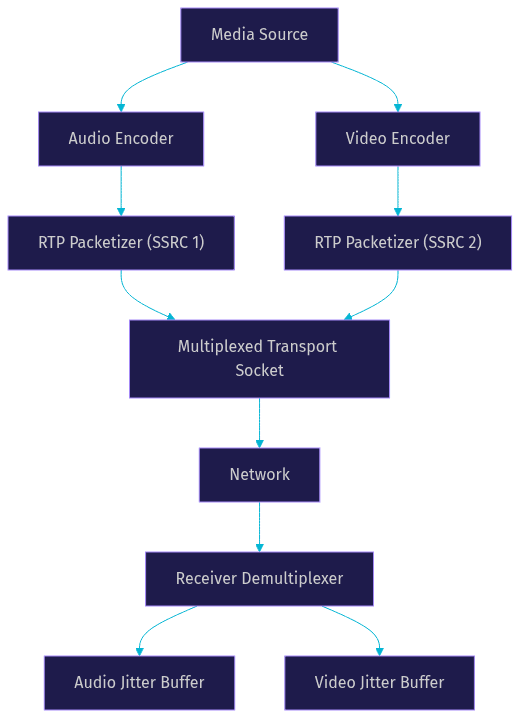
RTP multiplexing allows developers to send multiple media streams over a single transport socket. Instead of opening separate ports for audio and video, multiplexing combines them into one flow, differentiated by their SSRC identifiers. This approach simplifies NAT traversal and reduces port consumption.
Multiplexing is highly beneficial for multi-camera setups and adaptive bitrate streaming, where multiple encodings of the same source are sent simultaneously. The IETF outlines guidelines for this in RFC 8872, detailing how to bundle media within WebRTC. This BUNDLE mechanism is fundamental to modern WebRTC applications. VideoSDK leverages this multiplexing architecture to deliver composite audio and video streams efficiently within its meeting rooms.
Security Considerations: SRTP
Transmitting media over public networks introduces significant privacy risks. Secure RTP (SRTP) provides confidentiality, message authentication, and replay protection for RTP streams. SRTP works by encrypting the RTP payload and appending an authentication tag to each packet, leaving the RTP header unencrypted to allow network intermediaries to route the traffic.
Key exchange for SRTP typically occurs through DTLS-SRTP, where endpoints perform a DTLS handshake over UDP to derive symmetric keys. Alternatively, SDES (Session Description Protocol Security Descriptions) can exchange keys via signaling, though DTLS-SRTP is preferred for WebRTC. The authentication tag prevents tampering and replay attacks, ensuring the integrity of the media stream. VideoSDK enforces E2E encryption by default, utilizing SRTP to secure all video calling sessions.
Practical RTP Streaming Components
Building a robust RTP streaming pipeline requires several functional components working in harmony. Packetization is the first step, where encoded codec frames (like H.264, Opus, or AAC) are broken down into RTP packets. The packetizer must respect the Maximum Transmission Unit (MTU) to avoid IP fragmentation, typically keeping packets under 1500 bytes.
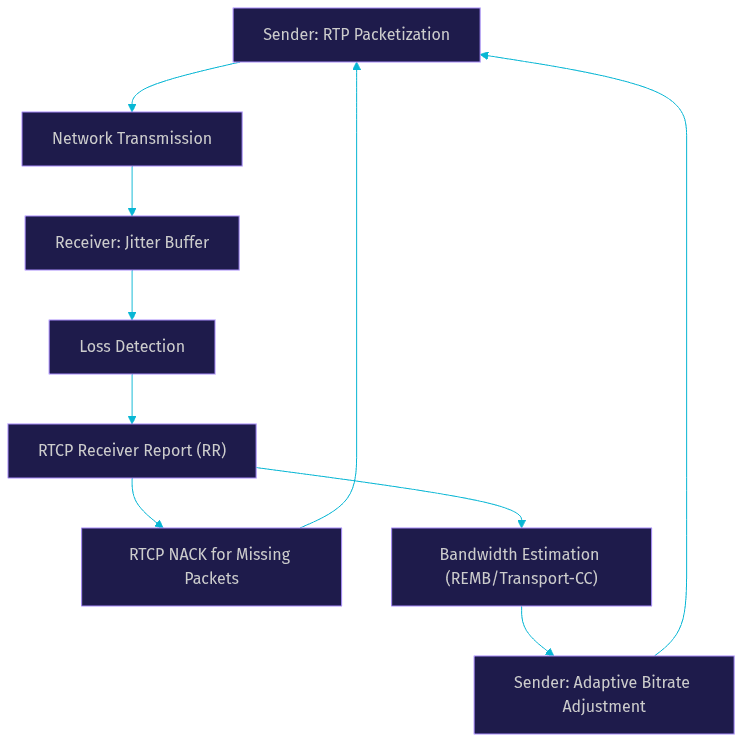
The Jitter Buffer on the receiving end reorders incoming packets and smooths out network delay variations. It holds packets briefly to ensure continuous playback, trading a small amount of latency for a seamless user experience. VideoSDK handles jitter buffer management automatically, optimizing latency based on real-time network conditions.
NACK (Negative Acknowledgement) and RTX (Retransmission) strategies handle packet loss. When the receiver detects a missing sequence number, it sends a NACK via RTCP. The sender then retransmits the lost packet using the RTX payload format. Bandwidth estimation relies on transport-cc (Transport Congestion Control) or REMB (Receiver Estimated Maximum Bitrate) feedback loops. Transport-cc works by adding sequence numbers to RTP packets at the transport level, allowing the receiver to estimate the available bandwidth and instruct the sender to adjust video resolution and bitrate dynamically.
Choosing an RTP Library for Your Stack
Selecting the right RTP library depends on your language, performance requirements, and use case. For Node.js developers, libraries such as the rtp-packet package offer basic parsing and creation of RTP headers, while NodeAV provides more comprehensive media processing. For heavy-duty media pipelines, GStreamer and FFmpeg are the industry standards, offering robust plugin architectures for transcoding, packetization, and network streaming.
GStreamer uses a pipeline architecture, connecting elements like a source, decoder, encoder, and RTP payloader. FFmpeg provides command-line tools to transcode and stream RTP. When evaluating a library, consider its codec support, API ergonomics, and community activity. However, if your goal is to build a video calling or live streaming application rather than a custom media server, using a higher-level SDK is more efficient. VideoSDK provides SDKs for React, React Native, Flutter, and native mobile platforms, abstracting away the need to manually configure RTP libraries while providing full control over the media experience.
Best-Practice Checklist for Production RTP Streaming
Shipping a real-time media application requires careful attention to network dynamics. Always use SRTP to encrypt media streams and protect user privacy. Enable RTCP reporting to gather metrics on packet loss and jitter, which are essential for debugging and adaptive streaming.
Implement adaptive bitrate control to ensure the stream survives network degradation. Monitor jitter buffer latency to balance smooth playback against real-time interactivity. Finally, implement graceful fallback mechanisms for severe packet loss, such as reducing video resolution or dropping to audio-only mode. VideoSDK includes these production features out of the box, along with network-adaptive streaming and active speaker detection.
Troubleshooting Common RTP Issues
Even with best practices, RTP streaming can encounter issues. Clock drift occurs when the sender and receiver clocks are not perfectly synchronized, leading to gradual audio desync. This requires RTCP Sender Reports to align the media clock with wall-clock time.
Packet loss spikes often result from network congestion or poor Wi-Fi signals. Analyzing RTCP Receiver Reports will reveal the extent of the loss. SSRC collisions happen when two participants in a session generate the same random SSRC identifier. The protocol handles this by requiring one party to generate a new SSRC and send a BYE packet for the old one. Using a managed platform like VideoSDK eliminates these manual troubleshooting steps, as the infrastructure handles conflict resolution and network recovery automatically.
Future Trends in RTP Streaming
The landscape of real-time media is continuously evolving. One significant trend is the exploration of RTP over QUIC, which aims to combine the reliability and security of QUIC with the real-time nature of RTP. This could simplify NAT traversal and improve performance on unreliable networks.
Another trend is the integration of RTP pipelines with AI-enhanced media processing, such as real-time noise suppression, background blur, and live transcription. As higher-resolution codecs like AV1 become more prevalent, RTP streaming will need to handle larger payloads and more complex packetization strategies. AV1 offers better compression than VP9 or H.264, but its packetization over RTP is more complex due to the larger frame sizes. VideoSDK is actively integrating these advancements, offering features like real-time transcription and virtual backgrounds directly within the RTP media pipeline.
Definitions Glossary
RTP (Real-Time Transport Protocol): A network protocol for delivering audio and video over IP networks, providing timing and sequencing information via packet headers.
RTCP (RTP Control Protocol): A companion protocol to RTP that provides out-of-band statistics and control information for an RTP session.
SRTP (Secure RTP): An extension of RTP that provides encryption, message authentication, and integrity for multimedia payloads.
Jitter Buffer: A shared data area on the receiving end that collects incoming RTP packets to smooth out delay variations and ensure continuous playback.
SSRC (Synchronization Source Identifier): A unique 32-bit number in the RTP header that identifies the source of a media stream within a session.
Key Takeaways
- RTP streaming remains the foundational protocol for real-time audio and video delivery, utilizing UDP to minimize latency.
- RTCP provides essential feedback for monitoring network quality and enabling adaptive bitrate streaming.
- Multiplexing multiple media streams over a single transport socket simplifies NAT traversal and is standard practice in WebRTC.
- SRTP is mandatory for securing media streams over public networks, typically using DTLS-SRTP for key exchange.
- VideoSDK abstracts the complexities of RTP packetization, jitter buffering, and congestion control, allowing developers to build production-ready video calling apps quickly.
Conclusion
Mastering RTP streaming is essential for any developer building modern real-time communication applications. Understanding the interplay between RTP headers, RTCP feedback, and SRTP encryption provides the foundation needed to debug issues and optimize media delivery. While raw RTP libraries offer flexibility, leveraging a platform like VideoSDK drastically reduces development time by handling the underlying protocol complexities. Ready to build your next real-time application? Explore the VideoSDK documentation and sign up for a free account at app.videosdk.live/login. What are you building with real-time media? Drop a comment below, I would love to hear about your use case.
Free $20 Balance for AI Voice Agents & Video Calls
FAQ