


RTMP streaming is the process of transmitting live video and audio from an encoder to a media server using the Real-Time Messaging Protocol over TCP. Despite newer protocols like SRT and WHIP gaining traction, RTMP remains the dominant ingest standard in 2026 because virtually every major platform, encoder, and CDN supports it out of the box. VideoSDK extends this compatibility by offering RTMP output as part of its Interactive Live Streaming feature, letting developers broadcast simultaneously to YouTube, Twitch, and other destinations from a single real-time room.
Introduction
Live video delivery hinges on one stubborn reality: the ingest protocol you choose determines how far your stream can reach. In 2026, developers have access to modern alternatives like SRT, WHIP, and WebRTC-based ingest, yet RTMP streaming continues to power the vast majority of live broadcasts across the internet. The reason is simple and pragmatic. RTMP is the one protocol that YouTube, Twitch, Facebook, TikTok, LinkedIn, and hundreds of other platforms accept without question.
For developers building live streaming applications, understanding RTMP at a technical level is non-negotiable. You need to know how the handshake works, why TCP-based delivery introduces specific latency tradeoffs, and when to stick with RTMP versus migrating to a newer protocol. This guide covers the full RTMP streaming lifecycle, from encoder configuration through CDN distribution, with practical decision frameworks for choosing the right server solution and following production-grade best practices.
We will also explore how Enhanced RTMP is extending the protocol's lifespan with modern codec support, and how platforms like VideoSDK integrate RTMP output into broader real-time communication workflows.
What Is RTMP Streaming?
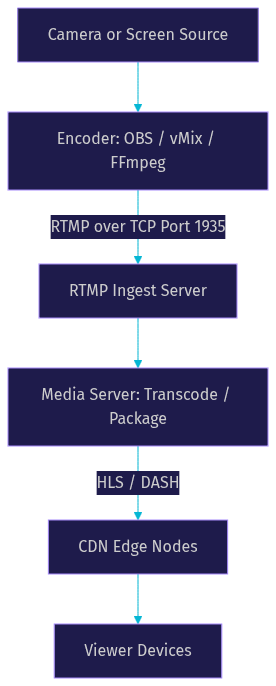
RTMP streaming is defined as the real-time transmission of audio, video, and metadata from a publisher to a server using the Real-Time Messaging Protocol, originally developed by Macromedia in the early 2000s and later acquired by Adobe. The protocol operates over TCP and uses a persistent connection to push media chunks from an encoder to a media server, which then redistributes the stream to viewers through adaptive bitrate formats like HLS or DASH.
The core components of an RTMP streaming workflow include the publisher (typically an encoder such as OBS, vMix, or FFmpeg), the RTMP server (software that receives and processes the incoming stream), and the distribution layer (CDN or player-facing endpoints). RTMP itself is an ingest protocol in modern workflows, meaning it carries the stream from the source to the server, while a different protocol handles delivery to end viewers.
Historically, RTMP served as both ingest and playback when Flash Player dominated the web. After Flash's deprecation, RTMP retreated to the ingest side while HLS and DASH took over playback. This division of labor persists today and explains why RTMP remains relevant even as the playback ecosystem has completely evolved.
The protocol's longevity stems from its simplicity. A single TCP connection, a straightforward handshake, and a chunk-based multiplexing system make RTMP easy to implement in both hardware and software encoders. According to the W3C WebRTC specification and related IETF streaming protocol documentation, RTMP's design prioritizes reliable delivery over minimal latency, which is why it works well for ingest but poorly for direct viewer playback at scale.
Here is a typical RTMP ingest workflow visualized:
How RTMP Streaming Works
RTMP streaming works by establishing a TCP connection, completing a three-step handshake, and then multiplexing audio, video, and data messages into chunked packets sent over that persistent connection. Understanding this lifecycle is essential for debugging connection failures and optimizing ingest performance.
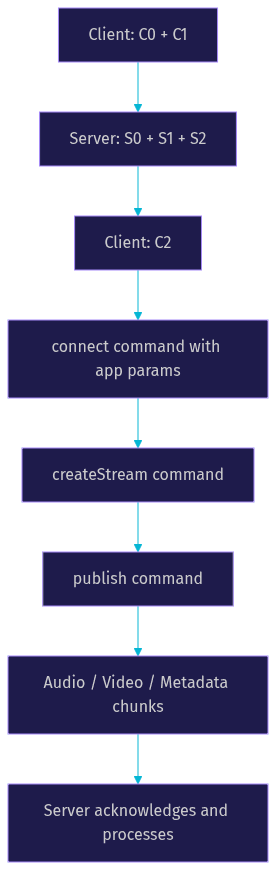
The connection begins with the handshake, which involves three phases labeled C0, C1, C2 on the client side and S0, S1, S2 on the server side. The client sends C0 and C1 simultaneously, containing a version byte and a timestamp with random data. The server responds with S0, S1, and S2, echoing the client's data back to confirm the connection is live. The client finalizes with C2, completing the handshake. This exchange happens in milliseconds but is critical because any failure here means the stream never starts.
After the handshake, the client sends a connect command with application parameters, followed by createStream to open a logical stream channel, and finally publish to begin sending media data. The server acknowledges each step, and once publish is accepted, the encoder begins pushing audio and video packets.
RTMP multiplexes different message types over a single TCP connection. Video packets carry encoded frames (typically H.264 or H.265), audio packets carry encoded audio (typically AAC), and metadata packets carry stream information like resolution, framerate, and codec details. The chunk stream mechanism divides these messages into configurable chunk sizes, defaulting to 128 bytes but often increased to 4096 or higher for efficiency.
Because RTMP runs over TCP, it inherits TCP's reliability guarantees. Every packet must be acknowledged, and lost packets are retransmitted. This ensures the stream arrives intact but introduces latency when network conditions degrade. A packet drop triggers retransmission, which stalls subsequent packets until the lost one is recovered. This head-of-line blocking is the primary source of RTMP latency variability, typically ranging from 2 to 5 seconds for ingest depending on network quality and encoder buffering.
When to Choose RTMP Streaming
Choosing RTMP streaming makes sense when platform compatibility and encoder simplicity matter more than ultra-low latency. In 2026, this describes the majority of standard live broadcasting workflows.
The compatibility advantage is RTMP's strongest selling point. YouTube Live, Twitch, Facebook Live, TikTok Live, LinkedIn Live, X (formerly Twitter), and virtually every social platform with live capabilities accepts RTMP ingest. If your application needs to broadcast to multiple platforms simultaneously (simulcast), RTMP is the path of least resistance because you can send the same stream to multiple RTMP endpoints without protocol translation.
Setup simplicity is the second major factor. Encoders like OBS Studio, vMix, Wirecast, and FFmpeg all have native RTMP output support. Hardware encoders from Teradek, AJA, and Blackmagic Design also default to RTMP. A developer can configure an RTMP destination by providing a server URL and stream key, and the encoder handles the rest.
RTMP is ideal for rapid deployment scenarios where you need to go live quickly without building custom protocol stacks. It is also well-suited for multi-platform simulcast, low-cost ingest from remote locations, and situations where the added latency of 2 to 5 seconds is acceptable for the content type (events, worship services, corporate webinars, gaming).
For interactive use cases where sub-second latency is required, such as live auctions, real-time Q&A, or audience participation, RTMP ingest paired with HLS delivery creates too much end-to-end delay. In those cases, protocols like WebRTC or SRT are better choices. VideoSDK's Interactive Live Streaming addresses this gap by offering sub-second latency for audience interaction while still supporting RTMP output for simultaneous broadcast to traditional platforms.
Here is a decision table comparing RTMP against SRT and WHIP for common criteria:
| Criterion | RTMP | SRT | WHIP |
|---|---|---|---|
| Platform compatibility | Universal | Growing but limited | Emerging |
| Typical ingest latency | 2 to 5 seconds | 0.5 to 2 seconds | Sub-second |
| Codec support | H.264, AAC (HEVC with E-RTMP) | H.264, HEVC, AV1 | H.264, HEVC, AV1 |
| Transport | TCP | UDP | UDP (WebRTC) |
| Encryption | RTMPS (TLS) | Built-in AES | DTLS/SRTP |
| Best for | Multi-platform simulcast, broad compatibility | Unreliable networks, remote production | Browser-based ingest, ultra-low latency |
[LINKABLE ASSET - comparison table]
Limitations of RTMP Streaming
RTMP streaming carries well-documented limitations that developers must understand before committing to it as a long-term ingest strategy. The protocol's age shows in several areas that modern alternatives address more elegantly.
TCP-induced latency is the most significant constraint. Because RTMP requires reliable, ordered delivery over TCP, any packet loss triggers retransmission and head-of-line blocking. On unstable networks (cellular, satellite, congested WiFi), this can cause latency spikes that accumulate over the duration of a stream. A stream that starts at 2 seconds of latency can drift to 8 or 10 seconds after an hour of intermittent packet loss. SRT, by contrast, uses UDP with configurable packet loss recovery, allowing the stream to continue without stalling.
The lack of built-in encryption is another limitation. Standard RTMP transmits all data in plaintext, including the stream key during the publish command. Anyone with access to the network path can potentially intercept the stream key and hijack the broadcast. RTMPS (RTMP over TLS) addresses this by wrapping the RTMP connection in an encrypted TLS tunnel, but not all platforms and encoders support RTMPS consistently. Developers should verify RTMPS support on both the encoder and server sides before relying on it for sensitive broadcasts.
Codec support is the third major limitation. The original RTMP specification predates modern codecs like HEVC (H.265) and AV1. Standard RTMP streams are limited to H.264 video and AAC audio, which means higher-efficiency codecs that could reduce bandwidth costs by 30 to 50 percent are unavailable without protocol extensions. Enhanced RTMP (E-RTMP) addresses this gap, but adoption is still uneven across platforms as of 2026.
Finally, RTMP does not scale efficiently for high-bandwidth professional productions. A single TCP connection cannot leverage multi-path delivery or adaptive congestion control the way UDP-based protocols can. For 4K or multi-camera live productions over challenging networks, RTMP's single-connection model becomes a bottleneck.
Enhancing RTMP Streaming
Several enhancements and architectural patterns can mitigate RTMP's limitations while preserving its compatibility advantage. Developers who understand these options can extend RTMP's useful life in their workflows significantly.
Enhanced RTMP for Modern Codecs
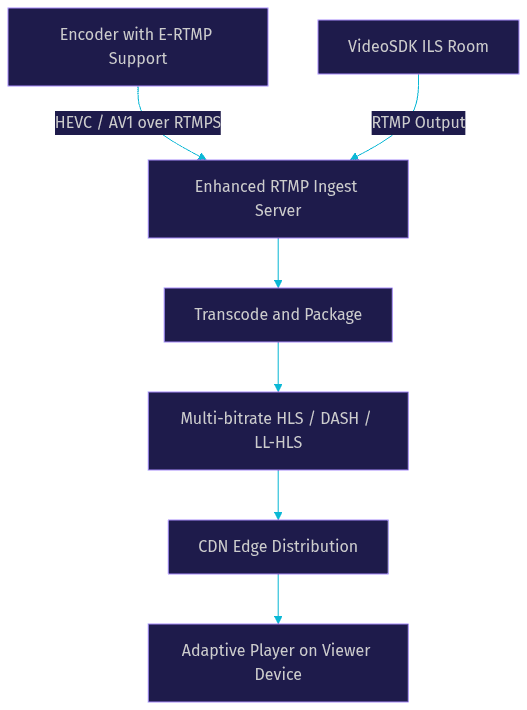
Enhanced RTMP (E-RTMP) is the most important evolution of the protocol. It extends the standard RTMP specification to support modern codecs including HEVC, AV1, and updated audio formats. E-RTMP works by modifying the codec identifier fields in the RTMP message header, allowing the server to recognize and process newer codecs without changing the underlying transport. As of 2026, adoption is growing but not universal. YouTube has begun accepting E-RTMP streams with HEVC, and several media servers including SRS and Wowza support it. Developers should test E-RTMP compatibility end-to-end before deploying it in production.
Enabling RTMPS for Secure Transmission
Enabling RTMPS should be the default for any production stream. The encoder connects to the server using a TLS-wrapped RTMP URL (typically using the RTMPS scheme on port 443 instead of the standard RTMP port 1935). The TLS handshake adds minimal latency (typically under 100 milliseconds) while protecting the stream key and media content from interception. Most major platforms now support RTMPS, and OBS Studio has supported it natively since version 27.
Multi-Bitrate Ingest via Parallel RTMP Streams
Multi-bitrate ingest is a pattern where the encoder sends multiple quality levels (for example, 1080p, 720p, and 480p) as separate RTMP streams to the same server. The server then packages these into an adaptive bitrate HLS or DASH manifest for viewer delivery. This approach requires more uplink bandwidth but gives viewers with varying connection speeds a smoother experience.
Server-Side Processing Options
On the server side, several software options process RTMP ingest effectively. The NGINX-RTMP module is a lightweight open-source option that handles RTMP receive and republish. SRS (Simple Realtime Server) is a high-performance alternative with native E-RTMP and HEVC support. Wowza Streaming Engine offers enterprise-grade transcoding and multi-protocol output. AWS IVS (Interactive Video Service) provides managed RTMP ingest with integrated CDN delivery.
VideoSDK also supports RTMP output through its Interactive Live Streaming mode, allowing developers to broadcast a VideoSDK room to any RTMP-compatible platform. This is particularly useful for applications that need both real-time audience interaction and traditional platform simulcast.
The SRS GitHub repository provides reference implementations for developers who want to inspect or contribute to an open-source RTMP server.
Here is an enhanced RTMP pipeline showing how modern extensions fit into the traditional workflow:
Choosing an RTMP Server Solution
Selecting the right RTMP server solution depends on your scalability requirements, budget, security needs, and the platforms you intend to broadcast to. The landscape in 2026 includes both self-hosted open-source options and fully managed cloud services.
NGINX-RTMP is the most common entry point for developers. It is a module that extends NGINX to handle RTMP ingest, record, and republish. It is lightweight, well-documented, and free. However, it lacks built-in transcoding, adaptive bitrate packaging, and modern codec support. It is best suited for simple relay scenarios where you receive an RTMP stream and forward it to another RTMP destination or a CDN.
SRS (Simple Realtime Server) is a more capable open-source option written in C++. It supports RTMP, SRT, WebRTC, HLS, and DASH, with native HEVC support through E-RTMP. SRS is designed for high concurrency and can handle thousands of concurrent streams on modest hardware. It is the recommended choice for developers who need a self-hosted solution with modern protocol support.
Wowza Streaming Engine is a commercial option that provides enterprise-grade transcoding, multi-protocol ingest and delivery, DVR recording, and detailed analytics. It is best for professional broadcast operations that need fine-grained control over encoding profiles and delivery formats.
AWS IVS is a fully managed service that handles RTMP ingest, transcoding, packaging, and CDN delivery as a single integrated product. It eliminates infrastructure management but locks you into the AWS ecosystem and pricing model.
VideoSDK offers RTMP output as part of its Interactive Live Streaming capabilities, which is distinct from traditional RTMP server software. Instead of receiving RTMP streams, VideoSDK generates RTMP output from its real-time rooms, enabling developers to broadcast interactive sessions to YouTube, Twitch, and other platforms simultaneously. For applications that need both real-time interaction and platform simulcast, this eliminates the need for a separate RTMP server.
Here is a quick-reference comparison of RTMP server solutions:
| Solution | Type | Scalability | E-RTMP Support | Cost Model | Best For |
|---|---|---|---|---|---|
| NGINX-RTMP | Open source | Low to medium | No | Free | Simple relay and republish |
| SRS | Open source | High | Yes | Free | Self-hosted multi-protocol ingest |
| Wowza | Commercial | High | Yes | Per-instance license | Enterprise broadcast operations |
| AWS IVS | Managed cloud | Auto-scaling | Partial | Per-hour streaming | Hands-off managed delivery |
| VideoSDK ILS | API/SDK platform | Auto-scaling | N/A (output only) | Per-minute participant | Interactive streaming with RTMP output |
[LINKABLE ASSET - comparison table]
When evaluating these options, consider five criteria: scalability (can it handle your peak concurrent stream count), security (does it support RTMPS and token-based authentication), monitoring (does it expose stream health metrics and alerts), cost (what is the total cost at your expected usage level), and platform support (does it output to the destinations your workflow requires).
Best Practices for Reliable RTMP Streaming
Reliable RTMP streaming requires attention to network conditions, encoder configuration, and proactive monitoring. Developers who follow these practices consistently achieve stable broadcasts even on challenging network paths.
Network Preparation
Ensure your uplink bandwidth is at least 2.5 times your target streaming bitrate to accommodate overhead and momentary fluctuations. For a 6 Mbps 1080p stream, this means a minimum of 15 Mbps stable uplink. Use a wired connection whenever possible, as WiFi introduces variable latency and packet loss that TCP-based RTMP handles poorly. If you must use WiFi, ensure the encoder is on a 5 GHz band with minimal interference. Disabling the Nagle algorithm on the encoder side can reduce small-packet latency, though this must be configured at the application or OS level depending on your encoder.
Encoder Settings
Set your keyframe interval to 2 seconds (or twice your framerate in frames, whichever is standard for your platform). YouTube and Twitch both expect 2-second keyframes for optimal HLS segmentation. Keep your bitrate within platform-recommended limits: 4500 to 6000 Kbps for 1080p at 30fps on YouTube, 6000 to 8000 Kbps for 1080p at 60fps. Exceeding these limits does not improve quality and risks buffer overflows on the ingest side. Maintain audio and video sync by ensuring your audio bitrate is consistent (128 to 160 Kbps for AAC) and your encoder processes audio and video on the same timeline.
Monitoring and Alerting
Track three key metrics: dropped frames (indicates network congestion or encoder overload), ingest bitrate versus target bitrate (divergence signals network issues), and round-trip time to the ingest server (sudden increases indicate routing problems). Most encoders expose these metrics, and server-side tools like SRS provide detailed session statistics. Set up alerts for dropped frame rates exceeding 1 percent and bitrate divergence exceeding 10 percent.
Redundancy and Failover
Dual-ingest sends the same stream to two RTMP servers simultaneously, with the CDN failing over to the backup if the primary goes offline. For critical broadcasts, consider a failover path using SRT or WHIP as a secondary ingest protocol, since these UDP-based protocols handle network degradation differently and may succeed where RTMP fails.
VideoSDK's REST APIs provide programmatic control over stream lifecycle, allowing developers to monitor room and participant status, detect disconnections, and trigger reconnection or failover workflows automatically.
Future Outlook: RTMP's Role in 2026 and Beyond
RTMP remains the default ingest protocol in 2026 not because it is technically superior but because its installed base is too large to displace. Every major platform, every hardware encoder, and every streaming software tool supports RTMP. Newer protocols like SRT and WHIP are gaining ground in specific niches (remote production, browser-based ingest), but they face a chicken-and-egg adoption problem: platforms will not add support until enough publishers use the protocol, and publishers will not switch until enough platforms accept it.
The expected evolution path for RTMP runs through Enhanced RTMP. As more platforms add E-RTMP support for HEVC and AV1, the protocol's bandwidth efficiency will improve significantly, extending its viable lifespan. Tighter integration between RTMP ingest servers and CDN edge services is also likely, with CDNs offering native RTMP receive endpoints that bypass intermediate processing layers.
For developers, the practical takeaway is to build workflows that use RTMP as the default ingest while maintaining protocol flexibility for the future. Architectures that can swap RTMP for SRT or WHIP without rewriting the application layer will be best positioned for the next protocol shift.
Definitions Glossary
RTMP (Real-Time Messaging Protocol): A TCP-based protocol for transmitting audio, video, and metadata from a publisher to a media server, originally developed by Macromedia and now the standard ingest format for live streaming platforms worldwide.
RTMPS: RTMP encapsulated in a TLS tunnel, providing encryption for the stream key and media content during transmission. Uses port 443 instead of the standard RTMP port 1935.
Enhanced RTMP (E-RTMP): An extension to the RTMP specification that adds support for modern codecs including HEVC (H.265) and AV1, enabling higher compression efficiency without changing the underlying TCP transport.
RTMP Handshake: The three-phase connection establishment process (C0, C1, C2 from client and S0, S1, S2 from server) that precedes all RTMP communication and validates the connection between encoder and server.
Chunk Stream: The RTMP multiplexing mechanism that divides audio, video, and data messages into configurable chunk sizes for transmission over a single TCP connection.
Simulcast (in RTMP context): The practice of sending the same RTMP stream to multiple platform endpoints simultaneously, enabling simultaneous broadcast to YouTube, Twitch, Facebook, and other destinations.
Interactive Live Streaming (ILS): VideoSDK's low-latency streaming mode that supports sub-second audience interaction while also providing RTMP output for simultaneous broadcast to traditional platforms.
Key Takeaways
- RTMP streaming remains the universal ingest standard in 2026 because every major platform and encoder supports it, making it the safest choice for multi-platform simulcast and broad compatibility.
- TCP-based transport gives RTMP reliable delivery but introduces latency variability through head-of-line blocking, typically resulting in 2 to 5 seconds of ingest latency.
- Enhanced RTMP (E-RTMP) extends the protocol with HEVC and AV1 codec support, improving bandwidth efficiency by 30 to 50 percent where supported.
- RTMPS should be the default for all production streams to protect stream keys and media content from interception.
- For applications needing both real-time interaction and platform simulcast, VideoSDK's Interactive Live Streaming provides sub-second audience latency with RTMP output to traditional platforms.
Conclusion
RTMP streaming is far from obsolete. Its universal compatibility, encoder support, and straightforward implementation make it the pragmatic choice for live video ingest in 2026. By understanding the protocol's handshake lifecycle, latency characteristics, and limitations, you can build streaming workflows that are both reliable and future-proof. Enhanced RTMP and RTMPS address the most pressing gaps, while server solutions like SRS and managed services like AWS IVS give you options at every scale.
If your application needs interactive streaming with RTMP output to traditional platforms, explore VideoSDK's Interactive Live Streaming and the VideoSDK REST API reference for programmatic stream control. You can start building for free at app.videosdk.live/login. What are you building with RTMP streaming? Drop a comment below, I would love to hear what kind of live streaming workflow you are working on.
Free $20 Balance for AI Voice Agents & Video Calls
FAQ