


A voice assistant app is an application that understands spoken natural language, processes requests through AI models, and responds with voice, text, or generated media. The best apps in 2026 combine speech-to-text, conversational AI, and multimodal output in a single interface. Developers can also build their own voice assistant experiences using platforms like VideoSDK's AI Agents, which connect speech recognition, LLMs, and text-to-speech into real-time pipelines.
Voice assistant apps have quietly become one of the most competitive categories in consumer software. What started as simple voice-command utilities has evolved into full conversational AI companions that draft emails, summarize documents, generate images, and control smart homes. Users now expect a single app to handle productivity, learning, and creative tasks without switching between a dozen tools.
The market reflects this shift. AI-driven assistants like Luzia, Hound by SoundHound, and Alexa-based apps have pushed the category forward, each taking a different bet on what an all-in-one assistant should be. Some prioritize speed and natural phrasing, others prioritize ecosystem depth or privacy. Meanwhile, developers building their own assistant products face a different question: which capabilities actually matter, and how do you evaluate them?
This guide breaks down what makes a voice assistant app stand out in 2026, compares the leading apps across their real strengths and weaknesses, and gives you a practical framework for choosing and optimizing one. Whether you are a power user, a student, or a developer researching the space, you will find concrete criteria here rather than marketing claims.
What Makes a Voice Assistant App Stand Out?
A voice assistant app stands out when it combines accurate speech recognition, genuine conversational memory, and multimodal output without forcing users into rigid command patterns. The gap between a mediocre assistant and a great one shows up in three places: how well it understands you, how it remembers context, and how naturally it responds.
Core AI Capabilities
The foundation of any modern voice assistant app is natural language understanding. Instead of matching fixed phrases, the best apps parse intent, handle follow-up questions, and maintain contextual recall across a conversation. Ask about the weather in Tokyo, then follow up with "what about next week," and a capable assistant knows you are still talking about Tokyo.
Multimodal support is the second differentiator. Leading assistants accept input as text, voice, and images, and can respond in kind. Snap a photo of a document and ask for a summary, or describe an image you want generated. This flexibility turns the assistant from a voice-command tool into a general-purpose AI companion.
User Experience & Accessibility
Great voice assistant apps are built around hands-free operation. Voice activation, continuous conversation mode, and background listening mean you can interact while driving, cooking, or working. Multilingual support matters too: the strongest apps handle dozens of languages and switch between them mid-conversation.
Privacy safeguards increasingly shape user choice. Apps that offer end-to-end encryption, on-device processing for sensitive requests, and transparent data policies earn trust that pure capability cannot. For users who treat their assistant as a daily companion, privacy-by-design is a feature, not an afterthought.
Key Functional Areas of Modern Voice Assistant Apps
Modern voice assistant apps cluster their capabilities into four functional areas: writing and productivity, learning and knowledge, creative generation, and daily life management. Understanding these areas helps you match an app to your actual workflow instead of paying for features you never touch.
Writing & Productivity
Productivity is where most users get daily value. A capable assistant drafts emails from a one-sentence brief, summarizes long PDFs into bullet points, and rewrites awkward paragraphs into clean prose. The time savings compound: users who delegate routine drafting to an assistant report reclaiming significant time each week. The best apps preserve your tone and voice across drafts, so output does not read like generic machine text.
Learning & Knowledge
For students and lifelong learners, a voice assistant app acts as an always-available tutor. It walks through math problems step by step, explains concepts at adjustable difficulty, and supports language practice through spoken conversation. Instant translation is a natural extension: speak a phrase in your language and hear it spoken back in another. This conversational practice mode is something static translation tools cannot replicate, because the assistant corrects pronunciation and suggests more natural phrasing.
Creative Generation
Creative tasks round out the modern assistant. AI-generated images from text descriptions, brainstorming partners that riff on your ideas, and code assistance for developers all live here. A developer can describe a function's intent in plain language and receive an explanation or a structural approach, while a designer can explore visual concepts before committing to a direction. The quality of creative output varies significantly between apps, which is one reason hands-on testing matters before committing to a subscription.
Daily Life Management
The classic assistant role persists: reminders, calendar sync, weather briefings, and news digests. What has improved is integration depth. The best apps chain these together, so a morning briefing can combine your first meeting, the commute weather, and the headlines you care about in a single spoken summary.
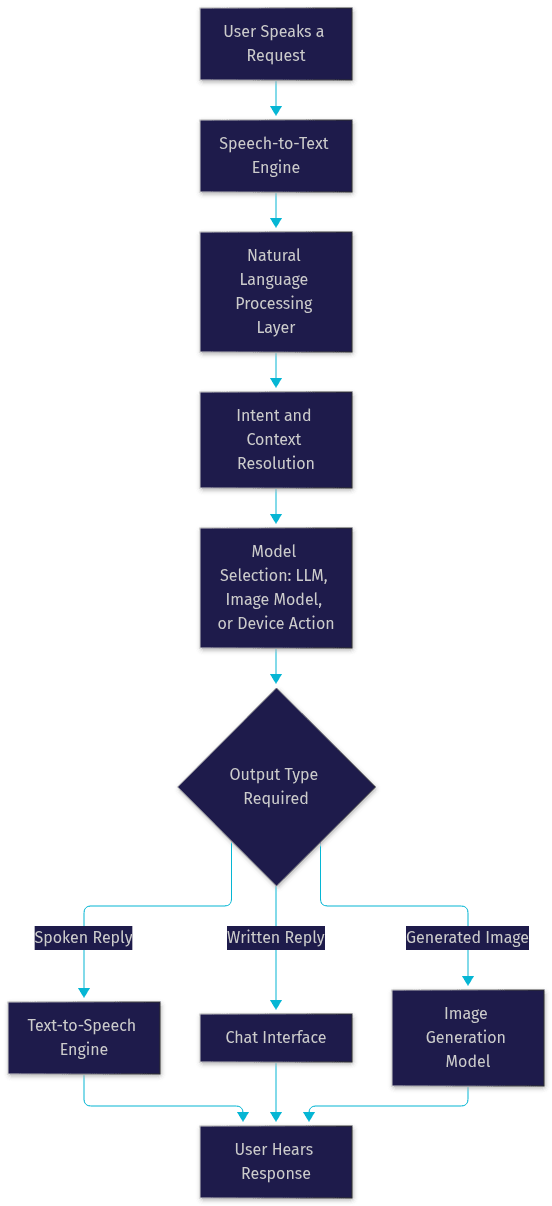
Here is how a typical request flows through a modern voice assistant app, from spoken input to delivered output:
Comparing Top Voice Assistant Apps
Comparing voice assistant apps honestly requires acknowledging that each excels in a different scenario. The four apps below represent the main strategic approaches in the 2026 market: the all-in-one AI companion, the speed-first assistant, the ecosystem play, and the lightweight utility.
Luzia: AI Assistant & Chat
Luzia takes the all-in-one approach, routing user requests across multiple AI models depending on the task. Its strengths include multi-task routing, the ability to start using it without creating an account, and end-to-end encryption for conversations. That privacy posture is rare in this category and appeals to users wary of cloud data retention. Its weaknesses are more situational: audio handling can falter in noisy environments, and image generation quality trails dedicated image tools. For users who want one private assistant for mixed daily tasks, it is a strong starting point.
Hound by SoundHound
Hound's differentiator is speed and natural phrasing. It handles compound questions and rapid follow-up queries better than most competitors, maintaining context across a chain of related questions without forcing you to repeat yourself. Speech recognition accuracy on complex queries is a genuine strength. Its main weakness is the limited offline mode: without connectivity, capability drops sharply. Hound suits users who value conversational flow and query speed above ecosystem integration.
Ultimate Alexa Voice Assistant
This app extends the Alexa ecosystem to devices beyond Amazon hardware, including Wear OS support on the wrist. Its strengths are deep Alexa integration, access to the skills catalog, and consistent smart home control. The weaknesses are real: music streaming is restricted compared to native Alexa devices, and the ad-supported experience interrupts regular use. It is best for users already invested in the Alexa ecosystem who want assistant access on non-Amazon devices.
Voice Commands Assistant App
This lightweight option focuses on core voice commands and smart home device control. Its strength is a small footprint and fast launch, useful on older devices. The trade-off is an ad-heavy experience in the free tier and limited AI depth: it executes commands well but offers little conversational intelligence. It suits users who primarily want device control without a full AI companion.
How to Choose the Right Voice Assistant App for You
Choosing well means matching an app to your dominant use case, then filtering by privacy, accuracy, and price. A structured approach beats downloading four apps and abandoning three.
Start by defining your primary use case. Productivity-focused users should prioritize drafting quality and document summarization. Learners should test tutoring depth and language coverage. Smart home users need device compatibility first. Creative users should compare image generation quality directly, since it varies widely.
Next, evaluate privacy policies and data handling. Look for explicit statements about encryption, whether voice recordings are stored, and whether you can delete your history. Apps offering on-device processing for sensitive requests deserve extra consideration if you handle confidential material.
Then test voice accuracy in your real environment. Recognition quality that looks fine in a quiet demo can degrade in a car or open office. Test follow-up queries specifically, because contextual recall is where weak assistants fail. If you work across languages, verify multilingual performance in each language you actually use.
Finally, consider the pricing model. Free tiers work for occasional use, freemium models let you evaluate before paying, and subscriptions make sense only when you use the premium features daily. A useful rule: if you cannot name three premium features you would use this week, the subscription is probably not worth it.
Implementation Tips for Power Users
Power users extract far more value from a voice assistant app by configuring it deliberately rather than using defaults.
Enable continuous conversation mode where available. This keeps the microphone active for follow-up questions, which is what makes contextual recall feel natural instead of fragmented. You avoid repeating wake words, and the assistant maintains conversation state across turns.
Integrate with third-party services through APIs or skill stores. Connecting your calendar, note-taking app, and smart home platform turns the assistant from a chat interface into an orchestration layer for your digital life. Most leading apps expose integration points, and the setup effort pays back quickly in daily convenience.
Optimize battery usage by preferring on-device processing where the app offers it. Local processing for simple requests reduces both battery drain and network dependency. It also improves response latency for routine commands, since nothing round-trips to a cloud model.
Set up custom wake words or shortcuts for your most frequent requests. A shortcut that triggers your morning briefing, or a custom phrase that opens a specific workflow, removes repeated navigation. Small configuration investments compound into a noticeably faster daily experience.
For developers interested in building rather than just using, the same principles apply to your own products. Real-time voice pipelines need low-latency speech-to-text, a responsive LLM layer, and natural text-to-speech output. Platforms like VideoSDK's AI Agent SDK handle the real-time transport layer, and its Conversational Graph enables deterministic, step-ordered conversation flows for use cases where the AI must follow a fixed sequence, such as booking or intake workflows.
Future Trends in Voice Assistant Apps
Voice assistant apps are heading toward four converging trends in 2026 and beyond.
Edge AI and on-device inference are moving more processing onto the phone itself. Smaller, efficient models now handle routine requests locally, cutting latency, reducing battery cost, and keeping sensitive audio off the network entirely. Expect the privacy and speed gap between on-device and cloud-only assistants to widen in favor of hybrid approaches.
Deeper multimodal interaction is the second trend. Voice plus vision means assistants that can look through your camera, understand what they see, and discuss it conversationally. Point your camera at a broken appliance and ask how to fix it, and the assistant reasons over the live image.
Personalization through user-specific models is the third. Rather than one generic model for everyone, assistants are adapting to individual vocabulary, routines, and preferences, making recognition and responses more accurate over time for each user.
Finally, accessibility features are expanding for neurodiverse users. Voice-first interfaces already reduce barriers for users with dyslexia, motor impairments, and attention differences. Expect purpose-built modes, such as simplified response structures and adjustable pacing, to become standard rather than optional.
Definitions Glossary
Voice Assistant App: An application that accepts spoken natural language input, interprets intent through AI, and responds with voice, text, or generated media. Modern examples combine conversational AI with productivity and smart home features.
Speech-to-Text (STT): The engine that converts spoken audio into written text, forming the input layer of every voice assistant app. Accuracy in noisy environments is a key quality differentiator.
Text-to-Speech (TTS): The engine that converts generated text responses into natural spoken output. Voice quality and pacing directly shape how human the assistant feels.
Contextual Recall: The assistant's ability to remember earlier parts of a conversation and resolve follow-up questions without repeated context. It is the core of natural multi-turn dialogue.
On-Device Processing: Running AI inference locally on the user's hardware instead of in the cloud, improving latency and privacy by keeping audio data off the network.
Conversational Graph: A deterministic orchestration layer, such as the one in VideoSDK's AI Agents, that controls conversation flow through defined steps rather than leaving branching entirely to the LLM.
Key Takeaways
- A great voice assistant app combines natural language understanding, contextual recall, and multimodal output, not just accurate voice commands.
- The leading 2026 apps each win in a different scenario: Luzia for privacy and multi-task routing, Hound for speed and follow-up queries, Alexa-based apps for ecosystem depth, and lightweight utilities for device control.
- Choose by primary use case first, then filter by privacy policy, real-world voice accuracy, and pricing model before committing to a subscription.
- Power-user configuration, including continuous conversation mode, third-party integrations, and custom shortcuts, multiplies the value of any assistant you pick.
- Developers building their own assistants can use real-time platforms like VideoSDK's AI Agents to assemble speech-to-text, LLM, and text-to-speech layers without building transport infrastructure from scratch.
Conclusion
The voice assistant app category has matured from novelty utilities into genuine daily companions, and the differences between apps now matter more than ever. Luzia, Hound, and Alexa-based options each serve distinct needs, so the right move is to trial two or three against your real workflow before subscribing. Test follow-up queries, check the privacy policy, and configure the app deliberately once you commit.
If you are a developer inspired to build rather than just use, explore VideoSDK's AI Agents documentation and the code samples library to see how real-time voice pipelines are assembled. You can start free at app.videosdk.live/login. What kind of voice assistant app are you building or using? Drop a comment, I would love to hear about your use case.
Free $20 Balance for AI Voice Agents & Video Calls
FAQ