


A voice assistant is a software agent that listens for a wake word, converts spoken language into text, interprets the user's intent, executes an action, and responds with synthesized speech. Modern assistants increasingly combine real-time large language models with speech-to-text and text-to-speech, enabling natural conversations rather than rigid command menus. Developers can build their own using platforms like VideoSDK's AI agent SDK, which connects speech recognition, LLM, and voice synthesis providers into one pipeline. This guide covers both the consumer landscape and the engineering path to building your own.
Introduction
Somewhere between your morning alarm and your evening lights-off command, a voice assistant probably touched your day. These systems have quietly moved from novelty demos to everyday infrastructure. They set reminders, read messages aloud, translate street signs in foreign cities, and let people with limited mobility control their entire homes without touching a switch.
For developers and product teams, the shift is even more significant. The rise of real-time large language models has collapsed the gap between scripted command menus and genuinely conversational agents. A voice assistant built in 2026 can hold a natural dialogue, remember context, and take actions across external services, not just match keywords against a fixed list.
That creates two audiences for this guide. If you are a consumer or business decision-maker, you need to know which platform fits your ecosystem, your language needs, and your privacy requirements. If you are a developer, you need to understand the pipeline architecture, the tooling landscape, and the trade-offs between cloud and edge processing.
This article covers both sides. We will break down how voice assistants actually work, compare the major platforms, walk through privacy considerations, and then go deep on how to build your own custom voice assistant from scratch.
What Is a Voice Assistant?
A voice assistant is defined as a software system that interprets and acts on spoken user input, responding through synthesized speech or connected interfaces. It works by continuously or on-demand listening for a trigger phrase, converting captured audio into text, extracting meaning from that text, executing a matching action, and converting the result back into audible speech.
The core components are consistent across platforms. A wake word engine keeps the device passively listening. A speech-to-text (STT) engine transcribes the utterance. A natural language understanding (NLU) layer or language model determines intent. An action dispatcher executes the intent, whether that means setting a timer or calling an external API. Finally, a text-to-speech (TTS) engine produces the spoken response.
VideoSDK provides the real-time communication layer that lets developers connect these components into live voice sessions, with an open-source AI agent SDK that wires STT, LLM, and TTS providers into a single managed pipeline.
How Voice Assistants Work
Every voice assistant follows the same fundamental processing pipeline, regardless of vendor. The flow below shows the journey from spoken audio to spoken response.
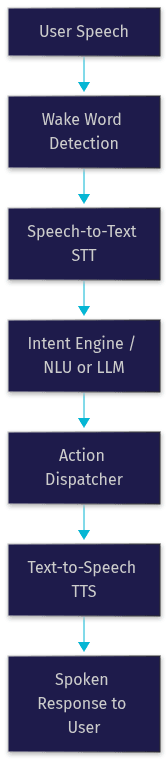
The pipeline begins when the wake word engine detects its trigger phrase in the audio stream. The captured audio is then transcribed by the STT engine, which may run on-device or in the cloud. The transcript passes to the intent engine, which in classic assistants maps the text to a predefined intent and slot values, and in modern generative assistants passes it to a large language model that interprets context and decides on a response.
The action dispatcher then performs the actual work: querying a weather API, sending a message, adjusting a thermostat, or calling a function tool. The result is formatted into natural language and rendered as speech by the TTS engine. Latency across this entire loop determines whether the assistant feels conversational or sluggish, which is why modern pipelines target sub-second end-to-end response times.
Major Voice Assistant Platforms
The voice assistant market in 2026 is dominated by a handful of ecosystems, each with distinct strengths. Choosing between them usually comes down to which devices you already own and how much you value on-device privacy.
Siri (Apple)
Siri is Apple's assistant, deeply integrated across iPhone, iPad, Mac, Apple Watch, HomePod, and CarPlay. Its defining strength is ecosystem lock-in: handoffs between devices are seamless, and requests can run entirely on-device for many common tasks. Apple has invested heavily in on-device processing, meaning audio for routine commands never leaves the hardware. With the integration of large language model capabilities, Siri now handles multi-step requests and richer contextual conversations while keeping its privacy-first stance.
Google Assistant
Google Assistant leverages the company's long leadership in speech recognition and natural language processing. It is cross-platform, available on Android, iOS, Nest devices, and vehicles, and supports the broadest language coverage of any major assistant. Its integration with Google's search infrastructure and Gemini models gives it strong conversational and knowledge capabilities. For users embedded in the Google ecosystem, it remains the most capable general-purpose option.
Amazon Alexa
Alexa dominates the smart-home segment. Its skill ecosystem, with hundreds of thousands of third-party extensions, lets developers add custom capabilities, and its device lineup spans speakers, displays, thermostats, and televisions. Alexa's strength is breadth of hardware integration and third-party extensibility. Its trade-off has historically been cloud dependence, with most processing happening on Amazon's servers, though newer devices push more inference to the edge.
Huawei Celia
Celia serves Huawei's device ecosystem, primarily in markets where Huawei maintains strong presence across Europe, Asia, and the Middle East. It emphasizes on-device AI processing and multilingual support tailored to regional languages. For developers building for those markets, Celia offers an open capability framework for integrating third-party services, though its reach is geographically narrower than the three leaders above.
Microsoft Copilot Voice
Copilot Voice is Microsoft's enterprise-leaning assistant, extending across Windows, Office, and Teams with a focus on productivity workflows rather than smart-home control.
VoiceOS
VoiceOS is a desktop-centric voice layer that brings assistant-style control to PC workflows, targeting power users who want hands-free operation of desktop applications.
Everyday Use Cases
Voice assistants earn their place through daily utility. The most common use cases cluster around productivity, home control, travel, and accessibility.
Daily Productivity
Alarms, timers, and reminders remain the most frequently used voice commands across every platform. Messaging by voice, including dictating texts and having incoming messages read aloud, is a close second, particularly while driving or cooking. Calendar queries, note capture, and hands-free search round out the productivity set. The hands-free nature of these interactions is the core value: they work when your hands and eyes are busy.
Smart-Home Control
Smart-home control is where assistants become a genuine control layer for your environment. Lights, thermostats, locks, cameras, and appliances can all be operated by voice, either individually or as grouped scenes. A single command like a bedtime routine can dim lights, lock doors, and set the thermostat. Alexa leads in device compatibility, while Google and Apple have closed much of the gap through the Matter standard.
Travel and Navigation
On the road, voice assistants handle navigation queries, live translation, flight status updates, and local search. Real-time translation is a standout capability: speaking a phrase and hearing it rendered in another language has transformed travel for millions. Integration with mapping services means directions, estimated arrival times, and route changes can all be requested without touching a screen.
Accessibility and Health
For users with visual, motor, or cognitive disabilities, voice assistants are not conveniences but essential tools. Hands-free operation opens device access to people who cannot easily use touchscreens. Voice-controlled home systems provide independence for users with limited mobility. Health-adjacent features like medication reminders, emergency contact calling, and fall-detection integration on smart speakers make assistants a meaningful part of care workflows.
Privacy and Security Considerations
Privacy is the most under-considered aspect of voice assistant adoption, and it deserves deliberate attention before you put an always-listening microphone in your bedroom.
The central trade-off is on-device processing versus cloud processing. On-device inference keeps audio on your hardware, reducing exposure but limiting capability to what local chips can run. Cloud processing unlocks larger models and richer responses but means audio and transcripts transit and are stored on remote servers. Apple and Huawei lean hardest into on-device processing; Alexa historically leaned hardest into cloud processing.
Data retention policies matter as much as processing location. Most platforms let you review and delete voice history, and some offer automatic deletion schedules. In the EU, GDPR compliance requires explicit consent for recording, the right to access stored data, and the right to erasure, and several platforms carry regional privacy certifications that verify these mechanisms.
A practical privacy checklist:
- Review the wake word settings and disable any always-recording features you do not want
- Set an automatic voice-history deletion window, ideally 3 months or shorter
- Disable third-party skill or app data sharing in the assistant's privacy settings
- Mute the microphone on bedroom and office devices when not in use
- Check whether your region's privacy certification, such as GDPR compliance, applies to your account
For developers building assistants, these considerations become design requirements rather than settings. Token-based authentication, encrypted transport, and explicit consent flows should be built in from the start, not bolted on later.
Building Your Own Voice Assistant
Building a custom voice assistant is now a realistic project for a small team, and the tooling has matured dramatically. The architecture below shows a hybrid edge-cloud design that balances latency, privacy, and capability.
Choosing a Platform or SDK
Your first decision is the build approach. Open-source frameworks like Mycroft and Rasa give you full control and no per-request costs, at the price of managing your own infrastructure. Cloud platforms like Google Dialogflow and Azure Speech offer managed NLU and speech services with strong tooling but ongoing per-use pricing. A newer middle path is agent SDKs, such as VideoSDK's open-source AI agent SDK, which connects STT, LLM, and TTS providers of your choice into a real-time voice pipeline and handles the session, turn detection, and transport layers for you. You can explore this approach in the VideoSDK AI agents documentation.
Designing Conversational Flow
The biggest architectural decision is deterministic versus LLM-driven conversation. A deterministic flow, often implemented as a conversational graph, defines explicit nodes and transitions, guaranteeing that critical steps like payment confirmation or identity verification always happen in order. An LLM-driven flow is more flexible and natural but less predictable. Production systems increasingly combine both: a graph controls the business logic while the LLM handles natural language within each step. VideoSDK's Conversational Graph is purpose-built for exactly this hybrid pattern.
Ensuring Data Privacy
Privacy engineering for a custom assistant means running STT and TTS at the edge where feasible, keeping only transcripts rather than raw audio, encrypting everything in transit and at rest, and authenticating every session with short-lived tokens generated server-side. Never embed long-lived credentials in a client device. If your assistant handles health or financial conversations, map your data flows against GDPR or your regional equivalent before launch, and document retention windows explicitly.
Testing and Deployment
Test locally first with recorded audio and scripted conversations, verifying that each pipeline stage behaves as expected before wiring in live speech. Then test under real network conditions, since latency on poor connections is where most prototypes fail. For deployment, decide between a managed agent cloud, which handles scaling and observability, and self-hosting with containers on your own infrastructure. Monitor latency per pipeline stage, transcription accuracy, and intent resolution rates after launch, because those three metrics predict user satisfaction better than any single end-to-end number.
Future Trends in Voice Assistants
Three trends are reshaping what a voice assistant can be.
First, generative AI has replaced scripted responses with real-time conversation. Real-time multimodal models, including OpenAI's Realtime API, Google's Gemini Live, and AWS Nova Sonic, process speech directly and respond with natural speech, collapsing the STT-LLM-TTS chain into a single model call. This cuts latency dramatically and makes conversations feel genuinely human.
Second, multimodal interaction is merging voice with vision. Assistants that can see through a camera while listening can interpret context, such as reading a label, recognizing a landmark, or describing a scene for a visually impaired user. Vision-capable voice agents are already shipping in mobile assistants and are expanding into wearables and smart glasses.
Third, edge AI chips are pulling more of the pipeline onto the device. Dedicated neural processors in phones and smart speakers now run wake word detection, STT, and increasingly the language model itself locally, improving both latency and privacy. Alongside this, open-source agent frameworks are lowering the barrier for teams to build custom assistants without locking into a single vendor's cloud.
Choosing the Right Voice Assistant for You
The right choice depends on your priorities. Use this decision matrix as a starting point.
| Assistant | Ecosystem | Language Support | On-Device AI | Best For |
|---|---|---|---|---|
| Siri | Apple devices | Broad, strong multilingual | Strong | Apple users who value privacy |
| Google Assistant | Android, iOS, Nest | Broadest coverage | Moderate | Cross-platform users and search-heavy tasks |
| Amazon Alexa | Echo and smart-home devices | Broad | Moderate | Smart-home-centric households |
| Huawei Celia | Huawei devices | Strong regional coverage | Strong | Huawei ecosystem users in supported regions |
| Microsoft Copilot | Windows, Office, Teams | Broad | Moderate | Enterprise productivity workflows |
| Custom build (VideoSDK) | Any, you control it | Depends on chosen providers | You decide | Teams needing full control and custom flows |
If you already own devices in one ecosystem, staying within it usually wins on convenience. If privacy is your top priority, favor assistants with strong on-device processing. If you need capabilities no commercial assistant offers, or you want to embed voice into your own product, building a custom assistant with an agent SDK is the path that gives you full control over the pipeline, the data, and the conversation flow.
Definitions Glossary
Wake Word: A short trigger phrase that a voice assistant listens for continuously before activating full processing, such as the name of the assistant itself.
Speech-to-Text (STT): The engine that converts spoken audio into written text, forming the input stage of every voice assistant pipeline.
Natural Language Understanding (NLU): The layer that interprets transcribed text to determine what the user wants, either by matching predefined intents or by reasoning with a language model.
Text-to-Speech (TTS): The engine that converts generated text responses into natural-sounding spoken audio for the user.
Conversational Graph: A deterministic, graph-based orchestration layer where developers define conversation steps and transitions explicitly, with the LLM handling only natural language within each step. VideoSDK provides this as a core feature for structured voice flows.
Agent Worker: The process that runs a voice AI agent and manages its session lifecycle, connecting STT, LLM, and TTS providers into a live conversation.
Key Takeaways
- A voice assistant follows a consistent pipeline: wake word detection, speech-to-text, intent interpretation, action execution, and text-to-speech response.
- Platform choice is primarily an ecosystem decision, with privacy and language support as the key differentiators between Siri, Google Assistant, Alexa, and regional players like Celia.
- Privacy should be evaluated on two axes: where processing happens (edge versus cloud) and how long data is retained.
- Building a custom voice assistant is now practical for small teams using agent SDKs that connect STT, LLM, and TTS providers into one real-time pipeline.
- Deterministic conversational graphs combined with LLM-driven language generation give production assistants both reliability and naturalness.
Conclusion
Voice assistants have matured from command-matching toys into genuinely useful layers of daily computing, and the generative AI shift of 2026 has made them conversational at last. Whether you adopt Siri, Google Assistant, or Alexa, or build your own custom voice assistant, the fundamentals are the same: a pipeline that listens, understands, acts, and speaks, with privacy engineered in from the start.
If you are ready to build rather than buy, start with the VideoSDK AI agents documentation, explore the Conversational Graph guide for structured flows, and check the code samples for working examples. You can create a free account at app.videosdk.live and have a voice agent running today.
What are you building with voice technology? Drop a comment, I would love to hear what kind of voice assistant use case you are working on.
Free $20 Balance for AI Voice Agents & Video Calls
FAQ