


An open source AI assistant is an AI-powered helper whose full source code is publicly available, letting you self-host it, inspect how it handles your data, and extend it with your own tools. Unlike proprietary assistants such as Siri or Alexa, an open source AI assistant keeps your conversations, memory, and files on hardware you control. This guide compares the leading projects of 2026 and walks you through deploying one yourself.
The demand for privacy-preserving, self-hosted AI assistants has exploded. Every week, another story lands about a smart assistant recording conversations, sending data to third parties, or changing its privacy policy overnight. Developers and privacy-conscious users are responding by building and running their own assistants, and the open source ecosystem has matured fast enough to make that practical.
An open source AI assistant gives you three things a proprietary service never can: full visibility into what happens to your data, the freedom to run everything locally, and the ability to reshape the assistant's behavior to fit your workflow. In 2026, the tooling around these projects, especially the Model Context Protocol for tool integration, has reached the point where a solo developer can stand up a capable voice assistant in an afternoon.
This guide defines what makes an assistant genuinely open source, surveys the leading projects, compares them side by side, and walks you through deploying and customizing one.
What Is an Open Source AI Assistant?
An open source AI assistant is defined as an AI-powered personal or team assistant whose source code is published under an open license, allowing anyone to run, inspect, modify, and redistribute it. The assistant typically combines a large language model with speech recognition, speech synthesis, persistent memory, and the ability to call external tools such as calendars, email, or smart home APIs.
An open source AI assistant works by connecting these components through a pipeline: your spoken or typed input is converted to text, passed to a language model that reasons about it, optionally routed to tool servers that act on the real world, and returned to you as speech or text. The critical difference from proprietary services is governance. When the code is public, the community, not a corporation, decides what data leaves the device and what features ship next.
Contrast this with closed assistants. A proprietary assistant is a black box: you cannot verify where your transcripts are stored, which model processed them, or whether a vendor quietly changed the retention policy. An open source assistant inverts that relationship. You choose the model, you choose the hardware, and you can read every line that touches your data. Core attributes to look for are self-hosting support, community governance through public repositories and roadmaps, and an extensible plugin or tool-calling layer.
Core Components
Most open source AI assistants share the same building blocks, and understanding them helps you evaluate any project you encounter.
The first block is LLM integration, the layer that connects the assistant to a language model, either a local model running on your own GPU or a hosted API you explicitly allow. The second is the speech layer: speech-to-text converts your voice into text the model can reason over, and text-to-speech turns responses back into natural-sounding audio. The third is the memory store, a persistent database that lets the assistant remember facts about you across sessions, which is what separates a genuine assistant from a stateless chatbot. The fourth is the tool-calling layer, the mechanism that lets the model act on the world by invoking functions, APIs, or external services. In modern projects this layer increasingly speaks the Model Context Protocol, an open standard for connecting AI systems to tools and data sources.
Architecture Overview
A generic open source AI assistant architecture has four tiers. At the top sits the frontend, the interface you interact with, which may be a web app, a mobile client, or a smart speaker. Below it is the backend gateway, which handles authentication, session state, and orchestration. The gateway talks to the model server, where the language model runs, either locally or through a remote API. Alongside the model server run tool servers, small services that expose specific capabilities such as calendar access, web search, or home automation.
The diagram below shows the full request flow, from spoken input through the pipeline and back out as speech, with tool plugins invoked when the model decides it needs external data.
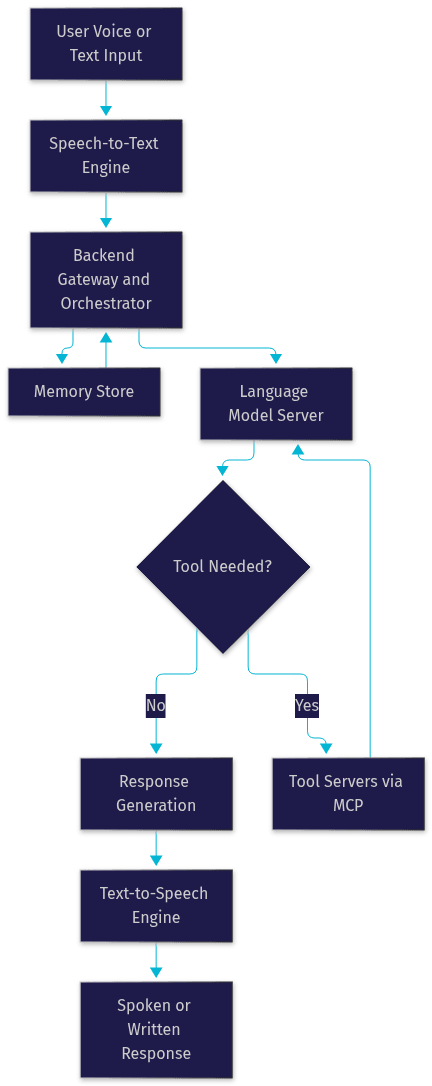
The key design insight is separation. Because the model server, tool servers, and memory store are distinct components, you can swap the language model without touching your tools, or add a new tool without retraining anything. This modularity is what makes open source assistants genuinely extensible rather than merely customizable.
Leading Open Source AI Assistant Projects
The open source AI assistant landscape in 2026 is surprisingly rich. Below is a survey of notable projects, each with a distinct focus. Verify current licensing and activity before committing, since these projects evolve quickly.
Sentient positions itself as a full-featured personal AI with strong emphasis on persistent memory and personality continuity. It remembers context across sessions by design, supports voice interaction out of the box, and runs on consumer hardware with a local model. Its community is one of the most active in the space, and it ships cross-platform clients for desktop and mobile.
Kai focuses on being a privacy-first local assistant that runs entirely offline. Its distinguishing feature is a fully local pipeline: local speech recognition, a local model, and local synthesis, with no network calls required after installation. It is the strongest choice if your priority is that no byte of your data ever leaves your machine, at the cost of needing reasonably capable hardware.
OpenClaw is a community-driven AI automation platform more than a conversational companion. It emphasizes tool-calling and workflow automation, with first-class support for the Model Context Protocol and a large plugin ecosystem. Teams use it to wire assistants into internal systems, and its permissive licensing makes commercial embedding straightforward.
Echo is an open source voice bot project aimed at smart-speaker-style deployments. It targets single-board computers and low-power devices, trading model sophistication for always-on availability. If you want a kitchen-counter assistant rather than a workstation companion, Echo is the project to evaluate.
Chanakya is a multilingual assistant project with particular strength in Indic languages, filling a gap that most Western-centric projects leave open. It bundles fine-tuned local models for regional language understanding and speech, and its roadmap is governed openly through community proposals.
Betsy rounds out the list as a lightweight, self-hosted AI assistant designed for easy deployment on modest hardware. Its philosophy is minimalism: a small footprint, a simple configuration surface, and just enough memory to be useful. It is frequently recommended as a first project for developers new to self-hosting.
Feature Comparison Table
The table below compares the projects across the dimensions that matter most in practice: memory persistence, voice support, platform coverage, self-hosting complexity, and community activity. Treat it as a starting point and verify each project's current state, since features move fast.
| Project | Persistent Memory | Voice Support | Cross-Platform | Self-Hosting Complexity | Community Activity |
|---|---|---|---|---|---|
| Sentient | Strong, long-term memory | Full duplex voice | Desktop and mobile | Moderate | Very high |
| Kai | Session plus long-term | Fully local voice | Desktop | High, needs capable hardware | High |
| OpenClaw | Configurable store | Add-on module | Server-first, API driven | Moderate, container-based | Very high |
| Echo | Basic recall | Core feature, wake word | Single-board devices | Low | Medium |
| Chanakya | Long-term memory | Multilingual voice | Desktop and mobile | Moderate | Growing |
| Betsy | Lightweight memory | Optional module | Desktop | Low | Medium |
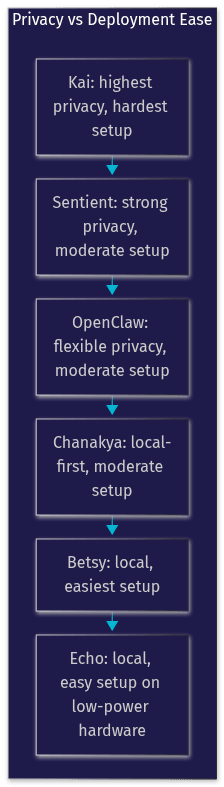
The most consequential row for most readers is self-hosting complexity. Kai offers the strongest privacy guarantee but demands the most from your hardware, while Betsy and Echo trade capability for accessibility. If you are evaluating projects for a team rather than personal use, OpenClaw's automation focus and permissive licensing usually win the shortlist.
The chart below visualizes how the projects distribute across two axes that matter most: privacy strength and deployment ease.
How to Choose the Right Open Source AI Assistant for Your Needs
Choosing well means matching the project to your actual constraints, not chasing the most starred repository. The decision framework below covers the five dimensions that most often decide the outcome.
Use case first. A personal assistant that remembers your preferences has different requirements than a team automation agent that wires into internal tools. For personal use, prioritize memory persistence and voice quality, which favor Sentient or Kai. For team or developer use, prioritize the tool-calling layer and API surface, which favors OpenClaw.
Platform preference. If you live on a single desktop, almost any project works. If you need your assistant on your phone, in your car, and on a home speaker simultaneously, cross-platform support becomes a hard filter, and the field narrows quickly.
Required integrations. List the tools your assistant must touch: calendar, email, home automation, code repositories, internal APIs. Projects that speak the Model Context Protocol make adding these integrations dramatically easier, because MCP-compatible tool servers can be plugged in without modifying the assistant core.
Privacy level. Be honest about your threat model. Fully local means no data leaves your hardware, but it also means you supply the compute. A hybrid setup, local memory with a hosted model, is a reasonable middle ground for many, but only an open source assistant lets you verify exactly which components phone home.
Maintenance resources. Every self-hosted system is a system you maintain. Estimate an hour or two per month for updates, plus occasional troubleshooting. If that budget does not exist, choose a project with low self-hosting complexity and an active community that publishes regular releases.
Decision Checklist
- Will the assistant serve one person or a team?
- Which devices must it run on, and does the project support all of them?
- Which external tools and APIs must it integrate with, and does it support MCP or an equivalent plugin standard?
- Does every component need to run locally, or is a hosted model acceptable?
- How much time per month can you commit to updates and maintenance?
- Is the license compatible with how you plan to use it, including any commercial embedding?
- Is the community active enough that bugs you hit will already have fixes?
Deploying an Open Source AI Assistant: A Practical Walkthrough
This walkthrough explains the deployment path in plain language. The exact steps vary by project, but the sequence below holds for nearly all of them.
Step 1: Evaluate your hardware. Start by inventorying the machine that will run the assistant. A fully local pipeline with a local model needs a machine with a capable GPU or a modern high-memory CPU; a hybrid setup that calls a hosted model API can run comfortably on a laptop or a small home server. Decide now whether speech recognition and synthesis will run locally or use a remote service, because that choice drives every later decision.
Step 2: Select your project. Using the framework above, pick one project that matches your constraints. Resist the urge to deploy three in parallel on day one. One well-understood deployment teaches you more than three abandoned experiments.
Step 3: Set up the runtime. Most projects offer two installation paths: a container-based install that bundles everything, or a native install directly on the host operating system. The container path is strongly recommended for first deployments because it isolates the assistant's dependencies and makes rollback trivial. The native path is worth considering only when you need direct access to GPU drivers or low-latency audio devices that containers handle awkwardly. Either way, expect the install to pull the model weights, the speech engines, and the memory database as separate components.
Step 4: Configure model access. Point the assistant at your chosen language model. If you are running locally, this means telling it where the local model server listens and which model variant to load. If you are using a hosted API, this means supplying an API key through the project's configuration interface, never hard-coded anywhere. Most projects also let you set a fallback model, which is worth configuring so a slow or unavailable model does not take your assistant down entirely.
Step 5: Secure your data. Before real conversations flow, lock things down. Ensure the assistant's web interface is not exposed to your broader network without authentication. Place the memory database in a directory you include in backups, because your assistant's memory is the hardest thing to reconstruct if lost. If any component calls external services, review which ones and confirm you are comfortable with that data flow, which is exactly the visibility open source gives you.
Step 6: Test voice interaction. Speak a few test phrases covering different scenarios: a simple question, a request that requires a tool such as a calendar lookup, and a follow-up that tests memory across turns. Listen for latency in the response and check the logs for how long each pipeline stage took. This is also the moment to tune wake-word sensitivity if your project supports hands-free operation.
Production Considerations
Running an assistant long-term introduces concerns that a weekend install does not surface.
If you expose the assistant's interface beyond your own machine, put it behind HTTPS, either via a reverse proxy or the project's built-in TLS support, and keep it behind your firewall otherwise. Manage tokens and API keys centrally and rotate them on a schedule rather than leaving them static for months. Back up the memory store on a regular cadence, since it is the component that accumulates irreplaceable value over time. Finally, set up basic monitoring, at minimum a check that the assistant's process is alive and its model endpoint is responding, so a silent failure does not leave you talking to a dead microphone for a week.
Extending and Customizing Your Assistant
The real payoff of open source arrives when you move from user to builder.
The primary extension mechanism in modern projects is the plugin architecture, and increasingly that means the Model Context Protocol. MCP lets you expose a new capability, a tool, a data source, or a prompt template, as a small service the assistant can discover and call. Adding a new integration becomes a matter of writing one tool server rather than modifying the assistant's core, which keeps your customizations safe across updates.
Personality customization is the second lever. Most projects expose a system-level prompt or persona configuration where you define tone, verbosity, boundaries, and standing instructions. Because this is plain configuration rather than hidden vendor logic, you can version it, share it, and iterate on it like any other artifact.
The third lever is contributing back. Bug reports, documentation improvements, and new plugins are the currency of community-driven projects, and contributing them is how the ecosystem stays healthy. A plugin you publish may become the reason someone else chooses the same project, which is how open source AI assistants compound in value.
If you want to go further and connect your assistant to real-time voice and video, VideoSDK's open source AI agent tooling is worth exploring: the AI Agents introduction explains how to connect speech pipelines to live rooms, and the Conversational Graph documentation covers deterministic, graph-driven conversation flows for assistants that must follow strict steps. For general real-time communication needs, the VideoSDK quickstart guides cover embedding voice and video into your own apps.
Future Trends in Open Source AI Assistants
Four trends are shaping where these projects go next.
Multimodal agents are the nearest-term shift: assistants that see images, read documents, and interpret screens alongside voice and text, with open models closing the quality gap with proprietary multimodal systems. On-device inference is the second, driven by increasingly capable small models that let a full assistant pipeline run on a phone or single-board computer without any network dependency. Federated learning is the third, an approach where assistants improve from community patterns without centralizing anyone's raw data, aligning naturally with the privacy-first ethos of the ecosystem. Finally, community-driven standards, with the Model Context Protocol as the leading example, are consolidating how assistants connect to tools, which reduces lock-in and makes plugins portable across projects. The open source AI roadmap for the next few years is effectively being written in public, and that transparency is itself a differentiator no proprietary assistant can match.
Definitions Glossary
Open source AI assistant: An AI-powered helper whose source code is published under an open license, allowing self-hosting, inspection, modification, and redistribution, with community governance over its direction.
Self-hosted AI assistant: An assistant that runs on hardware you control, such as your own server or desktop, rather than on a vendor's cloud infrastructure.
Model Context Protocol (MCP): An open standard for connecting AI systems to external tools and data sources, letting assistants discover and call capabilities without vendor-specific integration code.
Persistent memory: A storage layer that lets an assistant retain facts, preferences, and conversation context across sessions, distinguishing a true assistant from a stateless chatbot.
Tool-calling layer: The component that lets a language model act on the world by invoking functions, APIs, or plugin services such as calendars, search, or home automation.
Local AI assistant: An assistant whose entire pipeline, including speech recognition, the language model, and synthesis, runs on the user's own device with no external network calls.
Key Takeaways
- An open source AI assistant gives you verifiable privacy, self-hosting freedom, and extensibility that no proprietary assistant can offer, because you can read every line that touches your data.
- The core architecture is consistent across projects: a speech layer, a model server, a memory store, and a tool-calling layer, increasingly standardized through the Model Context Protocol.
- Match the project to your constraints: Sentient for memory-rich personal use, Kai for fully local privacy, OpenClaw for team automation, and Betsy or Echo for easy low-power deployments.
- Deployment follows a repeatable sequence: assess hardware, pick one project, prefer containerized installs, secure tokens and the memory store, and test voice flows end to end.
- The ecosystem's future, multimodal agents, on-device inference, and open standards, is being built in public, and contributing plugins back is how it compounds.
Conclusion
Open source AI assistants have crossed the threshold from hobbyist experiment to practical daily tooling. The privacy guarantees are real because they are verifiable, the deployment paths are documented, and the extension ecosystems, led by MCP-compatible tool servers, make customization genuinely achievable for a solo developer. Pick the project that matches your hardware, your privacy needs, and your maintenance budget, and give yourself a weekend to stand up your own open source AI assistant. If you want to push further into real-time voice and conversational flows, explore VideoSDK's AI agent documentation or grab a free account at app.videosdk.live to experiment. What are you building with your assistant? Drop a comment, I'd love to hear which project you chose and why.
Free $20 Balance for AI Voice Agents & Video Calls
FAQ