


A local AI agent is an autonomous software program that runs entirely on your own hardware, processing data and executing tasks without sending information to external cloud servers. It leverages local LLM deployment and open-source models to provide reasoning, tool use, and memory while preserving complete data privacy. Developers use local AI agents to build secure, offline AI assistants for automation, customer support, and knowledge management.
The surge of local AI agents marks a significant shift in how developers approach artificial intelligence. As privacy concerns grow and hardware becomes more capable, relying solely on cloud-based APIs is no longer the only option. Running a local AI agent gives you complete control over your data, eliminates API costs, and ensures your applications function even without internet access. This shift is driven by improvements in CPU inference for LLMs and the availability of powerful open-source models that rival proprietary offerings.
This article explores the architecture, setup, and advanced features of self-hosted AI agent platforms. Whether you are building an offline AI assistant for personal use or a secure enterprise automation tool, understanding how local agents operate is essential. We will cover everything from hardware requirements and installation to multi-agent collaboration and performance optimization. By the end, you will understand how to deploy a local AI agent hub that keeps your data secure while delivering powerful automation. We will also touch on how these local systems compare to cloud alternatives and how to extend them with real-time communication capabilities.
What Is a Local AI Agent?
A local AI agent is defined as an autonomous system that executes tasks using large language models hosted on local infrastructure. Unlike cloud-based agents that send user prompts to remote servers, a local AI agent processes everything on your machine. This privacy-preserving AI approach ensures sensitive data never leaves your network, making it ideal for industries with strict compliance requirements like healthcare, finance, and legal services.
Local AI agents work by combining a local LLM deployment with an agent loop that handles reasoning, tool use, and memory. They can read documents, execute scripts, and interact with external services through APIs, all while keeping the core processing offline. The agent operates autonomously, meaning it can break down complex tasks into smaller steps, use tools to gather information, and synthesize results without human intervention. This capability distinguishes a local AI agent from a simple local AI chatbot, which only responds to direct prompts without autonomous planning. The local AI agent vs cloud debate often centers on latency, cost, and privacy, with local agents winning on privacy and predictable performance. By running locally, these agents avoid the latency introduced by network round trips to cloud servers.
Core Components of a Local AI Agent Platform
A robust local AI agent platform consists of several interconnected layers that handle model execution, reasoning, and tool invocation. Understanding these components is crucial for optimizing performance and extending functionality. The modular design allows developers to swap out components like the model runtime or vector database without overhauling the entire system.
Architecture Overview
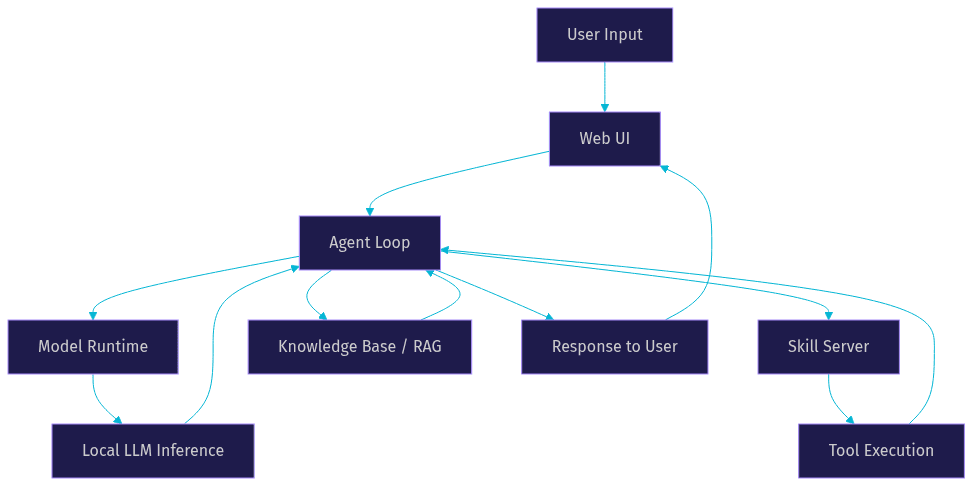
The architecture of a local AI agent platform typically includes four main layers: the model runtime, the agent loop, the skill server, and the user interface. The model runtime handles the local LLM deployment, loading the model weights and performing inference using optimized libraries. This layer is responsible for managing GPU memory and executing the mathematical operations required for text generation. The agent loop manages the conversation flow, deciding when to call tools and how to respond based on the model's output. It acts as the orchestrator, parsing the model's output for structured commands and routing them to the appropriate subsystem. The skill server hosts the executable tools the agent can use, acting as a secure bridge between the agent and the system. Finally, the web UI provides a no-code interface for users to interact with the agent, configure settings, and monitor performance. This modular design allows developers to swap out components like the model runtime or vector database without overhauling the entire system.
Here is a vertical flow showing how these components interact during a typical user request:
Knowledge Base and RAG
Memory is a critical component of any intelligent agent. A local AI agent platform typically implements both short-term and long-term memory. Short-term memory retains the current conversation context, allowing the agent to reference earlier messages within a single session. Long-term memory relies on Retrieval-Augmented Generation (RAG). Document ingestion allows the agent to read local files, chunk them into smaller pieces, and store embeddings in a local vector database. When the agent needs information, it performs a semantic search against this database to retrieve relevant context before generating a response. This local AI memory (RAG) capability is essential for agents that need to reference large amounts of proprietary data. The quality of the RAG implementation directly impacts the agent's ability to provide accurate and relevant answers.
Skill System
The skill system allows a local AI agent to perform actions beyond text generation. Reusable skill definitions are stored in a Git repository, enabling version control and easy sharing across different agents or deployments. Skills can range from simple tasks like fetching a URL to complex operations like querying a database or running a Python script. When the agent decides to use a skill, the agent loop sends a structured request to the skill server. The server executes the corresponding tool in a controlled environment and returns the result to the agent loop for further processing. This local AI skill system promotes reusability and modularity. Developers can create custom skills to extend the agent's capabilities and share them with the community.
Setting Up a Local AI Agent
Deploying your own offline AI assistant requires careful planning around hardware and software configuration. The process involves selecting the right hardware, installing the platform, and configuring your first agent.
Hardware Requirements
Hardware choices dictate the performance and capabilities of your local AI agent. For CPU inference, you need a modern multi-core processor and at least 16GB of RAM to run smaller quantized models. This setup is suitable for basic tasks and testing but will struggle with larger models or high concurrency. GPU-accelerated local AI offers significantly faster response times and the ability to run larger models. A GPU with 8GB to 24GB of VRAM allows you to run models with higher context windows and better reasoning capabilities. Edge AI with LLMs is also becoming viable on specialized hardware like Apple Silicon, which provides a unified memory architecture beneficial for local inference. When planning local AI agent scalability, consider the memory bandwidth and compute power of your hardware. For production deployments, a dedicated GPU server is recommended.
Installing the Platform
Setting up an open-source AI agent platform begins with downloading the distribution package from the official GitHub repository. You then configure environment variables to specify the model path, port number, and API keys for any external services you plan to use. This configuration step is crucial for ensuring the agent can locate the model weights and communicate with necessary tools. You also need to configure the vector database path for your RAG implementation. Finally, you start the service using the platform's command line interface. The service initializes the model runtime, starts the skill server, and launches the web UI. The entire setup process is designed to be straightforward, allowing developers to get a local AI agent running in minutes. It is important to verify that all dependencies are installed before starting the service.
Creating Your First Agent
Once the platform is running, you can create your first agent through the no-code web UI. You start by naming your agent and selecting a local LLM from the available models. Next, you write a system prompt that defines the agent's persona, instructions, and constraints. This prompt guides the agent's behavior and determines how it interacts with users. Finally, you enable one or more skills from the skill library. This no-code AI agent approach makes it accessible even to those without deep programming experience. After configuration, you can immediately start interacting with your agent, testing its reasoning and tool use capabilities in real-time. You can also adjust the agent's settings on the fly to refine its performance.
Advanced Features and Extensions
Modern local AI agent platforms offer capabilities that go beyond simple chat interfaces. These features enable complex automation and integration scenarios.
Multi-Agent Collaboration
Multi-agent collaboration allows you to link multiple agents into a team that shares context and divides labor. For example, one agent might handle research by browsing local documents, while another agent drafts the final report based on that research. The agent loop facilitates communication between agents, passing messages and results back and forth. This enables complex local AI automation workflows that a single agent could not handle alone. By distributing tasks, multi-agent systems can improve efficiency and allow for specialization, where each agent is fine-tuned for a specific type of task. This architecture is particularly useful for large-scale projects that require diverse skill sets.
Scheduling Periodic Tasks
Agents can be configured to run tasks on a schedule using cron-style definitions. This allows your local AI agent to perform recurring actions, such as checking server logs every morning, summarizing news feeds hourly, or generating weekly reports. The scheduling system integrates with the agent loop, triggering the agent with a predefined prompt at the specified time. This feature transforms the agent from a reactive tool into a proactive automation engine that works in the background without user intervention. Scheduled tasks can also be chained, allowing one agent's output to trigger another agent's workflow.
Multimodal Support
Vision-enabled agents can process images locally. Multimodal support allows the agent to analyze pictures, diagrams, and screenshots. The model runtime processes the image alongside text prompts, enabling use cases like analyzing local infrastructure diagrams, reading text from scanned documents, or inspecting UI mockups. This capability is entirely offline, ensuring sensitive visual data remains on your machine. As local AI agent performance benchmarks improve, multimodal processing is becoming faster and more accessible on consumer hardware. Future developments will likely include audio and video processing, further expanding the capabilities of local agents.
Connecting External Services
While the core processing remains local, agents can connect to external services through built-in connectors. Platforms often include integrations for Discord, Slack, Telegram, and custom webhooks. This allows your local AI chatbot to interact with users on their preferred platforms while keeping the data processing on your own infrastructure. External connectors act as a bridge, receiving messages from the platform, passing them to the local agent, and sending the agent's response back. This architecture maintains privacy while extending the agent's reach. Developers can also build custom connectors to interface with internal APIs and databases.
Managing Privacy and Security
Running a local AI agent inherently improves privacy, but security still requires active management. Data residency is guaranteed because your data never leaves your machine. Token-less operation means you do not need to authenticate with external API providers, reducing the risk of credential leakage. Network isolation can be enforced by blocking outbound traffic from the agent process, ensuring it cannot accidentally send data online. Permission gating for tool execution ensures the agent cannot run destructive skills without explicit approval. Developers should implement strict access controls around the skill server to prevent unauthorized actions. Local AI agent security also involves regularly updating the model weights and platform software to patch vulnerabilities. Additionally, developers should audit the skills and external connectors to ensure they do not inadvertently expose sensitive data through side channels.
Performance Tips and Troubleshooting
Keeping your local AI agent running smoothly requires optimization and awareness of common pitfalls.
Optimizing Inference Speed
Inference speed is the primary bottleneck for local AI agents. Model quantization reduces the precision of the model weights, significantly lowering memory usage and increasing speed. Adjusting the batch size can also improve throughput, especially when handling multiple requests. Using hardware-specific libraries, such as those optimized for Apple Silicon or NVIDIA GPUs, ensures you get the most out of your hardware. Developers should experiment with different quantization levels to find the right balance between speed and model accuracy. Caching frequent queries and responses can also reduce the load on the model runtime.
Handling Memory Limits
Context window limits can cause agents to forget earlier parts of a conversation. Swap strategies involve moving older messages to a secondary storage medium. Summarization techniques condense past interactions into a shorter summary, preserving key information while freeing up context space. Short-term memory windows restrict the agent's view to the most recent messages, preventing memory overflow. Implementing local AI memory (RAG) effectively can also reduce the burden on the context window by storing long-term information externally. Developers should monitor memory usage and adjust the context window size based on available hardware resources.
Common Errors
Developers often encounter a few frequent errors. An invalid model path usually means the environment variable pointing to the model weights is incorrect. Permission denied on skill execution indicates the skill server lacks the necessary file system rights to run the tool. Token expiration can occur if the platform uses external services that require authentication. Checking logs and verifying configuration settings are the first steps in resolving these issues. Ensuring the model runtime has sufficient memory allocated is also crucial for preventing crashes during inference.
Real-World Use Cases
Local AI agents are practical for a variety of scenarios. A personal knowledge assistant can ingest your notes and documents, providing a searchable, offline AI assistant that respects your privacy. An automated DevOps bot can monitor local server logs and execute remediation scripts when anomalies are detected. An on-premise customer-support chatbot can handle queries without exposing customer data to third-party cloud providers. Another powerful use case is a local AI voice agent for internal scheduling. By connecting your local agent to a real-time communication platform like VideoSDK AI Agents, you can enable voice interactions where the agent processes speech locally and responds in real time. These local AI agent use cases demonstrate the versatility and security benefits of self-hosted AI.
Future Trends for Local AI Agents
The future of local AI agents is promising. Edge AI hardware advances are making it possible to run larger models on smaller devices, bringing powerful AI to mobile phones and IoT devices. Federated learning for privacy allows models to learn from distributed data without centralizing it, improving model quality while maintaining data residency. The growing open-source ecosystem continues to provide better tools, models, and platforms for self-hosted AI. As local AI agent architecture evolves, we can expect more efficient inference, better memory management, and seamless integration with everyday development workflows. The integration of local agents with real-time communication SDKs will also expand, enabling secure, private voice and video interactions powered by local models.
Definitions Glossary
Local AI Agent: An autonomous software program that runs entirely on local hardware, processing data without relying on cloud servers.
Local LLM Deployment: The process of hosting and running large language models on local infrastructure rather than using cloud-based APIs.
RAG (Retrieval-Augmented Generation): A technique that combines a language model with a knowledge base, allowing the agent to retrieve relevant information before generating a response.
Model Quantization: A compression technique that reduces the precision of model weights to lower memory usage and increase inference speed.
Agent Loop: The core logic that manages the agent's reasoning, deciding when to call tools and how to respond to user input.
Key Takeaways
- A local AI agent provides privacy-preserving AI by processing data entirely on your own hardware.
- Core components include the model runtime, agent loop, skill server, and web UI.
- Hardware requirements range from CPU inference for smaller models to GPU-accelerated setups for larger ones.
- Advanced features like multi-agent collaboration and scheduling enable complex local AI automation.
- Model quantization and memory management are essential for optimizing performance.
Conclusion
Building a local AI agent gives developers unparalleled control over data privacy, security, and performance. By leveraging local LLM deployment and open-source platforms, you can create powerful offline AI assistants tailored to your specific needs. Once your local agent is ready for real-time interaction, you can extend its capabilities with voice and video using VideoSDK AI Agents. Sign up at app.videosdk.live/login to get started. What are you building with local AI? Drop a comment and share your implementations.
Free $20 Balance for AI Voice Agents & Video Calls
FAQ