



Echo removal AI is a technology that uses machine learning models to identify and strip delayed audio reflections from recordings. Unlike traditional acoustic echo cancellation, modern AI dereverberation analyzes the room impulse response and reconstructs the dry signal automatically. You can use these tools for post-production cleanup or leverage real-time echo suppression in communication SDKs like VideoSDK.
Introduction
If you have ever recorded a podcast, a voice-over, or a video conference in an untreated room, you know the frustration of listening back and hearing a hollow, delayed copy of your voice trailing every word. Echo ruins the clarity of speech, distracts listeners, and makes professional post-production a nightmare. For podcasters, educators, and remote workers, poor audio quality is often the difference between an engaged audience and a bounced viewer. The human ear is highly sensitive to these acoustic anomalies, and even a slight reflection can make a recording sound amateurish.
Historically, removing echo required expensive acoustic treatment, specialized hardware, or complex digital audio workstations with steep learning curves. You had to manually tweak parameters, apply noise gates, and hope you did not degrade the original signal. Today, echo removal AI handles this problem automatically. By leveraging deep learning models trained on thousands of acoustic environments, these tools can analyze an audio file, estimate the room impulse response, and synthesize a clean, dry signal in seconds. This shift means you no longer need a degree in audio engineering to produce studio-quality sound.
What Is Echo and How Does It Differ From Reverb?
Echo is defined as a distinct, delayed repetition of an original sound wave that reaches the listener's ear after bouncing off a surface. In digital recordings, echo manifests as a noticeable, separate copy of the audio signal. If you record in a large, empty room with hard surfaces, your microphone captures your direct voice and then captures the same voice bouncing off the walls a fraction of a second later. The delay is usually long enough that the brain perceives it as a separate event.
Reverb, or reverberation, is closely related but distinct. Reverb is the collection of thousands of echoes blending together so closely in time that the human ear perceives them as a single, continuous tail of sound. If echo is a single, distinct bounce, reverb is the ambient wash that follows a sound in a cathedral or a large hall. It smooths out the audio but can reduce speech intelligibility.
Both echo and reverb appear in digital recordings when the microphone captures sound reflecting off surfaces before the original sound wave has finished propagating. Echo removal AI targets these delayed reflections. While some tools focus specifically on distinct echo, many modern AI dereverberation models handle both distinct echoes and dense reverb tails, restoring the original, dry audio signal.
The Rise of Echo Removal AI
Acoustic echo cancellation has existed for decades in telecommunications. Traditional digital signal processing techniques used adaptive filters to estimate and subtract the echo from the incoming audio signal. These methods worked reasonably well for headsets and phone lines where the echo path was predictable. However, they struggled with complex acoustic environments, non-linear distortions, and varying room geometries. They also required constant tuning to maintain performance.
The rise of deep learning transformed this field. Instead of relying on fixed mathematical filters, researchers began training neural networks on paired datasets of clean and reverberated audio. These models learned to map the degraded audio directly to the clean signal. Modern echo removal AI can analyze a room impulse response dynamically, identifying reflections without manual tweaking. The models generalize across different rooms, microphones, and speakers.
This evolution moved echo removal from a real-time telecommunications necessity to a powerful post-production tool. Developers and audio engineers can now integrate AI-powered audio cleanup into web applications, mobile apps, and automated workflows.
How Echo Removal AI Works – A High-Level Pipeline
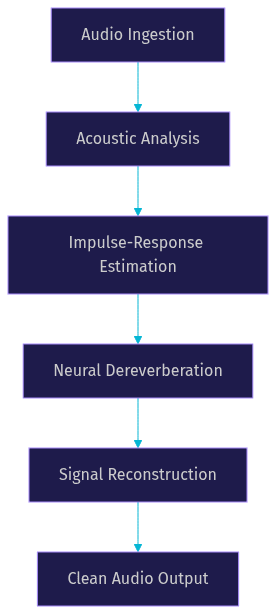
Echo removal AI works by passing the degraded audio through a multi-stage neural network pipeline designed to isolate and remove delayed reflections. The process transforms a reverberant signal back into a dry, clean signal by understanding the acoustic properties of the recording environment. This pipeline operates entirely in software, making it accessible to anyone with a web browser.
The pipeline typically begins with audio ingestion, where the tool accepts a file or a live stream. The system then performs acoustic analysis, identifying the delayed copies of the signal. Next, it estimates the room impulse response, which characterizes how the room alters the original sound. The core stage involves neural dereverberation, where convolutional or transformer-based networks predict and generate the clean signal. Finally, the pipeline reconstructs the audio, outputting the cleaned file.
Stage 1: Acoustic Analysis
In the acoustic analysis stage, the AI model detects delayed copies of the original signal. The model scans the incoming audio waveform for patterns that repeat at specific intervals. By identifying these repetitions, the system recognizes the presence of echo and prepares the data for impulse-response estimation. This stage is critical because it isolates the problematic frequencies and time delays that need correction.
Stage 2: Impulse-Response Estimation
A room impulse response represents how a room modifies an original sound before it reaches the microphone. It acts as an acoustic fingerprint of the space. During impulse-response estimation, the echo removal AI calculates this fingerprint by analyzing the delay and amplitude of the detected reflections. This step is crucial because it tells the neural network exactly how the room degraded the audio. The model uses this information to reverse the acoustic effects.
Stage 3: Neural Dereverberation
Neural dereverberation is the core processing stage where the AI predicts the dry signal. Convolutional neural networks or transformer-based architectures take the analyzed audio and the estimated room impulse response as input. These networks have been trained on vast datasets to understand how reverberation affects speech. They generate a new audio signal that represents the original sound without the room's acoustic reflections. The output is a clean voice that sounds like it was recorded in a treated booth.
Real-World Use Cases for Echo Removal AI
Echo removal AI serves a wide variety of practical applications across different industries. The primary benefit is speed and the elimination of hardware requirements, allowing anyone to achieve professional audio quality without investing in acoustic panels or expensive microphones.
Podcast post-production is a major use case. Podcasters often record in untreated bedrooms or offices. AI dereverberation tools clean up these recordings, removing the hollow sound of the room and making the host's voice sound like it was recorded in a professional studio. This improves listener retention and makes the content more enjoyable.
Video-conference recordings also benefit significantly. When participants join a meeting from echo-prone environments, the recording quality suffers. Applying an online echo cleaner to the recorded file ensures the final video is pleasant to watch. For live meetings, using a real-time communication SDK with built-in echo suppression, like VideoSDK, prevents echo from reaching the recording in the first place.
E-learning voice-overs often suffer from room echo because instructors record in home offices. AI echo removal ensures the educational content is clear and easy to understand, which is vital for student comprehension. Music rehearsal demos and archival audio restoration also use these tools to clean up historical recordings or rough takes captured in less-than-ideal spaces.
Step-by-Step Guide to Using an Online Echo Removal AI Tool
Using an online echo removal AI tool is a straightforward process that requires no technical expertise. Most web-based platforms follow a similar workflow designed for speed and ease of use. The interfaces are typically intuitive, guiding you through each step.
Step 1: Choose a Supported File Format
Begin by ensuring your audio or video file is in a supported format. Most AI echo removal tools accept common formats like WAV, MP3, AAC, and MP4. If your file is in an obscure format, you may need to convert it first. For the best results, use a lossless format like WAV, as it preserves the maximum amount of audio data for the AI to analyze. Compressed formats lose data that the AI needs to accurately estimate the room impulse response.
Step 2: Upload the File
Navigate to the web interface of your chosen echo reduction tool. Look for an upload button or a drag-and-drop area. Select your file and wait for the upload to complete. The processing time depends on the file size and the service's server capacity. Most platforms display a progress bar during this phase. Some services also offer cloud integration, allowing you to import files directly from storage providers.
Step 3: Select a Preset or Strength Level
Once the file is uploaded, the tool will typically present you with options for processing. You may see presets like "Mild," "Medium," or "Aggressive" echo removal. Some advanced tools allow you to adjust a slider that controls the intensity of the AI dereverberation. Start with a medium setting to avoid over-processing the audio. Aggressive settings can sometimes remove natural voice harmonics along with the echo.
Step 4: Preview the Before/After
After the AI processes the file, the platform will usually offer a preview feature. This interface lets you toggle between the original audio and the cleaned version. Listen carefully to the preview. Check if the echo is gone but also ensure the voice does not sound robotic or unnaturally muffled. If the result is not satisfactory, go back and adjust the strength level. This iterative process ensures you get the best possible audio quality.
Step 5: Download the Cleaned Audio
When you are happy with the preview, proceed to download the cleaned file. Choose a lossless output format if you plan to do further editing in a digital audio workstation. If the file is ready for distribution, you can download it in a compressed format like MP3 to save bandwidth. Some tools also allow you to export the cleaned audio directly back to a video file if you uploaded an MP4.
Tips for Best Results
To get the most out of echo removal AI, record as close to the microphone as possible. This increases the ratio of direct sound to reflected sound. Minimize background noise before recording, as heavy noise can confuse the AI model. Choose the appropriate strength level for your specific recording. Finally, always use lossless output formats if you plan to apply additional audio post-processing later.
Comparing AI Echo Removal With Traditional Methods
AI echo removal differs significantly from traditional methods like classic DeReverb plugins, noise-gate techniques, and manual equalization. Traditional methods require a deep understanding of audio engineering and often involve tedious manual adjustments. AI tools automate this process using machine learning, making them accessible to non-experts.
| Feature | AI Echo Removal | Traditional Plugins |
|---|---|---|
| Processing Method | Neural network dereverberation | Manual EQ and gating |
| Required Expertise | None | High |
| Processing Time | Seconds to minutes | Manual, time-consuming |
| Adaptability | Handles complex rooms | Struggles with varying echo |
| Audio Quality Risk | Can over-process if set too high | Can introduce artifacts |
| Cost | Subscription or per-use | One-time plugin purchase |
AI tools excel in speed and ease of use. They adapt to complex acoustic environments without manual tuning. However, traditional plugins offer granular control that experienced audio engineers might prefer for delicate mastering tasks. For real-time applications like live streaming or video calls, neither post-production method is suitable. Instead, developers should use SDKs with built-in acoustic echo cancellation, such as the quickstart, to handle echo suppression on the fly.
Limitations and When AI May Struggle
While echo removal AI is powerful, it has limitations. In extreme environments, such as large halls with very long decay times, the AI may struggle to fully separate the original signal from the reflections. The model might reduce the echo but leave a subtle unnatural artifact. The neural network has to guess what the original signal sounded like, and in extreme cases, it guesses incorrectly.
Low-bitrate recordings also pose a challenge. If the original audio is heavily compressed, the AI lacks the spectral data needed to accurately estimate the room impulse response. This can result in tonal coloration, where the cleaned voice sounds slightly metallic or robotic. The tool removes the echo but alters the timbre of the voice.
When AI struggles, you may need to combine it with other fixes. You can use a traditional noise gate to silence the gaps between words before running the file through the AI. Alternatively, applying a gentle equalization cut to the lower frequencies can reduce the boominess of the echo before AI processing.
Choosing the Right Echo Removal AI Service
Selecting the right echo removal AI service requires evaluating several criteria. First, check the model freshness. The field moves quickly, and services that update their models frequently will offer better results. Ensure the service supports the file formats you use regularly.
Review the privacy policy. If you are processing sensitive corporate recordings or private voice notes, you need a service that deletes your files after processing. Processing speed is also critical if you handle large volumes of audio. Look for a service that offers batch processing if you need to clean multiple files at once.
Look for a free tier to test the service before committing to a paid plan. Finally, consider integration options. If you want to automate audio cleanup in your application, look for a service that offers an API.
Future Trends in Echo Removal AI
The future of echo removal AI points toward real-time, on-device models. Currently, most heavy dereverberation happens in the cloud. As mobile processors become more powerful, developers will run these neural networks locally on devices, reducing latency and improving privacy. This will allow real-time echo removal in mobile apps without relying on server infrastructure.
Multi-modal dereverberation is another upcoming trend. By analyzing video frames of the room alongside the audio, AI can better understand the physical space and predict the room impulse response more accurately. Adaptive learning from user feedback will also allow models to fine-tune their output based on whether the user liked the cleaned audio.
Definitions Glossary
Acoustic Echo Cancellation: A digital signal processing technique used to remove echo from audio signals in real-time communications. VideoSDK provides this feature natively in its real-time communication SDKs.
Room Impulse Response: The acoustic fingerprint of a room, describing how sound reflects off surfaces and reaches a microphone.
Neural Dereverberation: The process of using deep learning models to remove reverb and echo from audio, reconstructing the original dry signal.
Echo Removal AI: Software that uses machine learning to automatically detect and strip delayed audio reflections from recordings.
Real-Time Echo Suppression: The active prevention of echo during a live audio or video call, ensuring clear communication without post-processing.
Key Takeaways
- Echo removal AI uses deep learning to automatically identify and strip delayed audio reflections from recordings.
- Modern AI dereverberation analyzes the room impulse response to reconstruct a clean, dry signal without manual tweaking.
- These tools are ideal for podcast post-production, e-learning voice-overs, and video-conference recordings.
- For live video calls, developers should use real-time communication SDKs like VideoSDK that include built-in acoustic echo cancellation.
- While powerful, AI echo removal can struggle with extreme environments and low-bitrate recordings, sometimes requiring manual fixes.
Conclusion
Echo removal AI has democratized professional audio quality. You no longer need expensive acoustic treatment or a degree in audio engineering to produce clear, engaging content. By leveraging neural dereverberation, anyone can clean up recordings in seconds. For developers building applications that require live, echo-free communication, integrating a real-time SDK is the best path forward. VideoSDK offers robust video and audio calling APIs with built-in noise suppression and echo cancellation. You can sign up for free at videosdk.live and explore the VideoSDK documentation to get started. What are you building with VideoSDK? Drop a comment below or join the VideoSDK Discord community to share your audio and video projects.
Free $20 Balance for AI Voice Agents & Video Calls
FAQ