


AI real time transcription is the process of converting live speech into text as it is spoken, using streaming audio transport and automatic speech recognition models that emit incremental results. VideoSDK provides built-in real-time transcription for video and audio calling rooms, alongside an AI Agent SDK that connects STT providers like Deepgram, OpenAI Whisper, and ElevenLabs Scribe for low-latency voice pipelines. To get started, review the VideoSDK transcription documentation and choose a provider that matches your latency and accuracy requirements.
Live captioning, meeting transcription, and voice assistant interactions all share one fundamental requirement: the text must appear almost as fast as the words are spoken. Developers building these experiences face a triangle of competing constraints. Latency must stay low enough that the transcript feels instantaneous. Accuracy must be high enough to be useful. Privacy must be preserved when sensitive conversations flow through third-party servers.
The demand for AI real time transcription has surged as applications move from post-call recordings to live, interactive experiences. Meeting platforms want captions for accessibility. Healthcare apps need live transcription for clinical documentation. Customer support tools want real-time agent assist. Every scenario has different latency budgets, language requirements, and deployment constraints. By the end of this guide, you will understand the full pipeline from audio capture to incremental transcript delivery, and you will have a decision framework for choosing the right approach for your use case.
What Is AI Real Time Transcription?
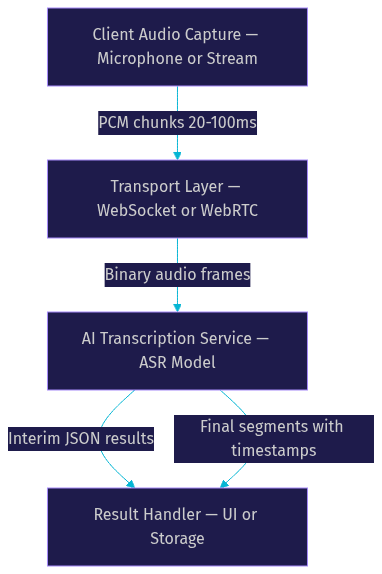
AI real time transcription is defined as the continuous conversion of spoken audio into text using automatic speech recognition models that process audio in small chunks and return results incrementally, rather than waiting for the full recording to finish. It works by capturing audio from a microphone or stream, sending it over a low-latency transport protocol to an ASR model, receiving interim and final transcript segments, and displaying them to users as the conversation unfolds.
The critical distinction from batch or async transcription is timing. Batch transcription accepts a complete audio file, processes it end to end, and returns a finished transcript seconds or minutes later. Real time transcription processes audio in chunks of 100 to 300 milliseconds and returns partial results within that same window. The user sees text appear and update as they speak, creating a live captioning experience.
VideoSDK provides real time transcription through its video and audio calling SDKs, where transcription runs natively inside the room session. For AI-powered voice pipelines, the VideoSDK AI Agent SDK connects external STT providers to the same room architecture, letting developers swap models without changing the transport layer.
Core Components of Real Time Transcription
Every real time transcription pipeline shares five essential pieces. The audio source captures sound from a microphone, system audio, or an existing media stream. The streaming protocol carries audio chunks to the transcription service, typically over WebSocket or WebRTC. The ASR model processes each chunk and generates text predictions. Turn detection segments continuous speech into logical utterances so the model knows when a sentence or thought is complete. Result handling receives interim and final transcripts and routes them to the UI or downstream systems.
Streaming Transport Options for Real Time Transcription
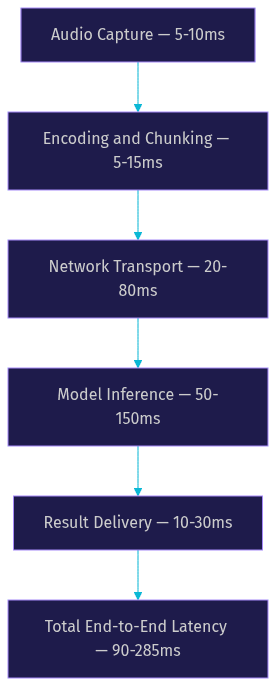
The transport layer is the single biggest factor in end-to-end latency for real time transcription pipelines. Two protocols dominate: WebSocket and WebRTC.
WebSocket is the most common choice for dedicated transcription services. It provides a persistent, bidirectional TCP connection that works well for sending sequential audio chunks and receiving text results. Most STT providers, including Deepgram and ElevenLabs, expose WebSocket endpoints for streaming ASR. The connection setup is straightforward: open a socket, authenticate with a token, send audio frames as binary messages, and receive JSON transcript responses. WebSocket works across browsers, mobile apps, and server-side runtimes without special network configuration.
WebRTC is the better choice when transcription is part of a real-time communication session, such as a video call or voice room. VideoSDK uses WebRTC as the underlying transport for room-based audio, and transcription runs as a server-side process within that same session. WebRTC handles NAT traversal, adaptive bitrate, and encryption natively, which means the audio reaching the transcription engine is already optimized for real-time delivery. The trade-off is that WebRTC setup is more complex than a raw WebSocket connection, which is why most developers use an SDK like VideoSDK rather than implementing WebRTC from scratch.
For applications where transcription is a standalone feature with no video or voice call component, WebSocket is simpler and sufficient. For applications where transcription accompanies a live call, WebRTC through an SDK is the right path.
Interim vs Final Results in Real Time Transcription
ASR models that support real time transcription emit two types of results: interim and final. Understanding the difference is essential for building a good user experience.
Interim results are non-final predictions. The model has processed the audio but has not yet committed to the text because more speech may follow that changes the interpretation. Interim results update rapidly, sometimes multiple times per second, and give users the feeling of seeing words appear as they speak. They are perfect for live captioning displays where text updates in place.
Final results are committed segments. The model has detected a pause, a sentence boundary, or a turn change and has finalized the text for that segment. Final results typically include word-level timestamps, confidence scores, and stable punctuation. They are what you store for post-call transcripts, search indexing, and analytics.
The standard UI pattern is to display interim results in a transient text area that updates in place, then move finalized segments into a permanent transcript log. This gives users immediate feedback while maintaining a clean, readable record. VideoSDK's real-time transcription feature exposes both interim and final results through its SDK event system, so developers can route each type to the appropriate UI component.
Audio Formatting Requirements for Real Time Transcription
ASR models are sensitive to audio format mismatches. Sending the wrong sample rate, bit depth, or channel count can cause silent failures, garbled transcripts, or rejected connections.
The most widely accepted format for streaming ASR is 16-bit PCM at 24 kHz, mono, little-endian. Some providers also support 16 kHz or 48 kHz, but 24 kHz has become the de facto standard for real time transcription because it balances speech clarity with manageable bandwidth. Mono is required because stereo audio doubles the payload without improving recognition quality for single-speaker scenarios.
Consistent chunking matters as much as the format itself. Most providers expect audio frames of 20 to 100 milliseconds. Smaller chunks reduce latency but increase overhead from frame headers and model context switching. Larger chunks improve throughput but add buffer latency. The sweet spot for most real time transcription services is 50 to 100 milliseconds per chunk.
If your audio source produces a different format, you must resample and convert before sending. Browser APIs typically provide floating-point 32-bit audio at the system's native sample rate, which means you need a conversion step. VideoSDK handles this normalization internally when transcription is enabled on a room, so developers using the SDK do not need to manage format conversion manually.
Turn Detection and Segmentation for Real Time Transcription
Turn detection is the mechanism that tells the ASR model when a speaker has finished a thought and the transcript should be finalized. Without it, the model would hold interim results indefinitely, waiting for more audio that might change the prediction.
Voice activity detection, or VAD, is the most common approach. VAD analyzes the audio stream for silence thresholds, typically 200 to 500 milliseconds of quiet, and signals the model to commit the current segment. VAD-based segmentation works well for dictation and single-speaker scenarios but can struggle with overlapping speakers or noisy environments.
Explicit turn-commit mechanisms offer more control. In conversational AI pipelines, the system can use semantic turn detection, where an LLM or dedicated model evaluates whether the speaker has completed a thought based on language cues, not just silence. VideoSDK's AI Agent SDK includes built-in turn detection that combines VAD with configurable silence thresholds and optional semantic evaluation, giving developers control over how aggressively turns are committed.
Proper segmentation improves both transcript quality and perceived latency. When segments are committed at natural boundaries, final results arrive with correct punctuation and sentence structure. When segmentation is too aggressive, transcripts fragment into incomplete phrases. When it is too conservative, latency increases because the model waits too long before finalizing.
Accuracy and Latency Benchmarks for Real Time Transcription
Developers evaluating real time transcription services need concrete numbers, not marketing claims. Several providers publish latency and accuracy metrics, and independent benchmarks from Artificial Analysis provide additional context.
Deepgram consistently reports sub-100 millisecond processing latency for its streaming ASR endpoints, making it one of the fastest options for real time transcription. According to Artificial Analysis's Speech Arena benchmark , Deepgram's Nova-3 model achieves a word error rate of approximately 8 to 10 percent on conversational English audio, outperforming several competitors on accuracy while maintaining low latency.
ElevenLabs Scribe reports approximately 150 milliseconds end-to-end latency for its real-time transcription API, with strong multilingual support covering over 30 languages. OpenAI's real-time transcription, available through the Realtime API and Whisper models, offers competitive accuracy but typically operates at higher latency unless paired with the real-time multimodal endpoint.
The trade-off between speed and accuracy is real. Models that prioritize raw speed may sacrifice accuracy on accented speech, technical jargon, or noisy audio. Models that prioritize accuracy may add 50 to 100 milliseconds of processing time for additional context windows and language modeling. For most meeting and captioning use cases, 150 to 300 milliseconds of total latency is acceptable. For voice assistant interactions where the transcript feeds into an LLM for response generation, sub-200 milliseconds is the target.
On-Device vs Cloud Real Time Transcription Solutions
Cloud-based real time transcription services from providers like Deepgram, OpenAI, and ElevenLabs offer the best accuracy and language coverage because they run large models on specialized hardware. The trade-offs are network dependency, per-minute pricing, and data privacy concerns. Every audio chunk leaves the device, which may violate compliance requirements in healthcare, finance, or legal applications.
On-device transcription libraries address the privacy and cost concerns by running ASR models locally on the user's device. Open-source options like Wisp and Whisper.cpp provide reasonable accuracy for English and several other languages without sending audio to any server. The trade-offs are higher battery and CPU usage on mobile devices, larger app bundles, and generally lower accuracy than cloud models, especially for accented speech or noisy environments.
For applications with strict privacy requirements, a hybrid approach works well. Use on-device transcription for the live preview to give users immediate feedback, then send audio to a cloud model for a high-accuracy final transcript when the session ends. VideoSDK supports both patterns: real-time transcription within the room session for live captions, and post-call transcription for accurate archived transcripts.
Scalability also differs. Cloud services handle concurrent sessions elastically, while on-device models scale with the number of user devices. For platforms with thousands of simultaneous meetings, cloud transcription with a provider that supports high concurrency is typically more practical.
Best Practices for Robust Real Time Transcription Implementations
Building a production-grade real time transcription pipeline requires more than connecting to an API. The following practices separate prototypes from reliable systems.
Token security: Never embed STT provider API keys in client-side code. Generate short-lived tokens on your server and exchange them for session credentials at connection time. VideoSDK's token-based authentication follows this pattern, and the same principle applies to STT provider credentials.
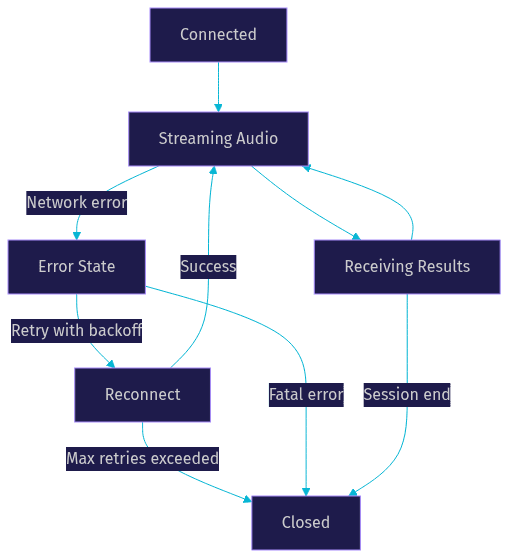
Reconnect logic: Network connections drop. Your transport layer must detect disconnections and reconnect automatically with exponential backoff. Buffer audio during the reconnection window and flush it once the connection is restored. Without buffering, users lose transcript segments during brief network blips.
Network jitter handling: Audio chunks may arrive at the transcription service out of order or with variable delay. Implement a small jitter buffer on the sending side to smooth delivery. A 100 to 200 millisecond buffer adds minimal latency but dramatically improves transcript consistency.
Error handling: STT services return errors for invalid audio formats, rate limits, expired tokens, and model overload. Each error type needs a specific response: retry with backoff for rate limits, refresh tokens for auth errors, and fall back to a secondary provider for extended outages. Log every error with enough context to diagnose without exposing sensitive audio data.
Graceful shutdown: When a session ends, send an explicit close signal to the transcription service so it flushes any pending final results. Without this step, the last few seconds of speech may be lost. VideoSDK's room lifecycle handles this automatically when transcription is enabled on a room.
Choosing the Right Real Time Transcription Service
Selecting a real time transcription provider depends on five factors: required latency, language support, privacy constraints, budget, and target platform.
For sub-100 millisecond latency requirements, Deepgram is the strongest choice based on published benchmarks. For multilingual applications with 30-plus languages, ElevenLabs Scribe offers broad coverage at moderate latency. For privacy-first applications, on-device libraries like Wisp or Whisper.cpp eliminate data egress entirely. For budget-constrained projects, compare per-minute pricing across providers and consider on-device models for high-volume scenarios where cloud costs scale linearly with usage.
For platform considerations, web applications benefit from WebSocket-based services that work directly in browsers. Mobile applications may prefer on-device models to reduce battery drain from constant network streaming. Desktop applications can leverage local GPU resources for larger on-device models.
If your application already uses VideoSDK for video or audio calling, the built-in real-time transcription feature is the simplest path because it requires no additional transport setup or provider integration. For AI agent pipelines that need STT as part of a voice interaction loop, the VideoSDK AI Agent SDK lets you swap STT providers without changing your application code.
Definitions Glossary
Real Time Transcription: The process of converting live speech into text incrementally as it is spoken, using streaming audio and ASR models that return results within hundreds of milliseconds.
Interim Results: Non-final transcript predictions that update in real time as the model processes additional audio, used for live captioning displays.
Final Results: Committed transcript segments with stable text, punctuation, and word-level timestamps, suitable for storage and post-call analysis.
Voice Activity Detection (VAD): A mechanism that analyzes audio for silence thresholds to determine when a speaker has paused, signaling the ASR model to finalize a transcript segment.
Streaming ASR: Automatic speech recognition designed to process continuous audio streams and return incremental results, as opposed to batch ASR which processes complete recordings.
Key Takeaways
- AI real time transcription processes audio in 50 to 100 millisecond chunks and returns interim and final results with end-to-end latency typically between 90 and 300 milliseconds.
- WebSocket is the standard transport for standalone transcription services, while WebRTC is preferred when transcription runs alongside a real-time video or audio call session.
- Audio formatting consistency is critical: 16-bit PCM at 24 kHz mono is the most widely accepted format across STT providers.
- Turn detection quality directly impacts both transcript readability and perceived latency, with VAD-based segmentation being the most common approach.
- VideoSDK provides built-in real-time transcription for room-based sessions and an AI Agent SDK for connecting external STT providers like Deepgram, ElevenLabs, and OpenAI Whisper.
Conclusion
AI real time transcription has moved from a nice-to-have accessibility feature to a core capability for meetings, voice assistants, and live captioning applications. The pipeline is straightforward in concept but demanding in execution: audio must be captured, formatted, transported, processed, and displayed with minimal delay and high accuracy. By understanding the transport options, audio requirements, turn detection mechanisms, and benchmark trade-offs covered in this guide, you can make informed decisions about which provider and architecture fit your use case. If you are building a video or audio calling application, explore VideoSDK's real-time transcription documentation to see how transcription integrates natively with room sessions. For AI voice agent pipelines, the VideoSDK AI Agent SDK provides a flexible foundation for connecting STT and TTS providers. Sign up at app.videosdk.live/login to start building with free credits. What are you building with VideoSDK? Drop a comment below, I would love to hear what kind of real time transcription use case you are working on.
Free $20 Balance for AI Voice Agents & Video Calls
FAQ