



TL;DR: A compliant video KYC system for the Middle East needs a live agent session, national ID capture and OCR, face-to-ID matching, liveness detection, session recording, Arabic language support, and data residency controls. VideoSDK provides the real-time video infrastructure and AI identity verification APIs to cover most of these requirements in a single integration.
Building a video KYC (Know Your Customer) system for the Middle East means handling regional identity document formats, Arabic-first UX, and data residency rules that vary by jurisdiction. This guide walks through the architecture, code, and VideoSDK APIs you need to ship a production-grade MENA video KYC flow.
Regulatory overview in the Middle East
The MENA region does not have a single unified eKYC standard. Each market has its own framework, and requirements continue to evolve. The patterns below reflect publicly documented guidance as of early 2026. Your legal team should verify the current rules for each jurisdiction before you go live.
In the UAE, the Central Bank of the UAE (CBUAE) permits digital onboarding with video-based identity verification for licensed financial institutions. The UAE Pass digital identity scheme also plays a role in consumer onboarding. The Emirates NBD and other major banks have deployed video KYC under CBUAE supervision, but the specific technical requirements are set by the regulator and may be updated. Verify current CBUAE circular guidance with your compliance team.
Saudi Arabia's Saudi Central Bank (SAMA) has published guidelines on digital banking and fintech. Remote customer onboarding via video verification is permitted for licensed entities under certain conditions. SAMA's open banking and fintech frameworks increasingly support eKYC flows, but session recording retention periods and biometric data handling rules require direct legal review.
Bahrain, Qatar, Kuwait, and Egypt each have central bank circulars or fintech regulatory sandboxes that address digital identity and remote onboarding. The common thread across MENA is a requirement for a live human agent on at least one side of the session, a recording of the session, and verification of a government-issued identity document.
Data residency is a recurring requirement. Several jurisdictions require that personally identifiable information (PII) and biometric data be processed and stored within the country or within approved regions. Verify this with legal counsel for each market you target.
Common technical requirements across MENA
Most MENA video KYC implementations share the following functional requirements regardless of exact regulatory jurisdiction.
A live video session connecting the customer to a human agent in real time is the core requirement. The session must be synchronous, not pre-recorded.
Document capture during the session is required to extract identity data. MENA markets use national ID cards with Arabic text, including the Emirates ID (UAE), Iqama (Saudi Arabia), Bahraini CPR, and Qatari QID. These documents have both Arabic and English fields.
Face matching against the captured document photo verifies that the person on the call is the same person shown in the ID.
Liveness or spoof detection prevents the use of printed photos or pre-recorded video to bypass face matching.
Session recording must be retained for audit and regulatory review. Retention periods vary by jurisdiction.
Arabic language support in the customer-facing UI is a baseline expectation across the region. Arabic is written right-to-left (RTL), which requires specific layout handling.
Architecture
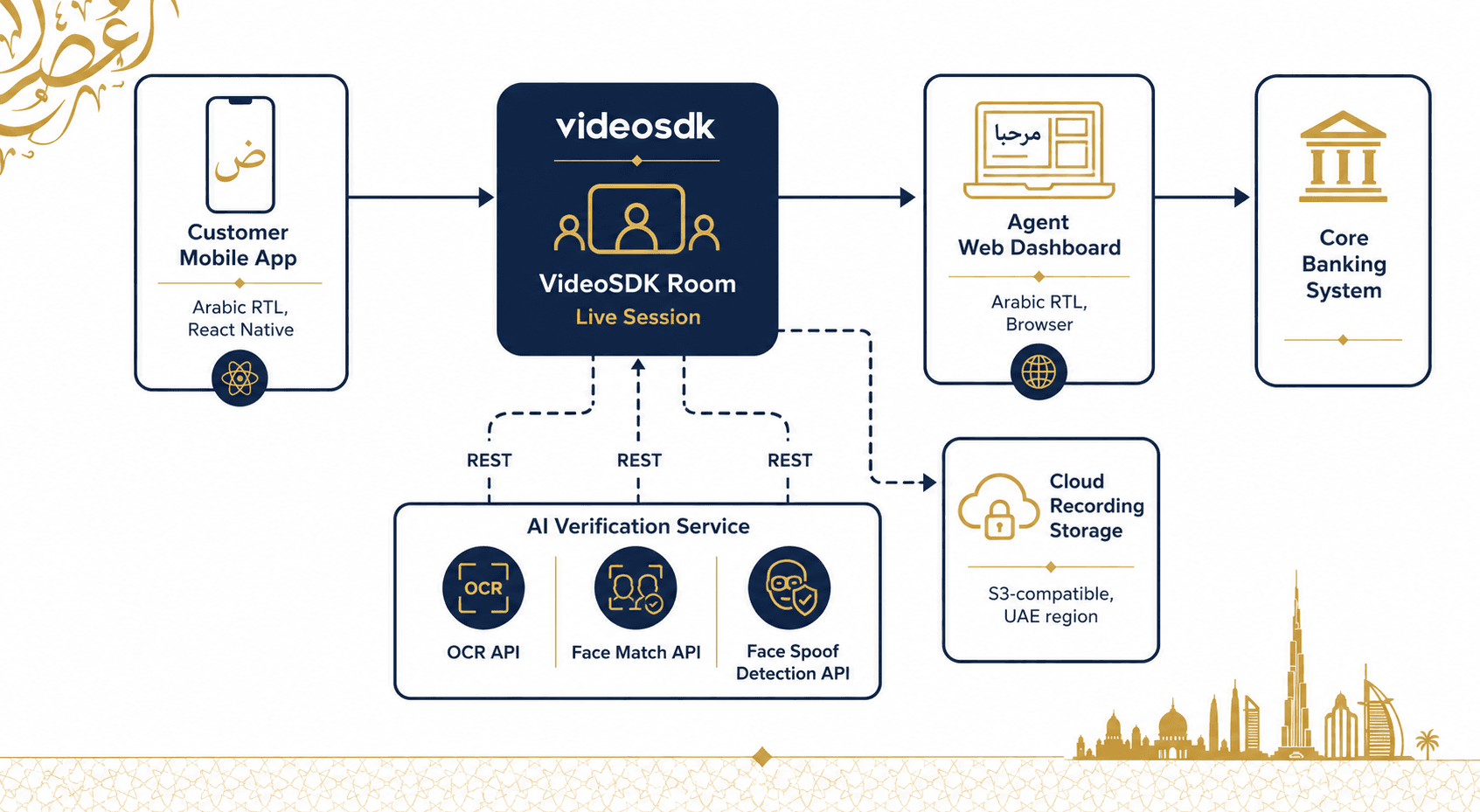
The flow works as follows. The customer opens the mobile app, which creates or joins a VideoSDK room. The agent joins the same room from a web agent dashboard. During the session, the customer holds up their identity document to the camera. The agent triggers a frame capture, which is sent as a base64-encoded image to VideoSDK's OCR API. The extracted fields are returned in JSON. A second call to the Face Match API compares the document photo against a live selfie frame. Spoof detection runs in parallel. The session records to cloud storage. On completion, the agent submits the verification outcome to the core banking system.
Building the customer app
The customer app targets both Android and iOS. React Native covers both platforms from a single codebase, which is the most practical choice given MENA's mixed Android-iOS market share.
Right-to-left (RTL) layout is a React Native concern, not a VideoSDK concern. VideoSDK's SDK renders video streams in a view component and does not control surrounding UI direction. To enable RTL layout for the Arabic interface, set the following before your root component renders:
// index.js
import { I18nManager } from "react-native";
I18nManager.forceRTL(true);
You also need to restart the Metro bundler after changing this setting for it to take effect in development.
Install the VideoSDK React Native SDK and the in-call manager package:
npm install "@videosdk.live/react-native-sdk" "@videosdk.live/react-native-incallmanager"Register VideoSDK services in your root index.js:
import { AppRegistry } from "react-native";
import App from "./App";
import { name as appName } from "./app.json";
import { register } from "@videosdk.live/react-native-sdk";

register();
AppRegistry.registerComponent(appName, () => App);
Wrap your meeting screen with MeetingProvider, passing a room ID and a JWT token:
import {
  MeetingProvider,
  useMeeting,
  useParticipant,
  MediaStream,
  RTCView,
} from "@videosdk.live/react-native-sdk";

<MeetingProvider
  config={{
    meetingId: roomId,
    micEnabled: true,
    webcamEnabled: true,
    name: "Customer",
  }}
  token={token}
>
  <KYCSessionView />
</MeetingProvider>
Use the useMeeting hook to access join, leave, toggleWebcam, and toggleMic. Use useParticipant(participantId) to access webcamStream and webcamOn for each participant. Render remote video with RTCView:
const { webcamStream, webcamOn } = useParticipant(participantId);

{webcamOn && webcamStream && (
  <RTCView
    streamURL={new MediaStream([webcamStream.track]).toURL()}
    objectFit="cover"
    style={{ height: 300, marginVertical: 8 }}
  />
)}
Android requires camera, microphone, and network permissions in AndroidManifest.xml. iOS requires NSCameraUsageDescription and NSMicrophoneUsageDescription entries in Info.plist. Set minSdkVersion to 23 in android/build.gradle. iOS platform must be 12.0 or later in the Podfile.
Quick start: run the sample project
To get a working video KYC demo running locally, follow these steps.
Step 1: Clone the sample project
git clone https://github.com/videosdk-community/vkyc-reactsdk-example.gitStep 2: Copy the environment file
cp .env.example .envStep 3: Add your VideoSDK token
Generate a temporary token from your VideoSDK account and paste it into .env:
REACT_APP_VIDEOSDK_TOKEN = "YOUR_VIDEOSDK_TOKEN"Step 4: Install dependencies
yarnStep 5: Run the app
yarn startDocument capture and verification
VideoSDK provides three REST APIs for identity verification. All three are available on the Enterprise plan only. Contact VideoSDK sales to enable them on your account.
OCR API
The OCR API (Optical Character Recognition API) takes the front and back of an identity document as base64-encoded images and returns extracted fields in a JSON response. Fields include idType, idNumber, name, dateOfBirth, address, gender, and mobileNumber. The exact fields returned depend on the document type.
Endpoint: POST https://api.videosdk.live/ai/v1/ocr
The request body requires two base64-encoded images:
const data = {
  frontPart: `data:image/jpeg;base64,${base64Front}`,
  backPart: `data:image/jpeg;base64,${base64Back}`,
};

const response = await axios.post(
  "https://api.videosdk.live/ai/v1/ocr",
  data,
  {
    headers: {
      Authorization: `${process.env.VIDEOSDK_API_TOKEN}`,
      "Content-Type": "application/json",
    },
  }
);
To capture a frame from the live video stream, use useParticipant to access the current webcamStream track, draw it to an offscreen canvas, and call canvas.toDataURL("image/jpeg") to get the base64 string. This step happens on the agent dashboard side, not in the customer app.
The OCR API does not document support for specific document types by country. Test your target document types (Emirates ID, Iqama, QID, CPR) against the API during development and verify extraction accuracy with your compliance team.
Face Match API
The Face Match API compares a selfie image against a document photo and returns a similarity score. The endpoint is POST https://api.videosdk.live/ai/v1/face-match (verify the exact path in your Enterprise plan documentation, as the docs page is at /react-native/guide/identity-verification/face-match-api).
The request format follows the same base64 pattern as the OCR API: send the document photo and the live selfie photo as frontPart and selfie fields. The response includes a match score. Your compliance threshold for what constitutes a pass is a business and regulatory decision.
Face Spoof Detection API
The Face Spoof Detection API detects whether the presented face is live or a spoofed input such as a printed photograph or a screen replay. The endpoint documentation is at /react-native/guide/identity-verification/face-spoof-detection. Pass a single base64 frame from the live webcam stream. The response indicates whether a live face was detected.
Run spoof detection before face matching. If spoof detection flags the frame, reject the session and require the customer to retry. Do not proceed to face matching on a flagged frame.
Geo-fencing for data residency
VideoSDK's geo-fencing feature restricts media server connections to a specified region. This is documented and available under the Enterprise plan. Geo-fencing is configured at the room creation level, not in the client SDK.
When you create a room via the VideoSDK REST API (POST https://api.videosdk.live/v2/rooms), you can specify a region. The documented available regions are INDIA, USA, UAE, EUROPE, SINGAPORE, and AUSTRALIA.
For MENA deployments requiring data residency in the UAE, specify the UAE region when creating the room:
const res = await fetch("https://api.videosdk.live/v2/rooms", {
  method: "POST",
  headers: {
    authorization: token,
    "Content-Type": "application/json",
  },
  body: JSON.stringify({ region: "UAE" }),
});
const { roomId } = await res.json();
VideoSDK's documentation notes that if a participant's physical location differs from the geo-fenced region, network quality between those locations may degrade. Avoid geo-fencing unless your compliance requirement explicitly demands it.
Geo-fencing controls where media passes through VideoSDK's infrastructure. It does not control where your own backend, recording storage, or AI API data is processed. You are responsible for ensuring that recording files and OCR/biometric data are stored in compliant locations. Consult your legal team on how VideoSDK's data processing fits within your broader data residency obligations for each MENA jurisdiction.
Cloud recording
VideoSDK supports cloud recording for React Native sessions. Recording is triggered via the VideoSDK REST API or through the useMeeting hook. The startRecording method is available via useMeeting:
const { startRecording, stopRecording } = useMeeting();

// Start recording with a webhook URL for status callbacks
startRecording(webhookUrl, awsDirPath, config);
Recordings are stored to cloud storage. For MENA data residency requirements, configure your recording storage destination (S3-compatible bucket in the UAE or your target region) via the VideoSDK dashboard or through recording API parameters. Verify the exact storage configuration options available on your plan with VideoSDK support, as cloud storage destination controls are plan-dependent.
Retain recordings for the period required by your target jurisdiction's regulations. Retention requirements vary: verify the current requirement for each market with your legal team.
Key takeaways
- A compliant MENA video KYC system requires a live agent session, document OCR, face matching, spoof detection, and session recording as a minimum viable feature set.
- VideoSDK's OCR API, Face Match API, and Face Spoof Detection API are all available on the Enterprise plan only. Plan for this in your commercial timeline.
- RTL Arabic UI is a React Native layout concern handled via
I18nManager.forceRTL(true), not a VideoSDK SDK concern. - Geo-fencing to the UAE region is supported and documented, but only controls media server routing, not recording or AI API data flows.
- Regulatory requirements across MENA differ by jurisdiction and are subject to change. All compliance-critical implementation decisions require legal review for each target market.
FAQ
Q1. Does VideoSDK support Arabic language in its SDK?
VideoSDK's React Native SDK (@videosdk.live/react-native-sdk) does not impose any language on the UI. The SDK renders video streams via RTCView and exposes hooks like useMeeting and useParticipant. All UI text, labels, and layout direction are under the developer's control. To render an Arabic RTL interface, use React Native's I18nManager.forceRTL(true) and write your UI strings in Arabic. The SDK itself is language-agnostic.
Q2. Does VideoSDK have data centers in the Middle East?
Yes. The VideoSDK geo-fencing documentation lists UAE as one of the available regions (alongside India, USA, Europe, Singapore, and Australia). This allows media traffic to be routed through UAE infrastructure. Geo-fencing is an Enterprise plan feature. Contact VideoSDK sales to enable it and to get the current list of available infrastructure regions, as this may expand over time.
Q3. What document types can the OCR API read?
The VideoSDK OCR API documentation states that it accepts front and back images of a document and returns available fields in JSON, with fields varying by document type. The documentation does not enumerate specific supported document types or countries. You should test Emirates ID, Saudi Iqama, Bahraini CPR, Qatari QID, and any other target document types against the API in a pre-production environment and verify extraction accuracy before going live.
Q4. Can biometric data be processed under regional data protection laws?
Sending biometric data (face images, document photos) to a third-party API constitutes third-party data processing under most data protection frameworks, including those in the UAE and Saudi Arabia. Whether this is permitted depends on your data processing agreements, the regulatory license of your institution, and the jurisdiction's specific rules on biometric data. Obtain a Data Processing Agreement (DPA) from VideoSDK before sending any customer biometric data to their APIs. Confirm with legal counsel that the data flow complies with each target jurisdiction's requirements.
Q5. Is a DPA available from VideoSDK?
VideoSDK's documentation does not describe the DPA or BAA process in detail as of the time of writing. Contact VideoSDK directly at videosdk.live/contact to request a DPA or to discuss compliance documentation requirements for your jurisdiction. Treat this as a procurement step before you begin sending real customer data to any VideoSDK API.
Conclusion
Building a video KYC system for the Middle East combines real-time video infrastructure with AI identity verification and regional compliance controls. VideoSDK covers the core technical layers: live video sessions via MeetingProvider and useMeeting, document extraction via the OCR API, biometric verification via the Face Match and Face Spoof Detection APIs, data residency controls via geo-fencing to the UAE region, and session recording for audit trails. The MENA video KYC layer that VideoSDK does not handle is regulatory compliance itself. Regulatory requirements across UAE, Saudi Arabia, Bahrain, Qatar, and Egypt each have their own frameworks, and all of them evolve. Build the technology with VideoSDK, and build the compliance framework with qualified legal counsel for each market.