



Video KYC for credit card onboarding is the process of verifying a customer's identity over a live video call before issuing a credit card, as required by the Reserve Bank of India (RBI) for full-KYC accounts. RBI's Master Direction on KYC 2016 (as amended) mandates that banks and NBFCs performing full-KYC through V-CIP must capture a live video of the customer, verify their Officially Valid Documents (OVD), and store the session recording. Without completing this step, institutions cannot open a full-KYC account, which is a prerequisite for issuing credit cards.
In this guide, you will build a production-grade V-CIP pipeline using VideoSDK. The stack covers: creating a video room, capturing the customer stream, running OCR on ID documents, performing face matching, detecting photo spoofing, and generating a cloud recording for audit purposes.
What Is Video KYC and Why Credit Card Issuers Use It
Definition: Video-based Customer Identification Process (V-CIP) is a method of KYC wherein an authorised officer of a Regulated Entity (RE) obtains an identification document from the customer and verifies the customer's identity through a live, real-time, and seamless video interaction.
RBI's Master Direction on KYC 2016, as updated through subsequent circulars (notably the January 2025 amendment), permits V-CIP as an alternative to in-person verification. Key requirements include:
- The session must be a live, two-way audio-visual interaction between the customer and a trained bank agent.
- The customer's face must be matched against the photo on the OVD (Aadhaar, PAN, passport, or driving licence).
- Customer location must be captured at the time of the session.
- The entire session must be recorded and stored securely.
- A geographically dispersed infrastructure must ensure data residency within India.
For credit card issuers, completing V-CIP means the account graduates to full-KYC status, unlocking higher transaction limits and enabling card issuance without a branch visit. This directly reduces cost-per-acquisition and speeds up onboarding from days to minutes.
System Architecture for Video KYC Onboarding
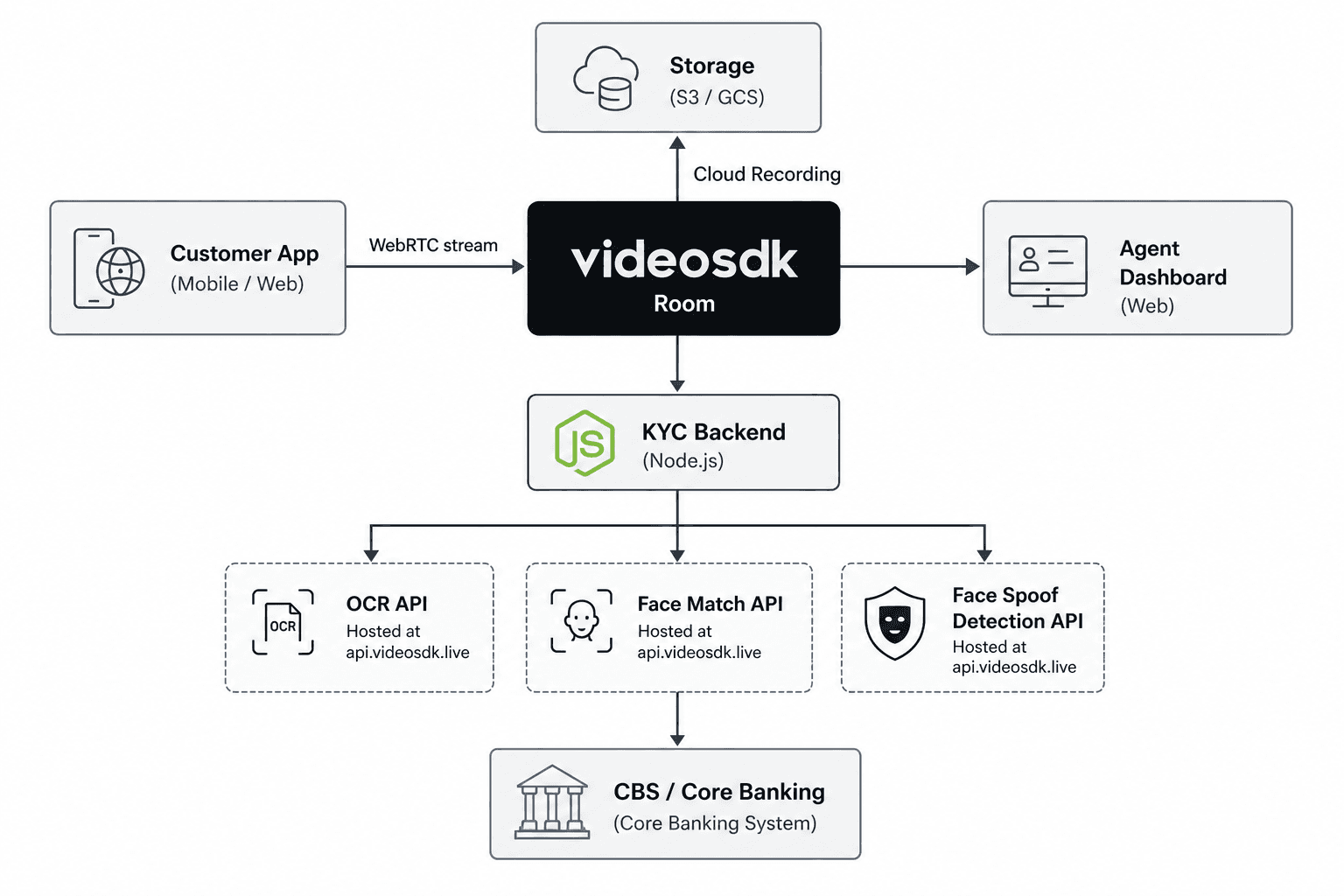
The system has six layers:
Customer App (mobile or web): The applicant opens the bank's app or web portal. The frontend uses the VideoSDK React SDK (or React Native / Flutter / Android / iOS SDK) to join a VideoSDK Room as a local participant, enabling the camera and microphone.
VideoSDK Room: A Room is VideoSDK's core real-time session primitive. Both the customer and the bank agent join the same Room as Participants. The Room carries the live MediaStream from each participant and provides the hooks for recording and PubSub-based signalling.
Agent Dashboard: The bank officer joins the same Room as a remote participant. They view the customer's stream, request document display, trigger server-side verification calls, and mark the session as approved or rejected.
KYC Backend: A Node.js service that bridges VideoSDK's AI APIs. When the agent requests document verification, the backend captures a frame from the customer's stream, base64-encodes it, and calls the OCR API, Face Match API, and Face Spoof Detection API in sequence.
Identity Verification APIs: Three REST endpoints at api.videosdk.live handle document extraction, biometric matching, and liveness/anti-spoofing. All are Enterprise-plan features. Exact endpoints are documented below.
Core Banking System (CBS): Once verification passes, the KYC backend pushes the extracted fields (name, Aadhaar number, date of birth, address) to the CBS to trigger the credit card application workflow.
Step-by-Step Implementation with VideoSDK
Step 1: Install the SDK
VideoSDK's React SDK is the primary package. The platform also supports JavaScript, React Native, Android, iOS, and Flutter.
npm install @videosdk.live/react-sdkWrap your application with MeetingProvider from the SDK:
import { MeetingProvider } from "@videosdk.live/react-sdk";Step 2: Generate an Auth Token
VideoSDK uses JWT tokens for authentication. Generate the token server-side using your API Key and Secret, which you obtain from the VideoSDK dashboard. The token does not include a "Bearer" or "Basic" prefix; pass it as a raw value.
// Server-side: Node.js token generation
import jwt from "jsonwebtoken";

const API_KEY = process.env.VIDEOSDK_API_KEY;
const SECRET = process.env.VIDEOSDK_SECRET;

const token = jwt.sign(
  {
    apikey: API_KEY,
    permissions: ["allow_join"],
    version: 2,
  },
  SECRET,
  { expiresIn: "24h" }
);
Refer to the VideoSDK auth guide at https://docs.videosdk.live/api-reference/realtime-communication/intro for full parameter options.
Step 3: Create and Join a Room
Use the useMeeting hook to access room controls. The useParticipant hook gives you access to each participant's media stream.
import { useMeeting, useParticipant } from "@videosdk.live/react-sdk";

function KYCRoom({ meetingId, authToken }) {
  const { join, leave, startRecording, participants } = useMeeting({
    onMeetingJoined: () => console.log("Session started"),
    onMeetingLeft: () => console.log("Session ended"),
  });

  return (
    <div>
      <button onClick={join}>Start KYC Session</button>
      <button onClick={leave}>End Session</button>
    </div>
  );
}
Pass meetingId and token via MeetingProvider:
<MeetingProvider
  config={{ meetingId, micEnabled: true, webcamEnabled: true, name: "Customer" }}
  token={authToken}
>
  <KYCRoom meetingId={meetingId} authToken={authToken} />
</MeetingProvider>
Step 4: Capture the Customer Video Stream
Use useParticipant to get the customer's webcam stream and render it:
import { useParticipant } from "@videosdk.live/react-sdk";
import { useEffect, useRef } from "react";

function CustomerVideo({ participantId }) {
  const { webcamStream, webcamOn } = useParticipant(participantId);
  const videoRef = useRef(null);

  useEffect(() => {
    if (webcamRef.current && webcamStream) {
      const mediaStream = new MediaStream();
      mediaStream.addTrack(webcamStream.track);
      videoRef.current.srcObject = mediaStream;
      videoRef.current.play();
    }
  }, [webcamStream]);

  return webcamOn ? <video ref={videoRef} autoPlay muted /> : null;
}
To extract a still frame for document scanning, draw the video element onto a canvas and export to base64:
function captureFrame(videoElement) {
  const canvas = document.createElement("canvas");
  canvas.width = videoElement.videoWidth;
  canvas.height = videoElement.videoHeight;
  canvas.getContext("2d").drawImage(videoElement, 0, 0);
  return canvas.toDataURL("image/jpeg"); // returns data:image/jpeg;base64,...
}
Step 5: Integrate the OCR API
Endpoint (verified from docs): POST https://api.videosdk.live/ai/v1/ocr
Send the front and back of the Aadhaar or PAN card as base64 images. The Authorization header takes the raw JWT token with no prefix.
async function runOCR(frontBase64, backBase64) {
  const url = "https://api.videosdk.live/ai/v1/ocr";
  const headers = {
    Authorization: process.env.VIDEOSDK_API_TOKEN,
    "Content-Type": "application/json",
  };
  const data = {
    frontPart: frontBase64, // e.g. "data:image/jpeg;base64,/9j/4AAQ..."
    backPart: backBase64,
  };

  const response = await axios.post(url, data, { headers });
  return response.data;
  // Returns: { idType, idNumber, name, dateOfBirth, address, gender, mobileNumber }
}
The response fields vary by document type. For Aadhaar, you receive name, dateOfBirth, address, and idNumber. Push these fields to your CBS workflow once verified.
Step 6: Run the Face Match API
Endpoint (verified from docs): POST https://api.videosdk.live/ai/v1/face-verification/verify
Compare the live selfie frame with the photo on the ID document. The API returns { "verified": true } or { "verified": false }.
async function runFaceMatch(idPhotoBase64, selfieBase64) {
  const url = "https://api.videosdk.live/ai/v1/face-verification/verify";
  const headers = {
    Authorization: process.env.VIDEOSDK_API_TOKEN,
    "Content-Type": "application/json",
  };
  const data = {
    img1: idPhotoBase64,   // photo extracted from ID document
    img2: selfieBase64,    // live selfie captured from the video stream
  };

  const response = await axios.post(url, data, { headers });
  return response.data; // { verified: true } or { verified: false }
}
Only proceed to card issuance if verified is true.
Step 7: Run the Face Spoof Detection API
Endpoint (verified from docs): POST https://api.videosdk.live/ai/v1/face-verification/detect-spoof
This catches applicants who hold a printed photo or screen in front of the camera instead of their real face. The response includes spoof_detected (boolean) and an accuracy score.
async function runSpoofDetection(selfieBase64) {
  const url = "https://api.videosdk.live/ai/v1/face-verification/detect-spoof";
  const headers = {
    Authorization: process.env.VIDEOSDK_API_TOKEN,
    "Content-Type": "application/json",
  };
  const data = {
    img: selfieBase64, // single base64 image of the customer's live face
  };

  const response = await axios.post(url, data, { headers });
  return response.data;
  // Returns: { spoof_detected: false, accuracy: 0.989... }
}
If spoof_detected is true, reject the session and flag the application for manual review.
Step 8: Start Cloud Recording for the Audit Trail
RBI mandates that the full V-CIP session be recorded. Use the startRecording method returned by useMeeting. VideoSDK stores the recording in its cloud, and you can configure a custom storage destination (see FAQ below for details on custom S3 buckets, which requires verification with VideoSDK support).
const { startRecording, stopRecording } = useMeeting();

// Start recording as soon as both participants have joined
function beginAuditRecording() {
  startRecording();
}

// Stop recording when the agent marks the session complete
function endAuditRecording() {
  stopRecording();
}
The recording captures both the customer and the agent streams in a composited layout. Store the recording URL in your KYC database alongside the session metadata (timestamp, customer ID, OCR output, face match result).
Agent Dashboard Setup
The bank agent joins the same VideoSDK Room using a separate interface. Their token should include the allow_join and allow_mod permissions so they can control the session.
// Agent's MeetingProvider configuration
<MeetingProvider
  config={{
    meetingId,
    micEnabled: true,
    webcamEnabled: true,
    name: "KYC Agent - Priya",
  }}
  token={agentToken}
>
  <AgentDashboard />
</MeetingProvider>
Inside AgentDashboard, iterate over participants (excluding the agent's own local participant) to render the customer's video feed using useParticipant. The agent UI should expose:
- A live view of the customer's webcam stream.
- A button to trigger the OCR + face match + spoof detection sequence server-side.
- An approval or rejection toggle that writes the outcome to your KYC backend.
- A session timer (RBI does not specify a maximum duration, but a timeout of 15 minutes is a sensible default).
The agent cannot directly call VideoSDK AI APIs from the browser. All AI calls should originate from your KYC backend server, which holds the API token securely.
RBI Compliance Checklist
Building the session is only half the work. The following controls are required or strongly implied by RBI's V-CIP guidelines.
Geo-fencing (INDIA region): VideoSDK's Geo Fencing feature restricts WebRTC connections to servers within a specified region, regardless of where the user physically connects from. For an RBI-compliant V-CIP, set the region to INDIA. This ensures all media traffic and data stays within Indian borders. Geo Fencing is an Enterprise plan feature. Configure it by setting the region parameter when creating the Room via the VideoSDK REST API.
Available regions confirmed from docs: INDIA, USA, UAE, EUROPE, SINGAPORE, AUSTRALIA. Select INDIA for RBI compliance.
Customer location capture: At session start, use the browser's Geolocation API (navigator.geolocation.getCurrentPosition) to capture the customer's latitude and longitude. Store this alongside the KYC record. RBI requires that the customer's location be verified as within India during the V-CIP.
Customer consent flow: Before the Room is joined, display a clear consent screen stating: the session will be recorded, the data will be used for KYC verification, and the recording will be stored for the regulatory period (typically 10 years per RBI guidelines). Log the timestamp of consent acceptance.
Recorded session storage: VideoSDK records the session to cloud storage. For long-term regulatory retention, download the recording after the session and archive it to your bank's own encrypted storage. Tag records with the customer ID, session ID, agent ID, and timestamp.
Trained agent requirement: The agent conducting V-CIP must be trained by the Regulated Entity. This is an operational control, not a software control, but your dashboard should enforce agent authentication through your existing IAM system before granting access to the VideoSDK Room.
Key Takeaways
- VideoSDK provides three identity verification REST APIs verified from the docs: OCR API (
/ai/v1/ocr), Face Match API (/ai/v1/face-verification/verify), and Face Spoof Detection API (/ai/v1/face-verification/detect-spoof). All three are Enterprise plan features. - The
useMeetinganduseParticipanthooks from@videosdk.live/react-sdkhandle room management and media stream access with minimal boilerplate. - RBI's V-CIP mandate covers four pillars: live video interaction, document OCR, face matching, and session recording. VideoSDK covers all four in a single platform.
- Geo Fencing to the
INDIAregion ensures your WebRTC media traffic does not leave Indian data centres, a critical data residency requirement for credit card KYC. - All AI API calls must be made server-side (from your KYC backend), not from the browser, to protect your API token.
Frequently Asked Questions
Q: Is VideoSDK suitable for RBI-compliant V-CIP for credit card onboarding?
VideoSDK provides the technical infrastructure required to build a V-CIP pipeline: live two-way audio-visual communication, cloud recording, and identity verification APIs (OCR, face match, and spoof detection). However, regulatory compliance is the responsibility of the Regulated Entity (bank or NBFC) that deploys the solution. The bank must ensure the system meets all RBI Master Direction requirements including agent training, consent flows, data retention, and audit procedures. VideoSDK's infrastructure can be configured to support these requirements, particularly with Geo Fencing set to the INDIA region and cloud recording enabled. Contact VideoSDK's enterprise team for a compliance-oriented deployment discussion.
Q: Can the V-CIP session recording be stored on a custom S3 bucket?
VideoSDK's cloud recording stores sessions in VideoSDK-managed storage by default. Custom storage destination support (such as your bank's own AWS S3 bucket or Azure Blob Storage) is a feature that should be confirmed directly with VideoSDK's enterprise support team, as the exact configuration options may depend on your contract. For regulatory retention requirements, the standard approach is to download the recording via the VideoSDK recording URL after the session ends and archive it to your own encrypted storage.
Q: How does the Face Spoof Detection API work?
The Face Spoof Detection API (POST https://api.videosdk.live/ai/v1/face-verification/detect-spoof) takes a single base64-encoded image of the customer's face and returns two fields: spoof_detected (a boolean) and accuracy (a float representing the model's confidence). The model distinguishes a real, live face from a printed photograph or screen replay held up to the camera. An accuracy value close to 1.0 indicates high confidence in the detection result. The API does not rely on motion or challenge-response; it performs a single-frame analysis.
Q: What is the latency of the OCR API?
The VideoSDK docs do not publish a specific latency SLA for the OCR API (POST https://api.videosdk.live/ai/v1/ocr). Actual response times depend on image size, server load, and network conditions. In practice, OCR calls on document images should complete within a few seconds for a typical JPEG. For a production deployment, implement a timeout and retry strategy on the KYC backend. Contact VideoSDK enterprise support for latency guarantees if your SLA requires a specific commitment.
Q: Does VideoSDK's React SDK work on Android and iOS for video KYC on mobile?
VideoSDK supports native mobile development through its React Native SDK, Android (Kotlin/Java) SDK, and iOS (Swift) SDK, in addition to the React web SDK used in this guide. All platform SDKs provide equivalent access to the same Room, Participant, and media stream primitives. The identity verification APIs (OCR, Face Match, Face Spoof Detection) are REST endpoints and can be called from any platform that can make HTTPS requests. This means you can build a fully native mobile V-CIP app using VideoSDK's mobile SDKs and the same backend API calls described here.
Q: Which document types does the OCR API support?
Based on the VideoSDK docs, the OCR API accepts the front and back of an ID document and returns fields including idType, idNumber, name, dateOfBirth, address, gender, and mobileNumber. The response fields vary by document type. For a complete list of supported Indian OVDs (Aadhaar, PAN, passport, driving licence, voter ID), confirm with VideoSDK's enterprise team, as the exact supported set is not enumerated in the current public documentation.
Conclusion
Building a video KYC system for credit card onboarding requires three things working together: a reliable real-time video layer, verified identity APIs, and a compliant recording pipeline. VideoSDK provides all three through its React SDK hooks (useMeeting, useParticipant), its Identity Verification REST APIs (OCR, Face Match, Face Spoof Detection), and its built-in cloud recording. Start with the full documentation at docs.videosdk.live and reach out to the enterprise team for Geo Fencing and custom storage configuration specific to your RBI compliance requirements.