


TL;DR: Building a mental health video consultation app requires more than standard HIPAA compliance. You need to handle psychotherapy note protections, substance use disorder record rules under 42 CFR Part 2, token-controlled waiting rooms, end-to-end encrypted sessions, AI-powered noise suppression, and explicit recording consent. This guide walks through each requirement and the VideoSDK React code to implement them correctly.
A mental health video consultation app carries stricter privacy obligations than a general telehealth platform. Psychotherapy session notes receive separate legal protection from other protected health information (PHI) under HIPAA, and substance use disorder (SUD) treatment records fall under an entirely distinct federal framework called 42 CFR Part 2.
Unique compliance requirements for mental health
Mental health data is not treated the same as other medical data under US federal law. Developers building in this space need to understand three distinct compliance layers.
HIPAA psychotherapy notes
Psychotherapy notes are notes a mental health provider records in the process of a session, separated from the rest of the medical record. Under the HIPAA Privacy Rule (45 CFR 164.524), these notes receive extra protection beyond general PHI. A covered entity generally cannot use or disclose psychotherapy notes without an authorization that is separate from any other authorization. This means your platform cannot treat session content like a general medical record: you need explicit, documented patient consent before storing, sharing, or processing session data beyond treatment purposes.
The practical implication for developers: do not log session transcripts or enable auto-transcription without a separate, auditable consent capture in your application layer.
42 CFR Part 2 for substance use disorder treatment
42 CFR Part 2 is a federal regulation that governs records related to substance use disorder treatment at federally assisted programs. It is stricter than HIPAA in several ways. It prohibits disclosure of SUD patient records to third parties, including other healthcare providers, without explicit written consent from the patient, with very narrow exceptions. This regulation applies even if the patient has already signed a general HIPAA authorization.
For a telehealth developer: if your platform serves SUD treatment programs, you cannot share session recordings, transcripts, or even the fact of treatment without compliant written consent. Recording such sessions by default violates the regulation.
State mandated reporting and involuntary commitment
Most US states require mental health providers to report credible threats of harm to self or others (Tarasoff duties) and to initiate involuntary hold processes when a patient presents imminent risk. Your platform's architecture needs to support this: a therapist must be able to take action outside the video session, and your crisis response flow must not depend on the session remaining active.
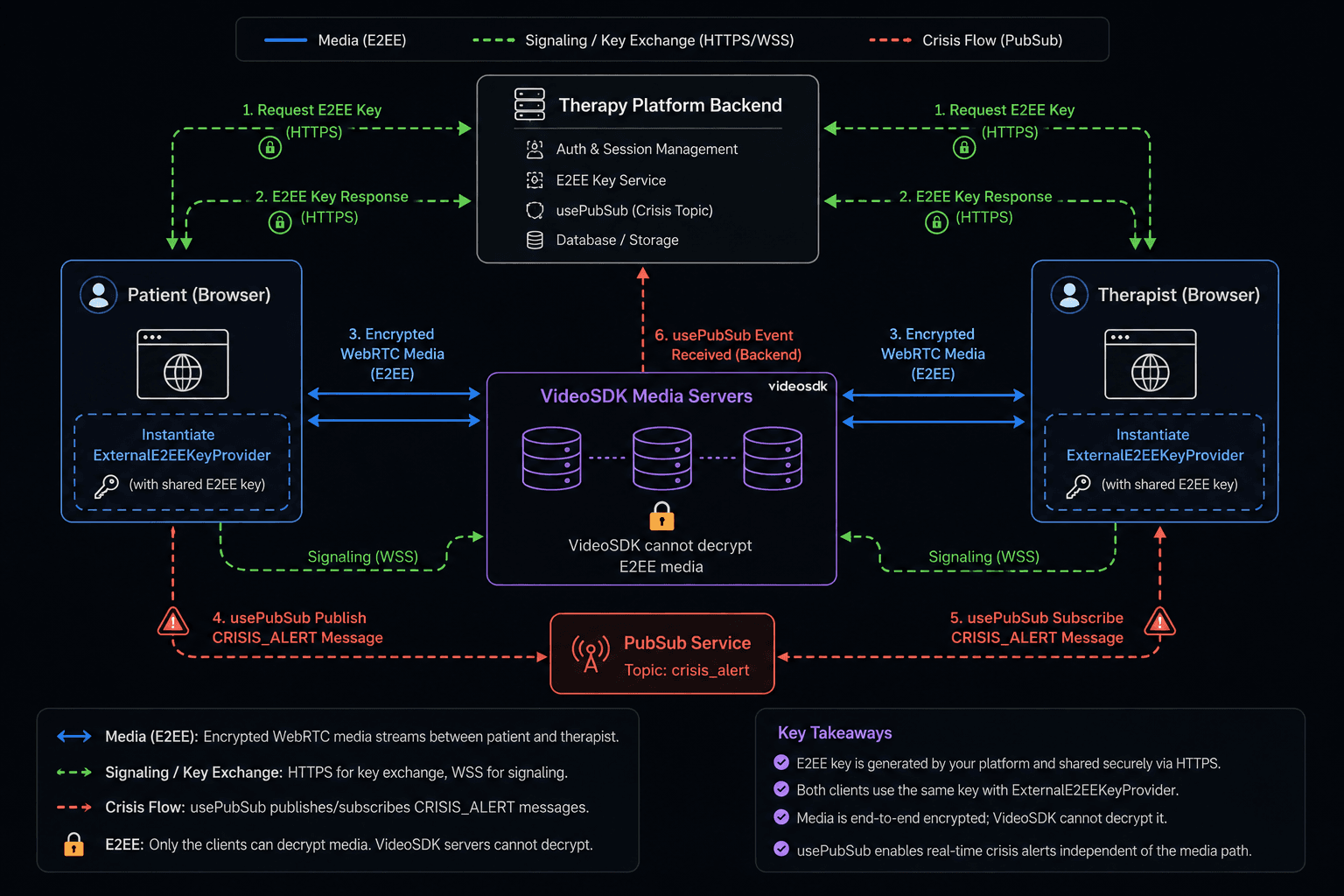
The practical approach is to build a parallel communication channel, covered in the session implementation section below.
Recommended VideoSDK features for a mental health video consultation app
VideoSDK's React SDK provides several documented features that directly address telemental health platform requirements.
End-to-end encryption with ExternalE2EEKeyProvider
E2EE (end-to-end encryption) is a documented feature in VideoSDK's React SDK from version 0.3.5 onwards. It encrypts media on the sender's device and decrypts it only on the receiver's device. VideoSDK servers never access or store the encryption keys.
You enable it by importing ExternalE2EEKeyProvider from @videosdk.live/react-sdk, calling setSharedKey() with your session key, and passing the provider instance as the keyProvider prop to MeetingProvider. Your server is responsible for generating and distributing the key to all session participants over HTTPS before they join.
import {
  MeetingProvider,
  ExternalE2EEKeyProvider,
} from "@videosdk.live/react-sdk";
import { useMemo } from "react";

function SecureTherapyApp({ meetingId, token, encryptionKey }) {
  const keyProvider = useMemo(() => {
    const _keyProvider = new ExternalE2EEKeyProvider();
    // Key must be set before passing to MeetingProvider
    _keyProvider.setSharedKey(encryptionKey);
    return _keyProvider;
  }, [encryptionKey]);

  return (
    <MeetingProvider
      config={{
        meetingId,
        micEnabled: true,
        webcamEnabled: true,
        name: "Patient",
      }}
      token={token}
      keyProvider={keyProvider} // enables E2EE
    >
      <TherapySession />
    </MeetingProvider>
  );
}
You can verify E2EE status at runtime using isE2EEEnabled from useMeeting(). The onE2EEStateChanged callback in useParticipant() reports per-stream encryption state (audio, video, share) with values such as EncryptionSuccess, DecryptionFailed, or MissingKey.
One critical limitation from the docs: recording and transcription are not supported when E2EE is enabled. This is actually aligned with mental health compliance requirements for SUD sessions, where recording should be off by default anyway. For sessions where recording is clinically justified and consented to, you would not enable E2EE.
Waiting room with onEntryRequested
A waiting room pattern prevents a patient from joining a live session without the therapist explicitly approving. VideoSDK supports this through token-based permissions. When a patient token includes the ask_join permission, calling join() does not immediately place the patient in the meeting. Instead, it fires an onEntryRequested event to any participant holding the allow_join permission (the therapist).
// Therapist token payload (server-side, before signing)
const therapistToken = { permissions: ["allow_join", "allow_mod"] };

// Patient token payload
const patientToken = { permissions: ["ask_join"] };
Cloud recording with startRecording() and stopRecording()
VideoSDK's useMeeting hook exposes startRecording() and stopRecording(). startRecording() accepts a webhookUrl, an awsDirPath for S3 storage, a layout config object, and an optional transcription config. For mental health use cases, call startRecording() only after capturing explicit patient consent in your application layer. Note that recording is incompatible with E2EE: if you have keyProvider set, startRecording() will not function.
usePubSub for in-session messaging
usePubSub is VideoSDK's publish-subscribe hook for real-time in-session messaging. You subscribe to a topic string and receive a publish() function and a messages array. For a therapy platform, use a dedicated CRISIS_ALERT topic to let a therapist trigger an internal alert without interrupting the session UI.
import { usePubSub } from "@videosdk.live/react-sdk";

const { publish } = usePubSub("CRISIS_ALERT", {
  onMessageReceived: (message) => {
    if (message.message === "CRISIS") {
      triggerCrisisProtocol(message.senderId);
    }
  },
});

const sendCrisisAlert = () => {
  publish("CRISIS", { persist: false });
};
Building the therapy session app
Installation and setup
npm install @videosdk.live/react-sdk
npm install --save "@videosdk.live/videosdk-media-processor-web"
Wrap your application in MeetingProvider with joinWithoutUserInteraction set to false so the patient does not join until they explicitly accept the consent screen. Pass the keyProvider instance to enable E2EE.
Pre-session consent screen
Before calling join(), render a consent screen that displays the purpose of the session, whether the session may be recorded, the patient's right to withdraw consent, and crisis resources. Only call join() when the patient explicitly clicks "I understand and agree."
function ConsentGate({ onConsent }) {
  return (
    <div className="consent-screen">
      <h2>Before your session</h2>
      <p>
        This session uses end-to-end encryption. Your video and audio cannot be
        accessed by any server. Recording will only occur with your separate
        written consent.
      </p>
      <p>
        Crisis resources: National Crisis Hotline: 988 | Crisis Text Line: Text
        HOME to 741741
      </p>
      <button onClick={onConsent}>I understand and agree to join</button>
    </div>
  );
}
Session component with useMeeting and useParticipant
function TherapySession() {
  const [consentGiven, setConsentGiven] = React.useState(false);

  const { join, leave, localParticipant, participants, isE2EEEnabled } =
    useMeeting({
      onMeetingJoined: () => console.log("Session joined"),
      onMeetingLeft: () => console.log("Session ended"),
      onEntryRequested: ({ participantId, allow, deny }) => {
        const approved = window.confirm(`Patient requesting entry. Allow?`);
        approved ? allow() : deny();
      },
    });

  if (!consentGiven) {
    return (
      <ConsentGate onConsent={() => { setConsentGiven(true); join(); }} />
    );
  }

  return (
    <div className="therapy-session">
      <div>E2EE active: {isE2EEEnabled ? "Yes" : "No"}</div>
      {[...participants.keys()].map((id) => (
        <ParticipantView key={id} participantId={id} />
      ))}
      <button onClick={leave}>Leave session</button>
    </div>
  );
}

function ParticipantView({ participantId }) {
  const { displayName, webcamStream, webcamOn } = useParticipant(
    participantId,
    {
      onE2EEStateChanged: (stateInfo) => {
        console.log(`E2EE ${stateInfo.state} for ${stateInfo.kind}`);
      },
    }
  );

  const videoRef = React.useRef(null);

  React.useEffect(() => {
    if (videoRef.current && webcamStream) {
      const mediaStream = new MediaStream([webcamStream.track]);
      videoRef.current.srcObject = mediaStream;
    }
  }, [webcamStream]);

  return (
    <div>
      <p>{displayName}</p>
      {webcamOn && <video ref={videoRef} autoPlay muted />}
    </div>
  );
}
Ensuring audio and video quality
AI noise suppression with VideoSDKNoiseSuppressor
AI noise suppression is available through the @videosdk.live/videosdk-media-processor-web package. The VideoSDKNoiseSuppressor class takes a raw MediaStream from createMicrophoneAudioTrack() and returns a noise-suppressed stream via getNoiseSuppressedAudioStream(). You then pass that processed stream to changeMic() to replace the active microphone input mid-session.
This is clinically relevant: a patient calling from a noisy environment may feel self-conscious about ambient sound. Enabling noise suppression reduces that barrier and ensures the therapist hears speech clearly.
import {
  useMeeting,
  createMicrophoneAudioTrack,
} from "@videosdk.live/react-sdk";
import { VideoSDKNoiseSuppressor } from "@videosdk.live/videosdk-media-processor-web";

function NoiseSuppressorControl() {
  const noiseProcessor = new VideoSDKNoiseSuppressor();
  const { changeMic } = useMeeting({});

  const handleStartNoiseSuppression = async () => {
    // Get raw mic stream
    const stream = await createMicrophoneAudioTrack({});
    // Process through AI suppressor
    const processedStream =
      await noiseProcessor.getNoiseSuppressedAudioStream(stream);
    // Swap the active mic track
    changeMic(processedStream);
  };

  const handleStopNoiseSuppression = async () => {
    // Restore unprocessed mic stream
    const stream = await createMicrophoneAudioTrack({});
    changeMic(stream);
  };

  return (
    <>
      <button onClick={handleStartNoiseSuppression}>
        Enable noise suppression
      </button>
      <button onClick={handleStopNoiseSuppression}>
        Disable noise suppression
      </button>
    </>
  );
}
To enable noise suppression from session start, pass the processed stream via the customMicrophoneAudioTrack config option in MeetingProvider before joining.
Network quality indicators
The useMeeting hook exposes an onQualityLimitation event callback. This event fires when the SDK detects quality limitations in the session. Listen to this event and surface a clear warning in the session UI. A degraded network warning is especially important in a mental health context: a patient in distress should not be confused by a frozen screen without explanation.
const { join } = useMeeting({
  onQualityLimitation: ({ participantId, reason }) => {
    setNetworkWarning(`Connection quality reduced: ${reason}`);
  },
});
Compliance checklist for a mental health video consultation app
| Requirement | VideoSDK feature | Implementation step |
|---|---|---|
| End-to-end media encryption | ExternalE2EEKeyProvider passed as keyProvider to MeetingProvider | Generate key server-side, distribute over HTTPS, call setSharedKey() before joining |
| Verify E2EE is active | isE2EEEnabled from useMeeting() | Assert isE2EEEnabled === true before allowing session to proceed |
| Monitor per-stream encryption state | onE2EEStateChanged in useParticipant() | Log or alert on DecryptionFailed or MissingKey states |
| Waiting room before therapist joins | ask_join in patient token; onEntryRequested event | Issue separate token types server-side per role |
| Recording consent capture | Conditional startRecording() call | Block startRecording() behind documented patient authorization |
| Recording disabled when E2EE is on | E2EE and recording are mutually exclusive per docs | Do not call startRecording() when keyProvider is set |
| SUD session: no recording | Never call startRecording() for 42 CFR Part 2 patients | Tag session type in backend; gate recording at API level |
| Background noise isolation | VideoSDKNoiseSuppressor from videosdk-media-processor-web | Call getNoiseSuppressedAudioStream() and pipe into changeMic() |
| In-session crisis escalation | usePubSub with CRISIS_ALERT topic | Therapist publishes event; backend triggers external response |
| Screen sharing for patient materials | enableScreenShare() / disableScreenShare() | Expose toggle in patient UI; inform patient content is visible to therapist |
| Audit log of session events | onMeetingJoined, onMeetingLeft, onRecordingStarted callbacks | Log to database from server-side webhook and client callbacks |
| Data deletion | S3 lifecycle policies on awsDirPath bucket | Configure bucket retention aligned with your HIPAA BAA |
Session recording considerations
Recording a mental health session is a legal decision, not a default behavior. HIPAA requires a separate, specific authorization to record psychotherapy sessions. For SUD programs covered by 42 CFR Part 2, recordings carry strict re-disclosure restrictions even after creation. The safest default is recording off.
There is also a hard technical constraint: VideoSDK's E2EE and recording features are mutually exclusive. When keyProvider is active, startRecording() is not supported per the docs. This means your session architecture has two distinct modes: E2EE sessions (no recording, maximum privacy), and non-E2EE sessions (recording possible with consent, relying on DTLS-SRTP transport encryption and S3 server-side encryption at rest).
// Server sets this flag based on session type and consent status
const sessionMode = sessionConfig.recordingConsentSigned &&
                    sessionConfig.sessionType !== "SUD_TREATMENT"
                    ? "recordable"
                    : "e2ee";

// In session initialization:
// E2EE mode: pass keyProvider, never call startRecording()
// Recordable mode: no keyProvider, startRecording() after consent confirmed
When recording completes, VideoSDK triggers the webhookUrl you provided. Use that webhook to log the recording event, associate the file reference with the patient record, and trigger any required patient notification.
Key takeaways
- A mental health video consultation app must comply with both HIPAA (separate psychotherapy note protections) and, for SUD programs, 42 CFR Part 2, which is stricter than HIPAA on disclosure.
- VideoSDK's
ExternalE2EEKeyProviderenables true end-to-end encryption from React SDK v0.3.5+, with client-side key management and anonE2EEStateChangedevent for per-stream monitoring. - E2EE and recording are mutually exclusive in VideoSDK: use E2EE for maximum-privacy sessions and non-E2EE for sessions where recording is clinically justified and explicitly consented to.
- AI noise suppression via
VideoSDKNoiseSuppressorfrom thevideosdk-media-processor-webpackage processes microphone audio before it reaches the session, improving clarity without modifying the WebRTC pipeline manually. - The token permission system (
ask_join/allow_join) implements a waiting room natively, andusePubSubprovides a parallel crisis escalation channel that does not depend on the video connection remaining stable.
FAQ
Q1. Should mental health sessions be recorded at all?
Recording is not required and is often inadvisable without clear legal justification. HIPAA requires a separate, specific authorization to record psychotherapy sessions, beyond a general consent form. For SUD programs covered by 42 CFR Part 2, recordings create identifiable records with strict re-disclosure restrictions. The safest default is no recording. When clinical or supervisory needs justify it, obtain documented written consent, use VideoSDK's non-E2EE mode with server-side S3 encryption at rest, restrict access via role-based controls, and define a retention and deletion policy in your HIPAA BAA.
Q2. How do you build a no-recording mode in VideoSDK?
Simply do not call startRecording(). VideoSDK sessions do not record by default. If you also enable E2EE by passing keyProvider to MeetingProvider, the SDK additionally makes recording technically unavailable. This double safeguard works well for SUD sessions: set keyProvider server-side for those session types and never surface a recording UI. For sessions where recording is possible, gate startRecording() behind a server-side flag that confirms both consent status and session type before allowing the call.
Q3. Can a patient share their screen with the therapist?
Yes. VideoSDK's useMeeting hook exposes enableScreenShare() and disableScreenShare(). When a participant calls enableScreenShare(), all other participants receive an onStreamEnabled() callback from useParticipant(), and the onPresenterChanged() event fires with the presenterId. Useful for reviewing worksheets, mood tracking tools, or journal entries together. Inform the patient at session start that screen sharing is voluntary and that any shared content will be visible to the therapist.
Q4. How do you handle a patient in crisis during a session?
Build a parallel escalation path that does not depend on the video session continuing. In the therapist UI, a crisis escalation button calls publish("CRISIS", { persist: false }) via usePubSub on a dedicated CRISIS_ALERT topic. Your backend subscribes to this topic and triggers a defined workflow: alerting on-call staff, pre-filling emergency contact forms, or logging the event with a timestamp. The video session continues in parallel so the therapist maintains contact. Display crisis line information (988 in the US, or a localized equivalent) persistently in the patient-facing UI rather than only at the pre-session consent screen.
Conclusion
Building a compliant mental health video consultation app requires treating privacy as a design constraint from day one. The legal requirements around psychotherapy notes, SUD records under 42 CFR Part 2, and state mandated reporting obligations go beyond what generic HIPAA tooling covers. VideoSDK gives you the concrete building blocks: ExternalE2EEKeyProvider for end-to-end encrypted sessions, the ask_join token system for waiting rooms, VideoSDKNoiseSuppressor for clean audio, conditional startRecording() for consent-gated recordings, and usePubSub for crisis escalation. The architecture decision that matters most is the E2EE vs. recording tradeoff: design your session types around that constraint early, and your compliance posture becomes significantly easier to defend.