


Building a telehealth app in Brazil requires LGPD-compliant data handling for health data, adherence to CFM Resolution 2.314/2022 for telemedicine practice, and a real-time video infrastructure that keeps sensitive patient data secure. This guide uses VideoSDK's Flutter and React SDKs, with verified API methods, E2EE, geo-fencing, and cloud recording, to walk you through a production-ready architecture.
Building an LGPD-compliant telehealth app in Brazil requires encrypting all session media, collecting explicit patient consent before any data is processed, and using a video infrastructure that can route traffic through Brazilian or regional servers. LGPD (Lei Geral de Proteção de Dados, Brazil's comprehensive data protection law, enacted in 2020) classifies health data as sensitive data, which carries stricter processing rules than ordinary personal data. VideoSDK provides the Flutter SDK, React SDK, E2EE, geo-fencing, and cloud recording needed to meet these requirements in a single integration.
LGPD and CFM requirements for telehealth
What LGPD requires for health data
Sensitive data under LGPD (Article 11) includes health and biometric data. Processing this category requires one of two legal bases: explicit and specific consent from the data subject, or a health necessity carried out by a qualified professional bound by professional secrecy.
For a telehealth app, this translates into three concrete obligations:
Data minimisation: Collect only the data that is strictly necessary for the consultation. Do not store video frames beyond the legally required retention period. Do not share identifiable health data with analytics or advertising services.
Explicit consent: The patient must give free, informed, and unambiguous consent before the video session starts. The consent must state what data is collected, why it is collected, how long it will be retained, and who will have access. A pre-ticked checkbox does not satisfy this requirement.
Data subject rights: Patients may request access, correction, deletion, or portability of their data at any time (Articles 18-20). Your app must provide a documented mechanism to respond to these requests within 15 days.
The ANPD (Autoridade Nacional de Proteção de Dados, Brazil's data protection authority) can impose fines of up to 2% of a company's Brazilian revenue in the prior fiscal year, capped at R$50 million per infraction (Article 52).
CFM Resolution 2.314/2022 requirements
CFM Resolution 2.314/2022 is the Brazilian Federal Council of Medicine regulation that governs telemedicine practice. It replaced the temporary rules from the COVID-19 period and establishes permanent requirements for remote consultations.
The resolution requires that any telemedicine session use a secure channel, meaning a channel that protects the privacy and confidentiality of the doctor-patient relationship. A simple video call over an unencrypted or third-party public platform does not satisfy this requirement. The regulation also requires that the consultation be documented in a medical record, and that digital prescriptions issued during the session comply with CFM's digital signature and tracking requirements.
Key practical requirements for your application:
- The video channel must provide confidentiality equivalent to a physical consultation.
- A medical record entry must be created for each teleconsultation.
- The patient must give informed consent to the teleconsultation modality before the session.
- Prescriptions issued remotely must use a certified digital signature system.
The video infrastructure itself only covers the secure channel requirement. Your application layer must implement the medical record and prescription components.
Why VideoSDK for Brazilian telehealth
VideoSDK provides three features that are directly relevant to LGPD and CFM compliance.
Geo-fencing: VideoSDK's Flutter SDK includes a Geo Fencing and Proxy Controls feature (documented at Geo Fencing - Flutter). This allows you to restrict or prefer media routing to specific geographic regions, which supports the goal of keeping patient data within defined jurisdictions. Contact VideoSDK support for region-specific server configuration for Brazil.
End-to-end encryption (E2EE): VideoSDK supports E2EE for media streams in the Flutter SDK starting from version 2.1.0. Encryption is handled entirely on the client device. VideoSDK servers never receive, store, or transfer your encryption keys. This directly satisfies the CFM requirement for a confidential channel. Note: cloud recording is not available when E2EE is enabled, because recording requires server-side media access. You must choose between E2EE and cloud recording for each session type, or design your architecture to use E2EE only and implement local recording separately.
Cloud recording: VideoSDK's REST API provides a POST https://api.videosdk.live/v2/recordings/start endpoint that starts cloud recording for a session. Recordings can be pushed to a custom AWS S3 bucket via the awsDirPath parameter, or to any pre-signed cloud URL. This supports LGPD's medical record retention requirement for non-E2EE sessions.
VideoSDK does not publish a Brazil-specific data processing agreement (DPA) or list specific server regions in its public documentation. Before going to production, obtain a data processing agreement from VideoSDK that covers your obligations as a data controller under LGPD, and confirm the specific server regions that will process your Brazilian patient data.
Architecture
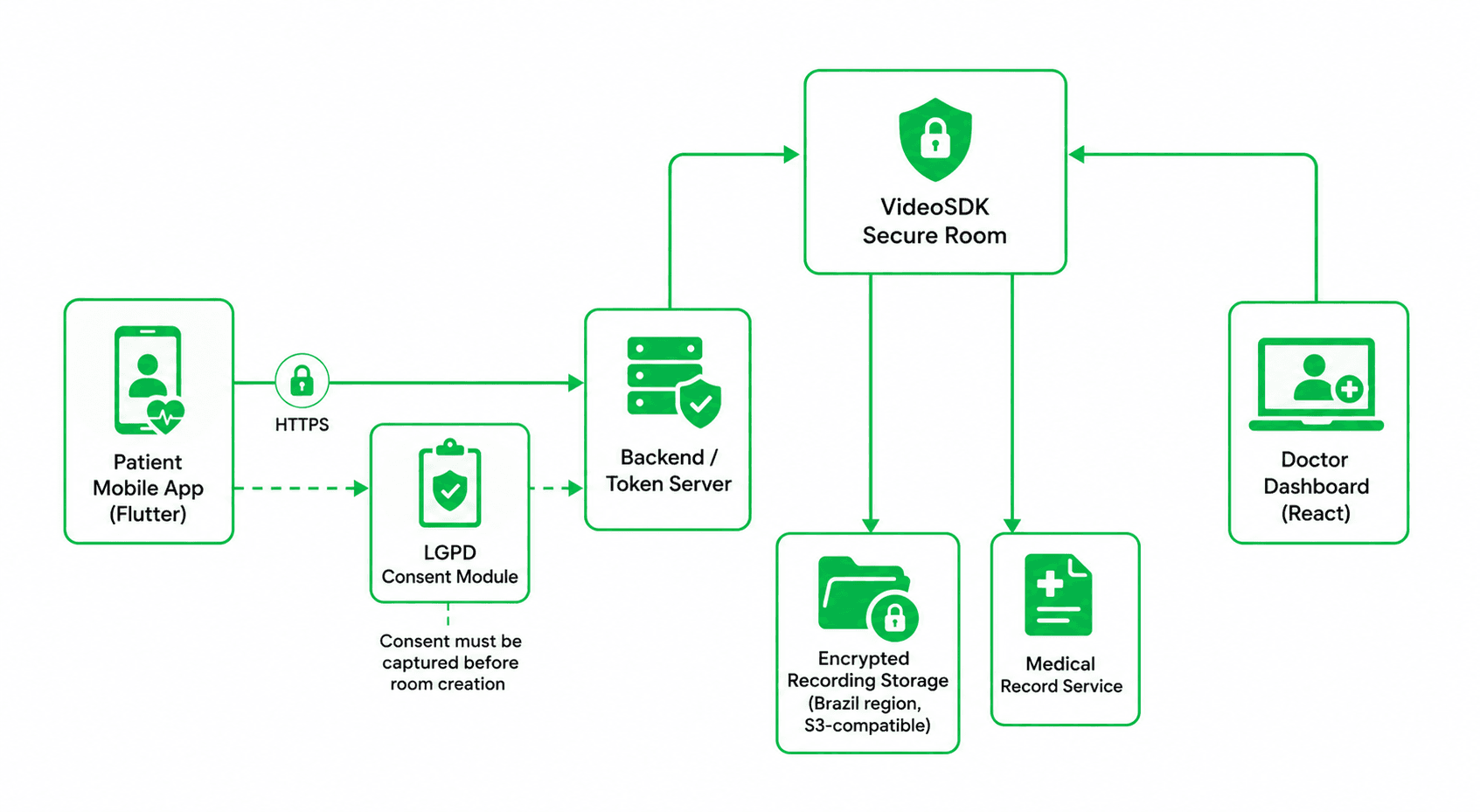
The architecture has five components:
Patient Mobile App (Flutter): Captures consent before room creation. Passes the consent record ID to the backend. Initialises the VideoSDK room only after consent is confirmed.
Doctor Dashboard (React): Joins the same room as a host. Controls recording. Provides a UI-level prescription button that triggers your own medical record service.
Backend / Token Server: Generates VideoSDK JWT tokens. Creates room IDs via the VideoSDK create-room API. Stores consent records. Starts and stops cloud recording via the VideoSDK REST API.
Medical Record Service: Owned entirely by you, not VideoSDK. Stores the structured consultation record, prescription data, and links to the recording file.
Encrypted Recording Storage: An AWS S3-compatible bucket in a Brazilian region (e.g., sa-east-1). VideoSDK pushes recordings here via awsDirPath. You control access, retention, and deletion.
Building the patient app with Flutter
Step 1: Install the SDK
Add the videosdk package to your Flutter project:
flutter pub add videosdkThis adds the following to your pubspec.yaml:
dependencies:
  videosdk: ^2.0.0
Import the SDK in your Dart files:
import "package:videosdk/videosdk.dart";For Android, set minSdkVersion to 23 in android/app/build.gradle and add the required permissions to AndroidManifest.xml:
<uses-permission android:name="android.permission.CAMERA" />
<uses-permission android:name="android.permission.RECORD_AUDIO" />
<uses-permission android:name="android.permission.INTERNET" />
<uses-permission android:name="android.permission.FOREGROUND_SERVICE" />
For iOS, add NSCameraUsageDescription and NSMicrophoneUsageDescription to Info.plist, and set the minimum platform version to 13.0 in your Podfile.
Step 2: Capture consent before joining
Under LGPD, you must not process health data before explicit consent is recorded. In the Flutter app, block room entry until the patient has accepted a clearly worded consent form.
// consent_screen.dart
import 'package:flutter/material.dart';
class ConsentScreen extends StatefulWidget {
final VoidCallback onConsentGiven;
const ConsentScreen({super.key, required this.onConsentGiven});
State<ConsentScreen> createState() => _ConsentScreenState();
}
class _ConsentScreenState extends State<ConsentScreen> {
bool _accepted = false;
Widget build(BuildContext context) {
return Scaffold(
appBar: AppBar(title: const Text('Consentimento LGPD')),
body: Padding(
padding: const EdgeInsets.all(24),
child: Column(
crossAxisAlignment: CrossAxisAlignment.start,
children: [
const Text(
'Esta teleconsulta será realizada por meio de um canal seguro. '
'Seus dados de saúde serão processados exclusivamente para fins '
'de atendimento médico, conforme a LGPD (Lei 13.709/2018) e a '
'Resolução CFM 2.314/2022. Você pode revogar este consentimento '
'a qualquer momento.',
style: TextStyle(fontSize: 16),
),
const SizedBox(height: 24),
CheckboxListTile(
value: _accepted,
onChanged: (v) => setState(() => _accepted = v ?? false),
title: const Text('Eu li e aceito os termos acima.'),
),
const SizedBox(height: 24),
ElevatedButton(
onPressed: _accepted ? widget.onConsentGiven : null,
child: const Text('Entrar na consulta'),
),
],
),
),
);
}
}After the patient accepts, post the consent record to your backend and receive a consentId. Include this in your room creation request metadata.
Step 3: Create and join the VideoSDK room
// meeting_screen.dart
import 'package:videosdk/videosdk.dart';
import 'package:flutter/material.dart';
class MeetingScreen extends StatefulWidget {
final String meetingId;
final String token;
final String displayName;
const MeetingScreen({
super.key,
required this.meetingId,
required this.token,
required this.displayName,
});
State<MeetingScreen> createState() => _MeetingScreenState();
}
class _MeetingScreenState extends State<MeetingScreen> {
late Room _room;
bool _joined = false;
void initState() {
super.initState();
// Create the room — consent must already be recorded before this point
_room = VideoSDK.createRoom(
roomId: widget.meetingId,
token: widget.token,
displayName: widget.displayName,
micEnabled: true,
camEnabled: true,
);
_registerRoomEvents();
}
void _registerRoomEvents() {
_room.on(Events.roomJoined, () {
setState(() => _joined = true);
});
_room.on(Events.roomLeft, () {
Navigator.pop(context);
});
}
void _joinRoom() {
_room.join();
}
void _leaveRoom() {
_room.leave();
}
Widget build(BuildContext context) {
return Scaffold(
appBar: AppBar(title: const Text('Teleconsulta')),
body: Center(
child: _joined
? Column(
mainAxisAlignment: MainAxisAlignment.center,
children: [
const Text('Sessão em andamento'),
const SizedBox(height: 24),
ElevatedButton(
onPressed: _leaveRoom,
child: const Text('Encerrar consulta'),
),
],
)
: ElevatedButton(
onPressed: _joinRoom,
child: const Text('Entrar na sala'),
),
),
);
}
}The VideoSDK.createRoom() method takes roomId, token, displayName, micEnabled, and camEnabled as parameters, as documented in the Flutter quick-start guide. Call room.join() to connect to the session and room.leave() to disconnect.
Building the doctor dashboard with React
Install the React SDK
npm install @videosdk.live/react-sdkMeetingProvider and hooks
The React SDK exports MeetingProvider, useMeeting, and useParticipant from @videosdk.live/react-sdk. MeetingProvider is a React context provider that accepts meeting configuration. useMeeting gives access to the meeting state and controls. useParticipant gives access to individual participant streams.
// DoctorDashboard.jsx
import { MeetingProvider, useMeeting, useParticipant } from "@videosdk.live/react-sdk";

const ConsultationView = ({ onStartRecording, onStopRecording }) => {
  const { join, leave, participants, startRecording, stopRecording } = useMeeting({
    onMeetingJoined: () => {
      console.log("Doctor joined the consultation");
    },
    onParticipantJoined: (participant) => {
      console.log("Participant joined:", participant.id);
    },
  });

  return (
    <div className="consultation-dashboard">
      <div className="controls">
        <button onClick={join}>Entrar na sala</button>
        <button onClick={leave}>Encerrar</button>

        {/* Recording controls — recording is managed via your backend
            calling the VideoSDK REST API. The startRecording() method
            available in useMeeting triggers server-side recording. */}
        <button onClick={() => startRecording()}>Iniciar gravação</button>
        <button onClick={() => stopRecording()}>Parar gravação</button>

        {/* Prescription button — this calls your own medical record service,
            not a VideoSDK feature */}
        <button onClick={() => alert("Abrir sistema de prescrição")}>
          Emitir receita
        </button>
      </div>

      <div className="participants">
        {[...participants.values()].map((p) => (
          <ParticipantView key={p.id} participantId={p.id} />
        ))}
      </div>
    </div>
  );
};

const ParticipantView = ({ participantId }) => {
  const { displayName, isAudioOn, isVideoOn } = useParticipant(participantId);
  return (
    <div>
      <p>{displayName} — Áudio: {isAudioOn ? "on" : "off"} / Vídeo: {isVideoOn ? "on" : "off"}</p>
    </div>
  );
};

export const DoctorDashboard = ({ meetingId, token }) => (
  <MeetingProvider
    config={{
      meetingId,
      name: "Médico",
      micEnabled: true,
      webcamEnabled: true,
    }}
    token={token}
  >
    <ConsultationView />
  </MeetingProvider>
);
The prescription button in this dashboard is a UI placeholder. It should call your own medical record service, not VideoSDK. VideoSDK has no built-in prescription or medical record capability.
Enabling E2EE and geo-fencing
E2EE setup in Flutter
E2EE requires videosdk version 2.1.0 or higher. Upgrade your dependency in pubspec.yaml:
dependencies:
  videosdk: ^2.1.0
VideoSDK supports two E2EE modes: a shared key for all participants, and per-participant keys. For a two-person teleconsultation, the shared key mode is simpler.
// e2ee_setup.dart
import 'package:videosdk/videosdk.dart';
class E2EEMeetingScreen extends StatefulWidget {
final String meetingId;
final String token;
final String displayName;
const E2EEMeetingScreen({
super.key,
required this.meetingId,
required this.token,
required this.displayName,
});
State<E2EEMeetingScreen> createState() => _E2EEMeetingScreenState();
}
class _E2EEMeetingScreenState extends State<E2EEMeetingScreen> {
late Room _room;
void initState() {
super.initState();
// E2EE must be configured before createRoom() is called
_setupE2EE();
_room = VideoSDK.createRoom(
roomId: widget.meetingId,
token: widget.token,
displayName: widget.displayName,
);
}
Future<void> _setupE2EE() async {
try {
var baseKeyProvider = BaseKeyProvider();
// Fetch this key from your server over HTTPS — never hardcode it
await baseKeyProvider.setSharedKey('<encryption-key-from-your-server>');
// setSharedKey() must be called before setKeyProvider()
VideoSDK.setKeyProvider(baseKeyProvider);
} catch (e) {
print("Error setting encryption key: ${e.toString()}");
}
}
Widget build(BuildContext context) {
return Scaffold(
appBar: AppBar(title: const Text('Teleconsulta (E2EE)')),
body: const Center(child: Text('Sessão criptografada em andamento')),
);
}
}You can verify that E2EE is active at runtime:
bool isE2EEEnabled = _room.e2eeEnabled;
print("Is E2EE Enabled: $isE2EEEnabled");
Monitor the encryption state per participant:
participant.on(Events.e2eeStateChanged, (E2EEState state, Stream stream) {
  print("E2EE state: $state for stream: ${stream.kind}");
});
Possible state values are EncryptionSuccess, DecryptionSuccess, EncryptionFailed, DecryptionFailed, and InternalError.
Geo-fencing
VideoSDK's Flutter SDK includes a Geo Fencing and Proxy Controls section in its documentation, confirming that the feature exists. The geo-fencing feature allows you to control which VideoSDK infrastructure regions handle media routing for a session. To configure geo-fencing for a Brazil-region deployment, consult VideoSDK's support team or your account representative. The specific API parameters for region selection are not exposed in the public documentation at the time this guide was written; contact VideoSDK directly for the current configuration method.
Recording and retention
For sessions where E2EE is not enabled, VideoSDK cloud recording is available via the REST API. Start a recording from your backend server:
// Node.js — backend only, never call this from the client
const fetch = require('node-fetch');

async function startConsultationRecording(roomId, s3BucketPath, token) {
  const response = await fetch('https://api.videosdk.live/v2/recordings/start', {
    method: 'POST',
    headers: {
      'Authorization': token,
      'Content-Type': 'application/json',
    },
    body: JSON.stringify({
      roomId: roomId,
      config: {
        quality: 'high',      // Full HD
        mode: 'video-and-audio',
      },
      awsDirPath: s3BucketPath,   // e.g. 's3://your-bucket/recordings/'
      webhookUrl: 'https://your-backend.com/webhooks/recording',
    }),
  });

  const data = await response.json();
  return data;
}
The awsDirPath parameter pushes the finished recording directly to an S3-compatible bucket. Use a bucket in the sa-east-1 AWS region (São Paulo) to keep data within Brazil. Set bucket policies to restrict access to your backend service only.
To stop recording:
POST https://api.videosdk.live/v2/recordings/stop
Authorization: YOUR_TOKEN
Content-Type: application/json

{ "roomId": "your-room-id" }
You can also retrieve recordings via the API at GET https://api.videosdk.live/v2/recordings and delete them at DELETE https://api.videosdk.live/v2/recordings/{recordingId}. Use the delete endpoint to fulfil patient data deletion requests under LGPD Article 18.
For LGPD-compliant retention, document your retention policy and enforce it programmatically. A common approach is a scheduled job that calls the delete endpoint after the retention period expires.
Key takeaways
- LGPD classifies health data as sensitive, requiring explicit patient consent before any video session processing begins. Implement a consent gate in your Flutter app before
VideoSDK.createRoom()is called. - CFM Resolution 2.314/2022 requires a secure channel for teleconsultations. VideoSDK's E2EE (using
BaseKeyProvider,setSharedKey(), andVideoSDK.setKeyProvider()) satisfies this at the media layer, but you are responsible for key generation and distribution. - E2EE and cloud recording are mutually exclusive in VideoSDK. Design your session types accordingly: use E2EE for sessions where you do not need a server-side recording, or use TLS-only sessions with cloud recording pushed to a Brazilian S3 bucket.
- The doctor dashboard uses
MeetingProvider,useMeeting, anduseParticipantfrom@videosdk.live/react-sdk. Prescription and medical record features are outside VideoSDK's scope and must be built in your own service layer. - Before production, obtain a data processing agreement from VideoSDK that covers your obligations as an LGPD data controller, and confirm the Brazilian server regions that will handle your patient data.
FAQ
Q1. Does VideoSDK process data in Brazilian servers?
VideoSDK documents a Geo Fencing and Proxy Controls feature in its Flutter SDK that allows you to influence media routing regions. However, VideoSDK's public documentation does not currently publish a list of specific server locations or a Brazil-region SLA. Before deploying a production telehealth app, request a data processing agreement (DPA) and server region confirmation from VideoSDK directly. Under LGPD, as the data controller, you are responsible for knowing where your patient data is processed.
Q2. What constitutes valid consent under LGPD for telehealth?
Valid consent under LGPD Article 8 must be free, informed, unambiguous, and specific to a defined purpose. For telehealth, the consent form must state: what health data will be collected during the session, the purpose (medical consultation), who will access it (the attending physician and your platform), how long it will be retained, and how the patient can withdraw consent. A pre-ticked checkbox is not valid. The consent record must be stored with a timestamp and a version reference to the consent text shown to the patient, and must be retrievable if the ANPD requests it.
Q3. Can a patient download the session recording?
LGPD Article 18 gives patients the right to data portability, which includes access to recordings of their consultations. You should implement a patient-facing download endpoint in your own backend that retrieves the recording from your S3 bucket using a time-limited pre-signed URL. Do not expose S3 credentials or bucket paths to the client. VideoSDK's GET /v2/recordings endpoint retrieves recording metadata, but the actual download access is controlled by your bucket policy.
Q4. How do you delete data on a patient deletion request?
Respond to patient deletion requests (LGPD Article 18, item VI) by calling DELETE https://api.videosdk.live/v2/recordings/{recordingId} for any VideoSDK-stored recordings, deleting the corresponding file from your S3 bucket, and removing the patient's records from your medical record service and consent store. You have 15 days to respond to the request. Document each deletion step with a timestamp for audit purposes. Note that VideoSDK may retain server-side logs for its own operational purposes; your DPA should address this.
Q5. Is VideoSDK HIPAA-compliant as well?
VideoSDK does not list HIPAA compliance certification in its public documentation as of the time this guide was written. HIPAA applies to US-based covered entities and their business associates. If you are building a product for both the Brazilian and US markets, verify VideoSDK's compliance status directly with their team and obtain a Business Associate Agreement (BAA) if required. For Brazilian operations, LGPD and the CFM resolution are the applicable frameworks, not HIPAA.
Conclusion
Building an LGPD-compliant telehealth app in Brazil requires more than a secure video call. It requires explicit consent capture before any data processing, a video channel that protects the confidentiality of the doctor-patient relationship as required by CFM 2.314/2022, and a data retention and deletion workflow that satisfies LGPD's patient rights provisions.
VideoSDK's Flutter SDK (package: videosdk, installed via flutter pub add videosdk) provides the core video infrastructure with VideoSDK.createRoom(), E2EE via BaseKeyProvider and VideoSDK.setKeyProvider(), and cloud recording via POST https://api.videosdk.live/v2/recordings/start. The React SDK provides MeetingProvider, useMeeting, and useParticipant for the doctor dashboard.
The components VideoSDK does not provide, consent management, medical records, prescriptions, and LGPD rights fulfillment, must be built in your own service layer. Treat VideoSDK as the secure transport for your LGPD-compliant telehealth app in Brazil, and build your compliance workflows around it.
For the full VideoSDK Flutter documentation, visit the Flutter SDK Quick Start. For the React SDK, visit React SDK Quick Start