


Building AI virtual avatars is no longer about stitching together experimental tools it’s about delivering a complete, real-time conversational experience where voice, intelligence, and visual presence work as one system.
By combining Anam-AI’s lifelike digital humans with VideoSDK AI Voice Agents, developers can create interactive avatars that don’t just speak they listen, reason, respond, and express themselves visually in real time.
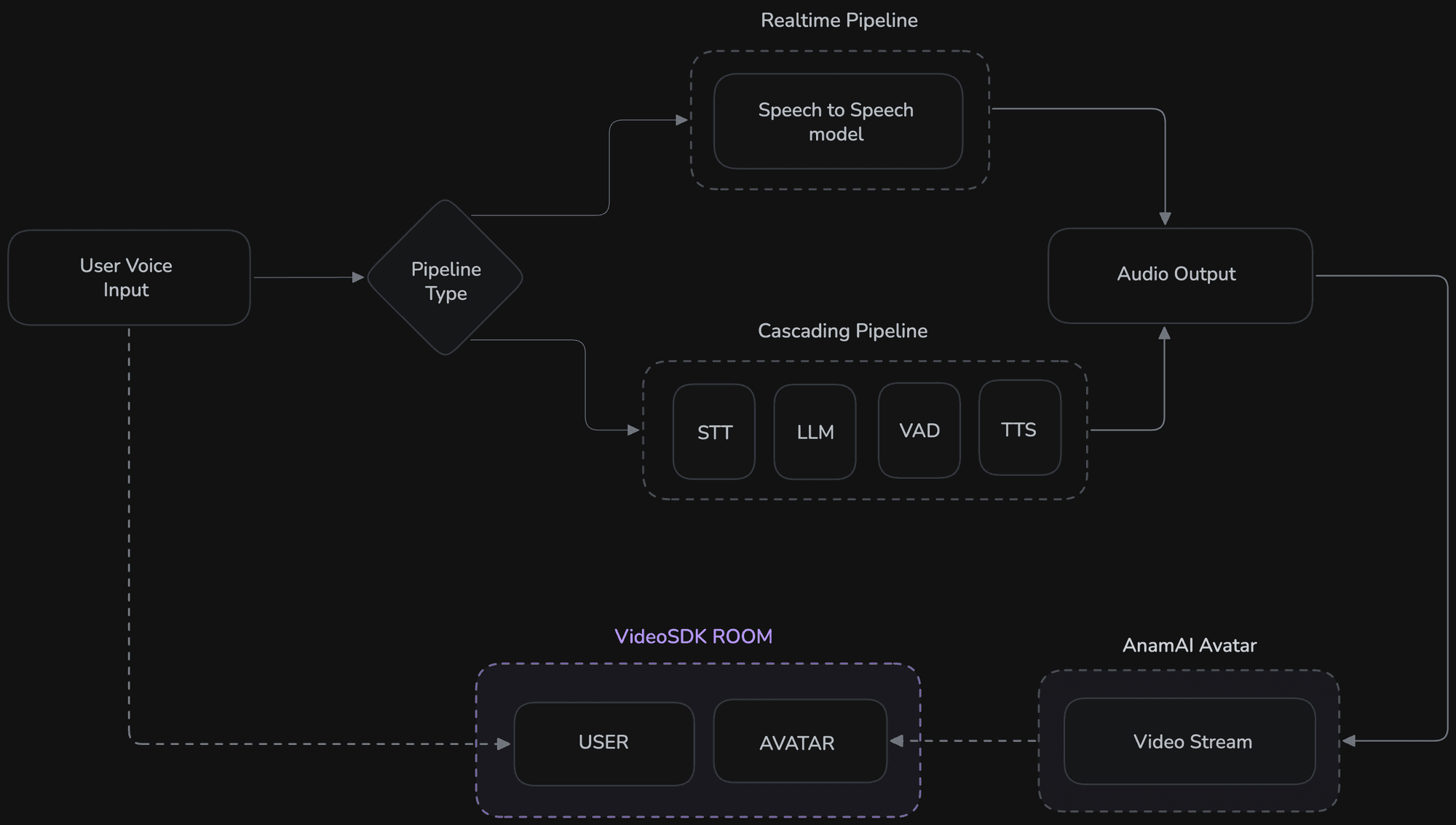
In a production setting, the avatar is not merely a visual layer. It is the final stage of the conversational pipeline where AI responses become human presence. Once a model generates speech, that audio must be delivered with minimal latency and synchronized perfectly with facial animation. Even small delays can break immersion, disrupt turn-taking, and make the interaction feel artificial.
AnamAI is designed specifically for real-time avatar rendering. It converts live audio streams into natural facial motion, lip synchronization, and expressive behavior, allowing AI agents to appear as believable digital humans. Meanwhile, VideoSDK handles the conversational backbone , capturing user audio, routing it to AI models, streaming responses back, and managing real-time sessions at scale.
In this guide, we’ll walk through how to build a fully interactive AI virtual avatar using AnamAI and VideoSDK AI Voice Agents, connect a real-time speech model, enable tool usage, and deploy an avatar that can hold natural conversations with users.
Why Use AnamAI + VideoSDK for AI Avatars?
- Real-time talking avatars with natural lip-sync
- End-to-end voice interaction pipeline
- Low-latency streaming, suitable for live conversations
- Tool-enabled intelligence (weather, search, actions)
- Production-ready infrastructure
If you’re already building conversational AI, adding a visual avatar layer can dramatically improve engagement and trust. You can use either a realtime pipeline or a cascading pipeline.
Let’s get started
Step 1 : Create and activate the virtual environment
macOS/Linux
python3.12 -m venv venv
source venv/bin/activate
windows
python -m venv venv
venv\Scripts\activate
Step 2 : Install all dependencies
Install the required VideoSDK Agents package:
pip install"videosdk-agents[anam,google]"Install any additional plugins you plan to use (Anam avatar plugin is included in the ecosystem).
Step 3 : Authentication
You will need:
- AnamAI API key and Avatar ID
- Google API key (for Gemini realtime model)
- VideoSDK authentication token
ANAM_API_KEY=your_anam_key
ANAM_AVATAR_ID=your_avatar_id
GOOGLE_API_KEY=your_google_key
VIDEOSDK_AUTH_TOKEN=your_token
When using a .env file, the SDK automatically reads credentials you don’t need to pass them manually.
Step 4 : Create a main.py file
In this example, we’ve used a realtime pipeline. However, if you want to use a cascading pipeline, you can follow this example.
import aiohttp
import os
from videosdk.agents import Agent, AgentSession, RealTimePipeline, function_tool, JobContext, RoomOptions, WorkerJob
from videosdk.plugins.google import GeminiRealtime, GeminiLiveConfig
from videosdk.plugins.anam import AnamAvatar
import logging
logging.basicConfig(level=logging.INFO, format="%(asctime)s - %(name)s - %(levelname)s - %(message)s", handlers=[logging.StreamHandler()])
@function_tool
async def get_weather(
latitude: str,
longitude: str,
):
"""Called when the user asks about the weather. This function will return the weather for
the given location. When given a location, please estimate the latitude and longitude of the
location and do not ask the user for them.
Args:
latitude: The latitude of the location
longitude: The longitude of the location
"""
print("###Getting weather for", latitude, longitude)
url = f"https://api.open-meteo.com/v1/forecast?latitude={latitude}&longitude={longitude}¤t=temperature_2m"
weather_data = {}
async with aiohttp.ClientSession() as session:
async with session.get(url) as response:
if response.status == 200:
data = await response.json()
print("###Weather data", data)
weather_data = {
"temperature": data["current"]["temperature_2m"],
"temperature_unit": "Celsius",
}
else:
raise Exception(
f"Failed to get weather data, status code: {response.status}"
)
return weather_data
class MyVoiceAgent(Agent):
def __init__(self):
super().__init__(
instructions="You are VideoSDK's AI Avatar Voice Agent with real-time capabilities. You are a helpful virtual assistant with a visual avatar that can answer questions about weather help with other tasks in real-time.",
tools=[get_weather]
)
async def on_enter(self) -> None:
await self.session.say("Hello! I'm your real-time AI avatar assistant powered by VideoSDK. How can I help you today?")
async def on_exit(self) -> None:
await self.session.say("Goodbye! It was great talking with you!")
async def start_session(context: JobContext):
# Initialize Gemini Realtime model
model = GeminiRealtime(
model="gemini-2.5-flash-native-audio-preview-12-2025",
# When GOOGLE_API_KEY is set in .env - DON'T pass api_key parameter
# api_key="AIXXXXXXXXXXXXXXXXXXXX",
config=GeminiLiveConfig(
voice="Leda", # Puck, Charon, Kore, Fenrir, Aoede, Leda, Orus, and Zephyr.
response_modalities=["AUDIO"]
)
)
# Initialize Anam Avatar
anam_avatar = AnamAvatar(
api_key=os.getenv("ANAM_API_KEY"),
avatar_id=os.getenv("ANAM_AVATAR_ID"),
)
# Create pipeline with avatar
pipeline = RealTimePipeline(model=model, avatar=anam_avatar)
session = AgentSession(agent=MyVoiceAgent(), pipeline=pipeline)
await session.start(wait_for_participant=True, run_until_shutdown=True)
def make_context() -> JobContext:
room_options = RoomOptions(
room_id="<room_id>",
name="Anam Avatar Realtime Agent",
playground=False
)
return JobContext(room_options=room_options)
if __name__ == "__main__":
job = WorkerJob(entrypoint=start_session, jobctx=make_context)
job.start()Step 5 : Run the file
python main.pyStep 6 : Deploy your AI Agent
Follow this guide to deploy your AI voice agent. We’ll walk you through every step required to set up, configure, and launch your agent successfully.
Real-World Applications
AI virtual avatars unlock a wide range of real-time interactive experiences. By combining conversational AI with expressive digital humans, you can build applications such as:
- Customer support agents that provide instant, human-like assistance
- Virtual tutors and trainers for personalized learning experiences
- Healthcare assistants that guide patients and answer common questions
- AI sales representatives that engage and qualify leads in real time
- Event hosts and presenters for webinars, conferences, and live streams
- Interactive entertainment characters for games and immersive experiences
In any scenario where human-like communication improves engagement, AI avatars can significantly enhance the user experience.
Conclusion
AI avatars represent the next evolution of conversational interfaces. Text chatbots lack presence, and voice assistants lack visual connection, but real-time digital humans combine intelligence, speech, and embodiment into a single experience.
With AnamAI providing expressive visual rendering and VideoSDK delivering the real-time conversational infrastructure, developers can now build production-ready virtual humans that feel natural, responsive, and engaging.
Plug in your model, choose an avatar, and bring your AI to life.
Resources and Next Steps
- You can also use cascading pipeline instead of realtime pipeline - see full working example here
- For more information visit anamAI documentation
- Learn how to deploy your AI Agents.
- Sign up at VideoSDK Dashboard
- 👉 Share your thoughts, roadblocks, or success stories in the comments or join our Discord community ↗. We’re excited to learn from your journey and help you build even better AI-powered communication tools!