


TL;DR: You can build a social live streaming app like TikTok Live using VideoSDK's Interactive Live Streaming (ILS) mode. The host broadcasts via WebRTC, VideoSDK converts the feed to HLS for CDN delivery to viewers, and usePubSub handles real-time reactions and chat. This guide walks through every step in React with verified API methods.Building a social live streaming app like TikTok Live means handling two fundamentally different participant types at once: a host who produces high-quality WebRTC video and an audience of potentially thousands who consume a low-latency HLS stream. VideoSDK's Interactive Live Streaming (ILS) mode handles both sides from a single SDK.
This guide walks through a host-viewer architecture with real-time emoji reactions, live chat, and CDN-backed HLS delivery.
Interactive live streaming vs plain broadcast
Interactive Live Streaming (ILS): ILS is a streaming model where one or more host participants produce audio and video over WebRTC, and that feed is simultaneously converted to HLS for consumption by a large viewer audience. Unlike a plain RTMP broadcast, ILS keeps a signaling channel open between hosts and viewers, which enables real-time features such as chat, reactions, and audience elevation.
In VideoSDK, ILS is the term for this architecture. The SDK exposes it through a participant mode system and the startHls() / stopHls() methods on the useMeeting hook.
Host participant vs viewer participant
VideoSDK uses a mode parameter to distinguish participant roles (as of React SDK v0.2.0):
SEND_AND_RECV: The participant produces audio and video streams and consumes others. This is the host mode.RECV_ONLY: The participant consumes streams without producing any. Suitable for viewers who want a low-overhead WebRTC connection with signaling.SIGNALLING_ONLY: No audio or video streams are produced or consumed. Used only for signaling.
Note: In SDK versions before v0.2.0, CONFERENCE and VIEWER were used instead of SEND_AND_RECV and SIGNALLING_ONLY. Do not mix SDK versions across participants.
A large HLS audience does not join the VideoSDK meeting as participants at all. They consume the playbackHlsUrl from a standard video player, entirely outside the WebRTC session.
Architecture
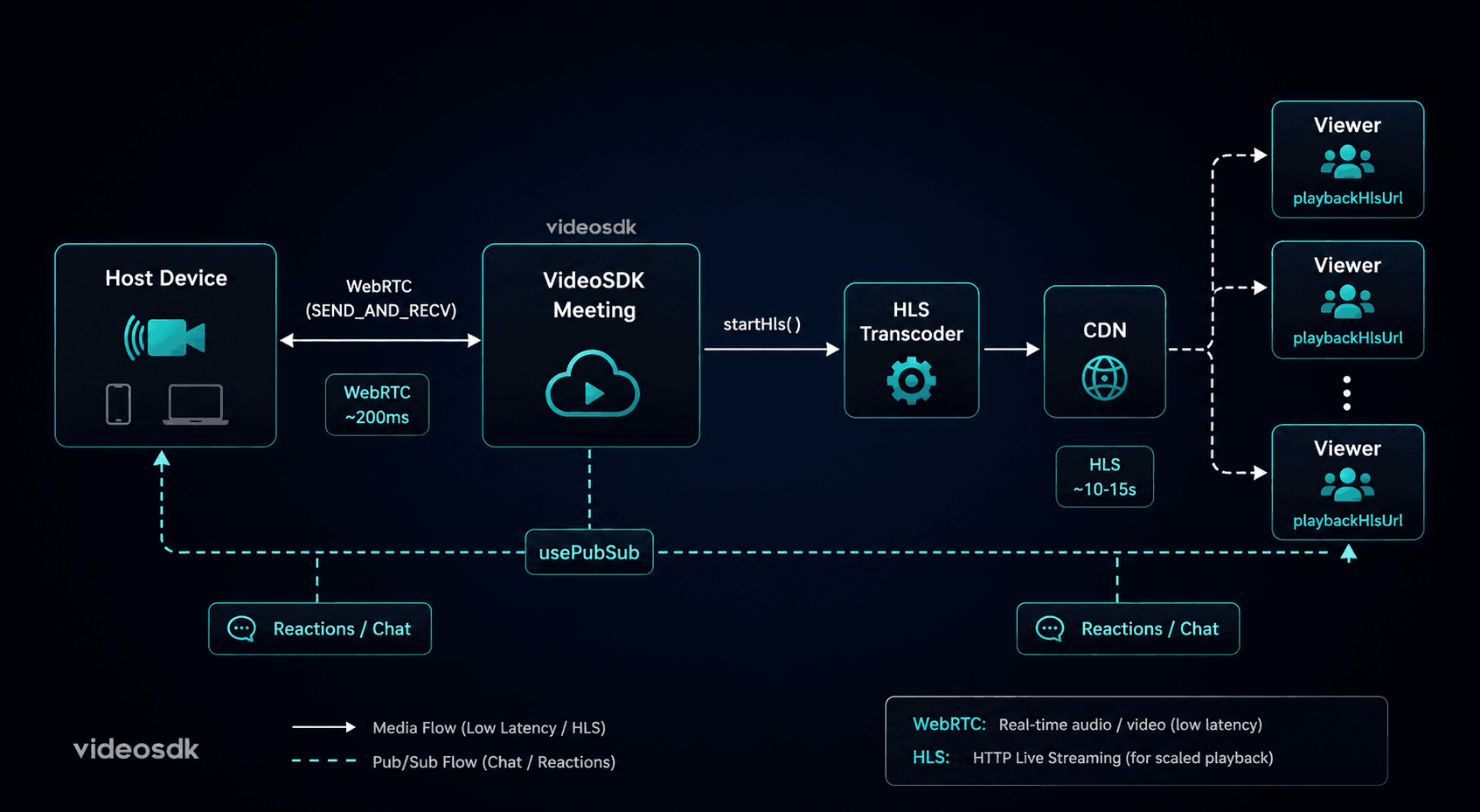
The host joins the VideoSDK meeting with SEND_AND_RECV mode. The host calls startHls() on the useMeeting hook, which triggers VideoSDK's server-side transcoder to generate an HLS stream. That stream is distributed via CDN. Viewers pull the playbackHlsUrl from hlsUrls (a property on useMeeting) and play it in any HLS-compatible video player. Real-time reactions and chat flow over usePubSub, which works for both meeting participants and, if you join viewers as SIGNALLING_ONLY, for the audience too.
Setting up the host stream (React)
Install the SDK first:
npm install @videosdk.live/react-sdkWrap your app in MeetingProvider with the host's token and meeting ID. Set the participant mode to SEND_AND_RECV:
import { MeetingProvider } from "@videosdk.live/react-sdk";

function App() {
  return (
    <MeetingProvider
      config={{
        meetingId: "your-meeting-id",
        micEnabled: true,
        webcamEnabled: true,
        name: "Host Name",
        mode: "SEND_AND_RECV",
      }}
      token="your-videosdk-token"
      joinWithoutUserInteraction={false}
    >
      <HostView />
    </MeetingProvider>
  );
}
Starting HLS from the host
Use the startHls() method from useMeeting. It accepts a config object and an optional transcription object. The config.layout.type can be "GRID", "SPOTLIGHT", or "SIDEBAR". For a TikTok-style single-creator stream, "SPOTLIGHT" with priority: "PIN" is the correct choice.
import { useMeeting } from "@videosdk.live/react-sdk";

function HostView() {
  const {
    join,
    startHls,
    stopHls,
    toggleMic,
    toggleWebcam,
    localMicOn,
    localWebcamOn,
  } = useMeeting();

  const handleStartStream = () => {
    startHls(
      {
        layout: {
          type: "SPOTLIGHT",
          priority: "PIN",
          gridSize: 1,
        },
        theme: "DARK",
        mode: "video-and-audio",
        quality: "high",
        recording: {
          enabled: true,
        },
      },
      {
        enabled: false,
      }
    );
  };

  return (
    <div>
      <button onClick={join}>Go Live</button>
      <button onClick={handleStartStream}>Start HLS</button>
      <button onClick={stopHls}>End Stream</button>
      <button onClick={toggleMic}>{localMicOn ? "Mute" : "Unmute"}</button>
      <button onClick={toggleWebcam}>
        {localWebcamOn ? "Camera Off" : "Camera On"}
      </button>
    </div>
  );
}
The startHls() call triggers the onHlsStarted() event on all participants. The stopHls() call triggers onHlsStopped(). Both are confirmed in the useMeeting methods documentation.
startRecording() is also available separately if you want cloud recording independent of the HLS stream.
Viewer interface (React)
Viewers who join the VideoSDK meeting use RECV_ONLY mode. They receive the signaling channel but produce no media streams, keeping bandwidth and compute low.
import { MeetingProvider, useMeeting } from "@videosdk.live/react-sdk";

// Viewer wrapper
function ViewerApp() {
  return (
    <MeetingProvider
      config={{
        meetingId: "your-meeting-id",
        micEnabled: false,
        webcamEnabled: false,
        name: "Viewer Name",
        mode: "RECV_ONLY",
      }}
      token="your-viewer-token"
      joinWithoutUserInteraction={true}
    >
      <ViewerScreen />
    </MeetingProvider>
  );
}
Playing the HLS stream
The hlsUrls property on useMeeting provides two URLs once HLS is active: playbackHlsUrl and livestreamUrl. Use playbackHlsUrl for viewer playback. Feed it to any HLS player. The example below uses hls.js:
npm install hls.jsimport { useMeeting } from "@videosdk.live/react-sdk";
import Hls from "hls.js";
import { useEffect, useRef } from "react";
function ViewerScreen() {
const { hlsUrls, isHls } = useMeeting();
const videoRef = useRef(null);
useEffect(() => {
if (isHls && hlsUrls?.playbackHlsUrl && videoRef.current) {
if (Hls.isSupported()) {
const hls = new Hls();
hls.loadSource(hlsUrls.playbackHlsUrl);
hls.attachMedia(videoRef.current);
hls.on(Hls.Events.MANIFEST_PARSED, () => {
videoRef.current.play();
});
return () => hls.destroy();
} else if (videoRef.current.canPlayType("application/vnd.apple.mpegurl")) {
// Safari native HLS
videoRef.current.src = hlsUrls.playbackHlsUrl;
videoRef.current.play();
}
}
}, [isHls, hlsUrls]);
return (
<div>
{isHls ? (
<video ref={videoRef} controls style={{ width: "100%" }} />
) : (
<p>Stream is not live yet.</p>
)}
</div>
);
}isHls is a boolean on useMeeting that is true when HLS is running. hlsUrls is an object with playbackHlsUrl and livestreamUrl, confirmed in the useMeeting properties documentation.
Real-time reactions and chat
usePubSub: usePubSub is VideoSDK's publish-subscribe hook that delivers string messages across all participants subscribed to the same topic. It works inside the MeetingProvider context and delivers messages to both SEND_AND_RECV and RECV_ONLY participants.
Each topic is a string you define. Use separate topics to separate reactions from chat messages.
Emoji reactions:
import { usePubSub } from "@videosdk.live/react-sdk";
import { useState } from "react";

function ReactionBar() {
  const [reactions, setReactions] = useState([]);

  const { publish } = usePubSub("REACTIONS", {
    onMessageReceived: (message) => {
      setReactions((prev) => [
        ...prev,
        { emoji: message.message, id: message.id },
      ]);
      // Remove after animation completes
      setTimeout(() => {
        setReactions((prev) => prev.filter((r) => r.id !== message.id));
      }, 2000);
    },
  });

  const sendReaction = (emoji) => {
    publish(emoji, { persist: false });
  };

  return (
    <div>
      {["❤️", "🔥", "👏", "😂"].map((emoji) => (
        <button key={emoji} onClick={() => sendReaction(emoji)}>
          {emoji}
        </button>
      ))}
      <div className="reaction-overlay">
        {reactions.map((r) => (
          <span key={r.id} className="floating-reaction">
            {r.emoji}
          </span>
        ))}
      </div>
    </div>
  );
}
Live chat
import { usePubSub } from "@videosdk.live/react-sdk";
import { useState } from "react";

function ChatPanel() {
  const [text, setText] = useState("");
  const { publish, messages } = usePubSub("CHAT", {
    onOldMessagesReceived: (oldMessages) => {
      // oldMessages is the persisted history
      console.log("Chat history loaded:", oldMessages);
    },
  });

  const sendMessage = async () => {
    if (!text.trim()) return;
    await publish(text, { persist: true });
    setText("");
  };

  return (
    <div>
      <div className="chat-messages">
        {messages.map((msg) => (
          <div key={msg.id}>
            <strong>{msg.senderName}:</strong> {msg.message}
          </div>
        ))}
      </div>
      <input
        value={text}
        onChange={(e) => setText(e.target.value)}
        placeholder="Say something..."
      />
      <button onClick={sendMessage}>Send</button>
    </div>
  );
}
Setting persist: true means late-joining viewers receive the message history through the onOldMessagesReceived callback, verified from the usePubSub documentation.
Q&A and viewer participation
Elevating a viewer to co-host
VideoSDK supports a changeMode() method on useMeeting that switches a participant's mode between SEND_AND_RECV, RECV_ONLY, and SIGNALLING_ONLY. A viewer currently joined as RECV_ONLY can call changeMode("SEND_AND_RECV") to begin sending audio and video, effectively becoming a co-host.
import { useMeeting } from "@videosdk.live/react-sdk";

function ViewerControls() {
  const { changeMode } = useMeeting();

  const requestToSpeak = () => {
    changeMode("SEND_AND_RECV");
  };

  return <button onClick={requestToSpeak}>Request to speak</button>;
}
The host can coordinate this elevation through a separate usePubSub topic (for example, "RAISE_HAND"), where a viewer publishes a raise-hand event and the host acknowledges it. The viewer then calls changeMode("SEND_AND_RECV") on confirmation.
This pattern is composable using the documented changeMode() and usePubSub APIs without any undocumented features.
Scaling to thousands of viewers
VideoSDK's HLS streaming uses a server-side transcoder that converts the host's WebRTC feed into an HLS manifest. That manifest is served from a CDN. Viewers do not connect to the VideoSDK media servers at all. They connect to CDN edge nodes closest to their location.
This is the same delivery model used by large-scale video platforms. The WebRTC session between the host and VideoSDK's servers remains a small, fixed-size connection regardless of audience size.
Latency expectations
Two latency values are relevant here:
WebRTC latency (host to VideoSDK): Approximately 200 to 400 milliseconds. This is the round-trip between the host device and the server.
HLS latency (VideoSDK to viewer): HLS introduces buffering by design. Typical HLS latency is 10 to 20 seconds with standard segment sizes. Low-Latency HLS (LL-HLS) can reduce this to 2 to 5 seconds, but depends on player support and CDN configuration. VideoSDK generates the HLS stream from the host's feed, and the actual playback delay depends on the player's buffer settings and CDN propagation.
For features like live chat and reactions, use usePubSub for near-instant delivery. Do not depend on the HLS video delay for synchronizing interactive elements.
Key takeaways
- VideoSDK's HLS mode (
startHls()) handles transcoding and CDN delivery from a single method call on the host side. - Participant modes
SEND_AND_RECVandRECV_ONLY(verified inchangeMode()docs) control who produces vs. consumes media in the meeting. - Viewer HLS playback uses the
playbackHlsUrlfield from thehlsUrlsproperty onuseMeeting, fed into any HLS-compatible player. usePubSubis the correct mechanism for real-time reactions and chat, available to all participant modes.- Viewer-to-co-host elevation is achievable using
changeMode("SEND_AND_RECV"), coordinated through ausePubSubtopic for signaling.
FAQ
Q1. What is the maximum viewer count for VideoSDK HLS?
VideoSDK's HLS delivery uses CDN distribution. Because viewers pull the stream from CDN edge nodes rather than from VideoSDK's media servers directly, the architecture is horizontally scalable. VideoSDK does not publish a hard viewer ceiling in its current documentation. For production limits, check the VideoSDK pricing page or contact their support team, as limits are plan-dependent.
Q2. How long can a live stream last?
VideoSDK does not document a hard maximum stream duration in the React SDK reference. In practice, stream length is constrained by your plan's usage limits (billed per minute of media processing). For exact session length caps, consult the VideoSDK pricing page or contact support.
Q3. Can the stream be recorded?
Yes. The startHls() method accepts a config.recording.enabled boolean. Setting it to true enables cloud recording of the HLS stream. Alternatively, startRecording() is a separate method on useMeeting that records the meeting independently, with options for layout, theme, quality, and post-session transcription.
Q4. What is the end-to-end latency for HLS viewers?
HLS latency from host capture to viewer playback is typically 10 to 20 seconds with standard segment sizes, due to HLS's chunk-based buffering model. The actual delay depends on segment duration, CDN propagation time, and the HLS player's buffer configuration. WebRTC-to-server latency (host side) is in the range of 200 to 400 milliseconds and is separate from the HLS delivery delay.
Conclusion
Building a social live streaming app like TikTok Live requires solving three distinct problems: reliable host media capture, scalable viewer delivery, and real-time audience interaction. VideoSDK's Interactive Live Streaming mode addresses all three in a single SDK. The host joins with SEND_AND_RECV, calls startHls() to trigger CDN distribution, and the audience consumes playbackHlsUrl from any HLS player. Chat and reactions run over usePubSub, independent of the video stream's latency. With changeMode(), a viewer can be elevated to co-host without dropping and rejoining the session. All methods and properties referenced in this article are confirmed from the VideoSDK React SDK documentation at docs.videosdk.live.