



To build a compliant telemedicine app with React, you need to satisfy HIPAA at minimum, then layer HITECH breach notification requirements, relevant state laws, and GDPR for international patients. VideoSDK's React SDK provides token-based authentication, cloud recording with a custom storage path, and participant event hooks that map directly to these regulatory requirements. End-to-end encryption (E2EE) is not currently documented as a built-in feature of the React SDK and is addressed separately in this guide.
Introduction
Building a compliant telemedicine app in React means treating HIPAA as a baseline, not a finish line. Regulatory obligations in healthcare video extend well beyond the Security Rule: HITECH increases breach penalties, state laws like the New York SHIELD Act add data protection requirements for residents, and GDPR applies the moment a patient located in the European Economic Area joins a session.
The compliance stack for telemedicine
HIPAA: the mandatory baseline
HIPAA (Health Insurance Portability and Accountability Act) is the US federal law that governs the protection of protected health information (PHI). For a telemedicine app, the three rules that matter most are the Privacy Rule, the Security Rule, and the requirement for a Business Associate Agreement (BAA).
A BAA is a contract between a covered entity (your healthcare organization) and a business associate (your video infrastructure vendor) that formally assigns responsibility for PHI protection. You cannot legally use a video platform for telehealth in the United States without a signed BAA from that vendor.
The Security Rule requires: encryption in transit and at rest, role-based access controls, audit controls that record activity on PHI systems, and integrity controls to prevent unauthorized alteration of PHI.
HITECH: enhanced penalties and breach notification
HITECH (Health Information Technology for Economic and Clinical Health Act) strengthens HIPAA in two key ways. First, it extends direct HIPAA liability to business associates, meaning your video vendor is also directly liable for breaches. Second, it mandates breach notification: if unsecured PHI is exposed, covered entities must notify affected individuals within 60 days, notify HHS, and for breaches affecting over 500 individuals, notify prominent media outlets in the affected state.
From an engineering standpoint, HITECH means your audit trail must be good enough to determine the exact scope of a breach. Session logs, join and leave timestamps, and recording access logs all become evidence in a notification determination.
State laws: the New York SHIELD Act as an example
The New York SHIELD Act (Stop Hacks and Improve Electronic Data Security Act, effective March 2020) applies to any organization that holds private information of New York residents, regardless of where the organization is based. It requires reasonable security measures, which the Act defines as administrative, technical, and physical safeguards.
For telehealth developers, this means your React app must implement reasonable access controls for New York patient sessions even if your servers are in another state. Other states have analogous laws: California's CCPA, Texas's HB 4390, and Virginia's CDPA all impose data security obligations that overlap with telehealth use cases.
GDPR for international patients
GDPR (General Data Protection Regulation) applies when any EU/EEA resident participates in a session, regardless of where your servers are. It adds requirements that go beyond HIPAA: a legal basis for processing (typically explicit consent or vital interests), the right to erasure (the patient's right to have their data deleted), data minimization, and data residency considerations.
The right to erasure has a direct engineering implication: your recording pipeline must support deletion by patient ID, not just by session ID.
VideoSDK features that address compliance
VideoSDK provides several features verified from its documentation that map to the compliance requirements above.
Token-based authentication is the primary access control mechanism. Every participant must present a valid token to join a meeting. Tokens are generated server-side and passed to MeetingProvider. This maps to the HIPAA Security Rule requirement for unique user identification and access control.
Cloud recording is available via the startRecording() and stopRecording() functions exposed by the useMeeting hook. The startRecording() call accepts a webhookUrl and an awsDirPath, which means you can route recordings to your own HIPAA-eligible S3 bucket. This satisfies the audit trail requirement and gives you custody of the recording for retention and deletion workflows.
Participant event callbacks (onParticipantJoined, onMeetingJoined, onMeetingLeft) are available in the useMeeting hook. You can log these events server-side to build a complete access audit trail per session.
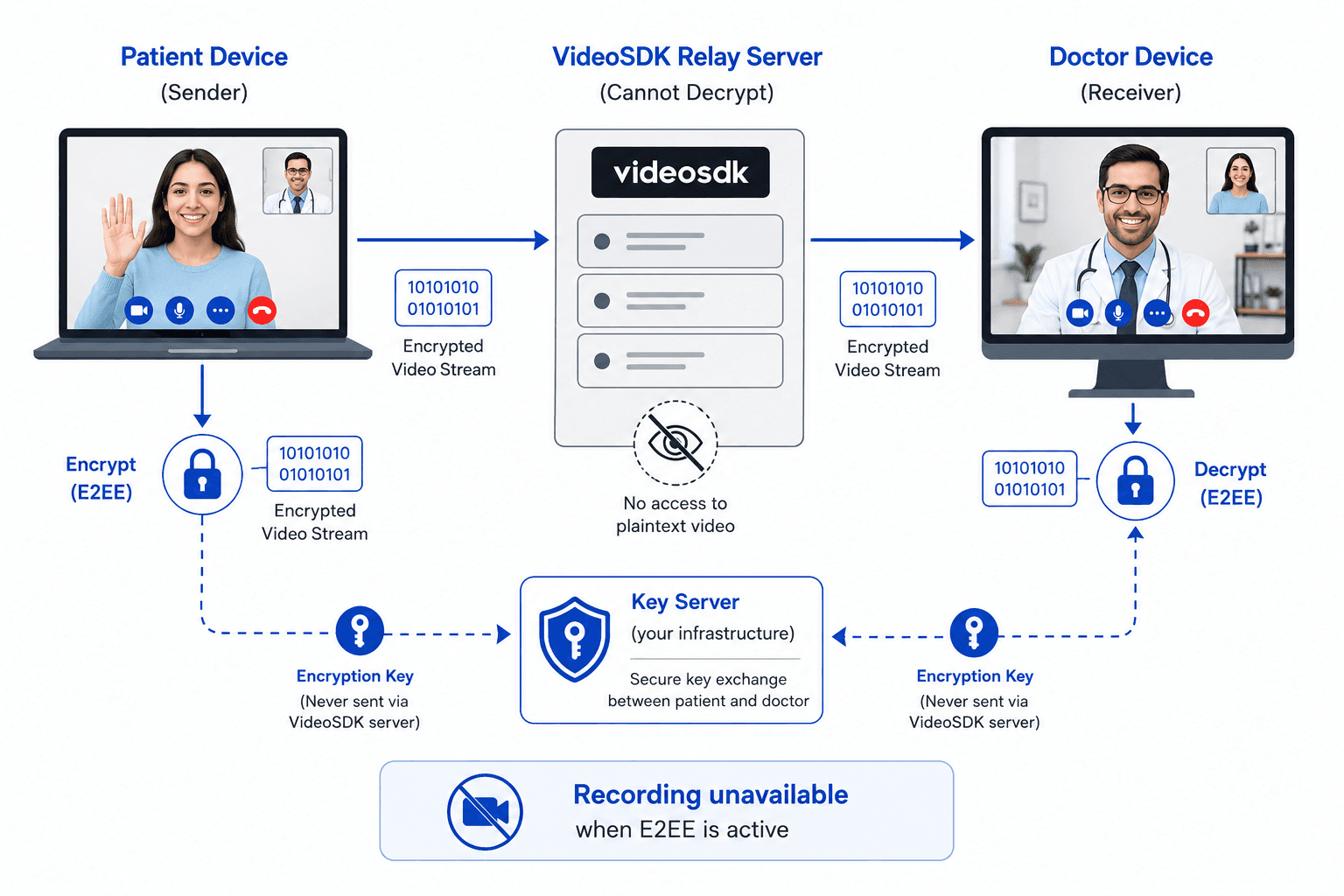
E2EE (end-to-end encryption) is a documented, production-ready feature of the React SDK as of version 0.3.5. It is implemented via the ExternalE2EEKeyProvider class, exported from @videosdk.live/react-sdk. You pass a configured key provider instance to MeetingProvider via the keyProvider prop. Encryption is applied at the room level with a shared key. VideoSDK never stores or accesses encryption keys. One critical architectural constraint: recording and transcription are not available when E2EE is enabled, because the server cannot access the media to record it. This is an important design decision for telehealth: sessions with E2EE cannot produce a server-side recording.
Geo-fencing/data residency is a documented feature available on the VideoSDK Enterprise plan. It restricts media server connections to a specified region regardless of where participants physically connect from. Available regions are India, USA, UAE, Europe, Singapore, and Australia. For GDPR data residency requirements with EU patients, you would configure the Europe region. Contact VideoSDK Sales to enable this feature.
React project setup
Install the SDK
Install the VideoSDK React SDK and the participant video renderer:
npm install "@videosdk.live/react-sdk"
npm install "react-player"
Or with Yarn:
yarn add "@videosdk.live/react-sdk"
yarn add "react-player"
The verified package name is @videosdk.live/react-sdk. Do not use any other package name.
Project structure
root
├── node_modules
├── public
├── src
│   ├── API.js        # token and meeting ID helpers
│   ├── App.js        # MeetingProvider setup
│   └── index.js
Auth token flow
Tokens must be generated server-side. Never embed your VideoSDK API secret in client-side code. The verified pattern from the docs is a server endpoint that returns a short-lived token:
// src/API.js

const LOCAL_SERVER_URL = process.env.REACT_APP_SERVER_URL;

export const getToken = async () => {
  try {
    const response = await fetch(`${LOCAL_SERVER_URL}/get-token`, {
      method: "GET",
      headers: {
        Accept: "application/json",
        "Content-Type": "application/json",
      },
    });
    const { token } = await response.json();
    return token;
  } catch (e) {
    console.error(e);
  }
};

export const createMeeting = async (token) => {
  try {
    const response = await fetch(`${LOCAL_SERVER_URL}/create-meeting`, {
      method: "POST",
      headers: { "Content-Type": "application/json" },
      body: JSON.stringify({ token }),
    });
    const { meetingId } = await response.json();
    return meetingId;
  } catch (e) {
    console.error(e);
  }
};
For compliance, log token issuance events on your server: who requested a token, at what time, and for which meeting ID. This creates the audit trail required by the HIPAA Security Rule.
Building the patient-facing interface
Consent screen before joining
HIPAA requires informed consent for telehealth, and GDPR requires explicit consent as a legal basis for processing. Render a blocking consent screen before calling join():
// src/ConsentScreen.jsx
import { useState } from "react";

const ConsentScreen = ({ onConsent }) => {
  const [agreed, setAgreed] = useState(false);

  return (
    <div style={{ maxWidth: 600, margin: "40px auto", padding: 24 }}>
      <h2>Telehealth session consent</h2>
      <p>
        This session may be recorded for quality and compliance purposes.
        Your video and audio will be transmitted to your provider.
        You have the right to end this session at any time.
      </p>
      <label>
        <input
          type="checkbox"
          checked={agreed}
          onChange={(e) => setAgreed(e.target.checked)}
        />
        {" "}I have read and agree to the telehealth consent and privacy notice.
      </label>
      <br /><br />
      <button disabled={!agreed} onClick={onConsent}>
        Join session
      </button>
    </div>
  );
};

export default ConsentScreen;
Store a timestamped record of consent server-side, keyed to the patient's identifier and the session ID. This record is your evidence of consent for HIPAA Privacy Rule and GDPR Article 7 purposes.
Joining the meeting with useMeeting
The useMeeting hook is the primary interface for session control. MeetingProvider must wrap all components that use this hook:
// src/App.js
import { useState } from "react";
import { MeetingProvider } from "@videosdk.live/react-sdk";
import ConsentScreen from "./ConsentScreen";
import MeetingView from "./MeetingView";

const App = () => {
  const [token, setToken] = useState(null);
  const [meetingId, setMeetingId] = useState(null);
  const [consented, setConsented] = useState(false);

  const handleConsent = async () => {
    const t = await getToken();
    const mid = await createMeeting(t);
    setToken(t);
    setMeetingId(mid);
    setConsented(true);
  };

  if (!consented) {
    return <ConsentScreen onConsent={handleConsent} />;
  }

  return (
    <MeetingProvider
      config={{
        meetingId: meetingId,
        name: "Patient",
        micEnabled: true,
        webcamEnabled: true,
        maxResolution: "hd",
      }}
      token={token}
    >
      <MeetingView />
    </MeetingProvider>
  );
};

export default App;
Video grid and mute controls
// src/MeetingView.jsx
import { useMeeting, useParticipant } from "@videosdk.live/react-sdk";
import ReactPlayer from "react-player";
import { useMemo } from "react";

const ParticipantView = ({ participantId }) => {
  const { webcamStream, micStream, webcamOn, micOn, isLocal, displayName } =
    useParticipant(participantId);

  const videoStream = useMemo(() => {
    if (webcamOn && webcamStream) {
      const mediaStream = new MediaStream();
      mediaStream.addTrack(webcamStream.track);
      return mediaStream;
    }
  }, [webcamStream, webcamOn]);

  return (
    <div>
      <p>{displayName} {isLocal ? "(You)" : ""}</p>
      {webcamOn ? (
        <ReactPlayer
          playsinline
          pip={false}
          light={false}
          controls={false}
          muted={isLocal}
          playing={true}
          url={videoStream}
          width="320px"
          height="240px"
        />
      ) : (
        <div style={{ width: 320, height: 240, background: "#111", display: "flex", alignItems: "center", justifyContent: "center", color: "#fff" }}>
          Camera off
        </div>
      )}
    </div>
  );
};

const MeetingView = () => {
  const { join, leave, toggleMic, toggleWebcam, participants } = useMeeting();

  return (
    <div>
      <div style={{ display: "flex", gap: 8 }}>
        <button onClick={join}>Join</button>
        <button onClick={() => toggleMic()}>Toggle mic</button>
        <button onClick={() => toggleWebcam()}>Toggle camera</button>
        <button onClick={leave}>Leave</button>
      </div>
      <div style={{ display: "flex", flexWrap: "wrap", gap: 16, marginTop: 16 }}>
        {[...participants.keys()].map((id) => (
          <ParticipantView key={id} participantId={id} />
        ))}
      </div>
    </div>
  );
};

export default MeetingView;
Building the provider interface
Waiting room pattern
Providers should not join the session until they have verified the patient's identity. Implement a waiting room by keeping the provider on a pre-session screen until the patient has an active session:
// src/ProviderWaiting.jsx
import { useState, useEffect } from "react";

const ProviderWaiting = ({ meetingId, onReady }) => {
  const [patientPresent, setPatientPresent] = useState(false);

  useEffect(() => {
    // Poll your server for patient-joined status
    const interval = setInterval(async () => {
      const res = await fetch(`/api/session-status/${meetingId}`);
      const { patientJoined } = await res.json();
      if (patientJoined) {
        setPatientPresent(true);
        clearInterval(interval);
      }
    }, 3000);
    return () => clearInterval(interval);
  }, [meetingId]);

  return (
    <div>
      {patientPresent ? (
        <button onClick={onReady}>Enter session</button>
      ) : (
        <p>Waiting for patient to join...</p>
      )}
    </div>
  );
};

export default ProviderWaiting;
The server-side patientJoined flag is set when you receive the onParticipantJoined webhook callback from VideoSDK.
Remote participant controls and recording
// src/ProviderMeetingView.jsx
import { useMeeting } from "@videosdk.live/react-sdk";

const ProviderMeetingView = ({ awsPath, webhookUrl }) => {
  const { startRecording, stopRecording, leave, participants } = useMeeting();

  const handleStartRecording = () => {
    startRecording(webhookUrl, awsPath);
  };

  return (
    <div>
      <button onClick={handleStartRecording}>Start recording</button>
      <button onClick={stopRecording}>Stop recording</button>
      <button onClick={leave}>End session</button>
    </div>
  );
};

export default ProviderMeetingView;
Pass awsPath as a directory path in your HIPAA-eligible S3 bucket. Recording files will be stored at that path, giving you direct custody for retention and deletion workflows.
Enabling E2EE
E2EE is a built-in, documented feature of @videosdk.live/react-sdk starting from version 0.3.5. The SDK exports an ExternalE2EEKeyProvider class that handles the encryption layer. You are fully responsible for generating, managing, and distributing the shared key to all participants. VideoSDK never stores or accesses it.
Step 1: generate and distribute a session key server-side
Generate a cryptographically random key on your server at meeting creation time and deliver it to participants alongside their access token over HTTPS. Never compute or store this key in client-side code.
Step 2: configure the key provider and pass it to MeetingProvider
import { MeetingProvider, ExternalE2EEKeyProvider } from "@videosdk.live/react-sdk";
import { useMemo } from "react";

const E2EEMeetingApp = ({ meetingId, token, encryptionKey }) => {
  const keyProvider = useMemo(() => {
    const _keyProvider = new ExternalE2EEKeyProvider();
    // Set the shared key before passing to MeetingProvider
    _keyProvider.setSharedKey(encryptionKey);
    return _keyProvider;
  }, [encryptionKey]);

  return (
    <MeetingProvider
      config={{
        meetingId,
        micEnabled: true,
        webcamEnabled: true,
        name: "Participant",
      }}
      token={token}
      keyProvider={keyProvider || null} // Enables E2EE
    >
      {/* Meeting components */}
    </MeetingProvider>
  );
};
Step 3: monitor encryption state per participant
Use the onE2EEStateChanged callback in useParticipant to detect encryption failures before they become silent data leaks:
import { useParticipant } from "@videosdk.live/react-sdk";

const { displayName } = useParticipant(participantId, {
  onE2EEStateChanged,
});

function onE2EEStateChanged(stateInfo) {
  // stateInfo.state: EncryptionSuccess | DecryptionSuccess |
  // EncryptionFailed | DecryptionFailed | MissingKey | InvalidKey | InternalError
  // stateInfo.kind: audio | video | share
  if (
    stateInfo.state === "EncryptionFailed" ||
    stateInfo.state === "DecryptionFailed" ||
    stateInfo.state === "MissingKey"
  ) {
    // Alert the session: PHI may not be protected, end call
    console.error("E2EE failure", stateInfo);
  }
}
Check E2EE status at session level
import { useMeeting } from "@videosdk.live/react-sdk";

const { isE2EEEnabled } = useMeeting();
console.log("E2EE active:", isE2EEEnabled);
Critical limitation: E2EE disables recording
When E2EE is active, VideoSDK recording and transcription are not available. The server cannot access encrypted media to record it. This creates a direct compliance trade-off: HIPAA may require session recordings as part of your audit trail, but enabling E2EE removes that capability. Your options are to store recordings through a client-side capture mechanism (outside VideoSDK), or to operate sessions without E2EE and rely on DTLS-SRTP encryption in transit combined with your storage-level encryption for compliance.
This trade-off must be evaluated against your specific BAA scope and your organization's risk posture.
Recording, retention, and right to delete
Starting and stopping recording
The startRecording() function routes the recording to your storage:
import { useMeeting } from "@videosdk.live/react-sdk";

const { startRecording, stopRecording } = useMeeting();

// Start recording to your HIPAA S3 bucket
startRecording(
  "https://your-server.example.com/recording-webhook",
  "s3://your-hipaa-bucket/recordings/2026/05/"
);

// Stop recording at session end
stopRecording();
The onRecordingStateChanged event fires as recording transitions through states:
import { Constants, useMeeting } from "@videosdk.live/react-sdk";

const onRecordingStateChanged = (data) => {
  const { status } = data;
  if (status === Constants.recordingEvents.RECORDING_STARTING) {
    console.log("Recording starting");
  } else if (status === Constants.recordingEvents.RECORDING_STARTED) {
    // Log to your audit database: { sessionId, startedAt: new Date() }
  } else if (status === Constants.recordingEvents.RECORDING_STOPPED) {
    // Log to your audit database: { sessionId, stoppedAt: new Date() }
  }
};

const { startRecording, stopRecording } = useMeeting({ onRecordingStateChanged });
Right to delete (GDPR Article 17 and HIPAA patient rights)
When a patient exercises their right to erasure under GDPR, or requests amendment under HIPAA, you need to delete the recording from your storage. Because you control the S3 path, your deletion workflow is straightforward:
// server-side deletion handler (Node.js example)
const { S3Client, DeleteObjectCommand } = require("@aws-sdk/client-s3");

const s3 = new S3Client({ region: process.env.AWS_REGION });

async function deletePatientRecording(bucket, key) {
  await s3.send(new DeleteObjectCommand({ Bucket: bucket, Key: key }));
  // Write deletion record to your audit log
  await auditLog.write({
    action: "recording_deleted",
    key,
    deletedAt: new Date().toISOString(),
    requestedBy: "patient_erasure_request",
  });
}
Store the S3 key for each recording in your session database at the time the RECORDING_STARTED event fires, so you can retrieve it later for deletion.
Access control and audit logging
Token-based access control
Every participant requires a server-issued token to enter a meeting. The token is passed as a prop to MeetingProvider. The recommended server-side approach is to issue short-lived tokens (15-30 minutes) tied to a specific participantId:
// server-side token generation (Node.js + VideoSDK server API)
const jwt = require("jsonwebtoken");

function generateToken(participantId, meetingId) {
  const payload = {
    apikey: process.env.VIDEOSDK_API_KEY,
    permissions: ["allow_join"],
    participantId,
    meetingId,
    iat: Math.floor(Date.now() / 1000),
    exp: Math.floor(Date.now() / 1000) + 60 * 30, // 30 minutes
  };
  return jwt.sign(payload, process.env.VIDEOSDK_SECRET_KEY);
}
Always validate the participant's identity (for example, against your EHR session record) before issuing a token. Never issue a token based solely on a client-provided meeting ID.
Audit logging with participant events
The useMeeting hook exposes callbacks that you can use to build a session audit trail:
import { useMeeting } from "@videosdk.live/react-sdk";

const onMeetingJoined = () => {
  fetch("/api/audit", {
    method: "POST",
    headers: { "Content-Type": "application/json" },
    body: JSON.stringify({
      event: "local_participant_joined",
      meetingId,
      timestamp: new Date().toISOString(),
    }),
  });
};

const onParticipantJoined = (participant) => {
  fetch("/api/audit", {
    method: "POST",
    headers: { "Content-Type": "application/json" },
    body: JSON.stringify({
      event: "remote_participant_joined",
      participantId: participant.id,
      displayName: participant.displayName,
      meetingId,
      timestamp: new Date().toISOString(),
    }),
  });
};

const onMeetingLeft = () => {
  fetch("/api/audit", {
    method: "POST",
    headers: { "Content-Type": "application/json" },
    body: JSON.stringify({
      event: "meeting_left",
      meetingId,
      timestamp: new Date().toISOString(),
    }),
  });
};

const { meetingId } = useMeeting({
  onMeetingJoined,
  onParticipantJoined,
  onMeetingLeft,
});
Store these audit events in a tamper-evident log. HIPAA requires audit logs to be retained for six years from the date of creation or last effective date.
Key takeaways
- HIPAA is the legal minimum for US telehealth. HITECH, state laws, and GDPR each add requirements that your architecture must satisfy on top of it.
- The VideoSDK package name is
@videosdk.live/react-sdk. The core hooks areMeetingProvider,useMeeting, anduseParticipant. E2EE is enabled by passing anExternalE2EEKeyProviderinstance toMeetingProvider. - Recording to a custom
awsDirPathgives you direct custody of session recordings, essential for HIPAA retention obligations and GDPR right-to-erasure workflows. Recording and E2EE are mutually exclusive: you cannot have both in the same session. - VideoSDK provides a BAA for HIPAA-covered use cases. Execute it before processing any PHI on the platform.
- Geo-fencing (data residency) is available on the Enterprise plan, supporting regions including USA and Europe. It is the correct mechanism for GDPR data residency requirements with EU patients.
FAQ
Does VideoSDK sign a BAA?
Yes. VideoSDK provides a Business Associate Agreement for HIPAA-covered use cases. You should request and execute the BAA before using VideoSDK in any session that involves PHI. Contact VideoSDK through their official support or sales channels to initiate the BAA process. Do not begin processing PHI on the platform until the BAA is signed.
What encryption standard does VideoSDK use for media?
VideoSDK uses two layers. At the transport layer, all WebRTC media is encrypted with DTLS-SRTP, which is the industry standard for real-time media in transit and satisfies the HIPAA Security Rule's encryption-in-transit requirement. At the application layer, you can enable E2EE using the ExternalE2EEKeyProvider class (available from React SDK version 0.3.5). With E2EE active, media is encrypted on the sender's device and decrypted only on the receiver's device. VideoSDK servers handle the relay but cannot access plaintext media. Note that enabling E2EE disables cloud recording and transcription.
How do you prevent unauthorized access to a telemedicine session?
Issue tokens only after server-side identity verification. Tie each token to a specific participantId and meetingId with a short expiry (15 to 30 minutes). Validate the participant's appointment record before token issuance. Use onParticipantJoined to detect unexpected participants and call the VideoSDK API to remove them if needed. Never expose your VideoSDK API secret in client-side code.
Can session recordings be stored in a HIPAA-compliant S3 bucket?
Yes. The startRecording(webhookUrl, awsDirPath) function accepts a custom S3 directory path. By passing a path in your own AWS account, which should have server-side encryption (SSE-KMS), access logging, and object lock enabled, you retain full custody of the recording. Your S3 bucket's HIPAA eligibility depends on your AWS BAA with Amazon, which is available under the AWS Business Associate Addendum for applicable services including S3.
What happens if the patient loses connection mid-session?
The onMeetingLeft callback fires on the provider's client when the remote participant disconnects. You can use this to trigger a reconnection prompt or session status update. The VideoSDK infrastructure maintains the session room so the patient can rejoin using the same meetingId and a freshly issued token without requiring the provider to restart the session. Your server should log the disconnect event and the subsequent rejoin as separate audit entries.
Conclusion
Building a compliant telemedicine app with React requires more than checking HIPAA boxes. HITECH extends direct liability to your infrastructure vendors, state laws like the New York SHIELD Act apply based on your patient's location, and GDPR activates the moment an EU/EEA resident joins a session.
VideoSDK's @videosdk.live/react-sdk covers the core mechanics: token-based access control via MeetingProvider, session recording to a custom S3 path via startRecording(), participant events via useMeeting callbacks for audit logging, E2EE via ExternalE2EEKeyProvider, and geo-fencing on the Enterprise plan for data residency compliance. VideoSDK also provides a BAA, which is the contractual prerequisite for any HIPAA-covered use.
The most significant architectural decision you face is the E2EE vs. recording trade-off. When E2EE is active, VideoSDK cloud recording is disabled. Your compliance requirements for audit trails and data encryption may point in opposite directions, and the resolution depends on your specific BAA scope and your organization's risk assessment.
Compliance is an ongoing process. Re-evaluate your controls when VideoSDK releases new versions, when your patient geography changes, and when new state laws take effect.