


A WebRTC video call is built from three moving parts: capturing media with getUserMedia, negotiating a direct peer connection through signaling and ICE, and attaching the resulting streams to your UI. This WebRTC video call tutorial walks through each layer in plain language, and shows where managed platforms like VideoSDK remove the hardest infrastructure work.
Building a video call that runs directly in the browser, with no plugins and no downloads, is one of the most satisfying projects in web development. It is also one of the most deceptively complex. WebRTC gives you the underlying standard for free, but everything around it, from signaling to network traversal to reconnection logic, is your responsibility.
This WebRTC video call tutorial is written for intermediate web developers who understand JavaScript and browser APIs but have not yet shipped a real-time communication feature. By the end, you will understand how a peer-to-peer video chat actually gets established, why roughly 10 to 20 percent of real-world connections need a TURN relay to punch through firewalls, and what separates a localhost demo from a production deployment. If you would rather skip the infrastructure entirely, VideoSDK's video calling SDK handles signaling, media routing, and reconnection for you across ten-plus platforms.
Understanding WebRTC Fundamentals
WebRTC is the foundation layer; everything else in this tutorial builds on it.
What is WebRTC?
WebRTC is defined as a free, open standard and API collection that enables real-time audio, video, and data exchange directly between browsers and devices, standardized by the W3C and IETF. Google open-sourced the underlying media engine in 2011 after acquiring the technology, and it has since become the transport layer inside Google Meet, Discord, and most modern calling products. Its core benefits are sub-300-millisecond latency on good connections, built-in encryption via SRTP and DTLS, and no requirement for any server to touch the media itself in the ideal case.
Core Components: getUserMedia, RTCPeerConnection, DataChannel
Three JavaScript APIs do the heavy lifting. getUserMedia requests access to the user's camera and microphone and returns a MediaStream you can display or send. RTCPeerConnection is the negotiation engine: it manages the SDP offer/answer exchange, gathers ICE candidates, encrypts media, and maintains the connection state. RTCDataChannel provides an ordered, reliable message channel alongside media, useful for chat, cursor positions, or application state. In a typical call, you capture a stream with getUserMedia, hand it to an RTCPeerConnection, let the connection negotiate with the remote peer, and then render the incoming remote stream in a video element.
Setting Up the Development Environment
A correct environment prevents the most common first-hour failures: permission prompts that never appear and connections that silently fail.
HTTPS and localhost requirements
Browsers only expose camera and microphone APIs on secure contexts. That means your page must be served over HTTPS in production, though localhost is treated as a trusted origin for development. If you test from a phone on the same network, localhost no longer applies, and you will need a locally trusted certificate or a tunneling tool that provides a valid HTTPS URL. Serving over plain HTTP will cause getUserMedia to simply not exist, which is why the permission prompt never appears.
Choosing a signaling method
WebRTC deliberately leaves signaling, the exchange of connection metadata between peers, undefined. You have three practical options. Firebase Realtime Database works well for small prototypes because it handles presence and message delivery with minimal setup. A WebSocket server you host yourself gives full control and scales predictably, at the cost of writing and operating the server. Managed signaling services, or full RTC platforms like VideoSDK, remove both the signaling and the media infrastructure work. For a weekend project, Firebase is fastest. For a product you intend to ship, a managed service or a well-tested WebSocket layer pays for itself quickly.
Building the Signaling Layer
Signaling is the handshake that happens before any media flows, and it is the piece most tutorials gloss over.
Role of signaling in WebRTC
Two browsers cannot find each other on the internet without help. Signaling is the process of exchanging two things through a server you control: session descriptions (SDP), which describe what media each peer wants to send and receive, and ICE candidates, which describe the network paths each peer can be reached on. The signaling server never touches media. It is a message relay, nothing more, which is why it can be lightweight. Once descriptions and candidates have been exchanged, the peers talk directly.
Options: Firebase, WebSocket, Managed services
Firebase signaling suits two-to-four participant prototypes: you write connection metadata to a shared database location, and the other peer listens for changes. Its weakness is presence handling and cleanup when users close tabs abruptly. A WebSocket server gives you explicit control over join, leave, and error events, and pairs naturally with a room-based model where participants join a named room and receive each other's messages. Managed services like VideoSDK fold signaling into the SDK itself: participants join a VideoSDK room with a token, and the platform handles discovery, presence, and reconnection. The practical tip: whatever you choose, design your signaling messages as a small, explicit vocabulary of join, leave, description, and candidate events, rather than ad-hoc messages.
Diagram: Signaling flow
The sequence below shows how connection metadata travels through the server while media never does.

Establishing Peer Connections
The offer/answer exchange and ICE gathering are where WebRTC does its most intricate work.
Offer/Answer exchange
The SDP negotiation works like two parties agreeing on a shared language. One peer, typically the caller, creates an offer: a text description of the audio and video tracks it wants to send, the codecs it supports, and its security parameters. That offer travels through your signaling layer to the other peer, which stores it as its remote description and responds with an answer describing its own capabilities. Once both sides have applied both descriptions, each knows exactly what the other expects, and the connection can move to network negotiation. A frequent mistake is creating the offer before the local media stream has been added, which results in a connection with no tracks to send.
ICE gathering and candidate selection
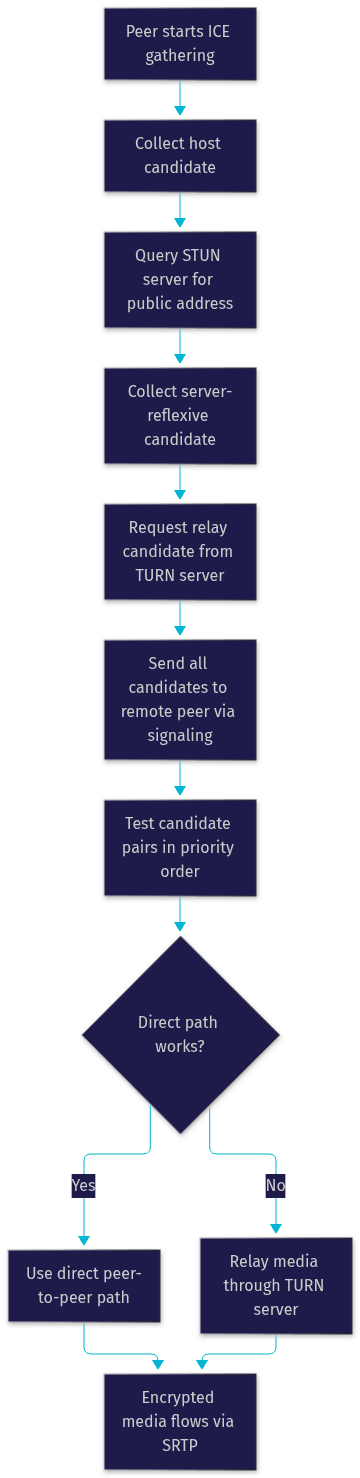
Browsers rarely know their own reachable network address, because most devices sit behind NAT routers. ICE, Interactive Connectivity Establishment, solves this by gathering candidates from every plausible path: the local address, the public address discovered by querying a STUN server, and relay addresses provisioned on a TURN server. Each candidate pair is tested in priority order, and the first pair that successfully carries traffic in both directions wins. This is why WebRTC calls usually connect within a second or two, and why a small fraction of users on restrictive corporate or carrier-grade networks end up relayed through TURN. According to Google's published WebRTC statistics, roughly 8 to 20 percent of sessions require TURN relay depending on the audience, which is why TURN is not optional in production.
Diagram: ICE candidate negotiation
The flowchart below traces the path from candidate gathering to a verified connection.
Integrating Media Streams
Once the connection is live, your job shifts from networking to media handling and presentation.
Capturing local video and audio
Capturing media starts with a permission request. When you invoke getUserMedia, the browser prompts the user, and only after explicit approval does it return a stream. You can request video and audio together or separately, and you can enumerate available devices to let users pick a specific camera or microphone, which matters on multi-camera laptops and external headsets. Always render the local stream immediately so users get visual confirmation their camera works before joining a call. Handle the denial case gracefully with a clear message and a retry path, because permission denial is one of the top support issues for any calling app.
Displaying remote streams
When the remote peer's media arrives, you receive it as a MediaStream attached to the connection's track events. The key behavior to understand: remote tracks can arrive at different times, and the stream can change mid-call if the remote user switches devices. Attach the stream to a video element, ensure the element is allowed to play, and update your layout when participants join or leave. A common pattern is a dynamic grid that reflows as the participant count changes, with the local video shown as a small self-view. VideoSDK's SDKs expose this same data through participant hooks, giving you each participant's audio and video tracks with join and leave events already wired up.
Enhancing Reliability and Security
A demo works on your network. Production reliability comes from the layers in this section.
TURN servers for NAT traversal
TURN is the fallback that guarantees connectivity when no direct path exists. A TURN server relays encrypted media when both peers sit behind symmetric NATs or strict firewalls. You can run your own using the open-source coturn project, or use a metered TURN provider. You need credentials, typically time-limited usernames and passwords generated server-side, and you should provision TURN alongside STUN from the start, because adding it after launch means a subset of users simply cannot connect.
Handling network drops and reconnection
Wi-Fi drops, sleep/wake cycles, and network switching between cellular and Wi-Fi all break connections. WebRTC provides ICE restart, which renegotiates network paths over the same connection object while preserving the call session. Pair that with application-level logic: detect the disconnection state, show a reconnecting indicator, attempt restart automatically, and fall back to rejoining the room if restart fails. Managed platforms like VideoSDK build reconnection and session recovery into the SDK, which is one of the largest time savings when moving from a hand-rolled demo to production.
Browser autoplay policies
Chrome and Safari block autoplay of media with sound until the user has interacted with the page. Because joining a call is itself a user gesture, this rarely blocks the local user, but programmatically played remote video can be silently paused. Ensure the join action counts as the interaction, and test on Safari, which is the strictest of the major browsers.
UI/UX Best Practices for Video Calls
The difference between a functional demo and a product users trust is largely interface quality.
Layout considerations
For small calls, a grid where every participant gets equal space works well up to roughly six participants. Beyond that, a speaker-focused layout with thumbnails, or picture-in-picture for the self-view, keeps attention on the active speaker. On mobile, prioritize the active speaker full-screen with a compact strip of other participants, and remember that users hold phones in portrait while cameras capture landscape, so plan for cropped and letterboxed video. Responsive behavior should be designed from the start, not retrofitted.
Controls and accessibility
Every control needs a clear, labeled icon: mute, camera toggle, and screen share at minimum. Use ARIA labels on all buttons so screen readers announce their purpose, provide visible state changes (a muted microphone should look unmistakably muted), and support keyboard operation for every control. Small touches, like showing a raised-hand state or a speaking indicator, dramatically improve multi-party usability.
Testing and Debugging
WebRTC failures are silent: the call just does not connect. Knowing the diagnostic tools turns hours of guessing into minutes.
Using Chrome DevTools and WebRTC Internals
Chrome ships a dedicated diagnostics page, chrome://webrtc-internals, which logs every peer connection's lifecycle: the SDP exchange, every ICE candidate and its state, bitrate graphs, and frame statistics. Open it before starting a call, reproduce the issue, and read the ICE section first, since most failures are candidate-pair failures. Firefox offers similar detail in its about:webrtc page. The W3C WebRTC specification and Mozilla's MDN WebRTC guide are the authoritative references when a log line points to an API behavior you do not recognize.
Common pitfalls
The recurring issues are predictable: serving over HTTP so getUserMedia never appears, missing TURN credentials so restrictive networks fail, codec mismatches between browsers, firewall blocks on the UDP ports ICE prefers, and permission prompts dismissed once and never re-requested. Cross-browser testing, especially Safari on both desktop and iOS, catches most of these before users do.
When to Use a Managed SDK Instead
Hand-rolled WebRTC teaches you the fundamentals, and that knowledge stays valuable regardless of what you ship. But production calling has a long tail: multi-party routing needs an SFU, recording needs server-side media processing, and every platform quirk needs testing. VideoSDK provides video calling across React, JavaScript, Flutter, React Native, Android, iOS, Unity, and Python, with a Prebuilt UI Kit for zero-code embedding, plus recording, transcription, and interactive live streaming built in. Use raw WebRTC when you need deep control of the media pipeline or a single specialized use case. Use a managed SDK when your goal is shipping a product, because the months you would spend on infrastructure go into features instead.
Definitions Glossary
WebRTC: A W3C and IETF standard enabling encrypted real-time audio, video, and data exchange directly between browsers without plugins or downloads.
Signaling: The server-mediated exchange of SDP descriptions and ICE candidates between peers that happens before media flows. WebRTC leaves the signaling mechanism to the developer, which is why Firebase, WebSocket, and managed approaches all exist.
RTCPeerConnection: The browser API that manages connection negotiation, media encryption, and connection state for a single peer-to-peer session.
ICE candidates: Potential network paths a browser discovers for reaching a remote peer, gathered from local addresses, STUN lookups, and TURN relays, then tested in pairs until one works.
TURN server: A relay that carries encrypted media when no direct peer-to-peer path can be established, required in production because a meaningful fraction of users sit behind restrictive NATs and firewalls.
SDP offer/answer: The session description exchange where one peer proposes its media capabilities and the other accepts and responds, establishing what codecs and tracks the call will use.
Key Takeaways
- A WebRTC video call is built from three layers: media capture with getUserMedia, connection negotiation through signaling and ICE, and stream rendering in your UI, and each layer has its own failure modes.
- Signaling is deliberately unspecified by the standard, so you must choose between Firebase for prototypes, WebSocket servers for control, or managed services like VideoSDK for production speed.
- TURN is not optional for production, since a meaningful percentage of real users on restrictive networks can only connect through a relay.
- HTTPS is a hard requirement for camera and microphone access, and localhost is the only non-HTTPS origin browsers trust.
- Chrome's webrtc-internals page and Firefox's about:webrtc page turn silent connection failures into readable diagnostics.
- When your goal is shipping a product rather than learning the stack, VideoSDK's multi-platform SDKs and Prebuilt UI Kit eliminate the signaling, traversal, and reconnection work this tutorial describes.
Conclusion
This WebRTC video call tutorial covered the full path from fundamentals to production concerns: the three core APIs, signaling design, the offer/answer and ICE negotiation that establish the connection, media stream handling, TURN traversal, reconnection, and the UI and debugging practices that make calls reliable. The natural next steps are multi-party calls with an SFU, server-side recording, and AI enhancements like real-time transcription, all of which are built into VideoSDK if you would rather not build them yourself. Start free on VideoSDK's platform or explore the code samples to see a working video call in minutes. What are you building with WebRTC or VideoSDK? Drop a comment, I'd love to hear what kind of video calling use case you're working on.
Free $20 Balance for AI Voice Agents & Video Calls
FAQ