


WebRTC is a free, open-standard technology that lets browsers and apps exchange audio, video, and data directly over a peer-to-peer connection with sub-second latency. Under the hood, it relies on ICE for NAT traversal, SDP for session negotiation, and DTLS/SRTP for encrypted media transport. Managed platforms like VideoSDK wrap these internals into simple SDKs, so you can ship production video calling without managing STUN/TURN infrastructure yourself. This guide walks through each layer of the stack and how the pieces fit together.
Latency is unforgiving. A video call that lags more than a few hundred milliseconds feels broken, and users abandon it. Yet most developers who reach for WebRTC only interact with its surface APIs, and when a connection fails silently behind a corporate firewall, they have no mental model of what went wrong. Understanding WebRTC internals is what separates developers who can debug a failed ICE negotiation from developers who file a vague bug report.
This article takes you through the full real-time communication stack: the four-layer architecture, NAT traversal with ICE, STUN, and TURN, session negotiation with SDP, secure media transport over UDP with DTLS and SRTP, and the debugging and optimization practices that make calls reliable in production.
Understanding WebRTC Internals: Core Real-Time Communication Explained
WebRTC is defined as a collection of standards and APIs, maintained by the W3C and IETF, that enable real-time exchange of audio, video, and arbitrary data between peers, typically directly between browsers, without requiring plugins or custom server software. It works by combining a JavaScript-facing API layer with a powerful media engine and transport stack that handle capture, encoding, encryption, and network transmission automatically.
The architecture is best understood as four layers stacked on top of each other. At the top sits the application layer, where your code captures media and orchestrates the user experience. Below it is the WebRTC API layer, the JavaScript interfaces your app calls. Beneath that is the media engine, which handles codecs, echo cancellation, jitter buffering, and packetization. At the bottom is the transport layer, which implements ICE, DTLS, SRTP, and the underlying UDP socket machinery.
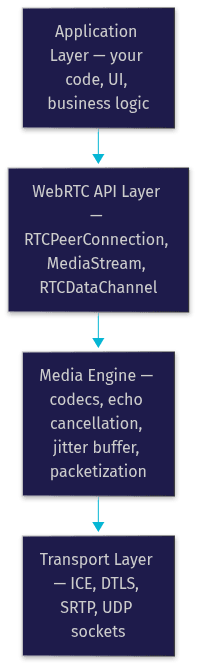
The key insight is that the two lower layers are almost entirely opaque to you. You never touch a codec or an ICE check directly; you observe their effects through events and statistics. That opacity is a feature for productivity and a hazard for debugging, which is why the rest of this article opens the box.
The Application Layer
Everything starts with media capture. The application layer is where your code requests access to the camera and microphone through the browser's media capture interface, and where you decide what the user sees: a custom grid of participants, a speaker view, or a prebuilt interface.
Capture is permission-gated. The browser prompts the user, and only after consent does your application receive a live media stream object containing audio and video tracks. Each track represents one continuous piece of media that can be independently enabled, disabled, or replaced, which is how features like mute and virtual backgrounds are built.
One practical note: capture happens in a secure context. Browsers require HTTPS for media device access, so a common rookie failure is a camera that works on localhost but fails the moment the app is deployed to plain HTTP. The permission prompt itself is also worth designing around, because a user who dismisses it once may not see it again without navigating back to your site settings.
The WebRTC API Layer
The API layer exposes three core interfaces, and nearly every WebRTC application is built from combinations of them.
The peer connection interface is the heart of the system. It represents a single connection to a remote peer and manages everything from codec negotiation to encryption to network path selection. You attach local media tracks to it, and it fires events when remote tracks arrive or when the connection state changes.
The data channel interface provides an ordered, reliable (or unordered, unreliable, if you choose) message pipe between peers. It runs over the same DTLS transport as media, so it inherits the same encryption, and it is ideal for chat messages, game state, or control signaling during a call.
The media stream interface ties everything together by grouping tracks into a coherent unit that can be rendered directly into a video element. When you build a participant grid in a custom UI, you are essentially mapping streams to DOM elements and reacting to join and leave events.
ICE, STUN, and TURN: The Backbone of NAT Traversal
Most devices on the internet sit behind a NAT, a router that translates between a private local address and a public one. NATs break naive peer-to-peer connections because neither peer knows its own public address, and many NATs actively block unsolicited inbound packets. ICE, which stands for Interactive Connectivity Establishment, is the framework WebRTC uses to solve this.
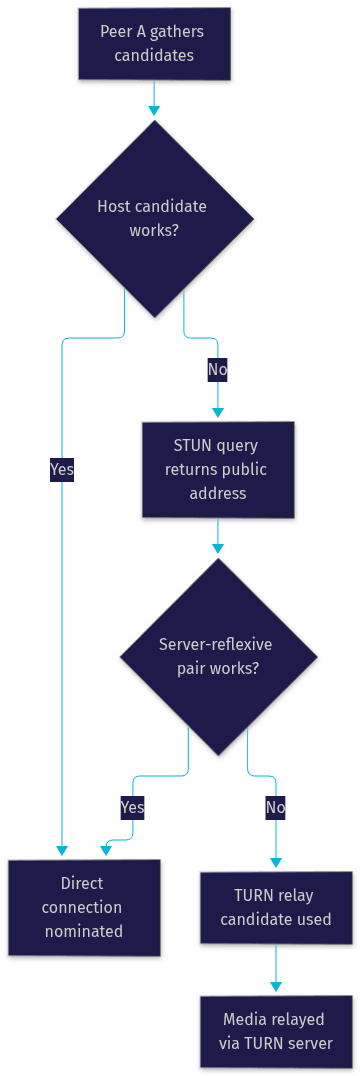
ICE works by gathering every possible network path, called a candidate, that might connect the two peers. It then tests each candidate pair and nominates the best one that actually works. To gather candidates, ICE leans on two helper server types.
A STUN server's job is simple: the peer sends it a request, and the server replies with the public IP and port it observed, which reveals the peer's server-reflexive address. A TURN server is the fallback: when no direct path works, often because of a symmetric NAT or a strict corporate firewall, the TURN server relays all media between the peers. Relaying adds latency and server cost, but it is the difference between a call that connects and one that fails entirely.
Candidate Gathering Process
When a peer connection starts, the browser collects three candidate types. Host candidates are the device's local network interfaces, fastest when both peers share a network. Server-reflexive candidates come from STUN queries and represent the public mapping of the local address. Relay candidates are allocated on a TURN server and represent a guaranteed-reachable path at the cost of a relay hop.
Gathering happens in parallel with signaling. Local candidates appear almost instantly, while STUN and TURN results arrive asynchronously, which is why well-behaved implementations trickle candidates to the remote peer as they are discovered rather than waiting for the full set.
Nomination and Connectivity Checks
Once both peers have candidates, ICE pairs them up and runs connectivity checks: each side sends a small STUN request to the other over each candidate pair. Pairs that respond are marked valid. ICE then nominates one valid pair, typically the highest-priority one that succeeded, and all media flows over that nominated pair for the life of the connection.
The state machine here matters for debugging. A connection stuck in the checking state means candidates were exchanged but no pair succeeded, which almost always points to a firewall or a missing TURN server. A connection that flips to disconnected mid-call means the nominated path degraded, and ICE will attempt to re-nominate a new pair, a process your application should tolerate gracefully rather than treat as a hangup.
Signaling and SDP: Negotiating the Session
Here is the part that surprises every newcomer: WebRTC has no built-in signaling. The standard deliberately leaves how peers discover each other and exchange connection information up to the application. You need your own channel, typically a WebSocket server, a REST API, or a hosted service, to shuttle messages between peers before the direct connection exists.
What peers exchange over that channel is SDP, the Session Description Protocol. One peer creates an offer describing the media it wants to send, its supported codecs, and its ICE credentials. The other peer answers with its own description, and from the overlap the two sides converge on a shared configuration.

The classic pitfall is mutating the SDP incorrectly. The offer and answer must be set in the right order on both sides, and modifying SDP strings by hand to force codecs or bitrates frequently breaks the negotiation entirely. A second pitfall is assuming signaling is secure by default; your signaling channel carries ICE credentials and DTLS fingerprints, so it must run over TLS and authenticate participants.
This is exactly the layer a platform like VideoSDK removes. Its SDKs handle the signaling server, room creation, and token-based participant authentication for you, so you describe the room you want and the negotiation happens behind the scenes.
SDP Fields that Matter
Three parts of an SDP description carry most of the practical weight. The media description lines declare each media stream, its direction (send, receive, or both), and the list of supported codecs in priority order. The ICE username and password fragments authenticate connectivity checks between the two peers. The DTLS fingerprint binds the session to a specific certificate, which is what prevents a man-in-the-middle from hijacking the connection even if signaling is compromised.
State Machines of RTCPeerConnection
The peer connection tracks two state machines you will live in during debugging. The signaling state reflects where you are in the offer/answer dance, and it moves through stable, have-local-offer, and related states; an application that creates two offers without waiting for an answer will wedge this machine. The ICE connection state reflects network health, moving from new through checking to connected, and degrading to disconnected or failed.
Reading these states together localizes most failures fast. A stable signaling state with a failed ICE state means negotiation succeeded but networking failed, pointing at NAT or firewall issues. A stuck signaling state means your own application logic raced the protocol.
Media Transport: UDP, DTLS, and SRTP
WebRTC sends media over UDP, and the choice is deliberate. TCP guarantees delivery through retransmission, but retransmission is poison for live conversation: a lost video packet retransmitted 300 milliseconds later arrives too late to matter and delays everything behind it. UDP lets the application decide how to react to loss, dropping stale frames or concealing missing audio instead of stalling the stream.
Before any media flows, the peers perform a DTLS handshake over the nominated ICE path. DTLS is TLS adapted to datagrams, and it authenticates both peers and establishes shared encryption keys. Those keys then feed SRTP, the Secure Real-time Transport Protocol, which encrypts every audio and video packet. The result is that all WebRTC media is always encrypted, by design, with no option to send it in the clear.

Handling Packet Loss
Real networks lose packets, and the jitter buffer is the media engine's answer. It deliberately delays incoming packets by a small, adaptive window so late arrivals still land in order. When audio packets are genuinely lost, the engine conceals the gap by synthesizing plausible audio from surrounding packets, a technique that hides small losses completely. Video losses are handled by requesting keyframes or tolerating brief visual corruption. The tradeoff is constant: a larger buffer absorbs more jitter but adds latency, and modern implementations resize it dynamically based on measured network conditions.
Debugging and Monitoring Tools
When a call misbehaves, the browser gives you real instrumentation. Chrome and Edge expose a dedicated diagnostics page that dumps per-connection statistics: ICE candidate pairs and their states, bitrate graphs, frame counts, and jitter buffer levels. Reading the ICE section of that dump tells you instantly whether a call is direct, STUN-assisted, or TURN-relayed, which is the single most useful fact when diagnosing quality complaints.
The standard statistics API lets your application poll the same data programmatically, which is how production systems feed call quality into dashboards. Firefox offers its own equivalent internal logging. Beyond the browser, hosted RTC platforms typically add server-side session analytics, so you can see whether a bad call was a client network problem or an infrastructure problem. VideoSDK, for example, surfaces session analytics and recording data through its REST APIs, which means quality investigations do not depend on a user reproducing the issue while you watch.
Performance Optimization Tips
Latency in WebRTC is rarely one problem; it is the sum of capture delay, encoding, network transit, jitter buffering, and decoding. Optimization means attacking each piece.
Start with network adaptivity. Modern WebRTC implementations continuously estimate available bandwidth and adjust sending bitrate and resolution to match. Fighting this adaptation by forcing high resolutions on constrained links produces stutter, not quality. Prefer hardware-accelerated codecs where available, and prefer newer codecs like AV1 or VP9 for bandwidth efficiency when CPU allows, falling back to H.264 or VP8 for compatibility.
TURN server placement is the most underrated lever. A relay in a distant region can add a hundred milliseconds or more to every packet, so place TURN infrastructure near your users, and prefer providers with global edge coverage. For production, also consider geo-fencing room allocation to regional servers, a capability VideoSDK exposes directly, so peers connect through nearby infrastructure by default.
Finally, measure before tuning. Pull the statistics API data for real calls, look at round-trip time, packets lost, and jitter buffer delay, and optimize the bottleneck the data actually shows. Most "WebRTC is slow" complaints trace to a TURN relay across an ocean or a camera capturing at an unnecessarily high resolution, not to the protocol itself.
Future Directions: WebRTC-Next and ORTC-Style APIs
The WebRTC specification continues to evolve. Work under the WebRTC-Next umbrella aims to modernize the stack: better bandwidth estimation, improved congestion control, and more capable encoding controls exposed to the application. Ideas that originated in the ORTC (Object Real-time Communications) effort, which proposed lower-level objects instead of the monolithic peer connection, have gradually been absorbed into the platform as advanced APIs for configuring encoders, senders, and receivers individually.
For application developers, the practical direction is more control without more plumbing: per-layer codec configuration, content hints that tell encoders whether a track is screen share or camera, and richer statistics. The core internals covered in this article, ICE, SDP, DTLS, and SRTP, remain the foundation, which is why understanding them now pays off for years.
Definitions Glossary
ICE (Interactive Connectivity Establishment): The framework WebRTC uses to find a working network path between two peers by gathering, testing, and nominating candidate address pairs.
STUN server: A lightweight server that tells a peer its public IP address and port as seen from the internet, enabling direct connections through many NAT types.
TURN server: A relay server that forwards all media between peers when no direct path can be established, guaranteeing connectivity at the cost of added latency and bandwidth.
SDP (Session Description Protocol): The text format peers exchange during signaling to describe media streams, codecs, and connection parameters before a direct link exists.
SRTP (Secure Real-time Transport Protocol): The encrypted variant of RTP that protects every audio and video packet using keys negotiated during the DTLS handshake.
Jitter buffer: An adaptive delay window in the receiving media engine that reorders late packets and smooths network timing variation before decoding.
Key Takeaways
- WebRTC is a four-layer stack: application, API, media engine, and transport, and the lower two layers are where connection failures actually originate.
- ICE, STUN, and TURN solve NAT traversal by gathering candidate paths, testing them, and falling back to a relay when direct connection is impossible.
- WebRTC has no built-in signaling; you must provide a secure channel for SDP offers, answers, and ICE candidates, or use a platform like VideoSDK that handles it.
- All WebRTC media is encrypted by design through DTLS key exchange and SRTP packet encryption, with no plaintext option.
- Effective latency optimization comes from measuring real call statistics, embracing adaptive bitrate, and placing TURN infrastructure near your users.
Conclusion
Understanding WebRTC internals, from ICE candidate gathering to DTLS-secured SRTP transport, turns mysterious connection failures into diagnosable, fixable problems. The protocol is a remarkable piece of engineering, but running it in production still means managing signaling servers, TURN infrastructure, and adaptive quality on your own.
That is exactly what VideoSDK eliminates. Its WebRTC-based SDKs for React, React Native, Flutter, Android, iOS, and JavaScript handle rooms, tokens, signaling, and global media infrastructure for you, with a Prebuilt UI Kit if you want a working video call in minutes. Start free at app.videosdk.live/login, explore the VideoSDK quickstart docs, and join the VideoSDK Discord community to compare notes with other developers.
What are you building with WebRTC? Drop a comment, I'd love to hear whether you are going raw protocol or using a managed SDK, and what your hardest NAT traversal war story is.
Free $20 Balance for AI Voice Agents & Video Calls
FAQ