


Video calling app development is the process of building real-time communication applications using WebRTC and specialized SDKs to transmit audio and video between participants. VideoSDK simplifies this process by providing cross-platform SDKs, prebuilt UI components, and network-adaptive streaming. Start your integration by reviewing the VideoSDK quickstart guide.
The demand for real-time video has shifted from a nice-to-have feature to a core infrastructure requirement across telehealth, edtech, and remote work. Users now expect flawless, sub-second latency video calls on any device and any network condition.
Building a reliable video calling app from scratch using raw WebRTC is notoriously difficult. Developers must handle signaling, NAT traversal, media routing, and dynamic network conditions. By leveraging a real-time video SDK like VideoSDK, you can bypass the underlying WebRTC complexities and focus on your application's core features. This guide breaks down the entire video calling app development lifecycle, from architectural planning to production deployment.
What Is Video Calling App Development?
Video calling app development is defined as the engineering practice of creating software that enables real-time, peer-to-peer or multi-party audio and video communication. It encompasses frontend UI design, backend signaling, media server orchestration, and security compliance.
Video calling works by capturing media from user devices, compressing it, transmitting it over a network using protocols like WebRTC, and rendering it on the receiving end. According to the W3C WebRTC specification, this involves establishing a peer connection, negotiating media codecs, and exchanging ICE candidates to traverse network firewalls.
VideoSDK provides a rooms-based architecture that abstracts these WebRTC complexities. Participants join a virtual room, share media streams, and communicate over a global cloud infrastructure with sub-300ms latency. This allows developers to build cross-platform video SDK applications without managing their own SFU (Selective Forwarding Unit) or TURN servers.
Key Considerations Before You Code
Before writing a single line of integration logic, you need to make critical architectural decisions that will affect your app's scalability and user experience.
Choosing the Right SDK (VideoSDK)
Selecting the right real-time video SDK dictates your platform coverage and development speed. VideoSDK offers the broadest SDK coverage in the market, supporting React, JavaScript, React Native, Android (XML and Jetpack Compose), iOS (UIKit and SwiftUI), Flutter, Unity, and Python.
When evaluating an SDK, look for a Prebuilt UI Kit if you want to ship a working video call interface with zero custom UI code. If you need full control, ensure the SDK supports custom video tracks for features like virtual backgrounds and screen sharing. Network-adaptive streaming is another non-negotiable feature, as it automatically adjusts bitrate and resolution based on real-time bandwidth.
Architecture Overview
A standard video call app architecture relies on a client-server-room flow. The client requests access from your backend, the backend generates a token, and the client uses that token to connect to the VideoSDK cloud, which routes media between participants.
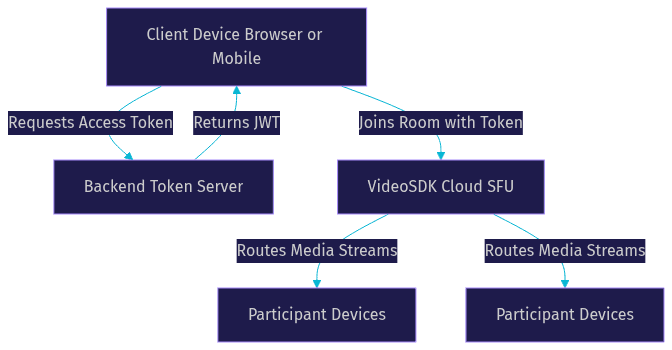
This architecture ensures your API secrets remain safe on the backend while the VideoSDK cloud handles the heavy lifting of media routing.
Backend Signaling & Token Service
WebRTC requires a signaling server to exchange session description protocols (SDP) and ICE candidates. When using VideoSDK, the signaling layer is managed entirely by the VideoSDK cloud. Your backend only needs to handle token authentication.
You must build a token server that generates JWTs using your VideoSDK API key and secret. This server creates tokens with specific claims, such as participant permissions and room identifiers, and securely hands them to your frontend clients. Never expose your API secret in your client-side application code.
UI/UX Design for Video Calls
Video call UI/UX design dictates how users perceive call quality. You need to decide between a speaker view, where the active speaker takes up the main screen, or a gallery view, which displays all participants in a grid.
Consider adding a waiting room feature to control participant entry, and always provide a pre-call device testing screen. This allows users to verify their microphone and camera permissions before joining a live session. VideoSDK's Prebuilt UI Kit handles these layouts out of the box, but if you are building a custom UI, plan your state management around participant join and leave events early.
Security & Privacy
Video call security and privacy are paramount, especially for telehealth and legal applications. VideoSDK provides end-to-end encryption (E2EE) to ensure media streams cannot be intercepted.
You should implement role-based access control to define what participants can do, such as restricting who can start a recording or share their screen. If your application serves users in specific regions, use geo-fencing to comply with data sovereignty laws. Always review GDPR and HIPAA requirements for your specific use case and ensure your backend infrastructure is compliant.
Step-by-Step Development Process
Building a production-ready video calling app requires a systematic approach. Here is the step-by-step process for mobile video call development and web integration.
1. Planning Your Feature Set
Start by defining your core features. Are you building 1-to-1 video calls for telehealth, or large group calls for virtual events? Identify if you need screen sharing in video apps, in-call chat, polls, or cloud recording. Prioritize the minimum viable product features first, then plan iterations for advanced capabilities like interactive live streaming or AI voice agents.
2. Setting Up Authentication & Token Server
Set up a backend service using Node.js, Python, or your preferred backend language. This service will communicate with the VideoSDK REST APIs to create rooms and generate authentication tokens.
When a user wants to start a call, your frontend requests a token from your backend. Your backend uses your API credentials to generate a JWT and returns it to the client. This token validates the user's identity and permissions when they connect to the VideoSDK room. Review the VideoSDK authentication guide for detailed claims and permission structures.
3. Integrating the VideoSDK (Video Calling API)
With your token ready, initialize the VideoSDK on your client application. The SDK provides hooks and methods to join a room using the token and a room ID.
Once the join method is called, the SDK handles the WebRTC peer connection, ICE candidate exchange, and media stream negotiation. You will listen to participant events to know when someone joins or leaves. The SDK exposes the local participant's media streams, which you render in a video container, and automatically receives remote participant streams as they join the room.
4. Managing Participants & Custom Video Tracks
Room management in video SDKs revolves around the participant lifecycle. You need to track who is speaking, who has muted their mic, and who has turned off their camera. VideoSDK provides active speaker detection, allowing your UI to dynamically highlight the current speaker.
For advanced features, utilize custom video tracks. Instead of just sending the raw camera feed, you can process the video stream to add a virtual background or apply noise suppression. You can also create a custom track specifically for screen sharing, allowing participants to present their desktop while keeping their camera feed active in a smaller window.
5. Adding In-Call Features (chat, polls, recording)
To make your app engaging, add collaborative features. VideoSDK includes built-in support for in-call chat, allowing participants to send text messages during the call.
You can enable polls and Q&A sessions for webinars and virtual events. For compliance and archival purposes, integrate cloud recording. You can trigger recording start and stop events from your client or backend, and VideoSDK will composite the video and audio streams into a single file stored in the cloud, available for retrieval via the REST API.
6. Testing & QA (unit, integration, network simulation)
Performance testing for video calling apps is critical. Do not limit your testing to a fast Wi-Fi connection. Use network simulation tools to throttle bandwidth and simulate 4G, 5G, and low-bandwidth 3G conditions.
Test how your app handles network drops and reconnections. Ensure that when a participant briefly loses connection, the SDK attempts to reconnect gracefully without dropping them from the room. Test across different devices, particularly low-end Android devices, to monitor CPU usage and battery drain.
7. Deploying to Production
Production deployment of video call apps requires specific configurations. WebRTC media requires HTTPS for camera access in browsers, so ensure your web server has a valid SSL certificate.
While VideoSDK handles TURN servers, ensure your corporate firewall rules allow outbound traffic on the necessary ports. Scale your backend token service horizontally to handle concurrent connection spikes. Finally, set up monitoring and alerting for your token server so you are notified immediately if authentication failures occur.
Performance Optimization
Optimizing video performance ensures high-quality calls even under poor network conditions.
Network-Adaptive Streaming
VideoSDK employs network-adaptive streaming to dynamically adjust media quality. The SDK continuously monitors bandwidth and packet loss. If bandwidth drops, it automatically reduces the video bitrate to prevent lag. If conditions worsen severely, it may drop video entirely and maintain audio-only mode to preserve the connection.
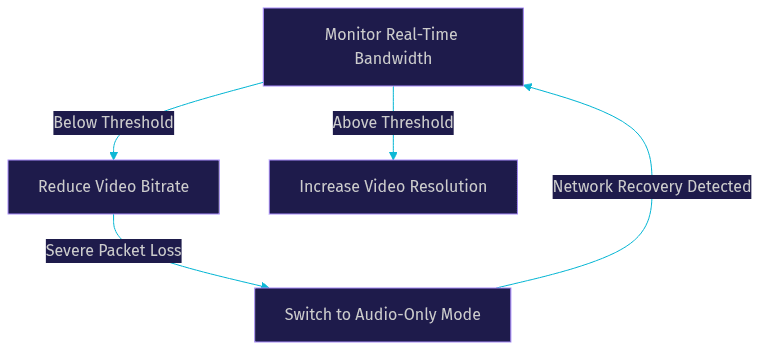
This automatic bandwidth optimization for video calls prevents the frustrating experience of frozen video frames and robotic audio.
Device Compatibility & Resource Management
Mobile video call development introduces device-specific constraints. On low-end Android devices, processing high-resolution video can cause thermal throttling and rapid battery drain. Use the SDK's configuration options to cap the default resolution at 720p or 480p for mobile devices. Encourage users to use hardware-encoded codecs rather than software encoding to offload processing to the GPU.
Monitoring & Analytics
Use the VideoSDK analytics API to track session quality. Monitor average latency, packet loss, and bitrate across your user base. If users in a specific geographic region experience high latency, consider using VideoSDK's geo-fencing to route their calls through a closer media server region.
Monetization & Scaling Strategies
Once your app is stable, consider monetization strategies for video calling apps. Subscription models work well for SaaS platforms offering premium features like HD recording and large meeting capacities. Usage-based pricing is ideal for platforms that charge per minute of video consumed.
White-labeling your video solution allows you to offer your infrastructure to other businesses. As you scale, the scalability of video call infrastructure becomes critical. VideoSDK's cloud architecture scales automatically, but your backend token server and database must be load-balanced to handle the increased authentication load.
Common Pitfalls & Troubleshooting
Even with a robust SDK, developers encounter common issues. Token expiry is a frequent problem. Tokens have a limited lifespan, so if a user leaves the app open for hours, the token may expire. Implement logic to request a fresh token from your backend if the SDK throws an authentication error.
Camera and microphone permission prompts can also cause friction. If a user denies permissions, the SDK cannot access media. Always handle permission denial gracefully by showing a UI prompt that directs the user to their device settings. Finally, TURN failures usually manifest as one-way video. Ensure your client network allows outbound UDP traffic to VideoSDK's TURN servers to resolve this.
Definitions Glossary
Room: A virtual meeting space in VideoSDK where participants connect and share media streams, identified by a unique room ID.
Participant: A user or AI agent connected to a VideoSDK room, with their own audio and video tracks.
Stream / Track: The audio or video media sent by a participant, accessible via SDK hooks and methods for rendering or processing.
Meeting Token: A JWT that authenticates a participant's access to a VideoSDK room, generated securely on your backend server.
Network-Adaptive Streaming: VideoSDK's automatic adjustment of bitrate and resolution based on real-time bandwidth detection to prevent call drops.
Key Takeaways
- Video calling app development requires managing WebRTC complexities, which VideoSDK abstracts through a rooms-based architecture and cross-platform SDKs.
- Always generate authentication tokens on a secure backend server and never expose your API secret in client-side code.
- Utilize custom video tracks to enable advanced features like screen sharing and virtual backgrounds without disrupting the core camera feed.
- Network-adaptive streaming is essential for mobile video call development, automatically adjusting media quality to handle fluctuating bandwidth conditions.
- Production deployment requires HTTPS, backend scaling, and comprehensive network simulation testing to ensure a flawless user experience.
Conclusion
Building a real-time video application in 2026 requires balancing low-latency media transmission, cross-platform compatibility, and robust security. By leveraging VideoSDK, you bypass the low-level WebRTC engineering and focus on delivering a great user experience. From token authentication to network-adaptive streaming, VideoSDK provides the tools needed for scalable video calling app development. Ready to start building? Sign in at app.videosdk.live/login and review the quickstart documentation. What are you building with VideoSDK? Drop a comment below, I would love to hear what kind of video calling use case you are working on.
Free $20 Balance for AI Voice Agents & Video Calls
FAQ