


Streaming WebRTC delivers ultra-low-latency real-time video and audio directly to browsers and mobile apps without plugins. Unlike traditional HLS or DASH protocols that buffer several seconds of video, WebRTC maintains sub-second delay using peer connections and UDP transport. You can build interactive live streaming experiences using VideoSDK's Interactive Live Streaming (ILS) mode, which handles the complex WebRTC infrastructure for you.
Audiences today expect zero delay. Whether it is a live auction where every millisecond counts, a massive multiplayer game stream, or an interactive webinar with audience participation, a ten-second buffer breaks the experience. Traditional HTTP-based protocols like HLS (HTTP Live Streaming) and DASH (Dynamic Adaptive Streaming over HTTP) were designed for video-on-demand. They trade latency for stability, segmenting video into small files delivered over TCP. This approach creates a delay of 5 to 30 seconds between the broadcaster and the viewer. Streaming WebRTC flips that trade-off, prioritizing real-time delivery over perfect buffering. For developers building live events, gaming platforms, or interactive social apps, WebRTC is the only protocol that delivers true sub-second latency at scale. VideoSDK provides robust Interactive Live Streaming capabilities built on this foundation, letting you focus on features rather than NAT traversal. In this guide, we will break down how streaming WebRTC works, the core protocols driving it, and how to choose the right architecture for your next project.
What is Streaming WebRTC?
Streaming WebRTC is defined as the use of the Web Real-Time Communication protocol for one-to-many or many-to-many live video broadcasting. It works by establishing direct peer connections between clients and a media server, using UDP transport to bypass the buffering inherent in TCP-based protocols. Core components include the Peer Connection API for managing media flows, ICE for network traversal, and DTLS-SRTP for encrypting the media stream. Unlike HLS or DASH, which segment video into small files delivered over HTTP, WebRTC sends continuous media packets. This approach eliminates the playlist refresh delay, allowing viewers to see the broadcast almost instantly. WebRTC also supports advanced codecs like VP8, VP9, H.264, and AV1, ensuring high-quality video even on constrained networks. VideoSDK leverages these codecs to provide HD and Full-HD streaming with automatic network-adaptive adjustments.
Core Protocols: WHIP and WHEP
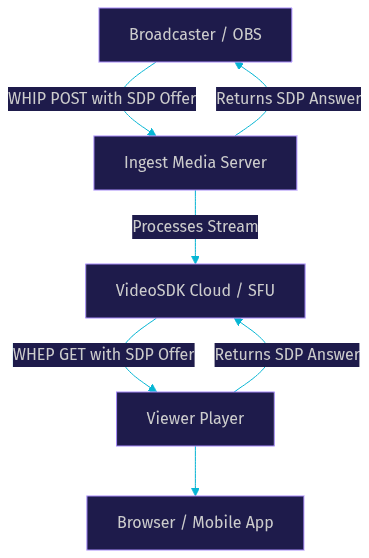
Historically, signaling was the hardest part of WebRTC. Every implementation needed custom WebSocket logic to exchange SDP (Session Description Protocol) offers and answers. The WebRTC-HTTP Ingestion Protocol (WHIP) and WebRTC-HTTP Egress Protocol (WHEP) standardize this process over simple HTTP requests. WHIP allows broadcasting software like OBS to publish a stream to a media server using a standard HTTP POST request containing the SDP offer. The server responds with an SDP answer. WHEP allows players to subscribe to that stream similarly. This removes the need for custom signaling servers and makes WebRTC as easy to ingest as RTMP. VideoSDK handles this complexity under the hood, but understanding WHIP and WHEP is crucial when integrating third-party encoders or custom players. Here is how the flow works:
Architecture Choices: SFU Relay vs Direct P2P
When deploying streaming WebRTC, you must choose how media flows between the broadcaster and viewers. The two primary architectures are Selective Forwarding Unit (SFU) relay and direct Peer-to-Peer (P2P). Your choice dictates your scalability, server costs, and latency profile. An SFU acts as a middleman, receiving one stream from the broadcaster and forwarding it to multiple viewers. Direct P2P connects the broadcaster directly to each viewer. Let's look at both paths:
SFU Relay
An SFU is a media server that routes streams without transcoding them. It is the standard for multi-viewer events. When a broadcaster sends their video to an SFU, the server replicates that packet flow to every connected viewer. This offloads the bandwidth burden from the broadcaster. Instead of uploading 10 copies of a 1080p stream for 10 viewers, the broadcaster uploads one copy, and the SFU handles the distribution. Use an SFU when your audience exceeds a few people, when you need CDN integration, or when you need server-side recording. VideoSDK uses a highly optimized SFU architecture to ensure scalable, low-latency delivery. This allows you to host webinars or live shopping events with thousands of viewers without crashing the broadcaster's network.
Direct P2P
Direct P2P connects the broadcaster's device directly to the viewer's device. There is no intermediary server. This is ideal for LAN environments, very low viewer counts (one-to-one or one-to-few), or privacy-first applications where media should never touch a server. However, P2P does not scale. A broadcaster's upload bandwidth is quickly exhausted as viewers increase. If you have 5 viewers watching a 2.5 Mbps stream, the broadcaster needs to upload 12.5 Mbps continuously. Network traversal is also harder, as each peer needs a successful ICE connection. For most production streaming WebRTC applications, P2P is impractical beyond a handful of viewers.
Key Implementation Considerations
Building a streaming WebRTC application requires handling network unpredictability. You need to manage connection establishment, adapt to changing network conditions, secure the media, and optimize for the lowest possible delay.
ICE, STUN, TURN
WebRTC uses Interactive Connectivity Establishment (ICE) to find the best path between peers. STUN servers help devices discover their public IP addresses. However, symmetric NATs and strict corporate firewalls block STUN. In these cases, TURN servers relay traffic. Always configure TURN servers for your production streaming WebRTC app, or rely on a managed service like VideoSDK that provides global TURN infrastructure automatically. Without TURN, a percentage of your viewers will simply fail to connect. The general rule is that about 10 to 20 percent of connections in the wild require TURN to function.
Adaptive Bitrate & Bandwidth Estimation
WebRTC adjusts video quality in real time based on available bandwidth. If a viewer's connection drops, the sender reduces the bitrate to prevent packet loss. This is network-adaptive streaming. VideoSDK includes built-in bandwidth optimization that automatically scales resolution and bitrate, ensuring smooth playback even on 3G networks. Configuring these parameters manually requires deep knowledge of codec constraints and congestion control algorithms. You need to monitor round-trip time and packet loss to make informed decisions about when to degrade the video quality. It is generally better to rely on an SDK that handles this for you.
Media Encryption & Security
All WebRTC media is encrypted using DTLS-SRTP. The keys are exchanged during the signaling phase. Never expose your signaling endpoints without authentication. Use token-based access control to secure your streams. VideoSDK generates secure meeting tokens server-side, ensuring only authorized participants can publish or subscribe to a stream. You can also implement role-based access control to separate hosts from viewers. This ensures that a malicious actor cannot hijack your broadcast by publishing their own stream to your room.
Latency Optimisation
To achieve sub-second latency, configure your jitter buffers to be aggressive but not so tight that you drop frames. Use UDP transport, which WebRTC does by default. Avoid transcoding video on the server if possible, as it adds delay. Measure end-to-end delay by comparing the broadcaster's timestamp with the viewer's playback time. VideoSDK's infrastructure is tuned for sub-300ms latency, making it ideal for interactive live streaming where real-time audience participation is required. You can also use custom video tracks to optimize the encoding pipeline for your specific content type.
Popular WebRTC Streaming Solutions
The streaming WebRTC ecosystem has matured, offering solutions ranging from raw libraries to fully managed cloud platforms. Here are some notable options for different development needs.
Rust/TypeScript library (SuperInstance/webrtc-stream)
For developers who want full control, open-source libraries like the ones in the SuperInstance ecosystem provide raw WebRTC stream handling. You can build custom signaling and media pipelines in Rust or TypeScript. This approach requires significant engineering effort but offers maximum flexibility for niche use cases or embedded systems. You are responsible for building your own SFU if you need to scale, and you must handle all ICE negotiations and codec preferences manually. It is a great choice for learning the internals of WebRTC or building highly specialized systems where off-the-shelf SDKs do not fit.
Cloudflare Stream WHIP/WHEP
Cloudflare Stream offers WHIP and WHEP endpoints, allowing you to publish and play WebRTC streams over their global edge network. This is a solid choice if you already use Cloudflare for CDN and want to add low-latency streaming without managing servers. It handles scaling automatically but offers less control over participant management compared to a full RTC SDK. You would need to build your own chat and interaction layers. It excels at one-to-many broadcasting scenarios where audience interaction is minimal and the goal is simply getting the video to the viewer as fast as possible.
G-Core WebRTC SDK
G-Core provides a WebRTC SDK focused on low-latency delivery and CDN integration. It is popular in the gaming and broadcasting space. Their infrastructure handles global distribution, but developers still need to build the surrounding application logic for chat, polls, and participant roles. It is a strong contender for large-scale one-way broadcasts. If you are streaming a major esports event and need reliable delivery to a global audience without managing your own media servers, G-Core is a viable option.
OBS-WebRTC-Link plugin
For broadcasters using OBS, the OBS-WebRTC-Link plugin allows direct streaming to a WHIP endpoint. This bridges the gap between professional broadcasting software and custom WebRTC applications. You can stream from OBS directly to a VideoSDK room or a custom SFU using standard WHIP. This is invaluable for bringing high-quality production feeds into interactive environments. It allows producers to use the tools they are familiar with while still leveraging the low-latency benefits of WebRTC for the end viewer.
.NET StreamTransport
.NET developers can leverage libraries like StreamTransport to handle WebRTC media flows within C# applications. This is useful for enterprise environments or backend services that need to process video streams, such as AI inference pipelines or recording bots. It allows server-side processing of WebRTC streams without needing a browser environment. You can build a backend service that joins a VideoSDK room as a hidden participant, processes the audio stream for transcription, and outputs the text to a separate dashboard.
Choosing the Right Solution for Your Project
Selecting the right streaming WebRTC tool depends on your audience size, latency tolerance, development resources, and budget. If you are building a simple one-to-one stream, a P2P library might suffice. If you are building a platform for thousands of viewers, you need an SFU-backed service. If you need interactive features like chat, polls, and screen sharing alongside your stream, a full RTC platform like VideoSDK is the best choice.
| Feature | SFU-focused services (VideoSDK) | P2P-focused libraries | Cloud-hosted WHIP/WHEP (Cloudflare) | Cost |
|---|---|---|---|---|
| Scalability | High (thousands of viewers) | Low (1-5 viewers) | High (CDN edge) | Varies |
| Latency | Sub-second (sub-300ms) | Sub-second | Sub-second | Varies |
| Interactive Features | Built-in (chat, polls, Q&A) | None (build from scratch) | None (build from scratch) | Higher for custom dev |
| Server Management | Fully managed | Self-hosted | Fully managed | High for self-hosted |
| Best For | Interactive live streaming, webinars | LAN streaming, privacy apps | One-to-many broadcasting | Enterprise budgets |
VideoSDK combines the scalability of an SFU with the developer experience of a modern SDK. You get real-time transcription, recording, and custom tracks without managing media servers. This makes it ideal for edtech, live shopping, and virtual events.
Production-Ready Tips
Deploying streaming WebRTC to production requires more than a working localhost prototype. First, serve your application over HTTPS. Browsers block camera and microphone access on insecure origins. Second, implement health monitoring. WebRTC connections can drop due to network changes. Use SDK event listeners to detect disconnections and trigger automatic reconnection logic. VideoSDK handles reconnection gracefully, but you should still update your UI to inform the user. Third, scale with CDN edge nodes. If your audience is global, ensure your SFU provider has edge servers close to your viewers. VideoSDK's geo-fencing and cloud proxy features help route traffic efficiently. Finally, always test on real devices over cellular networks, not just Wi-Fi. Network conditions vary wildly, and your adaptive bitrate logic needs to handle sudden drops in bandwidth.
Future Trends in Streaming WebRTC
The future of streaming WebRTC points toward new transport protocols and AI integration. WebTransport, built on QUIC, is emerging as a potential successor to WebRTC for certain use cases, offering reliable and unreliable data streams over a single connection. AI-enhanced video processing is also becoming standard. Developers are using VideoSDK's Python SDK to pipe WebRTC streams into AI models for real-time background removal, noise suppression, and content moderation. Expect to see more multimodal streaming, where voice, video, and data channels sync perfectly to power immersive AR and VR experiences.
Definitions Glossary
WebRTC: An open-source project that provides web browsers and mobile applications with real-time communication via simple application programming interfaces.
SFU (Selective Forwarding Unit): A media server architecture that receives a single media stream and forwards it to multiple participants without transcoding, optimizing bandwidth for the sender.
WHIP (WebRTC-HTTP Ingestion Protocol): A standard protocol that allows broadcasting clients to publish media to a media server using HTTP POST requests.
WHEP (WebRTC-HTTP Egress Protocol): A standard protocol that allows playback clients to subscribe to media from a server using HTTP requests.
ICE (Interactive Connectivity Establishment): A framework used by WebRTC to find the best network path between peers, utilizing STUN and TURN servers.
Key Takeaways
- Streaming WebRTC delivers sub-second latency, making it essential for interactive live events, gaming, and real-time social apps.
- WHIP and WHEP standardize publishing and playback over HTTP, simplifying the complex signaling process.
- SFU architectures are necessary for scaling to multiple viewers, while direct P2P is limited to small, private streams.
- VideoSDK provides a fully managed SFU with built-in network-adaptive streaming, handling ICE, STUN, and TURN automatically.
- For production, always use HTTPS, implement reconnection logic, and test on cellular networks to ensure robust delivery.
Conclusion
Streaming WebRTC is the backbone of modern interactive video. By prioritizing UDP transport and sub-second delivery over traditional buffering, it unlocks experiences that HLS and DASH simply cannot achieve. Whether you are building a massive webinar or a niche gaming stream, understanding the protocols and architectures is your first step. Ready to build? Explore VideoSDK's Interactive Live Streaming and start prototyping with a WHIP-enabled service today. You can also check out the VideoSDK GitHub repository for code samples and quickstart guides. What are you building with VideoSDK? Drop a comment, I'd love to hear what kind of streaming WebRTC use case you're working on.
Free $20 Balance for AI Voice Agents & Video Calls
FAQ