



Use RTSP when you need to pull video from IP cameras on a controlled network and latency of a few hundred milliseconds is acceptable. Use WebRTC when viewers watch in a browser and need sub-500 ms interactive latency. Use both together when cameras speak RTSP but users watch over the web, which is the most common production pattern in 2026. The biggest mistake is treating them as rivals when they actually solve different halves of the streaming pipeline: ingest versus delivery. VideoSDK's WebRTC-based SDKs handle the delivery half natively, with sub-second latency across browsers and mobile apps. Learn more in the VideoSDK docs. RTSP (Real Time Streaming Protocol) is defined as a network control protocol, standardized in RFC 2326 and updated in RFC 7826, that lets a client remotely control a media stream from a device such as an IP camera. WebRTC is defined as a browser-native, peer-to-peer media stack standardized by the W3C and IETF that delivers real-time audio and video with mandatory encryption. Developers building surveillance dashboards, remote monitoring tools, or interactive live-view features constantly hit this fork in the road, because the two protocols dominate opposite ends of the same pipeline. This guide compares them across latency, browser support, NAT traversal, security, and scalability, then maps real-world scenarios to the right choice, including the hybrid RTSP-ingest-plus-WebRTC-delivery architecture most production systems end up using. ## What Is RTSP? RTSP is a control protocol, not a transport protocol, and that distinction drives almost every difference in the RTSP vs WebRTC debate. RTSP works by sending control commands, such as play, pause, and teardown, between a client and a media source, while the actual audio and video frames travel separately over RTP (Real-time Transport Protocol), typically alongside RTCP for quality feedback. It was standardized by the IETF in 1998 as RFC 2326 and modernized in 2016 as RFC 7826, and it remains the lingua franca of IP cameras, encoders, and NVR (Network Video Recorder) hardware. A typical deployment looks like this: a camera exposes an RTSP endpoint on the local network, an NVR or media server connects to it, issues a play command, and then receives a continuous RTP stream that it records or forwards. On a LAN, RTSP latency can sit under 200 milliseconds because there is no transcoding, no encryption handshake overhead in most legacy setups, and no intermediary beyond a switch. The trade-off is that RTSP has no built-in answer for NAT traversal, browser playback, or encryption. It assumes a static, trusted network with open ports, which is exactly why it thrives in building surveillance and struggles on the open internet. ## What Is WebRTC? WebRTC is a full real-time communication stack that the IETF and W3C standardized for the web platform. Where RTSP only describes how to control a stream, WebRTC describes everything: signaling conventions, media transport over SRTP, congestion control, jitter buffering, codec negotiation, mandatory encryption, and a built-in mechanism for punching through NATs and firewalls. In practice, a WebRTC session begins when two peers exchange session descriptions and network candidates through a signaling channel you provide, often a simple WebSocket or HTTPS service. Each side then gathers its own network candidates using ICE (Interactive Connectivity Establishment), which tries direct UDP paths first, then falls back to STUN (Session Traversal Utilities for NAT) for public address discovery, and finally to TURN (Traversal Using Relays around NAT) relays when direct paths fail. Once a path is found, media flows peer to peer over encrypted SRTP with DTLS key negotiation, and RTCP-style feedback keeps quality stable under changing network conditions. The result is sub-500 millisecond latency in typical deployments, native playback in every modern browser without plugins, and security that is on by default rather than optional. The cost is complexity: WebRTC demands more from your infrastructure, your signaling design, and your scaling strategy, especially when one stream must reach thousands of viewers. ## RTSP vs WebRTC: Side-by-Side Comparison The clearest way to understand the RTSP vs WebRTC decision is to compare them dimension by dimension, because each protocol wins on different axes. ### Latency RTSP on a local area network routinely achieves latency under 200 milliseconds, and on a well-tuned LAN with H.264 passthrough it can approach 100 milliseconds. That performance comes from simplicity: the client asks for a stream, the camera sends RTP packets, and nothing else intervenes. WebRTC typically lands between 100 and 500 milliseconds end to end, including encryption, congestion control, and jitter buffers. On excellent networks it can drop below 100 milliseconds, which is why it powers video calls. The difference is that RTSP achieves low latency only on networks you control, while WebRTC achieves slightly higher latency reliably across the chaotic public internet. For surveillance on a LAN, RTSP wins. For anything crossing the internet, WebRTC wins by default because RTSP frequently fails to connect at all. ### Browser Support No mainstream browser plays RTSP natively. Chrome, Firefox, Safari, and Edge all refuse RTSP URLs, which forces teams into workarounds such as transcoding gateways, browser plugins that no longer work, or conversion to HLS with ten or more seconds of added latency. WebRTC is the opposite: it is built into every modern browser, on desktop and mobile, with no plugins and no downloads. A viewer opens a page, grants camera or simply watches, and media flows. If your audience is human beings using browsers, this single dimension often settles the RTSP vs WebRTC question by itself. ### NAT Traversal and Firewall Behavior RTSP assumes the client can reach the camera's IP and port directly. Behind a home router, a corporate firewall, or a cloud NAT, that assumption collapses: the camera has a private address, the viewer cannot route to it, and the stream never starts. Port forwarding is fragile, insecure, and impossible at consumer scale. WebRTC was designed for exactly this world. ICE probes multiple candidate paths, STUN discovers public mappings, and TURN relays traffic when no direct path exists. A WebRTC stream connects through symmetric NATs, hotel Wi-Fi, and restrictive corporate networks where RTSP simply cannot operate. ### Security RTSP in its legacy form sends control traffic in clear text and media over unencrypted RTP. Credentials in the URL, unauthenticated DES digest challenges, and unencrypted video make plain RTSP a liability on any untrusted network. RFC 7826 added RTSP 2.0 improvements, but camera support remains sparse, and most deployed RTSP devices still ship with the 1998-era security posture. WebRTC mandates encryption. DTLS secures the key exchange, SRTP encrypts every media packet, and browsers refuse unencrypted media entirely. There is no configuration choice to get wrong, which makes WebRTC the safer default for anything exposed to the internet. ### Scalability RTSP scales beautifully for ingest: one media server can pull hundreds of camera streams over a LAN with modest CPU, because it is just receiving RTP packets. For delivery, RTSP scales poorly because every viewer needs a reachable port and a dedicated session. WebRTC in its pure peer-to-peer form also struggles at scale, since each peer connection consumes server or relay resources, and naive mesh topologies fall over around eight to ten participants. The production answer is an SFU (Selective Forwarding Unit) or cascaded media server that fans out WebRTC to thousands of concurrent viewers, which is exactly what managed platforms like VideoSDK provide. ### Codec and Media Handling Both protocols commonly carry H.264 video and Opus or G.711 audio, so codec compatibility is rarely the deciding factor. The practical difference is control: RTSP pipelines usually pass camera-encoded H.264 through untouched, preserving quality and latency, while WebRTC stacks often transcode or repackage to fit browser-supported profiles, adding a small processing cost. A well-designed hybrid pipeline avoids transcoding entirely by forwarding the same H.264 payload from RTP into SRTP. ## Architecture: Where Each Protocol Fits The RTSP vs WebRTC debate dissolves once you stop treating them as competing transports and start mapping them onto the two halves of a streaming pipeline: getting media in, and getting media out. RTSP excels at ingest from devices. IP cameras, encoders, drones, and industrial sensors overwhelmingly speak RTSP because it is lightweight, universally supported by hardware, and perfectly suited to trusted networks where the devices live. WebRTC excels at delivery to people. Browsers, mobile apps, and interactive clients need low latency, NAT traversal, and encryption, and WebRTC delivers all three natively. The dominant production architecture in 2026 therefore uses both: cameras push RTSP into a media server, and the media server republishes each stream to viewers over WebRTC. In this pipeline, the media server acts as a protocol bridge. It maintains RTSP sessions with each camera, receives the RTP media, wraps the same payloads in SRTP, and serves them to browser viewers through an SFU. Viewers get sub-second interactive latency in any browser, while cameras keep speaking the protocol they were built for. The bridge also centralizes concerns that neither protocol handles alone: authentication of viewers, recording, simulcast for adaptive quality, and TURN relay capacity for viewers on hostile networks. ## Real-World Scenarios ### Building or Campus Surveillance A hospital, warehouse, or office campus with cameras on a private LAN should keep RTSP for ingest. Latency under 200 milliseconds, no transcoding, and direct NVR recording make it the right tool. If security staff also need a web dashboard, add a WebRTC delivery layer on top rather than replacing RTSP. ### Consumer Camera Products A doorbell or baby-monitor camera that customers view from anywhere cannot rely on RTSP. Home routers, mobile networks, and shared NATs make direct RTSP unreachable. Build the product on WebRTC delivery, optionally keeping RTSP available on the LAN for power users. ### Interactive Live View with Talk-Back Use cases like remote gate entry, drone piloting, or telepresence need round-trip latency low enough for conversation, which means WebRTC end to end. RTSP's one-way pull model cannot support talk-back without bolting on a separate return channel. ### One-to-Many Broadcasting A single stream to thousands of viewers rules out both raw RTSP and naive peer-to-peer WebRTC. Use RTSP or WebRTC for ingest into a media server, then fan out with an SFU-backed WebRTC service, optionally cascading to HLS or LL-HLS for viewers who tolerate higher latency. ### Legacy NVR Integration When an existing NVR already records RTSP streams, do not rip it out. Place a bridge next to the NVR that subscribes to the RTSP feeds and republishes them as WebRTC for the web UI, preserving recordings while modernizing the viewing experience. ## Common Mistakes to Avoid The first mistake is exposing RTSP directly to the internet. Opening camera ports through a firewall creates a well-known attack surface, and unencrypted RTP means anyone on the path can watch the video. Always terminate RTSP inside your network. The second mistake is assuming browsers will eventually support RTSP. They will not; the web platform committed to WebRTC, HLS, and MSE, and RTSP playback requires a gateway by design. The third mistake is transcoding between RTSP and WebRTC when forwarding would do. If the camera emits H.264 in a browser-compatible profile, forward the payload directly into SRTP and skip the CPU cost and quality loss of decode-encode cycles. The fourth mistake is underestimating TURN capacity. A meaningful fraction of WebRTC viewers, often ten to twenty percent, need TURN relays, and un-budgeted relay bandwidth is the most common production surprise. ## When to Choose Each Protocol Choose RTSP alone when every viewer is on the same trusted network as the media source, when devices are cameras or encoders that only speak RTSP, and when latency tolerance is in the hundreds of milliseconds. Choose WebRTC alone when media originates in a browser or app, when viewers are distributed across the internet, when sub-second latency matters, or when bidirectional audio is required. Choose both together when devices speak RTSP and people watch over the web, which describes the majority of modern video systems, from surveillance dashboards to remote machine monitoring. ## Conclusion The RTSP vs WebRTC question is really an architecture question. RTSP is a lightweight, hardware-native control protocol that assumes a trusted network and delivers excellent LAN latency but nothing for browsers, NATs, or encryption. WebRTC is a complete, encrypted, browser-native stack that traverses hostile networks and enables interactivity, at the cost of more moving parts and a real scaling strategy. In 2026, the strongest systems refuse to choose sides: they ingest over RTSP where devices live and deliver over WebRTC where people live, with a media server bridging the two. VideoSDK handles the delivery half of that bridge for you, with WebRTC-based SDKs that deliver sub-second latency to browsers and mobile apps, built-in SFU scaling, and TURN infrastructure included. Explore the VideoSDK quick start to see how little code a production-grade WebRTC delivery layer needs.
How RTSP Works: A Technical Overview
RTSP works by establishing a connection between an RTSP client and an RTSP server. The client sends commands to the server, such as PLAY, PAUSE, and SETUP, to control the streaming session. The media data itself is typically transmitted using RTP (Real-time Transport Protocol) and RTCP (RTP Control Protocol). RTSP uses SDP (Session Description Protocol) to describe the media streams.
Example RTSP client request
1OPTIONS rtsp://example.com/media.mp4 RTSP/1.0
2CSeq: 1
3
4DESCRIBE rtsp://example.com/media.mp4 RTSP/1.0
5CSeq: 2
6Accept: application/sdp
RTSP Advantages: Reliability and Established Infrastructure
RTSP benefits from its maturity and widespread adoption. It is a reliable protocol with a well-established infrastructure. This makes it suitable for applications where stability and compatibility with existing systems are paramount. RTSP also offers good control over the streaming session.
RTSP Disadvantages: Limitations in Scalability and Browser Support
RTSP's main drawbacks are its limited scalability and lack of native browser support. It typically requires a dedicated media server and is not directly playable in web browsers without plugins or transcoding. The client-server architecture can also introduce latency issues compared to peer-to-peer solutions.
WebRTC: The Modern Approach to Real-time Communication
What is WebRTC?
WebRTC (Web Real-Time Communication) is an open-source project that provides web browsers and mobile applications with real-time communication (RTC) capabilities via simple APIs. It enables peer-to-peer audio and video communication directly within the browser, without requiring plugins or additional software.
How WebRTC Works: Peer-to-Peer Communication
WebRTC establishes peer-to-peer connections between browsers or applications. It uses protocols like ICE (Interactive Connectivity Establishment), STUN (Session Traversal Utilities for NAT), and TURN (Traversal Using Relays around NAT) to overcome NAT traversal challenges. SDP (Session Description Protocol) is used to negotiate media capabilities between peers. The media itself is transmitted using RTP and RTCP.
Simple WebRTC connection setup
1// Create a new peer connection
2const peerConnection = new RTCPeerConnection();
3
4// Add a track to the connection
5navigator.mediaDevices.getUserMedia({ video: true, audio: true })
6  .then(stream => {
7    stream.getTracks().forEach(track => {
8      peerConnection.addTrack(track, stream);
9    });
10  });
11
12// Handle ICE candidates
13peerConnection.onicecandidate = event => {
14  if (event.candidate) {
15    // Send the candidate to the other peer
16    sendData({
17        type: 'candidate',
18        candidate: event.candidate
19    });
20  }
21};
22
23// Handle incoming tracks
24peerConnection.ontrack = event => {
25  const remoteVideo = document.getElementById('remoteVideo');
26  remoteVideo.srcObject = event.streams[0];
27};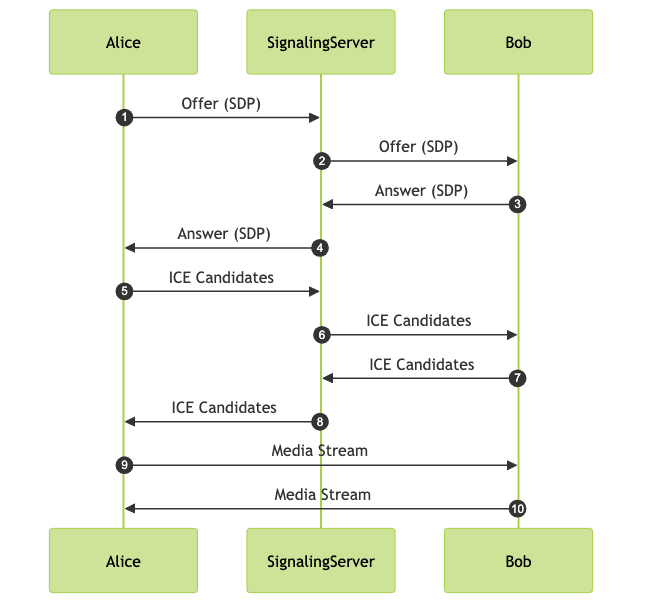
WebRTC Advantages: Low Latency and Native Browser Support
WebRTC's peer-to-peer architecture enables low-latency communication, making it ideal for interactive applications. Its native browser support eliminates the need for plugins, simplifying deployment and improving user experience. WebRTC's support for NAT traversal is also a significant advantage.
WebRTC Disadvantages: Complexity and Scalability Challenges
WebRTC can be complex to implement, especially when dealing with NAT traversal and signaling. Scalability can also be a challenge, as each peer-to-peer connection requires significant resources. For large-scale streaming, a media server or SFU (Selective Forwarding Unit) is often required.
Head-to-Head Comparison: RTSP vs. WebRTC
Latency and Real-time Performance
WebRTC generally offers lower latency compared to RTSP due to its peer-to-peer architecture. RTSP, with its client-server model, can introduce additional latency due to server processing and network hops. However, RTSP latency can be minimized through careful server configuration and network optimization.
Scalability and User Capacity
RTSP can handle a large number of viewers with a well-configured media server. WebRTC's peer-to-peer nature can limit scalability, as each client connection consumes server resources. Using SFUs or media servers can improve WebRTC scalability but adds complexity and cost.
Security and Data Encryption
Both RTSP and WebRTC support encryption. RTSP typically uses SRTP (Secure Real-time Transport Protocol) for media encryption. WebRTC mandates encryption using DTLS (Datagram Transport Layer Security) and SRTP, providing a secure communication channel. WebRTC's built-in encryption is a key security advantage.
Browser and Platform Compatibility
WebRTC has excellent browser compatibility, as it is natively supported by most modern browsers. RTSP, on the other hand, requires plugins or transcoding to be played in a browser. This makes WebRTC a more convenient option for web-based applications. RTSP often requires dedicated client applications for mobile platforms.
Implementation Complexity and Development Costs
WebRTC can be complex to implement, requiring expertise in signaling, NAT traversal, and media encoding. RTSP implementation is relatively simpler, especially when using existing media server solutions. However, the need for plugins or transcoding for browser playback can add to the overall development cost of RTSP-based solutions. WebRTC often requires more front-end development expertise.
Use Cases: Where Each Protocol Excels
RTSP Ideal Scenarios: Video Surveillance, IoT Devices
RTSP is well-suited for video surveillance systems and IoT devices where reliability and compatibility with existing infrastructure are important. It's commonly used in IP cameras and network video recorders (NVRs). RTSP's ability to stream to multiple clients from a central server makes it a good choice for these applications. RTSP excels in scenarios where low-cost encoders are used to stream to a centralized location.
WebRTC Best Fits: Video Conferencing, Interactive Applications
WebRTC is ideal for video conferencing, online education, and other interactive applications where low latency and real-time communication are essential. Its peer-to-peer architecture and native browser support make it easy to deploy and use. WebRTC is a natural fit for applications requiring real-time interactivity and collaboration.
Choosing the Right Protocol Based on Your Needs
The choice between RTSP and WebRTC depends on the specific requirements of the application. If low latency and browser compatibility are critical, WebRTC is the better choice. If reliability and compatibility with existing infrastructure are more important, RTSP may be more suitable. Consider the scalability, security, and cost implications of each protocol before making a decision.
Conclusion: Making Informed Decisions
Both RTSP and WebRTC have their strengths and weaknesses. Understanding these differences is crucial for choosing the right protocol for your real-time streaming needs. Consider the specific requirements of your application, including latency, scalability, security, and browser compatibility, to make an informed decision.
- Learn more about RTSP: For a deeper understanding of the RTSP protocol.
- WebRTC official website: Explore the official documentation and resources for WebRTC.
- Understanding WebRTC's architecture: A comprehensive guide to WebRTC's architectural components.
Free $20 Balance for AI Voice Agents & Video Calls
FAQ