


Building a Django WebRTC application means pairing Django Channels for WebSocket-based signaling with the browser's native WebRTC APIs for peer-to-peer media. Django handles rooms, authentication, and orchestration, while WebRTC handles the audio and video transport directly between peers. For teams that want to skip the signaling and TURN infrastructure entirely, VideoSDK provides managed rooms, recording, and multi-platform SDKs.
Real-time video has moved from a nice-to-have to table stakes. Telehealth appointments, remote interviews, online tutoring, and virtual events all run on embedded video chat, and users notice latency above a few hundred milliseconds. If you are a Django developer, you already own a backend with mature authentication, a powerful ORM, and an admin panel, which makes Django a natural orchestration layer for WebRTC.
"Django WebRTC" refers to a specific architecture: Django serves your application and business logic, Django Channels provides the WebSocket signaling layer that lets two browsers negotiate a direct media connection, and WebRTC itself carries the audio and video peer-to-peer. By the end of this article, you will understand the full architecture, the signaling implementation, TURN/STUN configuration, scaling strategies, production hardening, and when a managed solution like VideoSDK is the smarter call.
What Is WebRTC?
WebRTC is defined as a free, open-source technology and W3C/IETF standard that enables real-time audio, video, and data exchange directly between browsers and devices without an intermediary server for the media itself. It works by exposing JavaScript APIs, primarily the peer connection interface for negotiating media sessions, and the media capture interface for accessing the camera and microphone.
The peer-to-peer nature is the key differentiator. Once two peers exchange the small amount of metadata needed to find each other, audio and video flow directly between them, encrypted with mandatory DTLS and SRTP. The W3C WebRTC specification governs the browser side, while the IETF handles the underlying transport protocols.
Why Pair Django With WebRTC?
Django brings battle-tested strengths to a real-time application: a full authentication system out of the box, an ORM for modeling rooms and participants, automatic admin panels for moderation, and Django REST Framework for exposing room management endpoints to mobile clients.
The piece Django historically lacked was asynchronous, long-lived connections. Django Channels closes that gap. Channels extends Django from a synchronous request-response framework into an ASGI application that natively supports WebSockets, which is exactly what WebRTC signaling requires. You keep one framework for your entire stack: sessions, permissions, and signaling all live in the same codebase, sharing the same models and middleware.
Core Architecture of a Django WebRTC App
A Django WebRTC application splits responsibilities across four layers: the browsers, the Django Channels signaling server, the ICE/TURN infrastructure, and the direct media path between peers. The browsers never send media through Django. They only use Django to discover each other and exchange connection metadata, after which media flows peer-to-peer.
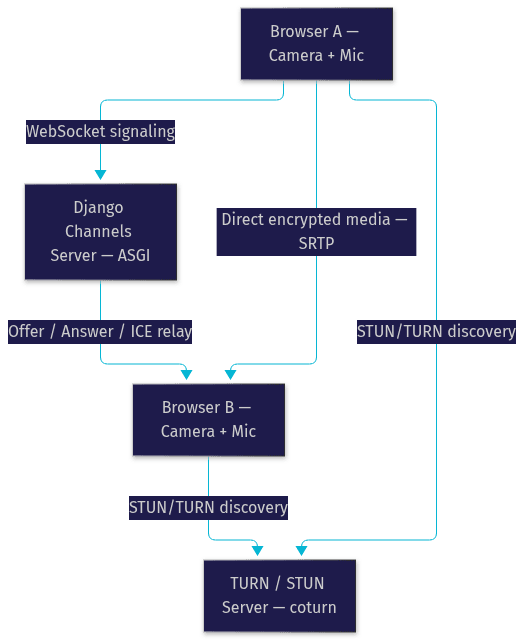
The flow works like this: Browser A captures media, creates an offer describing its capabilities, and sends that offer through the Django Channels WebSocket. Browser B receives it, responds with an answer, and both exchange ICE candidates describing possible network routes. Once connectivity is established, media flows directly, and Django steps out of the hot path.
Signaling with Django Channels
Signaling is the process of exchanging three message types: session descriptions (offers and answers) and ICE candidates. Django Channels handles this through a WebSocket consumer that receives each message, validates it, and broadcasts it to the other participants in the same room group.
Channels uses a concept called groups, backed by a channel layer, to route messages between connections. When a participant joins, the consumer adds their connection to a group named after the room. Every offer, answer, or candidate message the consumer receives is re-emitted to that group, so all other participants learn about it instantly. The Django Channels documentation covers the consumer and routing model in detail.
Managing Rooms and Tokens
Rooms map naturally to Django models: a Room record with a unique identifier, capacity, and permissions, plus a Participant record linking users to rooms. Django REST Framework can expose room creation and listing endpoints for mobile clients.
Access control should use short-lived tokens, either Django sessions for same-site clients or signed JWTs for cross-origin and mobile use. The token should encode the room identifier, the participant's identity, and an expiry, and the Channels consumer should verify it during the WebSocket handshake before admitting the connection to the room group. Never rely on the room ID alone as a security mechanism, since IDs leak through URLs and logs.
Setting Up the Development Environment
A Django WebRTC project needs four components beyond a standard Django install: Django Channels for WebSockets, an ASGI-capable server such as Daphne or Uvicorn, Redis as the channel layer backend, and a TURN server (coturn) for NAT traversal testing.
Start by creating an isolated virtual environment so the real-time dependencies stay separate from other projects. Install Django, Channels, the Channels Redis layer, and an ASGI server, recording them in your project's dependency file. Configure the ASGI application as your project's entry point, register the Channels application in your installed apps, and point the channel layer configuration at your local Redis instance.
For local TURN testing, you can run coturn in a Docker container with a minimal configuration: a listening port, a static credentials pair for testing, and a realm. In production you will replace static credentials with time-limited ones, covered later. Verify each piece independently: confirm the WebSocket handshake succeeds in the browser console, confirm Redis is reachable from Django, and confirm the TURN server responds to allocation requests before wiring the full signaling flow together.
Implementing the Signaling Server
The signaling server is the heart of a Django WebRTC build, and its implementation follows a clear logical sequence even without writing a single line of code.
First, define the WebSocket consumer that will handle all signaling connections. This consumer manages the full lifecycle of each participant's connection: accepting the handshake, joining the room group, processing messages, and cleaning up on disconnect.
Second, implement the connection handshake with authentication. When a browser opens the WebSocket, the consumer validates the participant's token, checks that the room exists and that the user has permission to join, and only then accepts the connection. A rejected handshake should return a meaningful error so the client can prompt for credentials.
Third, register the routing that maps WebSocket URLs to your consumer. Channels routing works like Django URL routing but for WebSocket paths, so a single route pattern carrying the room identifier in the URL is typically all you need.
Fourth, implement the join event. When a participant joins, broadcast their arrival to the room group so existing participants can initiate peer connections with the newcomer. In a mesh topology, every existing participant creates a separate peer connection to the new arrival.
Fifth, implement message forwarding. The consumer receives JSON messages from clients, each tagged with a type such as offer, answer, or candidate, and re-broadcasts them to the room group addressed to a specific recipient. The consumer should validate message shape and enforce that participants can only send to peers in the same room.
Sixth, handle disconnection. When a participant leaves, remove them from the group, broadcast a leave event so peers can close their peer connections and free resources, and update the Participant model so room state stays accurate.
Handling ICE Candidate Exchange
ICE candidates describe the possible network routes a peer can use, and they arrive asynchronously, often several seconds after the offer or answer. This is why candidate exchange must be a separate, ongoing message type rather than a one-shot handshake.
The Channels consumer forwards each incoming candidate to the targeted peer through the room group. On the browser side, candidates that arrive before the remote session description must be queued and applied once the description is set, a classic source of silent connection failures. Trickle ICE, where candidates stream in as they are discovered, keeps connection setup fast because peers do not wait for the full gathering process to finish.
Adding Text Chat Over WebSocket
The same channel layer that carries signaling can carry chat. Define a chat message type in your consumer, broadcast it to the room group with the sender's display name and a timestamp, and persist it to a Message model if you need history. Because the WebSocket is already authenticated, chat inherits your access control for free, and participants get a communication fallback when their microphone fails.
Integrating the Front-End
The browser side of a Django WebRTC app has four responsibilities: capturing media, creating peer connections, driving the signaling exchange, and rendering remote streams.
Media capture starts by requesting camera and microphone access through the browser's media APIs, which triggers a permission prompt. Handle the denial case gracefully with a clear message and an audio-only fallback, because permission denial is one of the most common support issues in production video apps.
Peer connection creation involves instantiating a connection object configured with your STUN and TURN server list. Attach the captured audio and video tracks to the connection, then create an offer. The offer, a small blob describing codecs and capabilities, is sent over the WebSocket to Django, which relays it to the remote peer.
When the answer comes back, set it as the remote description. As ICE candidates trickle in from both sides, feed each one into the connection. Once connectivity is established, the connection fires an event carrying the remote media stream, which you attach to a video element. Track events also tell you when a peer mutes their camera or microphone, letting you update the UI in response.
Browser Compatibility Checks
All modern browsers support WebRTC, but feature detection still matters, especially for older enterprise builds and in-app browsers. Check for the presence of the peer connection and media capture APIs before initializing, and surface a clear unsupported-browser message rather than a blank screen. For Safari, note that autoplay policies require a user gesture before remote video plays with sound.
TURN/STUN Server Configuration
Roughly one in ten network configurations, including symmetric NATs and strict corporate firewalls, prevents direct peer-to-peer connectivity. A STUN server lets peers discover their public address, while a TURN server relays media when direct connection fails. Without TURN, those users simply cannot connect.
Coturn is the de facto open-source TURN server. A production configuration defines the listening ports, the external IP, the realm, and crucially, a mechanism for time-limited credentials rather than static usernames and passwords. Static TURN credentials are a common security hole because anyone who extracts them can relay traffic through your server. Use the standard temporary credential mechanism, where your Django backend generates short-lived usernames with embedded expiry and a matching password derived from a shared secret, and expose them through an authenticated endpoint.
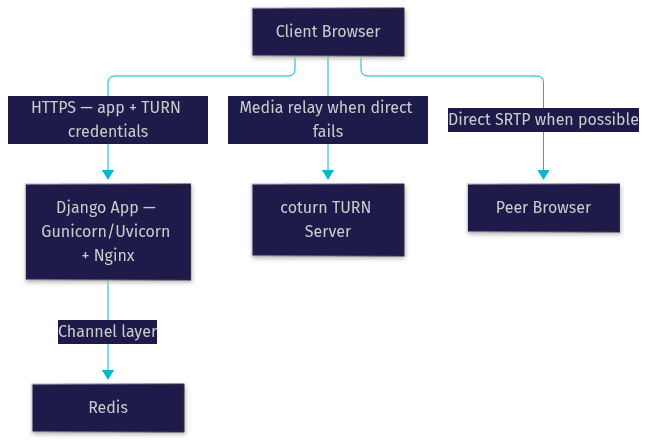
Monitor TURN allocation counts and bandwidth, because TURN relay traffic is the expensive path and a spike usually indicates a network segment where direct connectivity is broken.
Scaling to Multi-Party Calls
Two-party calls work fine over a direct mesh, where every participant maintains a peer connection to every other participant. Mesh is simple and has no server media cost, but bandwidth grows quadratically: in a four-person call each browser uploads its stream three times, and by six or seven participants most consumer connections choke.
Beyond small groups you need an SFU, a Selective Forwarding Unit. Each participant sends one stream to the SFU, and the SFU forwards streams to the other participants without decoding them. Open-source options include Janus, mediasoup, and LiveKit, and commercial SFUs handle the media plane for you.
Django's role shifts in an SFU architecture: it becomes the coordination layer that authenticates participants, creates SFU rooms via the SFU's API, issues SFU access tokens, and records session metadata. This is exactly the architecture VideoSDK uses, where your backend creates rooms and tokens through the REST API and clients join with a video calling SDK.
Production Hardening
Production changes everything for a Django WebRTC deployment. The first non-negotiable is HTTPS. Browsers refuse camera and microphone access on insecure origins, and secure WebSockets require TLS termination, typically at Nginx in front of your ASGI server.
Next, tighten Django's security posture: restrict allowed hosts to your actual domains, configure CSRF trusted origins if your front end is served separately, and set a strict CORS policy that permits only your front end's origin for REST endpoints. Keep WebSocket authentication token-based rather than cookie-based when clients are cross-origin.
For the process layer, run Uvicorn or Daphne workers behind Gunicorn or directly under a process manager, with enough workers to handle concurrent WebSocket connections. The Redis channel layer is mandatory in production because the in-memory layer only works with a single process, and multiple workers need Redis to route messages between connections held by different workers.
Monitoring should cover three signals: WebSocket connection counts and error rates, signaling message latency, and TURN relay volume. Log signaling failures with enough context to diagnose, since a failed ICE negotiation looks identical to a broken WebSocket from the user's perspective.
Deploying to Cloud Platforms
Platforms like Render, Heroku, and AWS Elastic Beanstalk all support ASGI Django deployments. The practical requirements are the same everywhere: a Redis instance (managed services work fine), TLS termination at the platform's load balancer, and a separately hosted TURN server, since most PaaS environments do not suit running coturn alongside the app. On AWS, an EC2 instance with a public elastic IP is the common coturn home.
Advanced Features
Once basic calling works, three extensions are commonly requested. Screen sharing uses the browser's display capture API to obtain a second video track, which you add to the existing peer connection as an additional sender, letting participants share camera and screen simultaneously.
Recording is possible client-side through the MediaRecorder API, which captures a local or remote stream into a webm file for download. This works for simple one-on-one recording, but server-side recording, where the backend composites all participants into a single file, is far more practical for multi-party calls. VideoSDK includes both individual and composite participant recording without custom infrastructure.
The third extension is AI. Voice agents that transcribe, summarize, and respond in real time are increasingly expected in video applications. Building this yourself means wiring speech-to-text, an LLM, and text-to-speech into your media pipeline, a significant undertaking. VideoSDK's AI Voice Agents provide a managed Python agent framework for exactly this, and its Conversational Graph handles deterministic flows like intake forms and bookings.
Common Pitfalls and Debugging Tips
Most Django WebRTC failures cluster into four categories. Token expiration causes mysterious mid-session disconnects; issue signaling tokens with short lifetimes and refresh them on reconnect. ICE gathering failures, where the connection never leaves the connecting state, usually mean a missing or misconfigured TURN server; test with a known-good TURN instance before debugging your own. Corporate firewalls sometimes block even TURN ports, so offer TURN over port 443 as a fallback.
For diagnosis, the browser's built-in WebRTC statistics interface exposes per-connection metrics including round-trip time, packet loss, and jitter. A connection with high packet loss and low round-trip time points to bandwidth saturation, while high round-trip time points to TURN relay. Also inspect the ICE candidate pairs to confirm whether media is flowing direct or relayed, and check the Channels error logs for group routing mistakes, which typically manifest as messages reaching the sender but not the peer.
When to Use a Managed Solution Like VideoSDK
Building Django WebRTC from scratch is the right call when you need deep control, have specific compliance constraints, or are building a small, well-understood two-party feature. You will invest in signaling, TURN infrastructure, SFU scaling, recording, and ongoing browser compatibility maintenance.
Use a managed solution when time-to-market matters, when you need multi-party calls beyond mesh capacity, or when you want recording, transcription, and adaptive streaming without building them. VideoSDK fits here: it provides Prebuilt UI for zero-code embedding, custom SDKs across ten-plus platforms including React, Flutter, and React Native, network-adaptive streaming that adjusts bitrate to each participant's bandwidth, and sub-second interactive live streaming for larger audiences. Your Django backend still owns authentication and business logic, creating rooms and tokens server-side while clients connect with the SDK.
The honest trade-off: for a single two-person call feature in an existing Django app, raw WebRTC with Channels is lightweight and free of vendor dependency. For anything multi-party, recorded, or AI-enhanced, the managed route usually wins on total engineering cost.
Definitions Glossary
WebRTC: A W3C/IETF standard enabling real-time audio, video, and data exchange directly between browsers, with mandatory encryption via DTLS and SRTP.
Django Channels: An extension that upgrades Django from synchronous request-response to an ASGI application supporting WebSockets, providing the signaling layer for Django WebRTC apps.
Signaling: The exchange of offers, answers, and ICE candidates between peers before media can flow, typically carried over WebSockets in a Django WebRTC architecture.
ICE Candidate: A description of one possible network route a peer can use, exchanged asynchronously between peers during connection establishment.
TURN Server: A relay server that forwards media when direct peer-to-peer connectivity fails due to NAT or firewalls, essential for reliable production WebRTC.
SFU (Selective Forwarding Unit): A media server that receives each participant's stream once and forwards it to others without decoding, enabling multi-party calls beyond mesh capacity.
Key Takeaways
- A Django WebRTC architecture splits responsibilities cleanly: Django Channels handles signaling over WebSockets, while media flows directly between peers, keeping Django out of the hot path.
- A TURN server is not optional in production, since a meaningful fraction of real-world networks cannot establish direct peer connections without a relay.
- Mesh topology works for small calls, but multi-party video requires an SFU, with Django acting as the authentication and coordination layer.
- Production hardening requires HTTPS, token-based WebSocket authentication, the Redis channel layer, and monitoring of both signaling and TURN relay traffic.
- For multi-party calls, recording, transcription, or AI voice features, a managed solution like VideoSDK typically costs less total engineering effort than building from scratch.
Conclusion
The Django WebRTC stack is a proven, well-documented path to real-time video chat: Django for rooms, authentication, and business logic, Channels for signaling, coturn for NAT traversal, and an SFU when you scale past mesh. The architecture is clean because each layer does one job, and you keep everything inside the framework you already know.
If you want to skip the signaling and TURN infrastructure and ship faster, VideoSDK's video calling SDKs handle rooms, recording, adaptive streaming, and multi-party media out of the box, with a free tier to start on app.videosdk.live. Explore the code samples or join the VideoSDK Discord community to see full working examples.
What are you building with Django WebRTC? Drop a comment, I'd love to hear what kind of real-time use case you're working on.
Free $20 Balance for AI Voice Agents & Video Calls
FAQ