


Voice over IP (VoIP) options fall into four main categories: hosted cloud PBX, on-premise systems, hybrid deployments, and open-source stacks. The best choice depends on your call volume, security requirements, integration needs, and budget. VideoSDK, for example, extends VoIP-style real-time communication into apps with its audio calling SDKs and SIP telephony integration, letting developers embed voice directly into their products. This guide compares every major option so you can pick with confidence.
Voice Over IP Options Overview
Voice over IP replaced the circuit-switched phone line with packet-switched internet audio, and in doing so it turned voice into software. That single shift explains why the market is crowded: once voice is software, every vendor from telecom giants to three-person startups can package it differently. Choosing among voice over IP options in 2026 is less about "does it carry audio" and more about who controls the infrastructure, how calls are routed, what it costs at scale, and how well it integrates with the rest of your stack.
The stakes are real. A mid-sized company that picks the wrong deployment model can end up locked into per-seat pricing it has outgrown, or stuck maintaining on-premise hardware it no longer has staff to support. Conversely, the right option cuts phone costs dramatically, adds capabilities traditional telephony never had (transcription, AI assistants, video, CRM screen pops), and scales from five users to five thousand without a forklift upgrade.
This article walks through the four major categories of VoIP options, the decision factors that actually separate them, a comparative look at leading providers, a practical evaluation process, and migration best practices. Whether you are an IT manager replacing a legacy PBX or a developer embedding voice into an application, you will finish with a clear framework for choosing.
Types of Voice Over IP Options
Every VoIP deployment fits into one of four architectural categories, and understanding the trade-offs between them is the foundation of every other decision.
Hosted Cloud PBX Solutions
Hosted cloud PBX is the dominant model today. Your provider runs the call server, media routing, and telephony connections in their data centers, and you simply connect desk phones, softphones, and mobile apps over the internet. There is no hardware to maintain beyond handsets, and features like auto-attendants, call queues, and voicemail-to-email are configured through a web portal.
The benefits are speed and elasticity. A new hire can be provisioned in minutes, and seasonal call volume spikes are absorbed by the provider's infrastructure. Pricing is typically a per-user monthly subscription, commonly in the range of fifteen to forty dollars per user depending on feature tier. The trade-off is dependency: your call quality lives and dies by your internet connection and your provider's uptime.
On-Premise VoIP Systems
On-premise VoIP puts the PBX server in your own rack. You own the hardware, license the software, and manage call routing, trunks, and updates yourself. This model appeals to organizations with strict data residency rules, heavy customization needs, or existing IT staff who already manage infrastructure.
Scalability is the weak point. Adding capacity means buying licenses and possibly hardware, and upgrades require planned maintenance windows. On-premise systems are preferred in regulated industries like healthcare and finance where keeping call media inside a controlled network simplifies compliance, and in large enterprises that have negotiated favorable SIP trunking rates and want to squeeze per-minute costs.
Hybrid VoIP Deployments
Hybrid deployments keep an on-premise PBX for core calling while pushing some functions, typically remote workers, contact center overflow, or international numbers, to a cloud service. This is the pragmatic middle path for companies mid-migration or with mixed requirements.
Hybrid architectures let you protect existing hardware investments while gaining cloud flexibility where it matters. The cost is complexity: you now manage two systems, two vendors relationships, and the integration between them. A common pattern is a headquarters running on-premise with branch offices and remote staff on a hosted service, connected through SIP trunks.
Open-Source and DIY VoIP Options
For teams with engineering resources, open-source VoIP stacks offer unmatched control and cost efficiency at scale. The three pillars of this world are Asterisk, the long-standing PBX and toolkit; FreeSWITCH, a highly scalable softswitch favored for carrier-grade deployments; and Kamailio, a SIP server excelling at routing and load distribution.
Community support is strong, with active forums, extensive documentation, and commercial support available from consultancies if you need guaranteed response times. The catch is that you are the vendor now: security patching, redundancy, monitoring, and fraud prevention are all your responsibility. DIY VoIP makes sense when call volume is high enough that per-minute or per-seat fees dwarf engineering cost, or when you need deeply customized call flows that hosted services cannot express.
Developers building voice into applications rather than running company telephony often take a different route entirely: embedding a real-time communication SDK like VideoSDK's audio calling API, which handles the media infrastructure while the application owns the experience.
Key Decision Factors
Four factors separate the voice over IP options in practice: cost, features, security, and compatibility.
Cost Structure and Pricing Models
VoIP pricing comes in three shapes: per-user subscriptions, per-minute usage, and capital expenditure for on-premise. Subscriptions are predictable but penalize light users; per-minute plans reward low volume but expose you to bill shock and toll fraud; on-premise has high upfront cost and low marginal cost.
Watch for hidden fees. Common ones include number porting charges, E911 fees, per-minute overage rates, admin portal fees, and charges for features like call recording that competitors bundle. A realistic ROI comparison should model three years of total cost including trunk capacity, handset refresh, and the staff time each option consumes. SIP trunking costs in particular vary widely, from a few dollars per channel to enterprise contracts, so before committing.
Feature Set and Scalability
Baseline features across serious providers include call routing, IVR, conferencing, and mobile apps. Differentiators now sit higher up: AI-enhanced voice services such as real-time transcription, post-call summaries, and voice agents; native video calling; and deep CRM integration. Unified communications platforms bundle chat, presence, and file sharing alongside voice, which reduces tool sprawl.
Scalability questions to ask: how quickly can you add users, what happens at peak concurrency, and does the platform degrade gracefully or hard-fail when capacity is exceeded. Cloud options generally win on elasticity; on-premise wins on predictable capacity you control.
Security and Compliance
VoIP security rests on transport encryption: TLS protects signaling, and SRTP protects the media stream itself. Ask every provider whether both are enabled by default, not available as an option. Beyond encryption, evaluate physical and logical access controls, fraud monitoring, and whether the provider supports IP whitelisting and geo-fencing for administrative access.
Compliance depends on your industry. GDPR applies if you handle European callers' data, PCI-DSS applies if calls may capture card numbers, and HIPAA applies to healthcare voice. On-premise and hybrid deployments can simplify compliance by keeping media on networks you control. Best-practice hardening includes strong authentication on all endpoints, segregating voice traffic onto a dedicated VLAN, and monitoring for subscription fraud and international toll fraud, which remains one of the most expensive attack vectors in telephony.
Compatibility and Integration
SIP is the lingua franca of VoIP, and SIP standards compliance determines whether you can mix vendors, keep existing handsets, and switch providers without replacing hardware. Codec support matters for quality and bandwidth: G.711 is the universal fallback, G.722 delivers wideband HD voice, and Opus offers the best quality-to-bandwidth ratio, especially on poor connections.
Integration is where modern VoIP earns its keep. Check for native connectors to your CRM, helpdesk, and identity provider, and open APIs for anything custom. If your roadmap includes embedding voice directly into your product, look at platforms like VideoSDK's telephony and SIP integration, which bridges traditional SIP trunks with WebRTC-based application experiences, and its REST APIs for programmatic room and participant management.
Comparative Matrix of Top Voice Over IP Options
The major hosted providers each occupy a distinct position. RingCentral leads on breadth, bundling voice, video, messaging, and contact center capabilities with strong APIs, making it a safe default for SMBs through mid-enterprise. 8x8 targets the enterprise and contact center segment, with strong global reach and compliance certifications. Microsoft Teams Calling is the natural choice for organizations already standardized on Microsoft 365, since voice becomes an extension of the collaboration suite they already pay for. Cisco Webex Calling suits Cisco-shop enterprises wanting a managed cloud migration path from existing Cisco infrastructure. Vonage Business (now part of Ericsson) offers flexible APIs alongside hosted voice, appealing to product teams building communications into software.
| Option | Best For | Strengths | Watch Out For |
|---|---|---|---|
| RingCentral | SMB to mid-market UC | Broad feature set, strong integrations | Pricing climbs with add-ons |
| 8x8 | Enterprise, contact center | Global coverage, compliance | Heavier setup complexity |
| Microsoft Teams Calling | Microsoft 365 shops | Unified experience, familiar UI | Voice features trail dedicated PBX |
| Cisco Webex Calling | Cisco enterprises | Migration path from Cisco hardware | Best value only in Cisco ecosystems |
| Vonage Business | API-driven product teams | Programmable communications | Less turnkey for non-technical buyers |
| Open-source (Asterisk/FreeSWITCH) | High-volume, custom needs | Cost at scale, total control | You own security and uptime |
| VideoSDK | Embedding voice in apps | Developer-first SDKs, SIP bridge, AI agents | Not a replacement for company telephony |
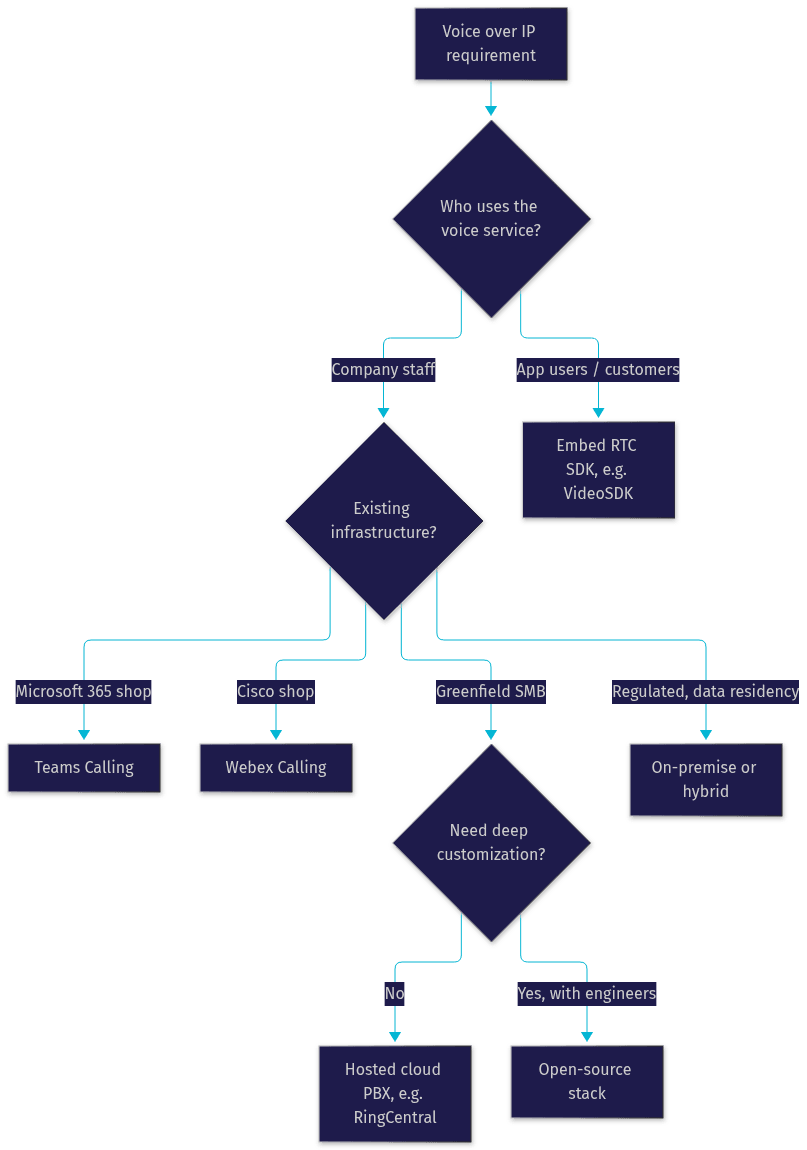
The single most important row for most readers is the last distinction: buying a phone system for your company and embedding voice into your software are different problems with different solutions. The flowchart below maps the decision:
How to Evaluate and Test a VoIP Option
A structured evaluation beats a feature-checklist skim, because call quality and support responsiveness only reveal themselves under real conditions.
Step one: run a genuine trial. Most providers offer fourteen to thirty day trials. Use the full period with real users making real calls, not a lab test. Include remote workers, since they stress the network differently than office users.
Step two: measure call quality objectively. The industry standard is the Mean Opinion Score (MOS), a one-to-five scale where 4.0 or higher is considered excellent. Test across your actual network conditions, including congested periods, and pay attention to jitter, latency, and packet loss rather than just subjective "sounds fine" impressions. A useful rule of thumb: latency under 150 milliseconds and packet loss under one percent keep voice comfortable.
Step three: test support responsiveness. Open tickets during the trial, including one urgent-severity issue, and measure both response time and resolution quality. Support quality at trial time is the best you will ever see.
Step four: run a migration dry run. Port one number, connect a handful of devices, and validate integrations against your CRM and identity provider before committing the full rollout.
Step five: score against your weighted criteria. Assign weights to cost, features, security, and compatibility based on your organization's priorities, and score each option. The discipline of writing down weights prevents the loudest vendor demo from winning.
Migration Best Practices
Migration failures almost always trace back to skipped planning in three areas: network readiness, number porting, and people.
Network readiness comes first. Voice traffic needs priority on your network, which means configuring quality of service so voice packets are not stuck behind large file transfers. Calculate bandwidth honestly: each active call using a wideband codec can consume around 100 kilobits per second in each direction, and concurrent call capacity must be provisioned for peak, not average. Verify firewall rules and, for remote staff, confirm that home connections sustain acceptable quality.
Number porting needs lead time. Porting existing phone numbers to a new provider typically takes two to four weeks and requires accurate account information matching your current carrier's records. Port your most critical numbers last, after the platform is proven, and never cancel service with the old carrier before the port completes, since that can strand your numbers.
Train staff before cutover, not after. New softphones, changed feature codes, and different voicemail workflows generate most post-migration support tickets. Short recorded walkthroughs and a one-page quick reference reduce the flood.
Monitor after cutover. Track call quality metrics, failed calls, and user-reported issues for the first month, and hold a checkpoint review at thirty days to decide whether configuration tuning or additional training is needed.
Future Trends in Voice Over IP
Three trends are reshaping voice over IP options through the rest of the decade. First, AI-driven voice is moving from novelty to expectation: real-time transcription, call summaries, and conversational voice agents are becoming standard capabilities, and platforms like VideoSDK's AI voice agents show how LLM-powered agents now handle live calls end to end. Second, 5G is making mobile VoIP genuinely reliable, enabling high-quality voice from anywhere without Wi-Fi dependency. Third, codec development continues pushing quality per bit, with Opus derivatives and emerging low-bitrate codecs extending HD voice onto constrained connections.
Definitions Glossary
Voice over IP (VoIP): The technology that carries voice calls over IP networks instead of traditional phone lines, converting audio into packets routed like any other internet data.
Cloud PBX: A hosted phone system where the provider runs the call server and routing infrastructure, and customers connect via internet-connected phones and apps.
SIP trunking: A service that connects an on-premise or hybrid PBX to the public phone network over the internet using the Session Initiation Protocol, replacing physical phone lines.
MOS (Mean Opinion Score): A one-to-five scale for measuring perceived voice quality, where 4.0 or above is considered excellent for business calls.
SRTP: Secure Real-time Transport Protocol, the encryption layer that protects the media stream of a VoIP call, paired with TLS for signaling protection.
SIP softphone: A software application that turns a computer or mobile device into a SIP-compatible phone, eliminating the need for a physical handset.
Key Takeaways
- Voice over IP options divide into four categories: hosted cloud PBX, on-premise, hybrid, and open-source, each with distinct cost and control trade-offs.
- Cost comparisons must model three years of total cost including hidden fees, trunk capacity, and staff time, not just headline per-seat prices.
- Security requires TLS for signaling and SRTP for media, enabled by default, plus fraud monitoring and VLAN segregation.
- Evaluate options with real trials, objective MOS-based quality testing, and weighted scoring rather than feature checklists.
- If your goal is embedding voice into an application rather than running company telephony, developer-first platforms like VideoSDK's audio calling SDKs and SIP integration are the better fit.
Conclusion
Choosing among voice over IP options in 2026 comes down to matching deployment model to your constraints: cloud for speed and elasticity, on-premise for control and compliance, hybrid for the middle path, and open-source when engineering capacity beats per-seat fees. Evaluate with trials and objective quality metrics, migrate with network readiness and porting lead time in mind, and weight your decision factors in writing. If your project is about building voice into software rather than buying a phone system, explore VideoSDK's audio calling documentation and the code samples library, or grab a free account at app.videosdk.live to start building. What are you building with voice? Drop a comment, I'd love to hear which VoIP use case you are working on.
Free $20 Balance for AI Voice Agents & Video Calls
FAQ