


Introduction to Speech to Text
Speech to text technology has emerged as a game-changer in the digital era, transforming how we interact with computers and devices. By converting spoken language into written text, speech to text enables hands-free communication, boosts productivity, and makes digital content more accessible. Whether you're a developer integrating voice commands, a content creator automating transcriptions, or someone with accessibility needs, speech to text is at the forefront of modern computing in 2025.
What is Speech to Text?
Speech to text, also known as voice to text or automatic speech recognition (ASR), refers to software and algorithms that convert spoken words into machine-readable text. Over the years, this technology has evolved from basic dictation software to advanced systems powered by AI and deep learning. Today's speech to text engines leverage neural networks and vast datasets to achieve remarkable accuracy, even in noisy environments or with diverse accents.
At the core, speech to text systems process audio input, segment it into linguistic units, and map those to text using language models. Modern implementations often employ large-scale transformer-based models that continually improve through AI-driven training. For developers looking to build custom voice-enabled applications, integrating a Voice SDK can significantly streamline the process and enhance functionality.
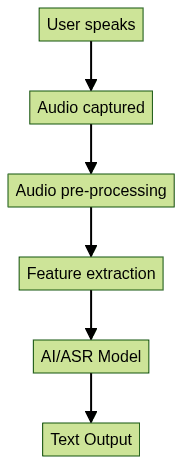
This high-level flow illustrates how speech to text works: the user provides audio input, which is processed and analyzed by AI models, resulting in accurate text output.
Core Features of Speech to Text Solutions
Modern speech to text solutions offer a robust suite of features designed to maximize usability and efficiency:
- Real-time transcription: Instantly convert spoken words into text, ideal for meetings, live captions, and rapid note-taking.
- Multi-language support: Advanced engines recognize dozens of languages and dialects, supporting global users.
- Voice commands and punctuation: Users can insert punctuation or execute commands by voice, enhancing dictation and automation workflows. Developers can further expand these capabilities by leveraging a Voice SDK to add custom voice interactions to their applications.
- Speaker diarization & timestamping: Identify and label different speakers in conversations, and attach time codes to transcriptions—key for interviews and video content.
- Accuracy and privacy considerations: Leading solutions use AI for high accuracy, even in challenging conditions, while offering robust privacy features to protect sensitive data.
Popular Use Cases for Speech to Text
Speech to text technology is revolutionizing workflows across industries:
- Note-taking and dictation: Professionals and students use dictation software to transcribe thoughts, ideas, and lectures in real-time.
- Meetings, interviews, lectures: Transcriptions provide searchable records, facilitate minute-taking, and support remote collaboration. Integrating a Video Calling API with speech to text can further enhance meeting productivity by enabling live transcription during calls.
- Captioning for video and social media: Automatic captions make video content accessible and boost engagement across platforms. For those building video platforms, using an embed video calling sdk allows you to seamlessly add video and audio features alongside real-time captioning.
- Accessibility for disabilities: Assistive technology powered by speech recognition empowers users with disabilities to interact with devices and content hands-free.
Top Speech to Text Tools & Platforms (2% keyword density)
When selecting a speech to text platform, developers and end-users have several powerful options in 2025. Each tool balances features, accuracy, integration, and usability.
Speechnotes (2% keyword density)
Speechnotes is a popular speech to text solution known for its web interface, Android app, API, and Chrome extension. It excels at real-time voice to text dictation, supports various languages, and offers seamless cloud integration. Developers appreciate its API for embedding speech recognition in custom workflows. For Python developers, integrating a python video and audio calling sdk can enable advanced audio features alongside speech transcription.
SpeechTexter (2% keyword density)
SpeechTexter provides robust speech to text capabilities with multilingual support and customizable voice commands. It works as a browser-based tool and mobile app, making it ideal for both stationary and on-the-go dictation. Its advanced punctuation recognition and integration options set it apart for productivity-focused users. If you're working with JavaScript, consider using a javascript video and audio calling sdk to add real-time audio and video capabilities to your web applications.
TextFromToSpeech (2% keyword density)
TextFromToSpeech offers a straightforward, free, browser-based speech to text experience. It's perfect for users seeking an uncomplicated tool for transcribing short notes or quick dictation sessions. Despite its simplicity, it leverages modern ASR engines to deliver reliable voice to text results. For those needing to add phone call functionality, exploring a phone call api can help extend your application's communication features.
1min.AI and Other Alternatives (2% keyword density)
1min.AI is an AI-powered speech to text solution focused on speed and accuracy. It supports bulk video and audio file transcription, automatic captioning, and integrates with major productivity platforms. Other alternatives in 2025 include Whisper by OpenAI, Google Cloud Speech-to-Text, and Microsoft Azure Speech Services—each offering robust APIs and enterprise-level reliability. Developers can also benefit from a Voice SDK to add scalable voice features to their products.
How to Implement Speech to Text in Your Workflow (2% keyword density)
Integrating speech to text into your programming or professional workflow can drastically enhance productivity.
Choosing the Right Speech to Text Tool (2% keyword density)
When evaluating speech to text solutions, consider the following:
- Features: Real-time dictation, multi-language support, API access, speaker diarization, and accuracy.
- Accuracy: Check benchmarks, user reviews, and demo results for the environments you'll use.
- Privacy: Ensure the provider complies with data protection standards and offers on-device processing if required.
- Integration: Look for APIs, SDKs, or browser extensions that fit your development stack and workflow. Utilizing a Voice SDK can simplify the integration of speech and audio features across platforms.
Getting Started: Step-by-Step Setup (2% keyword density)
To start using speech to text in your workflow:
- Set up your microphone: Use a high-quality mic for best results, and check OS-level permissions.
- Choose your platform: Web, desktop, or mobile—select a speech to text tool that matches your needs.
- Configure browser/app permissions: Allow access to your microphone in settings.
- Test with sample dictation: Ensure the tool recognizes your accent and language.
Here's a sample code snippet for integrating speech to text using a popular cloud API in Python:
1import speech_recognition as sr
2
3recognizer = sr.Recognizer()
4with sr.Microphone() as source:
5    print("Speak something...")
6    audio = recognizer.listen(source)
7
8try:
9    text = recognizer.recognize_google(audio)
10    print("You said: " + text)
11except sr.UnknownValueError:
12    print("Speech recognition could not understand audio")
13except sr.RequestError as e:
14    print(f"Could not request results; {e}")
This Python snippet demonstrates basic voice to text transcription using Google's speech recognition API.
Tips for Maximizing Speech to Text Accuracy (2% keyword density)
To achieve optimal results with speech to text technology:
- Optimize your environment: Reduce background noise, use directional microphones, and record in quiet rooms.
- Speak clearly: Enunciate words, maintain a steady pace, and avoid overlapping speech.
- Leverage custom voice commands: Many solutions let you train or define custom commands for frequent tasks, improving workflow efficiency.
The Future of Speech to Text Technology (2% keyword density)
In 2025, speech to text technology is advancing rapidly. AI models are reaching near-human accuracy, even in noisy or multilingual environments. Accessibility is a key focus, with real-time translation and captioning empowering global users. Expect deeper integration with productivity suites, developer APIs, and multimodal platforms combining voice, text, and visual recognition.
Conclusion: Why Speech to Text Matters
Speech to text technology is reshaping how we work, communicate, and interact with digital content. From boosting productivity to making technology more accessible, its impact is undeniable. As AI continues to evolve, speech to text will remain essential for developers, businesses, and users worldwide. Start exploring speech to text tools today to unlock new levels of efficiency and inclusion. Ready to experience these innovations firsthand? Try it for free and see how speech to text can transform your workflow.
Free $20 Balance for AI Voice Agents & Video Calls
FAQ