


A free SIP server is a Session Initiation Protocol server you can run or use at no cost, either as a hosted service or a self-hosted open-source platform like Kamailio or Flexisip. Developers use free SIP servers to test VoIP clients, learn SIP signaling, and prototype telephony features before committing to production infrastructure. If you eventually need to bridge SIP calls into modern WebRTC applications, VideoSDK's telephony integration connects SIP trunks to real-time rooms.
Every VoIP project starts with the same question: how do I test this without spending money? A SIP server is the signaling backbone of any telephony system, handling registration, call setup, and teardown between endpoints. Production-grade SIP infrastructure from commercial carriers can get expensive quickly, especially when you just want to validate a soft-phone client or experiment with a call flow.
That is where a server SIP free option earns its place. Whether you pick a hosted free service that gives you a working SIP account in minutes, or a self-hosted open-source SIP server you fully control, free options remove the cost barrier from learning and prototyping. By the end of this article, you will understand the landscape of free SIP servers, how to set one up, how to test and troubleshoot it, and how to secure it before you scale.
Overview of server sip free options
A server SIP free offering falls into two broad categories: hosted free services and self-hosted open-source servers. Understanding the difference matters because it determines how much control you have, how much effort you invest, and what you can actually build.
Hosted free services are operated by a third party. You create an account, receive a SIP address, and point your soft-phone at their servers. You never touch the server itself. These are ideal for quick client testing, interoperability checks, and learning how SIP registration works.
Self-hosted open-source servers are the opposite. You download the software, install it on your own hardware or a cloud instance, and configure every aspect of the SIP stack: transports, domains, routing logic, authentication, and NAT handling. This path takes longer but teaches you the protocol deeply and gives you a foundation you can grow into production.
Hosted free SIP services
Services like sip2sip.info and Ingate's Try SIP provide free SIP accounts with basic calling features. You register a SIP address, configure a soft-phone with the provided credentials, and can immediately place test calls, join conference bridges, and run echo tests. The trade-offs are limited control, no SLA, occasional service downtime, and restrictions on commercial use. For developers, they function as a public test bed rather than infrastructure.
Self-hosted open-source SIP servers
On the self-hosted side, projects like Flexisip, Kamailio, and SIP Express Router (SER) provide full SIP proxy and routing capabilities under open-source licenses. Flexisip, maintained by the team behind the Linphone ecosystem, focuses on mobile-first features like push notifications. Kamailio is a high-performance SIP server used by carriers and large deployments. SER is the older project from which Kamailio forked, still valued for its lean core. Each gives you complete control over signaling, at the cost of setup and maintenance effort.
Benefits of using a free SIP server
Cost savings are the obvious benefit, but they are not the only one. A free SIP server delivers value across the entire development lifecycle.
First, it eliminates procurement friction. You can stand up a test environment in an afternoon without a purchase order, a contract, or a sales conversation. For solo developers and small teams, that speed matters more than enterprise support.
Second, it is a genuine learning platform. SIP is a complex protocol with registration, INVITE transactions, dialog state, and media negotiation. Running your own server forces you to understand each piece, knowledge that transfers directly to debugging production VoIP issues later.
Third, community support is strong. Open-source SIP projects have decades of accumulated documentation, mailing lists, and forum threads. When your registration fails or your calls drop, someone has already solved that problem and written about it.
Fourth, free servers scale into real deployments. Kamailio, for example, handles thousands of calls per second on modest hardware. The server you learn on for free can become the same server you deploy in production, which removes an entire migration step from your roadmap.
Finally, free SIP servers are excellent for interoperability testing. Before integrating with a carrier or a SIP trunking provider, you can validate your client behavior against a neutral, standards-compliant server.
Popular free SIP server platforms
Four platforms dominate the free SIP server conversation in 2026. Each serves a different profile of developer and deployment.
Flexisip
Flexisip is the open-source SIP server from the Linphone project, written in C++ and designed with mobile communication in mind. Its modular architecture includes a proxy, a presence server, a back-to-back user agent (B2BUA), and a conferencing component, all managed through a unified configuration system.
Its standout feature is push notification support. Mobile operating systems suspend background apps, which breaks traditional SIP registration. Flexisip solves this by waking dormant clients through push when a call arrives, a feature most other free SIP servers lack or require heavy customization to achieve.
Flexisip is licensed under GNU AGPL, which means commercial deployments that modify the server may need to release those modifications. For prototyping and internal use, it is entirely free. Typical use cases include building your own WhatsApp-style calling service, testing mobile SIP clients, and running presence-heavy applications.
Kamailio
Kamailio is arguably the most capable free SIP server in existence. It evolved from SER, was formerly known as OpenSER, and is now maintained by an active global developer community. Its core is a lean, high-performance SIP router, with nearly all advanced functionality delivered through loadable modules: authentication, NAT traversal, database integration, WebRTC bridging, presence, and clustering.
Performance is Kamailio's signature. Community benchmarks and carrier deployments report routing capacity in the range of thousands of calls per second on a single modest server, with horizontal scaling supported through DNS-based load balancing and distributed registration.
Kamailio's community resources are extensive: detailed module documentation, a wiki with deployment recipes, and active mailing lists. It is the right choice when you need carrier-grade signaling, custom routing logic, or a server that will grow with you from prototype to production.
SIP Express Router (SER)
SER is the original project, developed starting in 2001 at the Fraunhofer Institute and later at iptel.org. Kamailio forked from it in 2005, and OpenSIPS forked in the same era. SER remains a lean, stable SIP router with a smaller footprint and a simpler configuration model than its descendants.
SER excels in straightforward deployment scenarios: a stateless or lightly stateful proxy in front of a media server, a small-office registration server, or a teaching environment where you want to study SIP routing without the complexity of a large module ecosystem. Its feature set is smaller, but for simple proxying and redirect duties, that simplicity is a feature, not a limitation.
sip2sip.info
sip2sip.info is a free hosted SIP service operated by AG Projects. You create an account through their web portal, receive a SIP address under the sip2sip.info domain, and configure any standard soft-phone with the credentials. The service supports TLS transport, which is strongly recommended over plain UDP for both security and NAT traversal reliability.
The service also publishes well-known utility addresses. An echo service answers your call and reflects your audio back, letting you verify both signaling and media paths in a single test. Conference addresses let you dial in from multiple clients to test multi-party audio. For a developer who needs a public, standards-compliant SIP endpoint for testing a client build, sip2sip.info is the fastest path from zero to a working call.
How to set up a server sip free
Setting up a free SIP server follows a consistent pattern regardless of platform. Here is the beginner's path in natural language, with no code required.
Step 1: Choose your platform
Decide between hosted and self-hosted based on your goal. If you want to test a SIP client, use sip2sip.info and skip to testing. If you want to learn the server side or build toward production, choose Kamailio for maximum capability, Flexisip for mobile-first features, or SER for simplicity.
Step 2: Prepare a host
For self-hosting, provision a Linux server, either a local virtual machine or a small cloud instance. Give it a stable hostname or domain name, because SIP registration and routing are domain-aware. Open the relevant network paths for your chosen transports, typically UDP and TCP on port 5060 and TLS on 5061.
Step 3: Install the server and dependencies
Install the SIP server through your distribution's package manager or the project's official repositories. Most platforms also need a database backend for persistent registration data, though SQLite is sufficient for testing. Follow the project's installation guide for your specific distribution, since package names and paths vary.
Step 4: Configure the basics
Configuration covers four areas. First, set the domain your server will serve, matching the hostname you prepared. Second, enable transports, starting with UDP and TCP, adding TLS once you have certificates in place. Third, define the registration and authentication logic so client accounts can register and be challenged for credentials. Fourth, set a default routing rule that directs incoming calls toward registered users or an echo destination.
Step 5: Register a soft-phone and verify
Install a free soft-phone such as Linphone, Jitsi, or Zoiper on your desktop. Create a client account pointing at your server's domain, using the credentials you defined during configuration. When the client shows a successful registration status, your signaling path works. Place a call to your echo address or a second registered client to verify the full flow.
Testing and troubleshooting
Testing a SIP server means verifying both signaling and media, because a call can connect at the protocol level while audio fails silently.
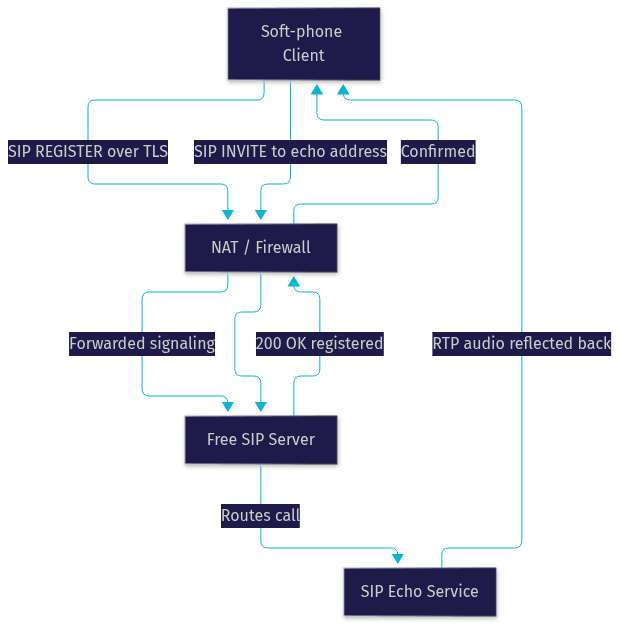
Start with an echo test. Dial the echo address published by your service or configured on your own server. If you hear your own voice returned after a short delay, both your signaling and your RTP media path are working. If the call connects but you hear nothing, the problem is media-related, usually NAT traversal or a firewall blocking RTP ports.
Next, use conference rooms for multi-party verification. Register three or four clients and dial them all into the same conference address. This exposes issues that one-to-one calls hide, such as mixed-transport problems where a TLS client and a UDP client cannot hear each other.
For deeper diagnosis, enable SIP tracing on the server or run a packet capture filtered to SIP traffic. Reading the raw SIP messages, the REGISTER exchanges, the INVITE and its responses, teaches you more about the protocol than any tutorial. Common failure patterns are recognizable on sight: a 401 response loop means an authentication mismatch, a 408 timeout means the server cannot reach the client, and a 477 or 488 response points to a transport or media negotiation failure.
The following diagram shows the full call flow from a client through NAT to a free SIP server and back through an echo service:
Security considerations
A free SIP server exposed to the internet will be scanned, probed, and attacked within hours. Security is not optional, even for a test deployment.
Transport security comes first. Plain UDP SIP sends credentials and call metadata in the clear. Always prefer TLS for SIP signaling, which encrypts the signaling channel end to end between client and server. Enable TLS during initial configuration rather than retrofitting it later, and use valid certificates from a recognized authority so soft-phones do not warn users.
NAT traversal is the second pillar. STUN servers let clients discover their public address and network conditions. TURN servers relay media when direct peer-to-peer paths fail, which is common behind symmetric NATs found in corporate networks. ICE combines both, letting clients systematically test candidate paths and pick the best working one. Free STUN and TURN services exist for testing, including public STUN servers from large projects and free-tier TURN offerings such as freeTURN. For production, run your own TURN server, because public free TURN services carry no availability guarantees.
Finally, harden the server itself. Require authentication on every registration, rate-limit failed attempts to blunt password-guessing attacks, restrict administrative access to a management network or localhost, and keep the software updated against published vulnerabilities. A SIP server with weak authentication becomes an open relay for toll fraud, which is one of the most expensive mistakes in telephony.
Choosing the right free SIP server for your needs
The right choice depends on four factors: scale, feature set, community activity, and licensing.
If you need a test endpoint today with zero setup, use sip2sip.info. If you are building a mobile calling app where push notifications are essential, choose Flexisip. If you need carrier-grade performance, custom routing, and the deepest community knowledge, choose Kamailio. If you want a lean, simple proxy for learning or light duties, choose SER.
Licensing deserves a final check. Kamailio and SER use GPL-family licenses that are friendly to most deployments. Flexisip's AGPL requires attention if you modify the server in a commercial product. Match the license to your business model before you build on any platform.
Definitions Glossary
SIP (Session Initiation Protocol): The signaling protocol that sets up, modifies, and tears down voice and video calls over IP networks. SIP handles registration and call control, while media flows separately over RTP.
SIP Proxy: A server component that receives SIP requests and forwards them toward their destination, either statelessly or while tracking dialog state. Kamailio and SER are primarily SIP proxy platforms.
B2BUA (Back-to-Back User Agent): A SIP server element that sits in the middle of a call, terminating both legs and acting as a user agent toward each endpoint. B2BUAs enable features like transcoding and call transfer that pure proxies cannot.
NAT Traversal: The set of techniques, including STUN, TURN, and ICE, that allow SIP and RTP traffic to pass through network address translation, which otherwise breaks direct peer-to-peer connections.
SIP Trunking: A service that connects a private SIP deployment to the public switched telephone network, enabling calls to and from regular phone numbers. VideoSDK's telephony integration bridges SIP trunks into WebRTC rooms.
Key Takeaways
- A server SIP free option comes in two forms: hosted free services like sip2sip.info for instant testing, and self-hosted open-source servers like Kamailio, Flexisip, and SER for full control and production growth.
- Kamailio offers the highest performance and deepest community support, Flexisip is uniquely strong for mobile push notifications, and SER remains the simplest lean proxy for learning.
- Echo services and conference addresses are the fastest way to verify both SIP signaling and RTP media paths after setup.
- Security is mandatory even for free test servers: use TLS for signaling, require authentication, and plan TURN-based NAT traversal for media.
- Free SIP servers scale into real deployments, and when you need to connect SIP telephony to modern WebRTC applications, VideoSDK's SIP integration bridges the two worlds.
Conclusion
A free SIP server is the lowest-friction entry point into VoIP development, whether you spin up a hosted account on sip2sip.info for afternoon testing or build a Kamailio deployment that grows into production. The free options in this guide cover every stage of that journey, from first echo test to carrier-grade routing. Start small, test with echo calls, secure your transports, and scale only when your use case demands it. When your project needs to bridge traditional SIP telephony into real-time WebRTC rooms, explore VideoSDK's telephony documentation and grab a free account at app.videosdk.live. What are you building with a free SIP server? Drop a comment, I'd love to hear what kind of VoIP use case you're working on.
Free $20 Balance for AI Voice Agents & Video Calls
FAQ