


Simulcast is a technique where a sender transmits multiple versions of a video stream at different quality levels simultaneously. In WebRTC video calls, a Selective Forwarding Unit (SFU) receives these layers and forwards the optimal resolution to each viewer based on their bandwidth. VideoSDK implements this as network-adaptive streaming, automatically adjusting bitrate and resolution for each participant.
Real-time video is constrained by the weakest link in the network chain. If a sender transmits a single high-definition stream, any viewer lacking the bandwidth to decode it will experience freezing, packet loss, and severe latency. Simulcast solves this by allowing the infrastructure to adapt to each receiver individually. This article breaks down how simulcast works, how it compares to multistream and multicast, and how to implement it effectively in 2026.
What Is Simulcast and Why It Matters
Simulcast is defined as the simultaneous transmission of a single media source across multiple channels or in multiple quality formats. The term originates from broadcast television and radio, where a program airs on more than one network or medium at the same time. In modern software engineering, simulcast refers specifically to a WebRTC optimization where a sender encodes multiple resolutions of the same video track and sends them to a server concurrently.
This matters because real-time communication demands sub-second latency, and network conditions vary wildly between participants. A viewer on a fiber connection can easily handle 1080p video, while a viewer on a congested 4G network will struggle with anything above 360p. Without simulcast, the sender must either target the lowest common denominator, degrading the experience for everyone, or risk dropping participants with weaker connections.
VideoSDK provides simulcast capabilities through its network-adaptive streaming feature. When a participant shares their camera, the VideoSDK React SDK or Flutter SDK encodes multiple layers, allowing the VideoSDK Cloud SFU to route the best possible stream to each participant based on their real-time bandwidth.
Historical Context
The concept of simulcast dates back to the early 20th century with radio broadcasts transmitting the same signal on multiple frequencies to widen coverage. Television adopted the term when networks began broadcasting the same program over different transmission standards, such as analog and digital signals simultaneously.
In the 2010s, as WebRTC emerged as the standard for browser-based real-time communication, the term was adapted to describe the encoding of multiple video layers. Early WebRTC implementations relied on point-to-point connections where simulcast was unnecessary. As calls grew beyond a few participants, SFUs became necessary, and simulcast evolved from an experimental WebRTC extension to a core requirement. By 2026, simulcast is a default expectation for any production-grade video calling platform.
How Simulcast Works in Modern Video Calls
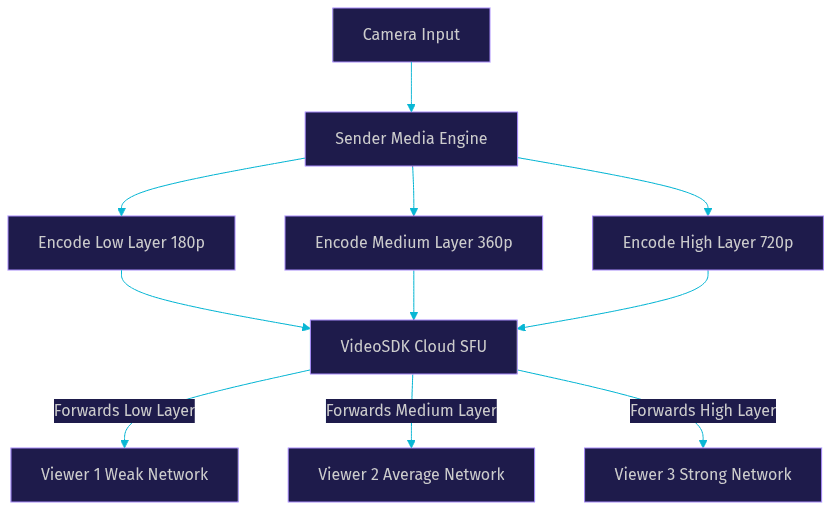
Simulcast in WebRTC works by having the sender's media engine encode the same camera input into multiple distinct RTP streams, each with a different resolution and bitrate. These streams are sent over a single peer connection to a Selective Forwarding Unit (SFU). The SFU does not mix or transcode the video. Instead, it acts as an intelligent router that forwards packets.
When a receiver joins the room, the SFU evaluates their available bandwidth, CPU capacity, and current network conditions. The SFU then decides which of the sender's encoded layers to forward to that specific receiver. If the receiver's network degrades, the SFU can switch them to a lower layer without asking the sender to re-encode anything. This decoupling of sender and receiver is what makes simulcast so powerful for scalability.
Encoding Layers Explained
A typical three-layer simulcast setup for a video call includes a low, medium, and high layer. The low layer might be 180p at 150 kbps, suitable for thumbnail gallery views or poor connections. The medium layer often targets 360p at 400 kbps for standard viewing. The high layer provides 720p or 1080p at 1.5 Mbps or higher for the active speaker. The sender transmits all three simultaneously, and the SFU only forwards one at a time to each viewer.
SFU Decision Process
The SFU continuously monitors packet loss, round-trip time, and available bandwidth estimates reported by the receiver's WebRTC stack. If a viewer on the high layer starts experiencing 5% packet loss, the SFU immediately drops them to the medium layer. This switch happens in milliseconds because the lower layer is already being encoded and sent by the origin participant. The SFU simply changes which stream it forwards, requesting a new keyframe from the sender only if necessary.
Simulcast vs. Multistream vs. Multicast
Developers often confuse simulcast, multistream, and multicast. Simulcast involves one source encoded into multiple quality layers of the same content, routed by an SFU. Multistream refers to sending multiple distinct media tracks from a single sender, such as a camera feed and a screen share simultaneously. Multicast is a network-level protocol where a single packet is replicated by network routers to reach multiple destinations efficiently.
For WebRTC video calls, simulcast is the standard choice for optimizing a single camera feed for mixed-bandwidth audiences. Multistream is used when a participant needs to share both video and screen. Multicast is rarely used in WebRTC because UDP multicast is generally blocked by consumer firewalls and browsers do not support it natively for security reasons.
Pros and Cons Table
| Technique | Best For | Strengths | Weaknesses |
|---|---|---|---|
| Simulcast | WebRTC video calls with mixed bandwidth | Adapts to each viewer, low server CPU | Higher sender CPU and upload bandwidth |
| Multistream | Sharing different media types | Distinct tracks for different purposes | Does not solve bandwidth adaptation |
| Multicast | One-to-many streaming on closed networks | Extremely efficient network usage | Blocked by most firewalls, no browser support |
Real-World Use Cases
Simulcast streaming serves two primary domains: broadcast media and real-time communication. In broadcast, simulcast live video means sending a single feed to multiple platforms like YouTube, Twitch, and Facebook Live simultaneously. In WebRTC, simulcast bandwidth optimization ensures stable video calls where participants have vastly different network speeds.
Example: Live Sports Event
A sports broadcaster captures a single 4K feed. Using a multi-platform distribution tool, they simulcast this feed to their proprietary streaming app, a cable TV network, and social media platforms. Each endpoint receives the appropriate format and bitrate. The WebRTC-based streaming app uses an SFU to deliver simulcast layers to mobile and desktop viewers, ensuring a fan on a train with a weak signal still sees smooth video.
Example: Enterprise Video Calls
In a 50-person enterprise meeting, participants join from offices, home networks, and mobile devices. The active speaker uses VideoSDK to send three simulcast layers. The SFU delivers the high layer to the 10 participants on fiber, the medium layer to the 30 on standard WiFi, and the low layer to the 10 on mobile networks. If someone drops to a weak signal, VideoSDK's network-adaptive streaming seamlessly downgrades them to the low layer, preventing a dropped call.
Choosing a Simulcast Platform
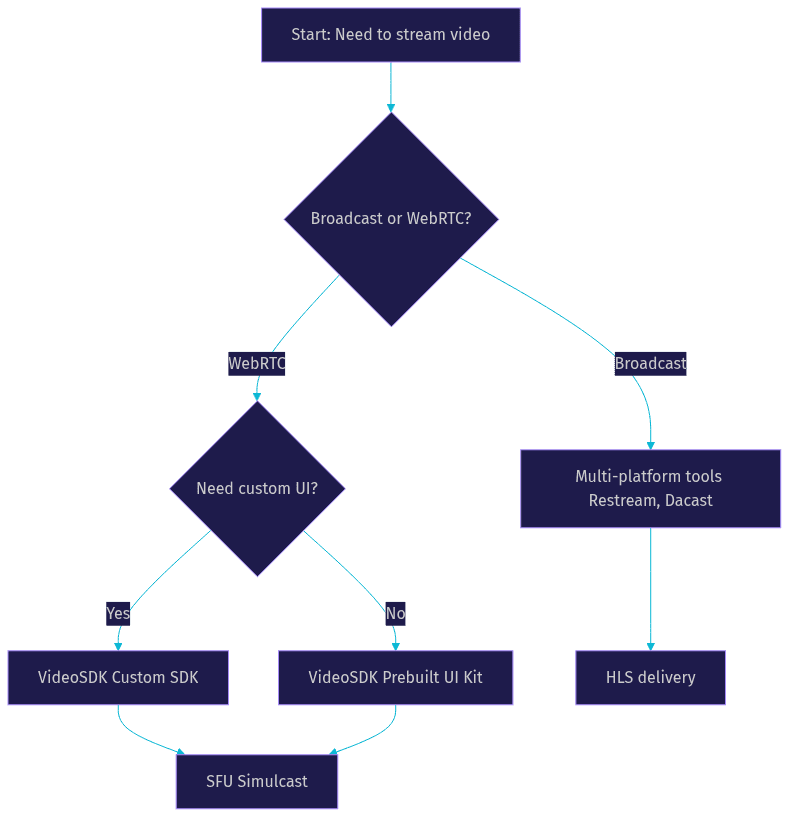
When evaluating a simulcast platform, developers must distinguish between broadcast-style multi-destination streaming and WebRTC-based SFU simulcast. Tools like Restream and Dacast focus on multi-platform distribution, taking a single RTMP input and replicating it. For WebRTC video calls, platforms like VideoSDK, Livekit, and Janus provide SFU-level simulcast.
VideoSDK abstracts the complexity of simulcast encoding and SFU routing. Instead of manually configuring RTP extensions and layer encodings, developers use the VideoSDK Prebuilt UI Kit or custom SDKs, which handle network-adaptive streaming automatically. This allows teams to ship video calling features in minutes rather than weeks.
Decision Framework
- Use Case: Is this a broadcast to multiple platforms or a WebRTC call with mixed participants?
- Latency: Do you need sub-second latency (WebRTC) or is a 10-second delay acceptable (HLS)?
- Integration: Do you need a drop-in UI or low-level SDK access?
- Scalability: How many concurrent viewers and active participants do you expect?
- Budget: Does the pricing model support your viewer concurrency?
Implementation Best Practices
Implementing simulcast requires careful encoder configuration and testing. For WebRTC, the sender must enable simulcast on the video track and the SFU must be configured to accept multiple layers. The sender's machine must have enough CPU to encode three streams concurrently, which is why hardware acceleration is often recommended.
Encoder Settings
For a standard three-layer simulcast, configure the low layer at 180p with a max bitrate of 150 kbps. Set the medium layer to 360p at 500 kbps. Set the high layer to 720p at 1.5 Mbps. Ensure the keyframe interval is synchronized across layers so the SFU can switch layers without visual glitches. Using the same framerate across all layers simplifies the SFU's switching logic.
Testing Workflow
- Verify the sender is transmitting three distinct RTP streams by inspecting the WebRTC stats.
- Join a receiver on a high-bandwidth network and confirm receipt of the high layer.
- Throttle the receiver's network using browser developer tools and confirm the SFU switches to the medium layer.
- Throttle further to confirm the low layer is received.
- Verify the sender's CPU usage remains stable during encoding.
Monitoring & Troubleshooting
Monitor the sender's outbound bitrate to ensure it matches the sum of all active layers. Watch the SFU logs for layer switch events. If viewers experience frozen video, check for keyframe misalignment between layers. If the sender's CPU spikes, consider hardware encoding or reducing to two layers. VideoSDK handles much of this monitoring automatically, exposing key metrics through its REST API for session analytics.
Future Trends in Simulcast
In 2026, AI-driven bitrate adaptation is replacing static layer thresholds. Instead of fixed bitrate ladders, machine learning models predict network conditions and dynamically adjust encoder parameters in real-time. Additionally, real-time CDN synchronization is improving, allowing WebRTC simulcast to hand off seamlessly to CDN edges for large-scale broadcasts. Emerging standards like SVC (Scalable Video Coding) are also gaining traction, offering even finer granularity than traditional simulcast by encoding a single stream into a base layer and multiple enhancement layers.
Definitions Glossary
Simulcast: The simultaneous transmission of a single media source in multiple quality layers or across multiple channels.
SFU (Selective Forwarding Unit): A media server in WebRTC that routes audio and video streams between participants without transcoding, selecting the optimal simulcast layer for each receiver.
Network-Adaptive Streaming: VideoSDK's automatic adjustment of video bitrate and resolution based on real-time bandwidth detection, powered by simulcast technology.
Multistream: The transmission of multiple distinct media tracks, such as a camera feed and a screen share, from a single participant.
Scalable Video Coding (SVC): An extension of video compression standards that encodes a single stream into a base layer and multiple enhancement layers, offering an alternative to simulcast.
Key Takeaways
- Simulcast sends multiple quality layers of a single video stream to an SFU, which routes the best layer to each viewer.
- It is essential for WebRTC video calls with participants on mixed-bandwidth networks.
- VideoSDK handles simulcast automatically through its network-adaptive streaming feature.
- Simulcast differs from multistream (multiple tracks) and multicast (network-level replication).
- Testing layer switching under network throttling is critical for a stable production deployment.
Conclusion
Simulcast is the backbone of reliable real-time video. By encoding multiple layers and letting an SFU adapt to each viewer, you eliminate the freezing and latency that plague naive video implementations. VideoSDK makes this production-ready with network-adaptive streaming built into every SDK. Start building with VideoSDK or grab your free API key at app.videosdk.live/login. What are you building with VideoSDK? Drop a comment below.
Free $20 Balance for AI Voice Agents & Video Calls
FAQ