


The Azure TTS API is the text-to-speech REST interface of Azure AI Speech, letting applications convert text into natural-sounding neural speech over HTTPS. It supports more than 500 neural voices across 140-plus languages, with SSML styling, custom voice models, and regional endpoints for latency control. If you are building voice into an app and want a service you can call from any language that speaks HTTP, the Azure TTS API is the most direct route, and pairing it with a real-time communication layer like VideoSDK gets that speech to users live.
Most developers meet text-to-speech at the moment they realize robotic voices kill user trust. A support bot that sounds synthetic gets hung up on. An e-learning module narrated by a flat voice loses learners in minutes. That is the gap neural voice synthesis closes, and it is why teams keep landing on Azure for TTS: the voice quality is production-grade, the API surface is plain REST, and the pricing has a genuine free tier for prototyping.
This guide walks through the Azure TTS API the way you would actually build against it. That means regional endpoints, the two authentication options, how a request is structured, what comes back in the response, pricing realities, and the production mistakes that bite people at 2 a.m. By the end, you will know exactly how to wire a working call and what to watch out for when traffic scales.
What Is the Azure TTS API?
The Azure TTS API is defined as the REST interface of the text-to-speech capability inside Azure AI Speech Service, the umbrella Azure cognitive services offering that also covers speech recognition, speech translation, and voice agents. You send text, optionally wrapped in Speech Synthesis Markup Language (SSML), and the service returns synthesized audio as a binary stream.
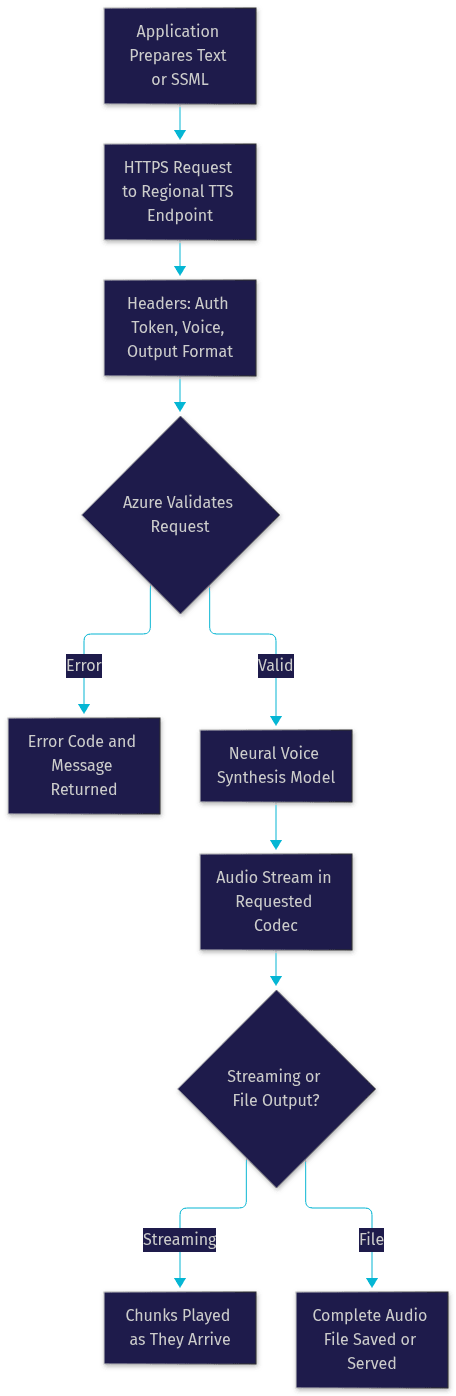
The Azure TTS API works by accepting an HTTPS request at a region-specific endpoint, authenticating it with either a subscription key or a short-lived bearer token, passing the text through a neural voice synthesis model, and streaming the resulting audio back in a codec you choose, commonly MP3, WAV, or the low-latency RAW formats used for real-time playback.
Two things make it stand out in practice. First, the voice catalog is deep: multilingual voices, speaking styles like cheerful or empathetic, and fine-grained control over pitch, rate, and pauses through SSML. Second, it is REST, so anything that can make an HTTP call can use it, from a serverless function to an embedded device. For teams building interactive voice experiences, the same Azure voices can also be driven through the VideoSDK AI agent pipeline, where TTS is one stage between a language model and the listener.
Core Components of the Azure TTS API
Every Azure TTS API integration stands on three components: the regional endpoint you call, the voice you select, and the output format you request. Get these three right and most of the common failure modes disappear before they start.
Regions and Endpoints
Azure Speech Service is deployed across dozens of Azure regions, and each exposes its own TTS endpoint under a region-specific hostname. The region you choose matters for two reasons. First, latency: calling an endpoint on the far side of the planet adds hundreds of milliseconds to every synthesis, which is fatal for conversational voice apps. Second, data residency: regulated workloads in healthcare or finance often must stay within a specific geography, and the region pin is how you enforce that. A common pattern is deploying per-region application instances, each pointed at the nearest Azure speech region endpoint, so a European user hits a European endpoint automatically.
Voices and Styles
Azure splits its voice catalog into standard neural voices and custom neural voices. Standard neural voices cover 140-plus languages and dialects, and many support speaking styles and roles, so a single voice can narrate a documentary in a calm style or read a sports update with energy. Custom neural voice creation goes further: you supply recorded speech samples from a consented speaker, train a model, and get a voice unique to your brand. Custom voices require an access application and carry higher pricing, but for IVR systems and brand-critical narration they are often worth it. [UPDATE guidance: verify the current voice catalog on the Azure Speech documentation portal, as new voices ship continuously.]
Authentication and Authorization for the Azure TTS API
The Azure TTS API accepts two authentication mechanisms, and choosing between them is your first real architecture decision. The first is a subscription key passed as a request header on every call. It is the simplest option and works fine for prototypes, but it means your long-lived secret travels with every request, so any place it is stored becomes a target.
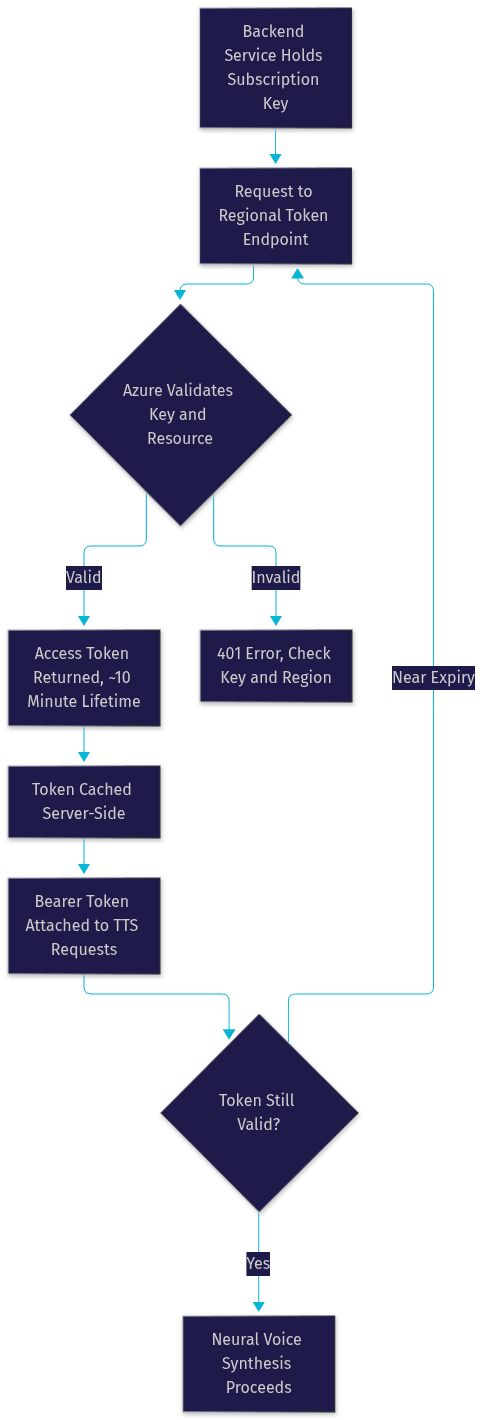
The second is token-based authentication. You exchange your subscription key once at the regional token endpoint for a short-lived access token, then present that token as a bearer credential on synthesis calls. Tokens expire after roughly ten minutes, so the secret itself stays on your backend and only ephemeral tokens reach the edge. This is the recommended pattern for anything production-facing.
Security best practices follow from that split. Never embed a subscription key in a browser or mobile binary. Generate tokens server-side, cache them until shortly before expiry, and rotate them proactively. Scope access with Azure role-based access control where possible, and monitor token issuance volume, because a sudden spike usually means a client is fetching a token per request instead of caching.
Getting an Access Token
The token lifecycle is a short, well-defined loop. Your backend sends the subscription key to the token endpoint for its region. Azure validates the key, confirms the Speech resource is active and quota is available, and returns an access token in the response body. Your service caches that token, attaches it as an authorization header on each TTS request, and refreshes it on a timer set comfortably inside the expiry window. When the token expires, synthesis calls start returning authorization errors, which is your signal to fetch a fresh one. Teams that skip the caching step and request a token per synthesis call get throttled quickly, because the token endpoint has its own rate limits.
Structuring a Request to the Azure TTS API
A synthesis request has three layers: the endpoint and query string, the headers, and the body. The endpoint URL carries the region and the output format as a query parameter, so the service knows both where it is running and what audio container to produce before it reads a byte of your text.
Headers carry authentication, the target voice name, the audio output format, and optional hints like the expected message size for streaming. The voice name header is where you select from the neural catalog, and the format header determines codec, sample rate, and container. Choosing RAW formats with small chunk sizes matters for real-time playback, while MP3 or WAV suits file-based workflows like generating narration assets.
The body is either plain text or SSML. Plain text is fine for quick tests. SSML is what you use in production, because it lets you set the language, insert pauses, adjust prosody, switch speaking styles mid-utterance, and pronounce tricky words correctly. A well-structured SSML document declares the voice and language at the top, then wraps each sentence with the prosody and style elements it needs.
Handling Responses and Audio Output
A successful synthesis returns the audio payload directly in the response body, with the codec and container determined by the output format you requested. There is no JSON envelope to unwrap on the happy path, which surprises developers the first time: the body is the audio. Error responses, by contrast, are JSON with a code and message, so your client needs to branch on the response content type rather than assuming one shape.
The codec choice shapes your architecture. Compressed formats like MP3 keep payloads small and are ideal when audio is stored or downloaded. Uncompressed and RAW formats give you PCM frames you can push straight into a playback buffer, which is what real-time and telephony-style applications want. Streaming behavior is supported on the REST path, and for genuinely interactive voice, the Azure Speech SDK's streaming synthesis API or a real-time transport like VideoSDK audio rooms delivers frames to listeners with sub-second latency.
Pricing Considerations
Azure cognitive services TTS pricing is metered per character of text synthesized, with real-time and neural tiers priced differently. The free tier gives you a monthly allowance of neural characters at no cost, which is generous enough to prototype a full feature before paying anything. Beyond the free allowance, neural voices are billed per million characters, with custom neural voices billed at a higher rate. [UPDATE guidance: confirm exact figures on the Azure pricing page, since per-region prices and free allowances adjust periodically.]
Two cost factors catch teams off guard. Region matters: prices are not perfectly uniform across Azure regions, and if you run multi-region deployments your bill reflects each region's rate. And SSML counts: every character inside your SSML markup, not just the visible words, is billable, so verbose markup on high-volume workloads has a real cost. Trimming unnecessary prosody elements is a legitimate optimization.
Best Practices for Production Use
Production TTS systems fail in predictable ways, and the defenses are straightforward. Rate limiting comes first: Azure enforces transactions-per-second limits per resource, so queue requests client-side, retry with exponential backoff on 429 responses, and provision additional resources in the regions where you exceed limits. Latency optimization means pinning the nearest regional endpoint, requesting streaming-friendly output formats, and keeping SSML documents lean, since oversized markup slows synthesis before it even reaches the model.
Error handling should treat the documented error codes as distinct cases: authorization failures point at token expiry or key rotation, throttling points at concurrency, and voice-not-found errors usually mean a region mismatch where the voice exists in one region but not the one you are calling. Monitoring closes the loop. Track synthesis latency percentiles, character volume against your billing tier, token refresh frequency, and error-rate by category. A dashboard on those four signals catches nearly every TTS incident before users report it.
Common Pitfalls
The recurring mistakes are few but expensive. Token expiry: caching a token forever instead of refreshing inside the ten-minute window causes intermittent 401s that look random. Region mismatch: using a key from one region against another region's endpoint fails authentication even though the key is valid. Key exposure: shipping a subscription key to a browser or mobile app, which turns a code review comment into a breach. And format confusion: expecting a JSON body on success when the response is raw audio, which breaks naive parsers.
Azure Speech SDK vs REST: Which Should You Use?
The Azure speech SDK vs REST question has a clean answer once you frame it around your transport. Use the REST API when you need broad language portability, when you are generating audio files rather than live speech, and when you want zero client dependencies beyond an HTTP library. Serverless functions, batch narration pipelines, and polyglot microservices all fit this profile.
Use the Azure Speech SDK when you need streaming synthesis with event-driven callbacks, when you are building conversational voice agents that also need speech recognition, or when you want built-in connection management and retry behavior. The SDK handles token refresh, keeps a connection warm, and exposes word-boundary events that make real-time highlighting and barge-in possible. Many teams use both: the SDK for the live agent path, the REST API for batch asset generation. If your live path involves real-time rooms, the VideoSDK Python SDK can bridge synthesized audio into interactive sessions.
Real-World Use Cases
IVR systems are the classic case: a contact platform synthesizes dynamic account information, appointment reminders, and routing prompts with a consistent custom voice, replacing brittle recorded prompts. E-learning narration is another: platforms generate localized course audio on demand, so a course ships in twelve languages without twelve recording budgets. Accessibility features depend on TTS too, giving screen readers and reading-assistance apps natural voices that keep users engaged.
Newer patterns are converging on voice agents. Outbound reminder calls, AI phone agents, and in-app voice assistants all need a TTS stage, and the Azure TTS API is a common choice for it because of the voice catalog and regional coverage. On the VideoSDK AI agents path, Azure Speech sits alongside providers like ElevenLabs and OpenAI TTS as a selectable synthesis plugin, so teams can swap voices without re-architecting the pipeline.
Quick Start Checklist
- Create an Azure AI Speech resource in the region closest to your users and note the region identifier.
- Grab the subscription key and the regional endpoint hostname from the resource page.
- Decide your auth model: subscription key for prototypes, token flow for production.
- Pick a neural voice from the catalog and an output format matching your playback path.
- Send a first synthesis request with short plain text to confirm the round trip.
- Wrap the text in SSML once the basic call works, then add styles and prosody.
- Add token caching, retry-on-throttle, and latency monitoring before shipping.
Definitions Glossary
Azure TTS API: The REST interface of Azure AI Speech that converts text into synthesized audio over HTTPS, accepting plain text or SSML and returning audio in a chosen codec.
SSML (Speech Synthesis Markup Language): An XML-based markup standard that controls how text is spoken, including voice, language, pauses, prosody, and speaking styles within a single utterance.
Neural voice synthesis: The use of neural network models to generate speech, producing more natural intonation and rhythm than concatenative or parametric approaches.
Access token: A short-lived credential obtained by exchanging a subscription key at a regional token endpoint, presented as a bearer token on synthesis requests and refreshed before expiry.
Regional endpoint: The region-specific hostname through which all Azure Speech requests for that resource are routed, affecting latency, data residency, and pricing.
Custom neural voice: A voice model trained on consented speaker recordings through Azure's custom voice program, producing brand-specific speech at a higher billing tier.
Key Takeaways
- The Azure TTS API is a plain REST surface over Azure's neural voice catalog, callable from any language that can make an HTTPS request.
- Token-based authentication with server-side caching is the production-grade pattern; subscription keys belong in prototypes only.
- Region choice drives latency, data residency, and even pricing, so pin endpoints near your users.
- SSML is where production quality lives, but every markup character is billable, so keep documents lean.
- For live, interactive voice rather than file generation, pair TTS with a real-time transport such as VideoSDK's audio and AI agent SDKs.
Conclusion
The Azure TTS API earns its place in production stacks by combining a deep neural voice catalog, straightforward REST mechanics, and a free tier big enough to prove value before spending. The work is in the details this guide covered: regional endpoints, the token lifecycle, SSML structure, and the monitoring that keeps synthesis healthy at scale. Start in the Azure portal with a Speech resource, get one voice saying one sentence, then layer in SSML and token caching. When your use case turns interactive, explore how VideoSDK's real-time communication SDKs and AI agent pipeline deliver that speech to live listeners, and sign up free at app.videosdk.live/login. What are you building with synthesized voice? Drop a comment, I would love to hear what kind of TTS use case you are working on.
Free $20 Balance for AI Voice Agents & Video Calls
FAQ