Bidirectional streaming with the Gemini Live API means maintaining a single persistent WebSocket connection through which your client sends audio, video, and text to Google's Gemini models while simultaneously receiving streamed model responses over the same channel. Unlike request-response APIs, this connection stays open for the whole session, enabling sub-second conversational AI with voice activity detection, tool calling, and interruption handling. This guide walks through the full architecture, session setup, media management, and production practices, and shows how platforms like VideoSDK's AI Agents apply the same patterns for AI-enhanced video calls.
A voice assistant that waits two seconds before replying feels broken. That single observation explains why bidirectional streaming has become the default architecture for real-time AI in 2026: the moment you stop round-tripping every utterance through a request-response API, latency collapses and conversations start to feel human.
The Gemini Live API is Google's purpose-built interface for exactly this. It gives you a persistent connection where audio, video, and text flow in both directions continuously, with the model handling turn detection and interruption natively. By the end of this article you'll understand the complete architecture, how to structure sessions, how to keep media flowing under real network conditions, and how to harden the whole thing for production.

What Is Bidirectional Streaming?

Bidirectional streaming is defined as a communication pattern where two parties exchange data over a single, long-lived connection simultaneously, rather than alternating discrete requests and responses. In the context of the Gemini Live API, it means your application pushes microphone audio, camera frames, or typed text upstream to the model while the model's generated speech and text stream back downstream over the same WebSocket channel.
The key property is simultaneity. A user can start speaking while the model is still talking, and the API detects the interruption, stops generating, and re-orients to the new input. That behavior is impossible with a request-response loop, where each turn must fully complete before the next begins.
For developers, bidirectional streaming changes how you think about state. There is no "current request." There is a session: a persistent connection with configuration, context, and a message history that evolves as the conversation unfolds.

Why Choose Gemini Live API for Real-Time AI?

The Gemini Live API works by exposing Google's multimodal Gemini models through a streaming-native interface, so the model consumes and produces audio and video directly instead of requiring you to bolt separate speech-to-text and text-to-speech systems around a chat model. That consolidation removes two full pipeline hops, which is where most latency in homegrown voice stacks comes from.
Three capabilities make it stand out for real-time AI integration. First, native voice activity detection and turn handling: the model decides when the user has finished a turn, so you don't have to build silence-detection heuristics. Second, built-in tool calling during streaming: the model can invoke functions you define mid-conversation and continue afterward. Third, multimodal input: you can stream video frames alongside audio, enabling assistants that genuinely see what the user sees.
It is worth noting that if you want these same capabilities inside a video calling product rather than as a standalone assistant, VideoSDK's AI Voice Agent SDK implements an equivalent pipeline (STT, LLM, TTS, turn detection, tool calling) that connects directly into VideoSDK rooms, letting human participants and AI agents share the same real-time session.

Core Architecture and Data Flow

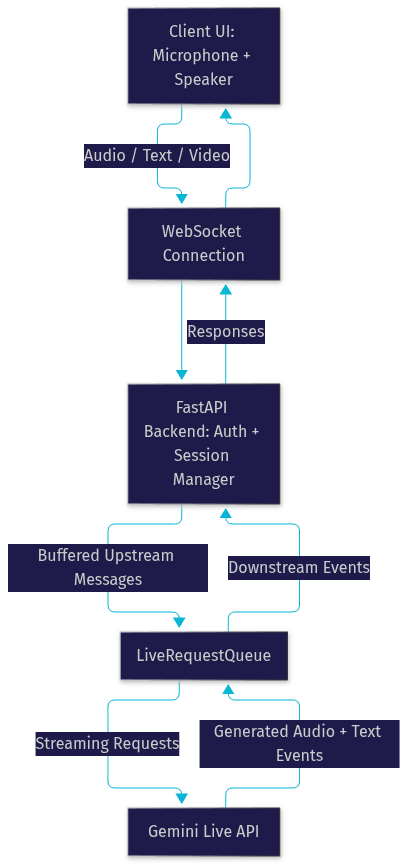
Every production bidirectional streaming deployment follows the same three-tier shape: a client that captures media, a server-side gateway that brokers sessions and protects credentials, and the Gemini Live API endpoint itself. Getting this separation right is what keeps your API keys off client devices and your sessions auditable.

Client-Side Components and Media Capture

The client is responsible for capturing microphone audio and, optionally, camera frames, packaging them into the API's expected message format, and playing back the model's streamed audio output. For low latency, capture should happen at the smallest viable chunk size, typically tens of milliseconds of audio per message, so the model can begin processing before the user finishes speaking. The client also renders any streamed text, handles playback interruption when the user talks over the model, and surfaces tool-call results to your UI when the model invokes functions.

Server-Side Gateway and Session Broker

Never connect a browser client directly to the Gemini Live API with a raw API key. Your server acts as a gateway: it authenticates the user with your own session system, requests or constructs an ephemeral token from Google's token endpoint, and hands that short-lived credential to the client. The gateway is also the natural place for session logging, rate limiting, and policy enforcement, such as which users may start multimodal sessions at all. This broker pattern mirrors how VideoSDK handles token-based authentication for its rooms, where tokens are always generated server-side and scoped to a single session.

Gemini Live API Endpoint and Protocol Basics

The API is reached over a WebSocket endpoint secured with your ephemeral token. After the connection opens, the first message you send is a session configuration that declares the model, the modalities you want responses in (text, audio, or both), your system instructions, and any tool definitions. From that point, the protocol is message-based: upstream messages carry user media or text, downstream messages carry model audio chunks, text, tool calls, and lifecycle events such as turn completion or connection close.

Preparing Your Environment

Before any streaming happens, you need credentials and an authentication strategy. This is the step most tutorials gloss over, and it is the step that determines whether your first production incident is a leaked API key.

Obtaining API Credentials from Google AI Studio

Start in Google AI Studio, where you create a project and generate an API key for the Gemini family of models. The key grants access to both the standard generate-content endpoints and the Live API, subject to your project's quotas and billing. Two practical notes from experience: first, confirm that your project has the Live API specifically enabled, since it is billed and rate-limited separately from standard inference in some configurations. Second, record which model versions you tested against, because Gemini model naming and availability shift frequently, and a session configuration that worked last quarter may reference a deprecated model today. [UPDATE guidance: always verify current model names and quota tiers against Google's official Gemini documentation before shipping.]

Configuring Authentication: API Keys vs. Ephemeral Tokens

There are two authentication modes, and choosing correctly matters. A raw API key authenticates your server directly and should live only in server-side environment secrets, never in a web or mobile client. Ephemeral tokens are short-lived credentials minted from your API key specifically for Live API sessions; they expire within minutes and are scoped to a single session, so a leaked token has a tiny blast radius.
The production pattern is straightforward: your server holds the API key, mints an ephemeral token when a user starts a session, and delivers it over HTTPS to the client, which then opens the WebSocket using that token. This is the same philosophy VideoSDK applies to meeting tokens, where a JWT authenticates one participant's access to one room and is generated server-side precisely so long-lived secrets never touch the frontend.

Setting Up a Persistent WebSocket Connection

The WebSocket connection is the backbone of bidirectional streaming, and its lifecycle deserves deliberate handling. Treating it as a fire-and-forget pipe is the most common source of flaky, hard-to-debug sessions.

Connection Lifecycle: Open, Configure, Keep-Alive, Close

A connection moves through four states: connecting, open, closing, and closed. While open, you must keep it alive. Long-lived WebSocket connections through proxies, load balancers, and mobile networks get dropped silently if no traffic flows, so send lightweight periodic activity, or rely on the protocol's own heartbeat and ping frames, to detect dead connections within seconds rather than minutes.
Closing deserves as much care as opening. When a session ends, send an explicit close through the protocol's graceful teardown path so the model can flush any in-flight generation and your billing stops cleanly. Abandoned connections eventually time out server-side, but relying on that wastes quota and leaves sessions in an ambiguous state. In practice, teams implementing this pattern consistently wire explicit close into both a user-facing "end session" action and the page's unload lifecycle, because mobile browsers in particular will otherwise leave half-open sockets.

Session Initialization Messages and Required Fields

Once the socket is open, nothing flows until you send the session configuration message. This is where you declare the model, the response modalities (text, audio, or both), your system instructions that define the assistant's persona and constraints, and any tool definitions the model may call. Getting this message right determines everything downstream: an assistant that responds in audio when you expected text-only, or a model that cannot see your tools, almost always traces back to a malformed or incomplete initial configuration.
Two fields deserve special attention. Voice selection, where supported, must be set at configuration time and cannot be swapped mid-session without restarting. Tool definitions must include complete schemas for each function's parameters, because the model constructs its tool-call arguments from those schemas; an underspecified schema produces tool calls with missing or malformed arguments that fail at runtime.

Managing Real-Time Media Streams

Streaming media is where theory meets network reality. Audio and video must arrive fast enough for natural conversation while respecting bandwidth limits and the API's own flow-control signals.

Audio and Video Capture Considerations for Low Latency

For audio, the guiding principle is small chunks, sent immediately. Capturing audio in short intervals and dispatching each chunk as its own message means the model begins transcribing and reasoning while the user is still speaking, which is the single biggest latency win in the whole architecture. Buffering audio into large blocks feels efficient and destroys responsiveness.
For video, send frames at a modest, steady cadence rather than at full camera framerate. The model does not need thirty frames per second to understand a scene, and each frame costs tokens and bandwidth. A common production pattern is sampling a frame every half second to one second, or sending frames only when the scene changes meaningfully. Also normalize your capture format to what the API expects: raw, uncompressed audio at the documented sample rate, and appropriately sized, encoded image frames for video. Mismatched formats are silently accepted in some client libraries and then rejected or garbled at the model boundary.

Throttling, Bandwidth Adaptation, and Back-Pressure Handling

The API enforces limits on how many messages and how much data you may send per second. Exceed them triggers throttling errors or, worse, silent queueing that inflates latency. Your client should pace its sends, and it should watch for server signals indicating the connection is saturated, then slow down rather than blast faster.
Back-pressure handling means your send loop must be interruptible: if the socket's buffer is full, stop capturing or drop the oldest video frames rather than blocking. For audio you cannot drop data without corrupting the stream, so the correct response to sustained back-pressure is degrading upstream, such as reducing video cadence, and if that fails, ending the session gracefully rather than letting it zombie. This is the same discipline VideoSDK applies with its network-adaptive streaming in video calls, where bitrate and resolution adjust automatically as bandwidth fluctuates, and it is equally non-negotiable for AI media streams.

Integrating AI Logic with Gemini

With the pipes working, the interesting part begins: shaping the model's behavior and handling its streamed output, including tool calls, correctly.

Defining System Instructions, Tools, and Modality Preferences

System instructions in a Live API session define the assistant's persona, scope, and behavioral rules, and they persist for the whole session. Write them as you would for any Gemini deployment: concrete, testable, and scoped. An instruction like "answer briefly and ask a clarifying question when the user's request is ambiguous" produces measurably better conversational behavior than a paragraph of vague positivity.
Tool definitions turn the assistant from a talker into an actor. Each tool is a named function with a parameter schema and a description; the model decides when to call it based on the description, constructs arguments from the schema, and pauses its response until your client or server returns the result. Modality preferences, set at configuration time, control whether the model answers with audio, text, or both, and you can adjust some response behavior mid-session through update messages, though the core modality choice is fixed at initialization.

Handling Streaming Responses, Partial Results, and Tool-Call Callbacks

Downstream messages arrive incrementally. Text arrives in fragments that you should render progressively, and audio arrives in chunks that you should begin playing immediately rather than accumulating. The critical UX detail is interruption: when the user speaks while the model is mid-response, the API signals the interruption, and your client must stop playback and flush the audio queue instantly. A half-second of overlapping playback after the user interrupts is the difference between a natural assistant and an annoying one.
Tool calls arrive as messages containing the function name and constructed arguments. Your handler executes the function, whether that is a database lookup, an API call, or a calculation, and returns the result as a message on the same connection; the model then continues its response incorporating that result. Design tool handlers to be fast and idempotent, because a slow tool call stalls the entire conversation, and a retried call after a reconnect must not double-charge a credit card or double-book an appointment. This tool-calling-in-streaming pattern is central to VideoSDK's Conversational Graph as well, where deterministic nodes and transitions govern structured flows like booking and payment while the LLM handles only natural language.

Production-Ready Practices

A demo that works on localhost over Ethernet is not a product. Production bidirectional streaming needs deliberate failure handling and security hardening.

Robust Error Handling and Automatic Reconnection Strategies

Plan for three failure classes: authentication errors (expired or invalid token), protocol errors (malformed messages, quota exceeded), and transport errors (network drop, proxy timeout). For transport failures, implement automatic reconnection with exponential backoff: retry quickly once or twice for transient blips, then slow down. Critically, reconnection requires a fresh ephemeral token, so your client must request one from your gateway on each reconnect attempt, not reuse the old one.
Decide upfront whether a reconnect resumes the session or restarts it. Resuming preserves conversational context but requires careful state reconciliation; restarting is simpler but loses the thread. A pragmatic middle ground many teams land on: restart the session but replay a compact summary of the prior conversation as context, so the user experiences continuity without you building full resume logic.

Security Hardening: Using Ephemeral Tokens, Rate-Limit Awareness

Security rests on three pillars. First, ephemeral tokens only on the client, with your master API key confined to server secrets, as covered earlier. Second, rate-limit awareness: enforce your own per-user session limits at the gateway so a single abusive client cannot exhaust your project quota and degrade service for everyone. Third, input and output hygiene: validate that tool-call arguments match your schemas before executing them, and treat model-generated content appropriately for your domain, especially in regulated contexts like healthcare or finance where an assistant's statements carry compliance weight.

Common Pitfalls and How to Avoid Them

The same handful of mistakes recur in nearly every first implementation. Knowing them in advance saves days of debugging.

Timeout and Latency Edge Cases

The two classic latency traps are oversized audio chunks (buffering kills the streaming advantage) and keep-alive gaps on quiet connections (idle sockets get dropped by intermediaries, and the failure surfaces minutes later as a mysterious dead session). A third trap is mobile network switching, where a phone hopping from Wi-Fi to cellular silently breaks the socket; only explicit heartbeat detection reveals it promptly. Instrument round-trip timing from your first audio send to the first model audio byte so you can see degradation before users report it.

Message Format Mismatches and Schema Validation

The other recurring failure class is structural: sending media in an unsupported encoding, omitting a required field in the session configuration, or defining tool schemas that don't match what your handlers accept. These fail in confusing ways because the connection stays open while individual messages are rejected or ignored. Validate your configuration message against the documented schema on every deploy, and log every rejected message with its reason code rather than swallowing errors. A schema mismatch caught in staging costs minutes; the same mismatch in production costs a support incident.

Next Steps and Extensions

Once a single bidirectional session works end to end, two extensions unlock the most value.

Combining Gemini Live with VideoSDK for AI-Enhanced Video Calls

The most compelling next step for teams building communication products is putting an AI participant inside a real video call. VideoSDK's AI Agents let a Python-based agent worker join a VideoSDK room alongside human participants, with the full pipeline (speech-to-text, LLM reasoning, text-to-speech, turn detection, and tool calling) managed for you, and deployment options spanning VideoSDK's managed Agent Cloud or self-hosted Docker and Kubernetes. You can pair that with the React SDK or any of VideoSDK's ten-plus platform SDKs to build telehealth assistants, AI interviewers, or live coaching products where the AI sees and hears exactly what the humans do.

Scaling to Multiple Agents and Multi-Modal Workloads

Beyond single sessions, the architecture extends naturally: multiple concurrent sessions per user, multi-agent setups where a router hands conversations between specialist agents, and heavier multimodal workloads mixing live video understanding with tool-driven actions. VideoSDK's Agent SDK supports multi-agent switching and vision-based multi-modality for exactly these patterns, and its REST APIs handle the server-side orchestration, session analytics, and recording that production multi-agent systems require.

Definitions Glossary

Bidirectional streaming: A communication pattern where two parties exchange data simultaneously over one persistent connection, rather than alternating discrete requests and responses. The Gemini Live API uses it so user media flows upstream while model responses stream downstream on the same channel.
Ephemeral token: A short-lived, session-scoped credential minted from a master API key, used to authenticate a single Live API WebSocket connection so long-lived secrets never reach client devices.
Session configuration message: The first message sent after a WebSocket opens, declaring the model, response modalities, system instructions, and tool definitions that govern the entire session.
Voice activity detection (VAD): The mechanism that determines when a user has finished speaking so the model can respond, and when the user has interrupted the model so playback should stop. The Gemini Live API provides it natively.
Tool calling in streaming: The model's ability to invoke developer-defined functions mid-conversation, pause its response until the function result returns over the same connection, and then continue incorporating that result.
Back-pressure: The condition where a streaming connection cannot absorb data as fast as it is produced, requiring the sender to slow down, degrade media quality, or end the session gracefully rather than blocking or dropping audio.

Key Takeaways

  • Bidirectional streaming with the Gemini Live API uses one persistent WebSocket connection so user audio, video, and text flow upstream while model responses stream back simultaneously, enabling sub-second conversational AI with native interruption handling.
  • Always broker authentication through a server-side gateway: keep your master API key in server secrets and hand clients short-lived ephemeral tokens scoped to a single session.
  • Send audio in small chunks immediately, pace video frames at a modest cadence, and handle back-pressure by degrading media rather than blocking the stream.
  • Define complete tool schemas, execute tool calls quickly and idempotently, and stop playback instantly when the user interrupts the model.
  • For AI participants inside real video calls, VideoSDK's AI Agent SDK implements the same pipeline (STT, LLM, TTS, turn detection, tool calling) directly inside VideoSDK rooms across ten-plus platform SDKs.

Conclusion

Implementing bidirectional streaming with the Gemini Live API comes down to four disciplines: a clean three-tier architecture with a server-side gateway, a carefully managed persistent WebSocket session, media handling tuned for low latency and back-pressure, and production hardening around reconnection and ephemeral tokens. Get those right and the result is an assistant that feels present rather than laggy.
If your next step is putting that assistant inside a live video call alongside human participants, start with the VideoSDK AI Agents documentation and the code samples library, or grab a free tier account at app.videosdk.live/login and join the VideoSDK Discord community to compare notes with other developers building real-time AI. What are you building with bidirectional streaming? Drop a comment, I'd love to hear what kind of live AI assistant use case you're working on.

Free $20 Balance for AI Voice Agents & Video Calls

FAQ