


Edge TTS is a free text-to-speech service that provides access to Microsoft's premium neural voices without requiring an API key or Azure subscription. It works by establishing a WebSocket connection to the Microsoft Edge speech service, making it ideal for developers building voice-enabled applications in Node.js, Deno, Bun, or browser environments. You can use open-source libraries to integrate it into your projects or route the audio into real-time communication platforms like VideoSDK.
Developers building voice-enabled applications often hit a wall when they see the pricing for commercial text-to-speech APIs. High-quality neural voices are expensive, and free tiers usually come with strict limits or watermarks that degrade the user experience. Edge TTS changes this dynamic by offering access to Microsoft's premium neural voices at no cost, without requiring an API key or a cloud subscription.
This unique positioning makes it an attractive option for hobbyists, startups, and even enterprise teams looking to prototype voice features quickly. In this guide, you will learn how Edge TTS works under the hood, how to integrate it across server-side and browser environments, and how to handle streaming, voice selection, and common pitfalls. We will also explore how you can pipe the synthesized audio into real-time applications using VideoSDK.
What Is Edge TTS?
Edge TTS is defined as the speech synthesis service powering the Read Aloud feature in Microsoft Edge. It provides developers with access to a vast catalog of neural voices across multiple languages and locales. The service supports standard Speech Synthesis Markup Language (SSML) for fine-grained control over pronunciation, rate, pitch, and volume.
Unlike traditional cloud TTS providers that require API keys and billing setups, Edge TTS operates without authentication tokens. You can use it through open-source libraries like edge-tts-universal or edge-tts-python to generate audio in formats like MP3 and WAV. This token-less authentication model is what makes it so accessible, though it comes with specific technical requirements regarding how requests are formatted and sent.
How Edge TTS Works Under the Hood
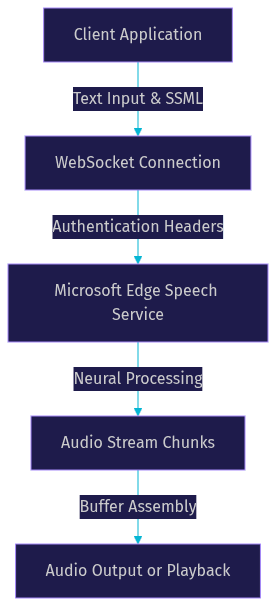
Edge TTS works by establishing a WebSocket connection to the Microsoft Edge speech service endpoint. The client sends text and SSML configuration over this connection, and the service streams audio data back in real-time. Authentication relies on a token-less mechanism that uses specific WebSocket headers and a trusted user-agent string.
This is why server-side environments like Node.js work perfectly. They allow full control over headers, letting you mimic the exact request profile of the Microsoft Edge browser. The service then processes the text through Microsoft's neural network models to produce natural-sounding speech. The audio is returned in chunks, allowing for streaming playback rather than waiting for the entire file to generate.
Universal Access: Server-Side vs Browser
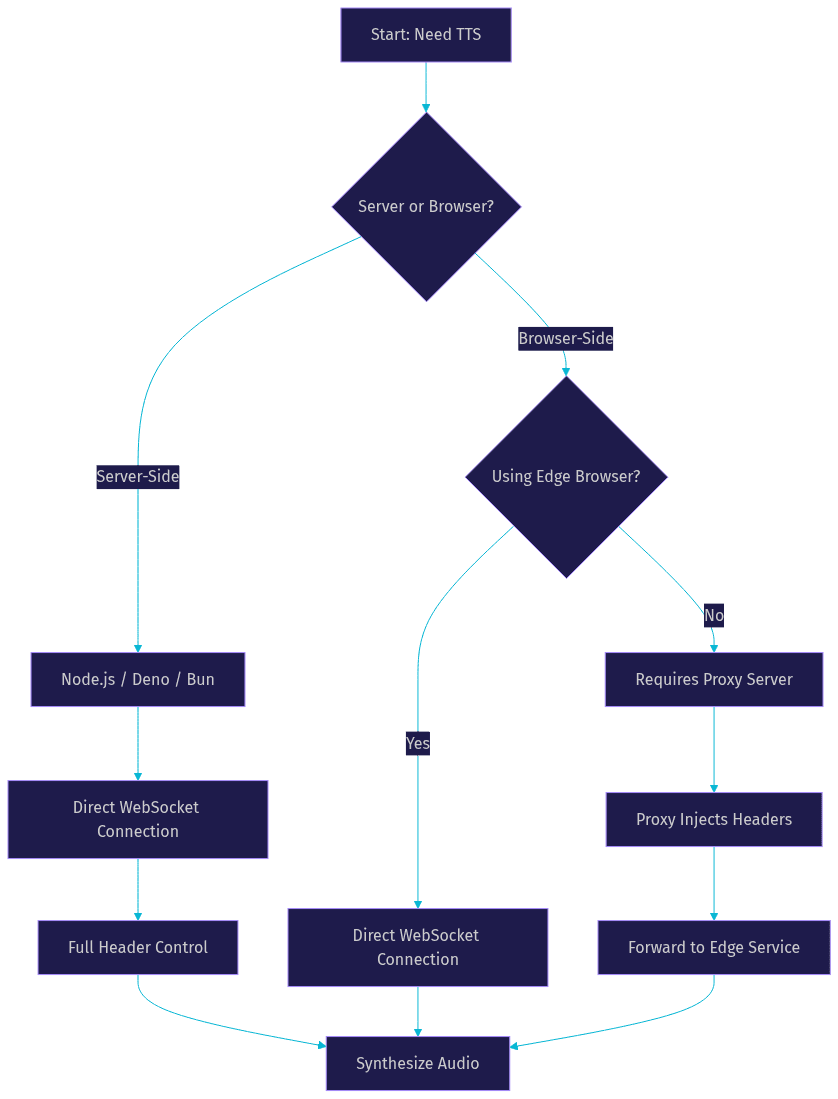
Choosing the right runtime for your Edge TTS integration is critical because the service relies on specific HTTP headers to authenticate requests. Server-side environments offer the most straightforward path, while browser environments require additional considerations.
Server-Side Environments
Server-side runtimes like Node.js, Deno, and Bun provide full control over HTTP and WebSocket headers. You can easily set the required user-agent and connection headers to match what the Edge service expects. This makes server-side integration the most reliable approach for production applications. You can build a simple API endpoint that accepts text, synthesizes it using Edge TTS, and returns the audio buffer to your frontend.
Browser Environments
Using Edge TTS directly in the browser is more complex. Only Microsoft Edge supports the required headers natively. Other browsers like Chrome, Firefox, and Safari enforce strict CORS policies and do not allow you to override the user-agent header for WebSocket connections. If you need to use Edge TTS in a non-Edge browser, you must route the request through a proxy server that adds the necessary headers before forwarding it to the Microsoft service.
Choosing Voices and Languages
The Edge TTS voice catalog includes hundreds of neural voices spanning dozens of languages and regional locales. Each voice is optimized for a specific dialect and tone. For example, the en-US locale offers multiple female and male voices, each with distinct characteristics ranging from conversational to professional.
You can list available voices programmatically by calling the library's voice enumeration function. This returns a list of available voices, including their locale, gender, and friendly name. When selecting a voice for your application, consider your target audience's primary language and regional dialect. A voice trained on en-US English will sound noticeably different from one trained on en-GB English, and using the wrong locale can make your application feel foreign or disconnected.
Audio Formats and Output Options
Edge TTS supports several audio formats, giving you flexibility in how you store and deliver the synthesized speech. The most common formats include MP3, WAV, WebM, OGG, and PCM. MP3 is the most popular choice for general use due to its small file size and universal compatibility. WAV offers uncompressed audio, which is useful when you need to process the audio further or require maximum fidelity.
Beyond static file generation, Edge TTS supports streaming synthesis. This means you can start playing audio as soon as the first chunks arrive, rather than waiting for the entire text to be processed. The service also provides word-boundary timestamps, which you can use to generate subtitle files in VTT or SRT format. This is particularly useful for creating accessible video content or synchronizing audio with on-screen text.
Integrating Edge TTS in a Node.js Project
Integrating Edge TTS into a Node.js project is straightforward using an open-source npm package like edge-tts-universal. The process involves installing the package, importing it into your script, and initializing a new instance of the TTS client.
Once initialized, you configure the client by selecting a voice and specifying your desired audio format. You then pass your text string to the synthesis function. The library handles the WebSocket connection, header injection, and stream buffering internally. When the synthesis is complete, the function returns an audio buffer containing the complete speech file.
You can save this buffer to disk using standard file system operations, or you can stream it directly to an HTTP response. Error handling is important here. Network failures, rate limits, and unexpected service interruptions can occur. You should wrap your synthesis calls in try-catch blocks and implement retry logic for transient errors. If you are building a real-time application, consider routing this audio buffer into a VideoSDK room so multiple participants can hear the synthesized speech simultaneously.
Using Edge TTS in a Browser Application
Using Edge TTS in a browser application requires careful planning due to the CORS and header restrictions mentioned earlier. If you are certain your users will only use Microsoft Edge, you can connect directly to the service. The browser-specific entry point in libraries like edge-tts-universal handles the WebSocket setup for you.
However, if you need to support a wider range of browsers, you must set up a proxy server. The proxy acts as an intermediary. Your browser application sends a standard HTTP or WebSocket request to your proxy. The proxy then opens a connection to the Microsoft Edge speech service, injects the required headers, and forwards the response back to the browser. Once the browser receives the audio stream, you can play it back using the standard HTML Audio element or the Web Audio API for more advanced control.
Advanced Scenarios: Streaming Large Texts
When working with large texts, such as audiobooks or long articles, synthesizing the entire content at once can lead to timeouts and high memory usage. Edge TTS handles this through its streaming API. You can feed large text inputs in chunks, and the service will stream the corresponding audio chunks back as they are processed.
This enables real-time playback. You can start playing the first chunk of audio while the subsequent chunks are still being generated. This capability is essential for interactive voice assistants and live narration systems where latency is critical. If you are building an AI voice agent, you can pipe this streaming audio directly into a VideoSDK AI Voice Agent pipeline. The agent can process user input, generate a text response using an LLM, synthesize it with Edge TTS, and stream the audio back to the user in a VideoSDK room with minimal delay.
Performance, Latency, and Cost Considerations
Edge TTS offers impressive performance for a free service. Community benchmarks and developer reports indicate that latency is typically low enough for interactive applications, often starting playback within a few hundred milliseconds. Because there is no per-request cost, you can synthesize unlimited amounts of text without worrying about a billing surprise.
However, it is important to remember that Edge TTS is not an officially supported production API. Microsoft could change the endpoint, alter the header requirements, or rate-limit requests at any time. For mission-critical enterprise applications where uptime is non-negotiable, you should implement a fallback to a paid service like Azure Speech or Google Cloud TTS. This hybrid approach gives you the cost savings of Edge TTS with the reliability of a commercial SLA.
Common Pitfalls and Troubleshooting
Integrating Edge TTS is not without its challenges. The most common pitfall is the browser header restriction. Developers often try to connect directly from a non-Edge browser and encounter CORS errors. The solution is always to use a server-side proxy that can inject the correct headers.
Another frequent issue is the "voice not found" error. This usually happens when the requested voice name does not match the available locale. Double-check the exact voice identifier and ensure your locale string is formatted correctly. Finally, network interruptions can cause the WebSocket connection to drop. Implementing automatic reconnection logic ensures your application recovers gracefully from temporary network failures.
Edge TTS vs Competing TTS Solutions
To understand where Edge TTS fits in the broader landscape, it helps to compare it against established commercial providers. The table below breaks down the key differences across cost, quality, and platform support.
| Feature | Edge TTS | Google Cloud TTS | Amazon Polly | Azure Speech |
|---|---|---|---|---|
| Cost | Free | Pay-per-use | Pay-per-use | Pay-per-use |
| API Key Required | No | Yes | Yes | Yes |
| Voice Quality | High (Neural) | High (Neural) | High (Neural) | High (Neural) |
| Platform Support | Server & Browser (via proxy) | Server & Browser | Server & Browser | Server & Browser |
| Latency | Low | Low | Low | Low |
| Production SLA | No | Yes | Yes | Yes |
| Best For | Prototyping, cost-sensitive apps | Enterprise, scalable apps | AWS ecosystems, enterprise | Microsoft ecosystems, enterprise |
Edge TTS shines in scenarios where cost is a primary concern and you need high-quality neural voices. It is perfect for prototyping, hobby projects, and internal tools. For customer-facing production applications with strict uptime requirements, a paid service with an SLA is a safer choice.
Definitions Glossary
Edge TTS: A free text-to-speech service provided by Microsoft Edge that offers access to neural voices without requiring an API key.
SSML (Speech Synthesis Markup Language): An XML-based markup language used to control pronunciation, pitch, rate, and volume in text-to-speech engines.
WebSocket: A communication protocol providing full-duplex communication channels over a single TCP connection, used by Edge TTS to stream audio.
Neural Voice: A type of synthetic voice generated by deep neural networks, offering more natural intonation and human-like quality compared to standard voices.
Streaming Synthesis: The process of generating and delivering audio in chunks, allowing playback to begin before the entire file is processed.
Key Takeaways
- Edge TTS provides free access to Microsoft's premium neural voices without an API key or subscription.
- Server-side environments like Node.js are the easiest way to integrate Edge TTS due to full header control.
- Browser applications require a proxy server to bypass CORS restrictions on non-Edge browsers.
- The service supports streaming synthesis, making it suitable for real-time applications and AI voice agents.
- For production systems requiring high availability, implement a fallback to a paid TTS provider like Azure Speech.
Conclusion
Edge TTS is a compelling option for developers who need high-quality text-to-speech without the overhead of cloud subscriptions. Its token-less authentication and extensive voice catalog make it easy to prototype and build voice-enabled features quickly. Whether you are building a simple narration tool or a complex real-time voice agent, Edge TTS provides the raw audio capabilities you need. Try the npm package in your next project, explore the voice catalog, and consider routing the audio into a VideoSDK room to build interactive voice experiences. What are you building with Edge TTS? Drop a comment below, I would love to hear about your use case.
Free $20 Balance for AI Voice Agents & Video Calls
FAQ