


Chat translation is the process of converting messages between languages in real time or on demand within a messaging application. VideoSDK supports in-meeting chat and real-time transcription that can be paired with translation APIs to enable multilingual communication across video and audio calls. Developers can integrate translation services alongside VideoSDK's chat features to build cross-language messaging experiences.
Introduction
Imagine a customer support team spanning three continents. A user in Tokyo sends a message in Japanese. The agent in Berlin reads it in German. The agent replies in German, and the user sees it in Japanese. Without chat translation, that exchange takes minutes of copy-pasting into external tools, or worse, goes unanswered entirely. Productivity drops, response times climb, and users churn.
Multilingual communication is no longer a nice-to-have feature. It is a baseline expectation for any app with a global user base. Whether you are building a customer support platform, a remote team collaboration tool, or a live shopping experience, your users need to understand each other regardless of the language they speak.
This guide walks through everything you need to know about chat translation: what it is, how it works technically, the implementation options available, and the best practices that separate a production-ready system from a fragile prototype. By the end, you will have a clear architecture for adding multilingual messaging to your application.
What Is Chat Translation?
Chat translation is defined as the real-time or on-demand conversion of text messages from one language to another within a messaging interface. Unlike document translation, which processes entire files with full context, chat translation operates on short, conversational messages that often lack surrounding context, contain abbreviations, and arrive in rapid succession.
Chat translation works by detecting the source language of an incoming message, routing it through a translation engine, and delivering the translated output to the recipient in their preferred language. The process happens fast enough to feel seamless in a live conversation.
Two primary modes dominate the landscape. On-demand translation lets users explicitly request a translation for a specific message, giving them control over when and what gets translated. Automatic translation runs every inbound message through the translation pipeline without user intervention, creating a seamless multilingual experience where users always read messages in their preferred language.
VideoSDK provides in-meeting chat as part of its video calling SDK, and developers can layer translation APIs on top of this chat surface to enable cross-language communication during live calls. The same architecture applies to standalone messaging apps.
Why Add Chat Translation to Your App?
Adding chat translation to your application delivers measurable business outcomes. Customer support teams resolve tickets faster when agents and users communicate without language barriers. A support agent who speaks only English can serve users in 50+ languages without learning any of them.
Market reach expands immediately. Instead of launching localized versions of your app for each region, you ship one version with translation built in. Users in new markets adopt your product without waiting for a localized rollout.
Engagement metrics improve. When users can participate in conversations in their native language, they send more messages, stay longer in sessions, and return more frequently. The friction of switching to an external translation tool disappears.
For real-time communication apps built with VideoSDK, adding translation to the in-meeting chat means participants in a video call can collaborate across languages without leaving the room. This is particularly valuable for telehealth, edtech, and global team collaboration scenarios.
How Chat Translation Works: Technical Overview
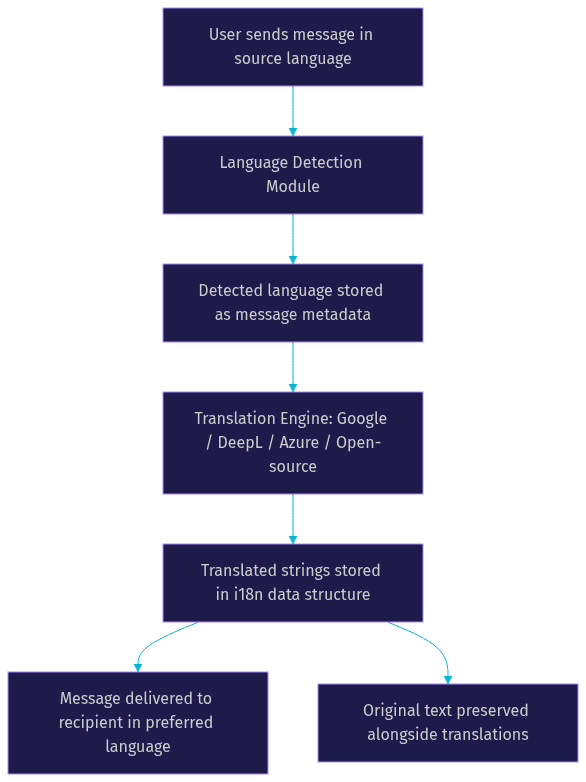
A production chat translation system involves several connected components: language detection, a translation engine, a data store for translated strings, and a delivery mechanism that routes the right language version to the right recipient. Each component introduces its own latency, accuracy, and cost considerations.
Language Detection
Language detection identifies the source language of an incoming message before translation begins. Most cloud translation APIs include automatic language detection as part of their pipeline, but you can also run detection independently using libraries like CLD3 or compact neural models. For chat applications, detection must be fast and tolerant of short messages, emojis, and code-switching where users mix languages within a single message. Some systems store the detected language as metadata on the message record so that re-translations do not repeat the detection step.
Translation Engine Choices
The translation engine is the core of your pipeline. Google Cloud Translation offers broad language coverage and strong neural translation quality. DeepL is known for superior quality on European languages, particularly for nuanced phrasing. Azure Translator integrates well with enterprise Microsoft ecosystems and offers custom translation models. Open-source models like NLLB and MarianMT provide self-hosted alternatives for teams with strict data residency requirements.
The choice depends on your language coverage needs, latency tolerance, budget, and privacy constraints. For real-time chat, API response time matters as much as translation quality. A translation that takes two seconds degrades the conversation flow.
Message Flow Diagram
The following diagram shows how a message travels from sender to recipient through the translation pipeline:
i18n Data Structure
Translated messages need a storage structure that preserves the original text while holding translations for each recipient language. A common pattern stores the original message alongside translated variants keyed by language code. For example, a message object might contain the original text field plus separate fields for each translated language. This approach lets you serve cached translations to multiple recipients without re-calling the translation API. It also supports on-demand translation: if a user requests a language that has not been pre-translated, the system generates and caches it on the fly.
Implementation Options
On-Demand Translation
On-demand translation activates when a user explicitly requests a translation for a specific message. The user sees the original text with a translate button or tap gesture. When triggered, the system sends the message to the translation API, stores the result, and displays it to the user. This mode conserves API costs because only requested messages get translated. It also respects user autonomy: not every message needs translation, especially in mixed-language rooms where some users share a common language. The tradeoff is that the experience feels less seamless. Users must take an action for every message they want translated, which adds friction in fast-moving conversations.
Automatic Translation
Automatic translation processes every inbound message through the translation pipeline before delivery. The recipient always sees messages in their preferred language with no action required. This mode creates the most seamless multilingual experience and is ideal for customer support, live events, and cross-language team chat. The cost is higher because every message triggers a translation API call, even if the recipient could have understood the original. Caching translated strings mitigates this: when multiple recipients share the same target language, the system translates once and serves the cached result to all of them.
Using Built-In SDK Features
Some chat platform SDKs offer native translation features that reduce boilerplate. Stream, TalkJS, and Shavely provide varying levels of built-in translation support. If you are already using one of these platforms, leveraging their native translation can save significant development time. For apps built on VideoSDK, the in-meeting chat feature provides the messaging surface, and you can integrate any translation API alongside it. VideoSDK's real-time transcription capabilities can also be combined with translation for spoken-word scenarios.
Choosing the Right Solution
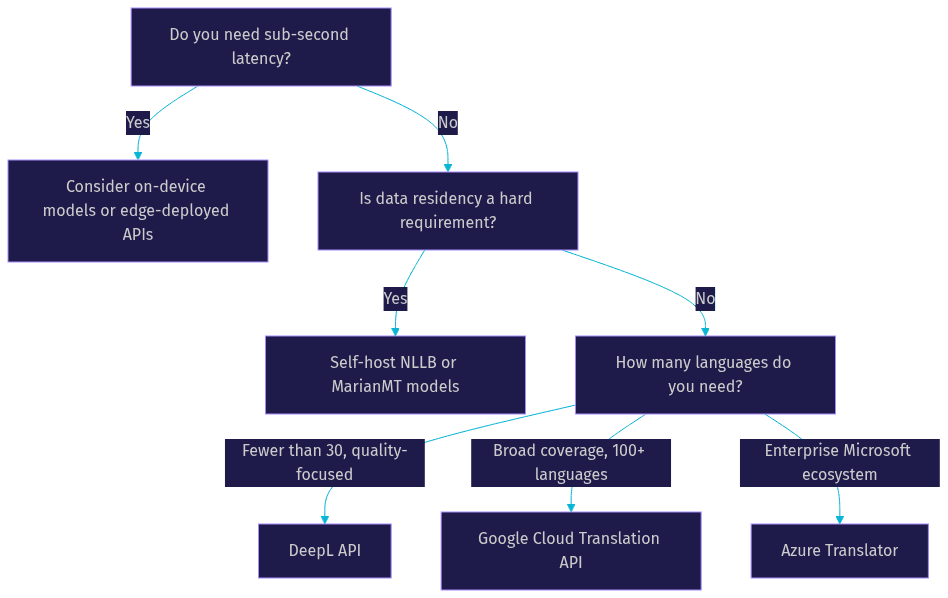
Selecting a chat translation approach requires evaluating five criteria: latency tolerance, language coverage, cost structure, data privacy requirements, and developer experience.
If your application requires sub-second translation for live conversations, choose a provider with edge-deployed models or consider on-device translation. If you need coverage for 100+ languages including low-resource languages, Google Cloud Translation or NLLB are strong choices. If translation quality on European languages is your priority, DeepL consistently outperforms competitors on nuance and naturalness.
Cost scales with message volume. Automatic translation on a high-traffic chat app can generate significant API bills. Estimate your daily message volume and multiply by the per-character pricing of your chosen provider before committing.
Data privacy is critical for healthcare, legal, and enterprise applications. If messages contain sensitive information, self-hosted models or providers with zero-retention policies are necessary. Google Cloud Translation and Azure Translator offer enterprise tiers with data processing agreements.
Decision Tree Diagram
The following decision tree guides you from your core requirements to an appropriate provider choice:
Best Practices for Reliable Chat Translation
Set and Store User Language Preferences
Every user profile should include a preferred language field that the translation system reads automatically. Store this preference at account creation and let users change it in settings. When a user joins a chat or VideoSDK room, the system uses this preference to determine which translated version of each message to deliver. Without stored preferences, the system cannot perform automatic translation and falls back to showing original text.
Handle Fallbacks and Missing Translations
Translation APIs fail. Rate limits get hit. Network timeouts occur. Your system must degrade gracefully. If a translation fails, display the original message with a subtle indicator that translation was unavailable. Queue the message for retry and translate it when the API recovers. Never block message delivery on translation success. The original text should always be available as a fallback.
Optimize for Low-Bandwidth Scenarios
Users on mobile networks or in regions with poor connectivity should not experience degraded chat because of translation overhead. Cache translated strings aggressively so that repeated messages or common phrases do not trigger new API calls. Batch translation requests where possible to reduce round trips. If you are using VideoSDK for real-time communication, its network-adaptive streaming handles media quality adjustments, but text translation requires its own optimization strategy.
Secure Data and Respect Privacy
Messages flowing through translation APIs may contain personally identifiable information, health data, or confidential business communications. Choose providers with clear data retention policies. For regulated industries, use providers that offer zero-data-retention agreements or self-host your translation models. Encrypt translated strings at rest in your database. Log translation metadata such as timestamps, language pairs, and success rates, but never log message content unless your compliance framework explicitly permits it.
Real-World Use Cases
Customer support platforms use chat translation to let agents serve users in any language without hiring multilingual staff. A single agent pool handles global tickets, and translation happens transparently in both directions.
Global remote teams use translated chat to collaborate across language boundaries. A team with members in Japan, Germany, and Brazil conducts daily standups in a shared chat channel where everyone reads and writes in their native language.
E-commerce live shopping events use chat translation so that viewers from different regions can ask questions about products and receive answers in their language. When combined with VideoSDK's interactive live streaming, this creates a globally accessible shopping experience.
Live-event moderation teams use translation to monitor chat across languages, identifying inappropriate content or safety concerns regardless of the language they are written in.
Future Trends in Chat Translation
Multimodal translation is emerging as the next frontier. Instead of translating only text, systems are beginning to translate spoken words in real time, convert speech to text, translate, and synthesize speech in the target language. VideoSDK's AI voice agent capabilities already combine speech-to-text, LLM processing, and text-to-speech, and adding translation to this pipeline enables real-time multilingual voice conversations.
On-device models are shrinking. Models like NLLB-200 distilled and MarianMT can now run on modern smartphones with acceptable latency. This eliminates API costs and addresses privacy concerns by keeping message data on the device. The tradeoff is model size and translation quality compared to cloud APIs.
Contextual AI translation is improving. Current translation engines treat each message in isolation. Emerging models use conversation history to disambiguate pronouns, idioms, and domain-specific terminology. This is particularly relevant for chat, where short messages often depend on prior context for accurate translation.
Standards for real-time translation APIs are evolving. The W3C and IETF are exploring protocols for real-time text translation that could standardize how messaging platforms handle multilingual content, similar to how WebRTC standardized real-time audio and video.
Definitions Glossary
Chat Translation: The real-time or on-demand conversion of text messages between languages within a messaging application, distinct from document translation which processes complete files with full context.
On-Demand Translation: A translation mode where users explicitly request translation for specific messages, conserving API costs while giving users control over what gets translated.
Automatic Translation: A translation mode where every inbound message is translated before delivery, creating a seamless multilingual experience without user intervention.
Language Detection: The process of identifying the source language of a message using statistical models, neural networks, or metadata, performed before routing to the translation engine.
i18n Data Structure: A storage pattern that preserves original message text alongside translated variants keyed by language code, enabling cached delivery to multiple recipients without repeated API calls.
Translation Latency: The time elapsed between a message being sent and the translated version being delivered to the recipient, a critical metric for real-time chat applications.
Key Takeaways
- Chat translation enables multilingual communication within messaging apps through either on-demand or automatic modes, each with distinct cost and experience tradeoffs.
- A production translation pipeline requires language detection, a translation engine, an i18n data structure for caching, and graceful fallback handling for API failures.
- Provider selection depends on latency tolerance, language coverage, cost, data privacy, and developer experience, with DeepL, Google Cloud Translation, and Azure Translator leading the market.
- VideoSDK's in-meeting chat and real-time transcription features provide a natural surface for integrating translation in live video and audio calling applications.
- Future trends point toward multimodal translation, on-device models, and contextual AI that uses conversation history to improve accuracy on short chat messages.
Conclusion
Chat translation has moved from a novelty to a necessity for any application serving a global user base. The architecture is straightforward: detect language, translate, cache, and deliver. The execution is where most teams stumble, particularly around latency, cost management, and fallback handling. By choosing the right translation mode for your use case, storing user language preferences, and building resilient fallbacks, you can ship a multilingual chat experience that feels native to every user regardless of the language they speak. If you are building real-time communication features, explore how VideoSDK's chat and transcription capabilities can serve as the foundation for your translation pipeline. You can start building for free at app.videosdk.live/login. What are you building with chat translation? Drop a comment below, I would love to hear what multilingual use case you are working on.
Free $20 Balance for AI Voice Agents & Video Calls
FAQ