


AutoGen is an open-source multi-agent framework from Microsoft that lets developers build applications where multiple AI agents converse, delegate tasks, call tools, and collaborate to solve complex problems. Unlike a single LLM call, AutoGen structures agents as independent actors that exchange messages, with support for human-in-the-loop input, code execution, and deterministic workflows. If you are evaluating agentic AI frameworks in 2026, AutoGen's actor-based architecture and Python SDK make it one of the most flexible options available, and this guide walks you through everything from setup to production best practices.
Developers stopped asking whether LLMs are useful and started asking how to make them reliable. That shift is why multi-agent systems exploded in 2024 and have kept accelerating since. A single model call hallucinates, forgets context, and cannot iterate on its own output. A team of specialized agents that critique, delegate, and verify each other behaves differently, and AutoGen is the framework that makes that team programmable.
AutoGen, originally released by Microsoft Research, has become one of the most starred open-source agent frameworks on GitHub, with an active community contributing extensions, tool adapters, and research prototypes. Its v0.4 rewrite rebuilt the framework on an asynchronous, actor-based core, which changed how developers reason about agent communication.
By the end of this article you will understand AutoGen's architecture, know when multi-agent collaboration actually pays off versus a single-agent approach, and have a conceptual blueprint for building, debugging, and extending your own agentic workflows.
What Is AutoGen?
AutoGen is defined as an open-source framework for building multi-agent applications, where autonomous or semi-autonomous agents communicate through messages to accomplish tasks that are too complex for a single LLM invocation. AutoGen works by letting you define agents with specific roles, capabilities, and tool access, then wiring them together into workflows where they exchange structured messages until a task completes.
The core concepts are straightforward. An agent is a conversational entity with a role, a system prompt, and optionally a model backend. A workflow defines how agents interact: who speaks when, when a task is delegated, and when the conversation terminates. Tool use lets agents call external capabilities, such as searching the web, executing code, or querying a database. Memory persists context across turns so agents can recall earlier decisions instead of re-deriving them.
Where AutoGen differs from raw LLM calls is structure. A direct API call to GPT-4o gives you one response with no iteration, no verification, and no access to external state. AutoGen wraps that same model call in an agent that can receive feedback from another agent, revise its answer, invoke a tool, and loop until a quality bar is met. The framework, not the prompt, owns the control flow.
This is also what separates AutoGen from prompt engineering alone. You are not coaxing one model into behaving like a team. You are actually running a team, with each member having distinct instructions, tools, and termination conditions.
Core Architecture of AutoGen
AutoGen's v0.4 architecture is layered, and understanding the two layers is the key to using it well. The high-level API gives you prebuilt agent types and declarative team composition for common patterns. The low-level core exposes an asynchronous actor model, where every agent is an actor that processes messages from a queue and can publish messages to other actors. This design lets agents run concurrently, which matters when a workflow fans out work across multiple specialists.
The classic agent types illustrate the framework's philosophy. The AssistantAgent is an AI-backed agent that reasons about tasks, writes plans, and generates code or answers. The UserProxyAgent acts on behalf of a human or an execution environment: it can execute code the assistant produces, request human approval before acting, and inject real-world results back into the conversation. In v0.4 these roles are generalized into a broader agent abstraction, but the assistant-plus-proxy pattern remains the mental model most developers start with.
Tool integration happens through adapters. An agent declares the tools it can call, the framework routes tool requests to the right adapter, and results flow back into the agent's message stream. Because agents are actors, a tool call does not block the whole workflow; other agents keep processing while one agent waits on an external system.
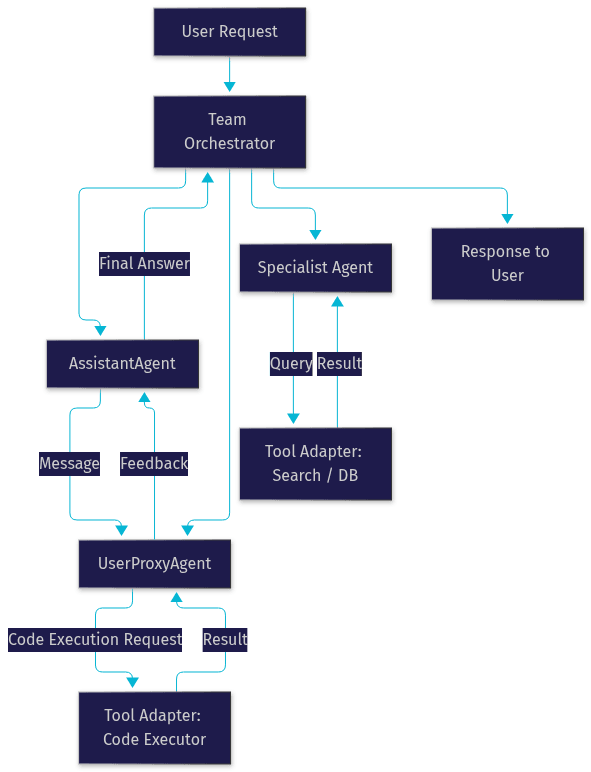
The diagram above shows the actor-model flow: the orchestrator routes messages between agents, tool adapters handle external side effects, and results loop back until termination conditions are satisfied. In practice, teams adopting AutoGen find that thinking in terms of message queues rather than function calls is the biggest conceptual hurdle, and the one that pays off most once internalized.
When to Use AutoGen: Single-Agent vs Multi-Agent
Multi-agent collaboration adds value when a task genuinely decomposes into different responsibilities. Use AutoGen when your problem involves iterative refinement (an agent writes code, another reviews and tests it), heterogeneous tools (one agent searches, another executes, a third aggregates), or human checkpoints where a person must approve actions before they proceed.
A single-agent approach is better when the task is a straightforward transformation: summarize a document, classify text, answer a question from context. Adding a second agent to a summarization task mostly adds latency and token cost without improving quality.
The honest rule of thumb: start single-agent, and introduce additional agents only when you observe a concrete failure mode that specialization would fix. Ambiguous requirements, long-horizon planning, and self-verification loops are the signals that a multi-agent design earns its complexity. AutoGen also supports deterministic workflows for cases where business rules, not model judgment, should control branching, which is worth comparing against fully autonomous agent teams.
Setting Up AutoGen: A Conceptual Walkthrough
Getting started with AutoGen follows three phases: environment, credentials, and workflow initialization.
Environment setup. AutoGen is a Python framework, so you need a supported Python installation (check the official documentation for the currently recommended version, as v0.4 raised the minimum). Install the core package first, then add optional extension packages only for the capabilities you need, such as code execution or retrieval. Keeping optional dependencies separate keeps your environment lean.
Credential configuration. AutoGen talks to model providers through API keys. You configure credentials for whichever provider you use, whether that is OpenAI for GPT-4o, Anthropic for Claude, or Google for Gemini. The standard practice is to keep keys in environment variables or a secrets manager rather than in your source files, and to configure a per-provider client that agents reference by name. Never hardcode keys, since agent workflows often run in shared or automated environments.
Workflow initialization. Conceptually, you define each agent by giving it a name, a role description, a model client, and any tools it may call. You then create a team that registers those agents and specifies a termination condition, such as a maximum number of conversation rounds or a keyword that signals completion. Finally, you submit a task to the team and let the message-passing loop run. The expected outcome is a transcript of the agent conversation plus a final result, which you can inspect, log, or feed into downstream systems.
For a deeper reference on agent concepts and architecture, the AutoGen documentation covers each agent type and team pattern in detail, and the GitHub repository includes runnable examples for every major workflow pattern.
Building a Multi-Agent Workflow
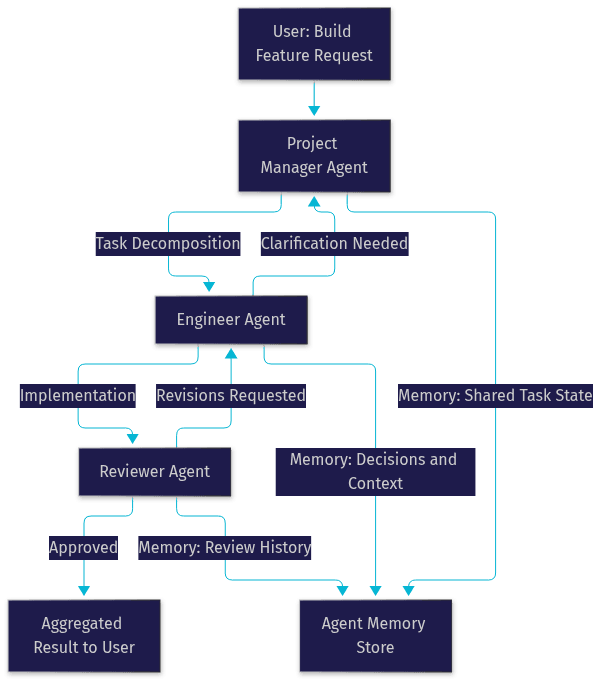
The best way to understand AutoGen is to design a realistic team. Consider a software development scenario with three roles: a Project Manager who decomposes the task, an Engineer who implements, and a Reviewer who verifies quality.
Defining Agent Roles
Each role needs a crisp charter. The Project Manager agent receives the user's request, breaks it into subtasks, and assigns them. The Engineer agent writes the implementation and documents assumptions. The Reviewer agent inspects the output against explicit acceptance criteria and either approves it or sends it back with specific objections. Role clarity is what prevents agents from drifting into each other's responsibilities, which is the most common failure mode in multi-agent designs.
Designing the Communication Protocol
The protocol defines message flow. In this workflow, the Project Manager broadcasts the task decomposition, the Engineer responds with implementation, and the Reviewer's verdict determines whether the loop continues or terminates. You specify termination conditions explicitly: a maximum round count to bound cost, plus a completion signal the Reviewer emits when acceptance criteria are met. Without explicit termination, agent teams can converse indefinitely, burning tokens without converging.
Managing State and Memory Across Turns
State management is where workflows succeed or fail. AutoGen lets teams share context so every agent sees the task history, decisions made, and prior review feedback. For longer tasks, you want to summarize older turns rather than replay the full transcript, because unbounded context eventually degrades both quality and cost. A common production pattern is a rolling memory window: recent turns in full, earlier turns compressed into a summary the Project Manager maintains.
The expected outcome of this workflow is a self-correcting loop. The Engineer produces work, the Reviewer catches defects, and the loop terminates only when explicit criteria are satisfied, which is a materially different quality profile than a single-shot generation.
Debugging and Monitoring Agents
Agent workflows fail in ways single calls do not: infinite loops, agents ignoring instructions, tool calls returning errors that propagate silently. AutoGen addresses this with built-in logging that records every message exchanged between agents, plus visualization tooling (such as the AutoGen Studio interface) that renders conversation flow so you can see exactly where a workflow diverged.
Three practices cover most debugging needs. First, always set a maximum round count so a stuck loop terminates loudly instead of quietly consuming budget. Second, inspect the full transcript rather than just the final answer, since the root cause of a bad output is usually two turns earlier. Third, log tool inputs and outputs separately from agent messages, because tool failures masquerade as agent reasoning failures. If you are building agents that also need real-time voice or video interaction, VideoSDK's AI agents documentation covers observability patterns for live pipelines that complement AutoGen's text-based logging.
Extending AutoGen with Plugins and Tool Adapters
AutoGen's extension system is deliberately modular. Optional packages add capabilities like retrieval-augmented generation, mathematical reasoning, and sandboxed code execution, and you install only what your workflow needs. This keeps the core lightweight while letting ambitious projects compose richer agents.
Custom tool adapters follow a consistent pattern: you describe the tool's purpose and input schema so the model knows when to call it, implement the execution logic on your side, and register the adapter with the agent that should have access. Typical custom adapters include database queries, internal API calls, image analysis, and integrations with external SaaS systems. The design principle to respect is one tool, one responsibility; adapters that bundle unrelated capabilities confuse the model's tool selection and degrade reliability.
Because agents can call tools concurrently in the actor model, a workflow that queries a database while another agent searches the web does not serialize those operations, which is a meaningful latency advantage for tool-heavy pipelines.
Real-World AutoGen Use Cases
Software development automation. Teams use AutoGen to automate the write-review-test cycle: an Engineer agent drafts code, a Reviewer agent checks it against style and correctness criteria, and an executor agent runs tests and feeds failures back. This does not replace engineers, but it accelerates first drafts and catches mechanical defects before human review.
Business process automation. Proposal writing, data extraction, and report generation fit the multi-agent pattern well because they involve gathering information, drafting, and verification, which map naturally onto distinct agent roles. A common pattern is a researcher agent that collects source material, a writer agent that drafts, and a critic agent that checks claims against the sources.
Research assistance. Literature review and experiment design benefit from agents that divide papers, extract findings, and synthesize contradictions. AutoGen's origins in Microsoft Research mean the framework has strong traction in agentic research workflows, where reproducibility and structured outputs matter more than raw conversational fluency.
Best Practices and Gotchas
Token management deserves deliberate attention. Multi-agent conversations multiply token consumption, because every message a agent sends becomes input context for its teammates. Set round limits, compress old turns, and monitor per-run cost from day one.
Balance determinism against autonomy. Fully autonomous agent teams are impressive demos and unreliable production systems. For business-critical flows, prefer deterministic orchestration where the workflow structure controls branching and agents only handle language generation, reserving autonomous mode for exploratory tasks.
The most common pitfalls: memory overflow from unbounded transcripts, ambiguous role prompts that cause agents to duplicate work, and missing termination conditions that let teams loop forever. Each has a cheap fix if you catch it early.
Future Directions of AutoGen
The AutoGen roadmap points toward greater modularity and accessibility. The v0.5 line of work emphasizes enhanced component modularity, cross-language support, and a maturing low-code Agent Studio that lets non-programmers compose agent teams visually. The community roadmap is public, and contributions, from new tool adapters to framework improvements, are actively welcomed through the project's GitHub and Discord channels.
Definitions Glossary
Agent: An autonomous or semi-autonomous conversational entity in AutoGen that has a role, a model backend, and optional tool access, processing messages and producing responses within a workflow.
Actor Model: The asynchronous architectural foundation of AutoGen v0.4, where each agent is an independent actor that receives messages from a queue and can send messages to other actors without blocking them.
UserProxyAgent: A classic AutoGen agent type that acts on behalf of a human or execution environment, capable of running code, requesting approvals, and returning real-world results into the conversation.
Termination Condition: An explicit rule that ends an agent conversation, such as a maximum round count or a completion signal, preventing unbounded token consumption.
Tool Adapter: A registered extension that lets an agent invoke an external capability, such as code execution, web search, or a database query, with results flowing back into the message stream.
Key Takeaways
- AutoGen is an open-source multi-agent framework that structures LLMs into collaborating agent teams with message passing, tool use, and memory, rather than relying on single model calls.
- The v0.4 actor-model architecture lets agents run concurrently and integrate external tools without blocking the workflow, which is a real latency advantage for tool-heavy pipelines.
- Use multi-agent designs only when tasks genuinely decompose into distinct roles; single-agent approaches remain better for straightforward transformations.
- Explicit termination conditions, bounded memory, and clear role charters are the three practices that separate reliable AutoGen workflows from expensive demos.
- AutoGen's modular extension system and active community make it a strong foundation for agentic AI projects, from software development automation to research assistance.
Conclusion
AutoGen has matured from a research prototype into a production-viable multi-agent framework, and its actor-based architecture, modular extensions, and deterministic workflow options cover the full spectrum from autonomous experimentation to controlled business automation. Start with a two-agent team, add roles only when you observe a concrete failure mode, and instrument everything from your first run. Try AutoGen via its GitHub repository, explore the official documentation, and join the community Discord to see what other teams are building. And if your agentic project needs real-time voice, video, or telephony capabilities, VideoSDK's AI agents platform provides the real-time communication layer to connect your agents to users. What are you building with AutoGen? Drop a comment, I'd love to hear which agentic workflow you're working on.
Free $20 Balance for AI Voice Agents & Video Calls
FAQ