


RTSP (Real-Time Streaming Protocol) is a network control protocol used to command and manage media streaming sessions. It acts as a remote control for media servers: a client sends text requests such as DESCRIBE, SETUP, PLAY and TEARDOWN, by default to TCP port 554, while the audio and video travel separately as RTP packets. Browsers cannot play RTSP directly.
Pick the wrong streaming protocol, and your media pipeline will suffer from crippling latency or unmanageable server costs. This article breaks down how the Real-Time Streaming Protocol operates: the core commands, the ports a firewall must allow, its architectural limitations, and how to get an RTSP camera feed to browser viewers through HLS or WebRTC.
What is RTSP Protocol?
The Real-Time Streaming Protocol (RTSP) functions as a "network remote control", the phrase RFC 2326 uses, that dictates exactly how and when media streams are delivered between clients and servers. RTSP Protocol is defined as an application-level network control protocol designed to manage stateful, real-time multimedia sessions over IP networks. In most sessions this protocol does not carry the video or audio itself. It delegates the heavy lifting of data transmission to secondary transport protocols like RTP (Real-Time Transport Protocol) and RTCP (RTP Control Protocol).
RTSP Protocol works by exchanging text-based commands between the client and the streaming server to initiate, pause, or terminate media sessions. The protocol normally uses a persistent TCP connection as its control channel; RTSP 2.0 removed the UDP option that RTSP 1.0 allowed. This separation of control and media allows the media data to stream over UDP for speed, while the control commands travel reliably over TCP.
The IETF published RTSP 1.0 as RFC 2326 in April 1998 and replaced it with RTSP 2.0, RFC 7826, in December 2016. When a client sends SETUP, the server returns a session identifier that tracks the ongoing interaction. RTSP is also the protocol IP cameras expose: the ONVIF Streaming Specification requires every ONVIF device to support RTSP for session initiation and playback control.
Why Developers Look for RTSP Alternatives
Developers look for RTSP alternatives because browsers cannot play it and it does not run over the HTTP caches that content delivery networks are built on. Building scalable applications with RTSP requires custom client-side software or a server-side conversion step just to display video in a standard web browser. Each conversion step adds delay, which matters most for interactive applications. Browsers do not implement the rtsp:// scheme at all: the Fetch standard handles only about, blob, data, file and HTTP(S) URLs and returns a network error for any other scheme.
Furthermore, maintaining stateful server connections for thousands of concurrent viewers increases infrastructure costs. Each viewer requires an active, dedicated control session on the media server. Without multicast, the server also sends every packet to each viewer separately, while HTTP streaming serves identical files that web caches can share.
That is why an RTSP feed is converted to HLS or WebRTC before it reaches browser viewers. WebRTC is often called peer-to-peer, but at scale it also runs through a server: a Selective Forwarding Unit (SFU), which RFC 7667 describes as a Selective Forwarding Middlebox.
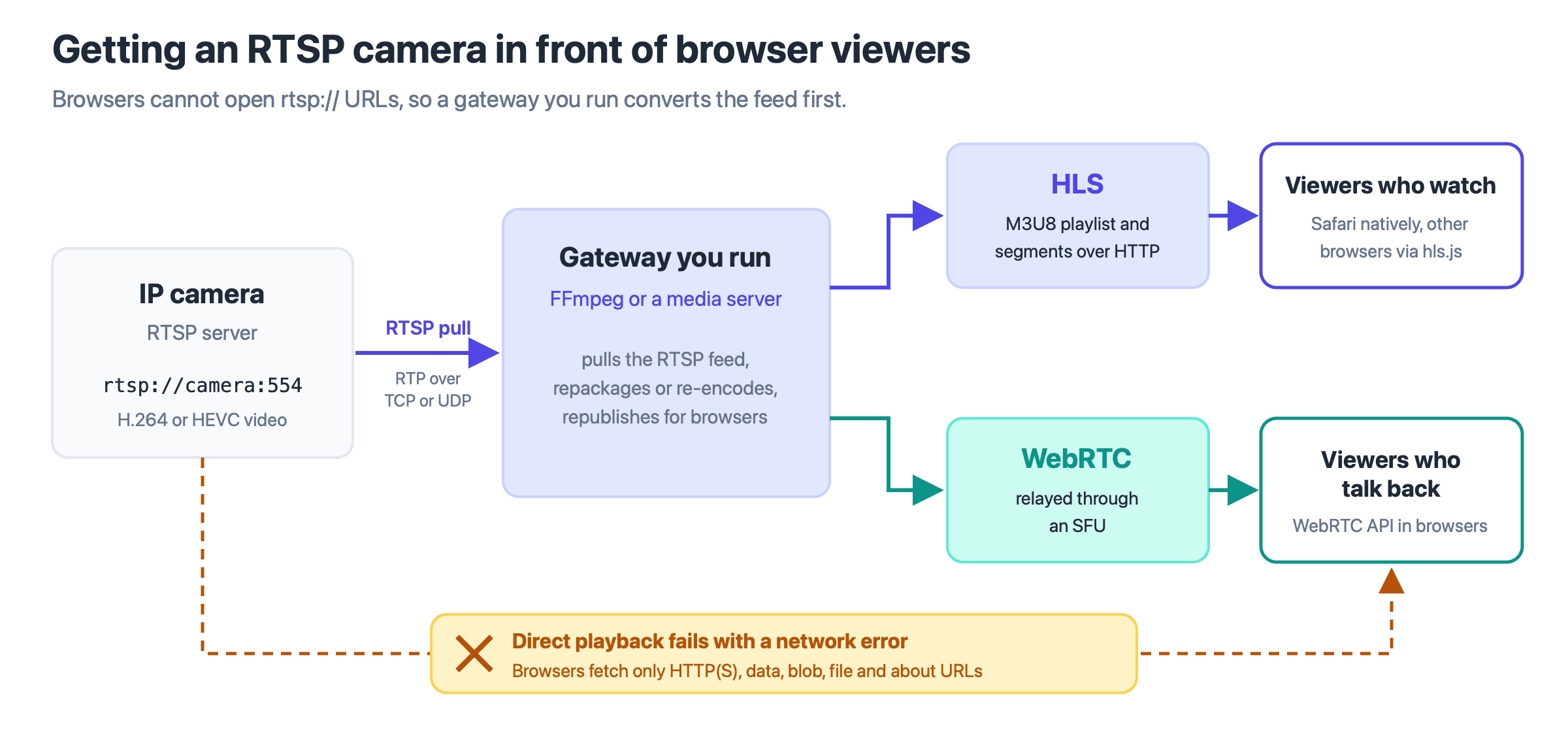
Only the gateway on the camera's network speaks RTSP; viewers receive HLS or WebRTC.
Comparison Table of RTSP Alternatives
Evaluating RTSP alternatives requires balancing your specific latency requirements against the scalability demands of your application architecture.
| Protocol | What sets latency | Browser Support | Best For |
|---|---|---|---|
| WebRTC | RTP packets played as they arrive; no segments | Native (all major browsers) | Interactive video, live streaming |
| HLS | Players start at least 3 target durations behind live (RFC 8216) | Native (Safari), via JS (others) | Mass broadcast, passive viewing |
| CMAF | A container format; depends on the HLS or DASH chunk settings | Through HLS or DASH players | Unified media delivery |
| RTSP | RTP packets played as they arrive; no segments | None (convert to HLS or WebRTC) | IP cameras, closed networks |
For a deeper comparison of the two viewer-side options, see WebRTC vs HLS.
How Does RTSP Work?
RTSP works as a short sequence of text requests from client to server, while the media flows separately. The server tracks each client with a session identifier, even when the client opens a new TCP connection. A typical session runs in this order:
- OPTIONS asks which methods the server supports.
- DESCRIBE returns an SDP description of the tracks and a control URL for each.
- SETUP, sent once per track, agrees the transport and ports and returns the session identifier.
- PLAY starts delivery of RTP packets.
- TEARDOWN ends the session and frees the server's resources.
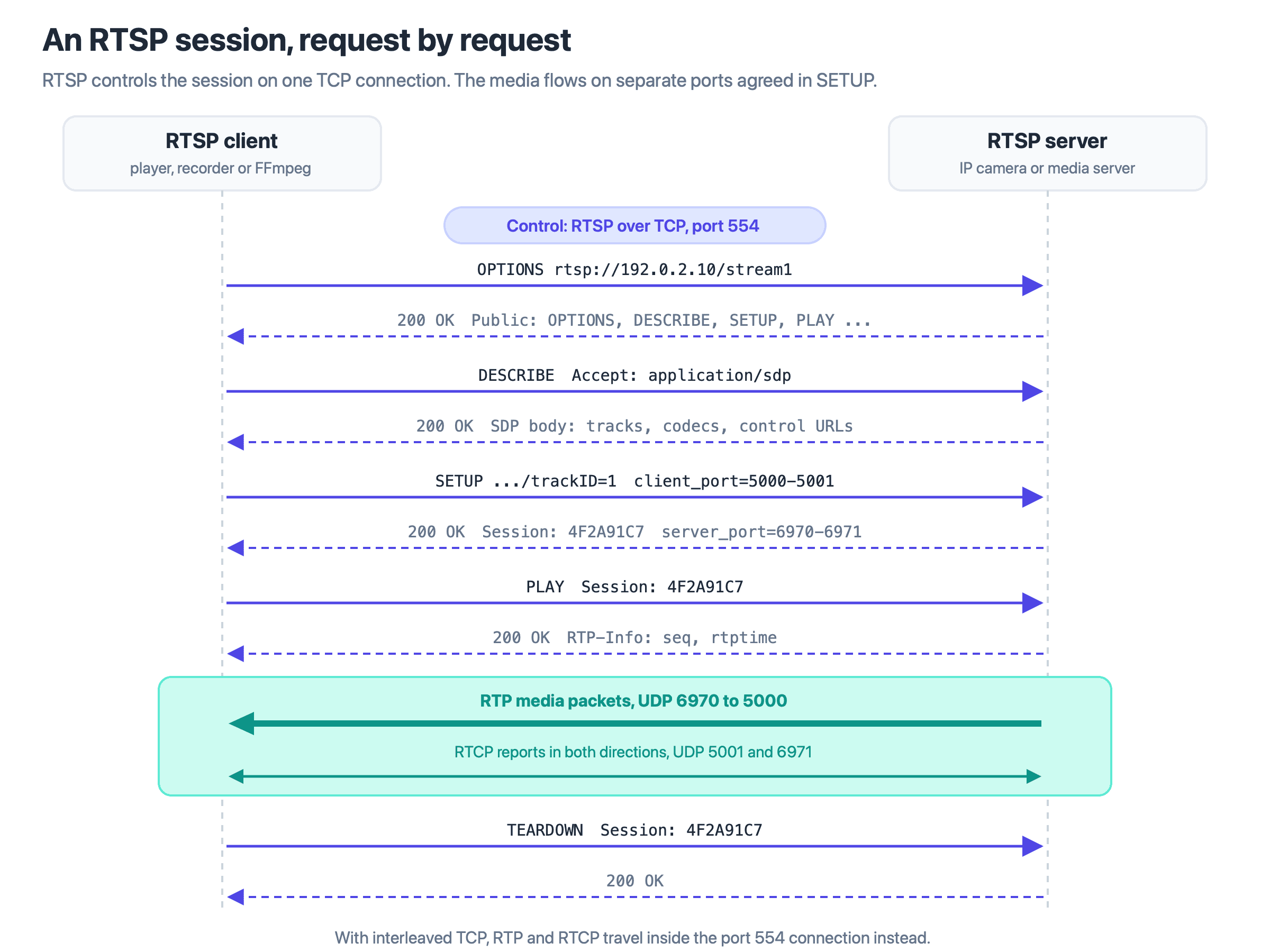
RTSP requests travel on the TCP control connection to port 554; RTP media and RTCP reports use the separate ports agreed in SETUP.
RTSP Commands
RTSP commands are called methods. These six cover a normal playback session:
OPTIONS
The client asks which methods the server supports, and the reply lists them in a Public header. Clients often send it first, and it does not change the session's state.
DESCRIBE
The client asks for a description of the stream. The server usually returns SDP (Session Description Protocol) listing each track, its codec and the control URL that SETUP will use.
SETUP
SETUP creates the session and agrees how one track is transported: RTP over UDP with client and server ports, or interleaved on the TCP connection. The client sends one SETUP per track, and the server's reply carries the session identifier used in every later request.
PLAY
Once a session is established, the PLAY command cues the server to start streaming the media to the client. Through its Range header, this command can specify not only when to start the playback but also supports playing the media from a given point, making it possible to jump to specific sections of the content.
PAUSE
To temporarily halt the media stream without terminating the session, the PAUSE command is used. A later PLAY resumes delivery. RFC 2326 only recommended PAUSE and RTSP 2.0 made it required, so check older cameras before relying on it.
TEARDOWN
This command is used to end a session and release all allocated resources on the server. After a TEARDOWN request, a new SETUP command is needed to restart the streaming. In RTSP 2.0 a server can also send TEARDOWN to end a session.
The remaining methods are GET_PARAMETER and SET_PARAMETER, which read and set parameters and can serve as a keep-alive ping; REDIRECT, which sends a client to another server; ANNOUNCE and RECORD, which RTSP 1.0 used to push a stream to a server and RTSP 2.0 removed; and PLAY_NOTIFY, new in RTSP 2.0. The two versions are not backwards compatible, and the ONVIF Streaming Specification still requires RTSP as defined in RFC 2326, so check which version a device speaks.
Which port does RTSP use?
The RTSP port is TCP 554 by default, and RTSPS, RTSP over TLS, uses TCP port 322. RFC 7826 sets both defaults. A camera's stream address follows the pattern rtsp://host:554/path, where the path after the port differs by manufacturer.
Port 554 carries only control messages. Media ports are agreed per track in SETUP: over UDP, RTP takes an even port and RTCP the next odd one, as RFC 3550 recommends. A firewall that opens only 554 lets the session start and then drops the media, unless the client asks for interleaved TCP, which carries the media inside the RTSP connection.
RTSP vs. Other Streaming Protocols: A Comparative Analysis
RTSP vs WebRTC
While RTSP is primarily a network control protocol used for managing media sessions, WebRTC is a browser API and set of protocols for real-time audio, video and data. It can connect two browsers directly, but multi-party calls and live streams route media through an SFU.
This architectural difference is pivotal; RTSP relies on a server to control the stream, making it suitable for applications like surveillance where centralized control is necessary. In contrast, WebRTC is built for two-way, real-time interaction such as video chats and collaborative platforms.
WebRTC is also built into all major browsers, while no browser supports RTSP. WebRTC encrypts all media: RFC 8827 requires every media channel to use SRTP, whereas RTSP sends plain RTP unless SRTP is negotiated.
RTSP vs HLS
HTTP Live Streaming (HLS) is another significant protocol in the landscape of video streaming. Unlike RTSP, which facilitates control over streaming sessions, HLS delivers content as short media segments, listed in a playlist and downloaded over HTTP. Because a playlist can offer the same stream at several bitrates, the player can switch quality as the viewer's connection changes; this is adaptive bitrate streaming. The two also work together: a server pulls a camera's RTSP feed and repackages it as HLS for viewers.
Real-World Applications of RTSP: Surveillance and Broadcasting
Surveillance Systems
RTSP is indispensable in the world of security and surveillance, where it manages the streaming of live video feeds from cameras to monitoring stations. Pan, tilt and zoom are not RTSP functions: cameras expose them through a separate control interface, such as the ONVIF PTZ service, while RTSP controls the video session.
Broadcasting
RTSP is common for camera and contribution feeds, which are then converted to HLS or WebRTC for viewers.
Glossary
- RTP (Real-time Transport Protocol): The IETF protocol, defined in RFC 3550, that carries audio and video packets with sequence numbers and timestamps.
- RTCP (RTP Control Protocol): The companion to RTP that exchanges sender and receiver reports, so both sides can monitor delivery.
- SDP (Session Description Protocol): The text format, defined in RFC 8866, that lists each track's media type, transport and codec.
- SFU (Selective Forwarding Unit): A media server that receives participants' streams and selects which ones to forward to each endpoint.
- ONVIF (Open Network Video Interface Forum): The industry forum whose specifications let IP cameras, recorders and clients from different manufacturers work together; its streaming specification requires RTSP.
Key takeaways
- RTSP controls a media session, while SDP describes the streams and RTP carries the packets.
- A session runs OPTIONS, DESCRIBE, SETUP, PLAY and TEARDOWN, and the server tracks it with a session identifier.
- Port 554 carries only control, so a firewall must also pass the media ports agreed in SETUP, or the session must use interleaved TCP.
- Browsers cannot open rtsp:// URLs, so convert camera feeds to HLS for large audiences or to WebRTC for interactive viewers.
Use RTSP between cameras and servers you control, and convert the feed at a gateway you run before it reaches any viewer. To put a camera into a live session with hosts and an audience, start from VideoSDK's interactive live streaming documentation.
Frequently asked questions
What is Real Time Streaming Protocol?
Real Time Streaming Protocol is the full name of RTSP, a network control protocol used to manage the streaming of audio and video over IP networks. It allows for functions like play, pause, and stop, similar to using a remote control with a TV. The IETF published RTSP 1.0 as RFC 2326 in 1998 and RTSP 2.0 as RFC 7826 in 2016.
How does RTSP differ from WebRTC?
RTSP is mainly used to control streaming media sessions and relies on a server to manage the streams, making it ideal for applications like surveillance. WebRTC, on the other hand, is built into browsers for real-time, two-way audio and video. It can connect two devices directly, but group calls and live streams route media through a Selective Forwarding Unit (SFU). Browsers support WebRTC but not RTSP.
What are the key commands used in RTSP?
The main commands in RTSP are OPTIONS (to list supported methods), DESCRIBE (to fetch the stream description), SETUP (to create the session and agree the transport), PLAY (to start streaming), PAUSE (to temporarily stop streaming), and TEARDOWN (to end the session and release resources). RTSP 2.0 removed ANNOUNCE and RECORD and added PLAY_NOTIFY.
In what applications is RTSP most commonly used?
RTSP is commonly used in surveillance systems to manage real-time video feeds from IP cameras, which the ONVIF specification requires to support it. Recorders, analytics services and media servers pull these feeds. In broadcasting it appears in camera and contribution feeds, which are then converted to HLS or WebRTC for viewers.
Can RTSP and HLS be used together?
Yes. They work at different stages of a pipeline. RTSP brings the feed from a camera or encoder to a server, and the server repackages it as HLS, a playlist of short segments over HTTP that browsers and phones can play. Tools such as FFmpeg can make this conversion without re-encoding H.264 video.
What is RTSP streaming?
RTSP streaming is media delivered as RTP packets under RTSP control, unlike HTTP streaming, where a player downloads playlist and segment files. An RTSP camera exposes its stream at an rtsp:// URL, by default on port 554, and a recorder or media server pulls it. To reach browser viewers, the stream must first be converted to HLS or WebRTC.
Is RTSP secure?
Plain RTSP is not encrypted. RFC 2326 reuses HTTP Basic and Digest authentication, which check identity but do not hide requests or media. RFC 7826 requires every implementation to support RTSP over TLS, signalled by the rtsps scheme on port 322, and allows Basic authentication only over TLS. Media needs its own protection: ONVIF uses SRTP and requires TLS on the RTSP connection whenever SRTP is used.