
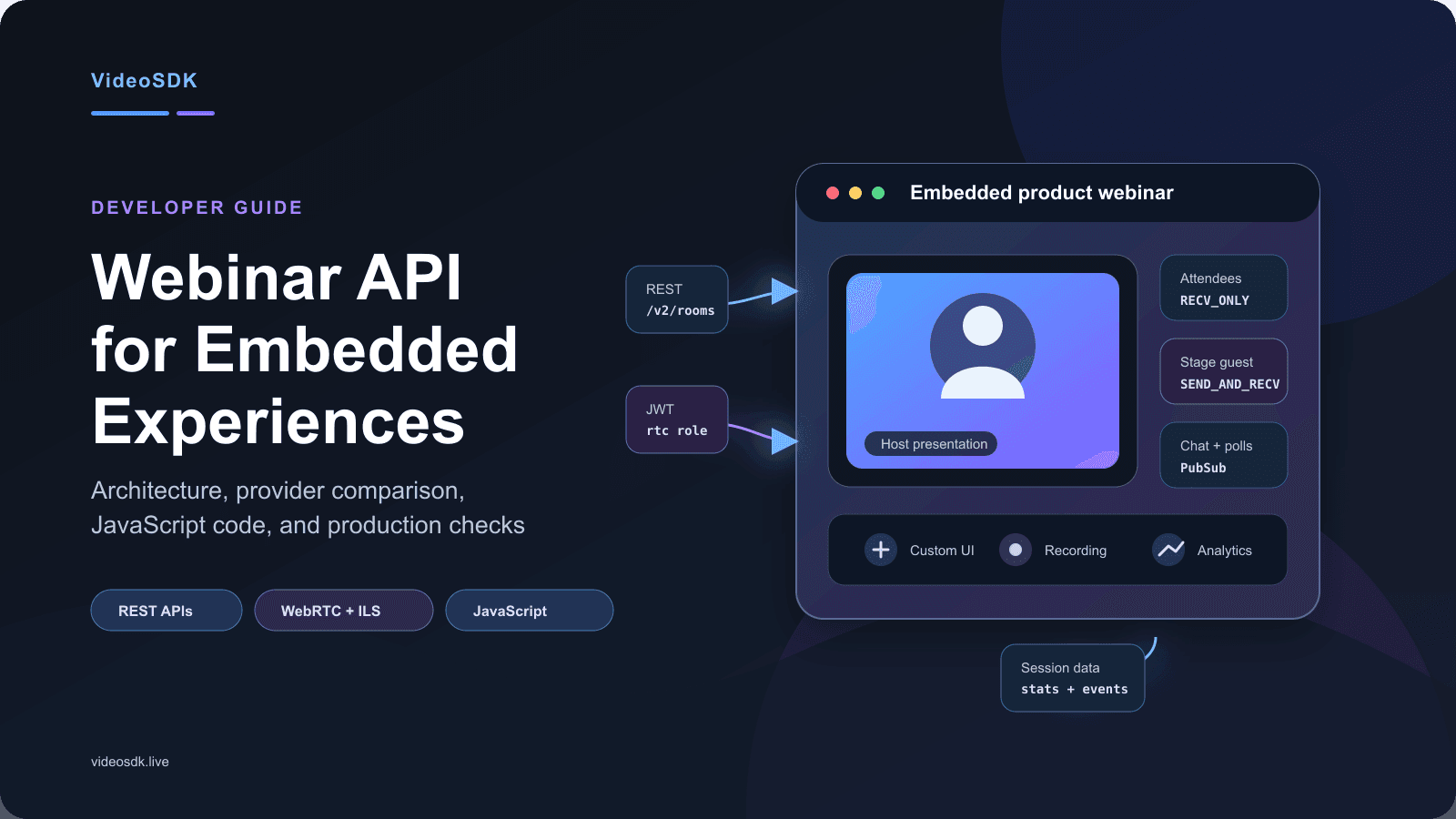


A Webinar API lets software schedule events, manage registrants, or embed live webinar media programmatically. VideoSDK serves the embedded-media model with REST room APIs, custom client SDKs, and presenter or audience modes. Its JavaScript ILS quickstart documents up to 100 hosts or co-hosts and 2,000 real-time viewers for that configuration.
Scheduling a webinar is a workflow problem. Delivering a branded, low-latency webinar inside your product is a media and application-architecture problem.
Those jobs need different tools. This guide separates them, compares leading providers, and shows how to build a working embedded webinar with VideoSDK, Node.js, and JavaScript.
What Is a Webinar API?
A Webinar API is a set of authenticated endpoints, SDK methods, events, and data models that software uses to create, deliver, manage, or measure webinars.
A Webinar API works by accepting commands from an application, updating webinar resources, and returning records or live events. The exact resources depend on the provider.
RingCentral's Webinar API, for example, focuses on schedules, participants, recordings, and analytics. Microsoft Graph webinar APIs manage Teams webinars, registrations, presenters, attendance, and webhooks.
VideoSDK addresses a different part of the market. Its real-time communication API manages rooms, sessions, participants, recordings, RTMP output, and HLS, while its client SDKs control media and interface behavior.
A workflow Webinar API automates a hosted webinar product. An embedded Webinar API also lets developers control the participant interface and media experience. VideoSDK fits the embedded model because its REST APIs orchestrate rooms while its client SDKs handle presenter and audience media.
Two Webinar API models
| Model | What it controls | Typical output | Best fit |
|---|---|---|---|
| Workflow REST API | Events, registration, reminders, attendance, reports | Automated workflows around a hosted webinar | Teams already using a webinar platform |
| Embedded media API and SDK | Rooms, media tracks, roles, layouts, chat, recording | A webinar inside your web or mobile product | SaaS, education, community, and commerce products |
| Combined architecture | Workflow data plus embedded media | A custom webinar connected to CRM, email, and analytics | Teams needing full ownership of experience and data |
Neither model replaces the other. A production product may combine VideoSDK with a registration database, email provider, CRM, payment service, and analytics pipeline.
How Webinar Automation and Media Delivery Work
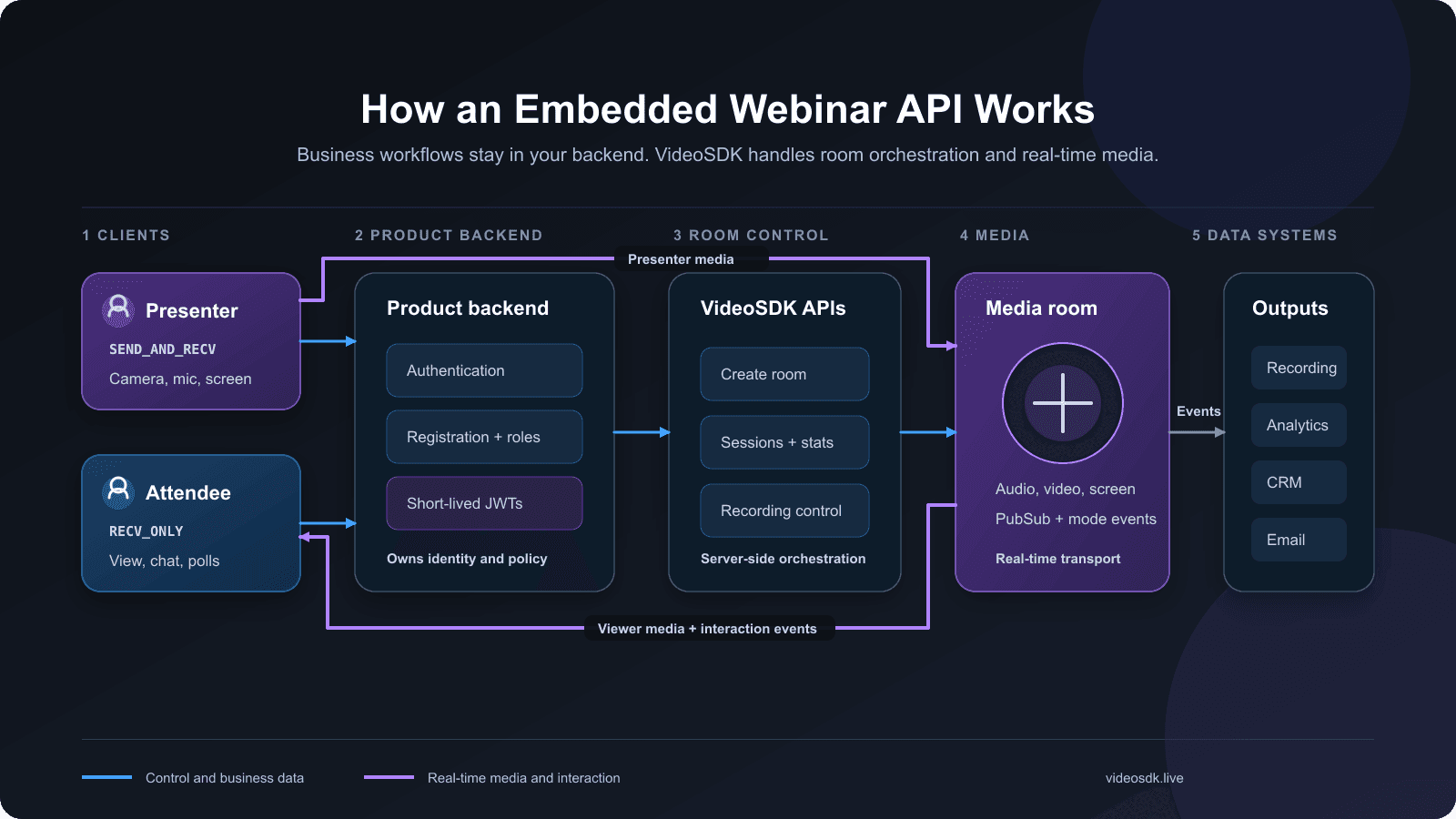
A production webinar separates business workflows from media delivery so each layer can scale, fail, and change without taking the entire product down.
Your backend authenticates the user, verifies registration, determines the webinar role, creates or validates a room, and issues a short-lived token. The client uses that token to join.
The media layer then carries audio, video, and screen-share tracks. The W3C WebRTC Recommendation defines browser APIs for sending and receiving real-time media and application data.
The event layer carries chat, polls, reactions, participant joins, mode changes, and moderation commands. Recordings and session analytics move into storage or downstream systems after the session.
Control, media, and event planes
The control plane creates rooms, issues access, removes participants, starts recordings, and fetches session data. VideoSDK exposes these operations through server-side APIs.
The media plane carries time-sensitive audio and video. VideoSDK represents the live space as a room, each user as a participant, and each media source as a track.
The event plane keeps the interface synchronised. Participant, stream, connection, mode, chat, and poll events let the application update without repeatedly polling the backend.
Your application owns identity, registration, permissions, and business data. VideoSDK handles room orchestration and media transport, but it does not replace those product responsibilities.
Webinar API Comparison for 2026
The best Webinar API depends on whether you need to automate a hosted platform or own the live interface inside your application.
Capability and experience comparison
| Provider | Creation API | Registrant API | Live experience | Best fit |
|---|---|---|---|---|
| VideoSDK | Creates rooms, not marketing webinars | Build or integrate separately | Fully custom web or mobile UI | Embedded, domain-specific webinar products |
| Zoom | Creates Zoom Webinars | Adds, lists, and updates registrants | Zoom-hosted attendee experience with branding options | Organizations already using Zoom |
| GoTo Webinar | Creates sessions, series, and sequences | Accepts and manages registrants | GoTo-hosted experience | Webinar workflow and campaign automation |
| Livestorm | Manages events and sessions | Registers people through session endpoints | Livestorm-hosted browser experience | Marketing, training, and customer education |
| webinar.net | POST /webinars and schedule endpoints | POST /webinars/{id}/registrants | Provider-hosted webinar experience | Managed webinars with external integrations |
| Microsoft Graph | Creates, publishes, updates, and cancels Teams webinars | Creates and lists registrations | Microsoft Teams webinar experience | Microsoft 365 and Teams workflows |
Recording, analytics, and pricing model
| Provider | Recording and analytics | Public pricing model | Main caveat |
|---|---|---|---|
| VideoSDK | Recording APIs plus session and network analytics | Usage-based, pay-as-you-go | Registration, email, CRM, and webinar business logic remain yours |
| Zoom | Cloud recording, attendance, engagement, and reports | Paid webinar product or add-on, with quoted tiers | API access controls a Zoom webinar, not a fully custom media UI |
| GoTo Webinar | Recordings, registrant data, attendance, polls, and surveys | Product subscription; API has no separate fee | A GoTo account remains required |
| Livestorm | Unlimited recording on current Pro plans plus engagement data | Annual attendee-credit model, with add-ons | API quotas and plan allowances affect integrations |
| webinar.net | Managed webinar reporting and platform features | Contact sales | The open API focuses on webinar, schedule, and registrant workflows |
| Microsoft Graph | Registration and attendance through Graph; recording follows Teams | Microsoft 365 or Teams licensing, with advanced event options | Permissions and tenant administration add integration work |
This comparison reveals the intent gap. Most webinar APIs automate a provider-hosted event, while VideoSDK gives product teams deeper control of the live interface.
Capabilities to Evaluate
A useful evaluation covers the complete webinar lifecycle, not only the moment when a presenter turns on a camera.
Room lifecycle and authentication
Your backend should create, validate, inspect, and deactivate webinar rooms. Tokens should use the shortest practical expiry and the narrowest room or participant scope.
VideoSDK uses JWT authentication. Its token guide documents allow_join, ask_join, and allow_mod permissions, plus separate crawler and rtc roles.
The crawler role accesses server-side version 2 APIs. The rtc role runs a meeting or room. Keeping those tokens separate reduces the authority exposed to browsers.
Presenter, moderator, and attendee modes
A webinar needs asymmetric media behavior. Presenters publish audio, video, and screen share, while most attendees initially receive media and interact through controlled channels.
VideoSDK JavaScript uses SEND_AND_RECV for hosts or co-hosts and RECV_ONLY for audience members. The current changeMode() guide shows how an invited attendee can join the stage.
Participant mode is an SDK behavior, not a complete business authorization system. Your application must still approve speakers, monitor changes, and remove unauthorized publishers when necessary.
Engagement and moderation
Useful engagement features include chat, Q&A, polls, reactions, hand raising, presenter invitations, participant removal, slow mode, and abuse reporting.
VideoSDK implements live-stream chat and audience polls through PubSub. Your product still owns retention, filtering, moderator permissions, and rate limits.
Recording and observability
Recording requirements differ. Product demos may need one composite replay, while training, compliance, or editing workflows may require participant-level or track-level files.
VideoSDK's recording documentation covers meeting and participant recording. Its analytics dashboard reports duration, participants, jitter, round-trip time, packet loss, resolution, and frame rate.
Workflow integration
Registration, email, CRM synchronization, payment, consent, webhooks, and post-event processing belong in the architecture. Stable identifiers must connect each registration to room activity and replay access.
The complete test is straightforward: verify how the provider handles access, media roles, engagement, recording, observability, and downstream data before comparing headline prices.
ILS Versus HLS for Webinar Delivery
Interactive webinar delivery needs a different latency profile from a broadcast that viewers only watch.
VideoSDK's current JavaScript quickstart describes standard HLS playback at 6 to 7 seconds. Its ILS path uses real-time participant modes for immediate audience interaction.
Apple's Low-Latency HLS documentation explains that LL-HLS reduces delay with partial segments, playlist delta updates, blocking reloads, and preload hints.
Apple recommends a one-second partial-segment target and at least three part durations of hold-back. That implies a design floor near three seconds before network and player effects, not WebRTC-style conversational timing.
| Delivery path | Interaction model | Documented timing signal | Scale profile | Use it when |
|---|---|---|---|---|
| VideoSDK ILS | Presenters and real-time viewers can change roles | Designed for real-time media; measure p50 and p95 glass-to-glass latency in target regions | Interactive cohorts with controlled speakers | Q&A, tutoring, auctions, panels, live commerce |
| VideoSDK standard HLS | One-way playback with separate data interactions | VideoSDK quickstart states 6 to 7 seconds | Larger passive audiences | Keynotes, broadcasts, and replay-oriented events |
| Low-Latency HLS | Segment-based playback with faster partial delivery | Apple recommends one-second parts and at least three parts of hold-back | CDN-friendly audiences needing lower delay | Near-live broadcasts where sub-second conversation is unnecessary |
These figures are architecture signals, not service guarantees. Measure actual end-to-end delay across representative devices, networks, countries, and firewall conditions before selecting a delivery mode.
Why VideoSDK Fits Embedded Webinars
VideoSDK is a practical fit when the webinar must live inside your product and your team needs control of roles, layout, interaction, and data.
The platform combines a room and session REST API with JavaScript, React, React Native, Android, iOS, Flutter, Python, and other SDK paths.
Its ILS model maps naturally to webinar roles. Hosts use SEND_AND_RECV, attendees use RECV_ONLY, and selected attendees can change mode after your application approves them.
Recording, RTMP output, HLS, chat, polls, reactions, captions, and analytics appear in current documentation. The Prebuilt quickstart provides a faster path when a custom interface is unnecessary.
VideoSDK is not presented as a complete webinar marketing suite. Registration pages, reminder campaigns, payment, lead scoring, CRM ownership, and lifecycle email usually remain in your application.
Capacity also depends on the delivery path. The JavaScript ILS quickstart, updated July 10, 2026, states up to 100 hosts or co-hosts and 2,000 real-time viewers.
VideoSDK's public ILS page also describes a 100,000-plus viewer pattern with up to 25 simultaneous hosts. Confirm the intended mode, region, interaction level, and contracted limit before promising attendance.
VideoSDK's ILS product page features Fynd and Ankur Chandra, its Engineering Manager, and reports a go-live in under two weeks. Treat this as vendor-reported onboarding evidence, not an independent performance benchmark.
That trade-off is clear. VideoSDK gives product teams more control of the live experience, but that control requires more application engineering than a hosted webinar dashboard.
Common Integration Errors
Most Webinar API failures come from authentication, role handling, browser security rules, or assumptions that worked only during local testing.
Token expiry and reconnect failures
An expired VideoSDK token does not disconnect an active participant, but it prevents a later rejoin. Generate a fresh short-lived token whenever a reconnect needs authorization.
Store the application session separately from the VideoSDK token. A user can remain signed into your product while receiving a newly scoped media token.
Mode mismatches
Joining every attendee as SEND_AND_RECV increases publisher count and device work. Standard attendees should enter as RECV_ONLY until your application approves a stage invitation.
Do not treat the mode string as the only authorization check. Monitor mode changes, restrict presenter controls, and reconcile the approved speaker list with live participants.
HTTPS and media permissions
Camera, microphone, and screen capture require secure browser contexts. MDN's getUserMedia() reference confirms that production pages need HTTPS, while localhost is allowed for development.
Test denied permissions, missing devices, browser privacy settings, and embedded iframe permissions. A generic “camera failed” message is not enough for presenters under time pressure.
Corporate networks and TURN fallback
A successful home-network test does not represent enterprise conditions. Test corporate firewalls, VPNs, restricted UDP, mobile handoffs, and TURN relay paths before launch.
Track join time, connection failures, round-trip time, jitter, and packet loss by region. Those measurements reveal whether a failure belongs to the application, network, device, or media service.
Production Readiness Checklist
A production webinar must survive expired tokens, restricted networks, presenter mistakes, abusive messages, service outages, and post-event data requests.
Security and privacy
- Generate API and RTC tokens only on the backend, with short expiry and appropriate room scope.
- Authenticate organizers before room creation and verify registration before issuing attendee access.
- Keep presenter promotion, participant removal, recording access, and session termination behind approved controls.
- Display recording consent and enforce retention or deletion rules for every region and industry served.
- Rate-limit room creation, token issuance, registration, chat, polling, and promotion endpoints.
Reliability and scale
- Test camera, microphone, speaker, screen-share, and browser permissions before a presenter joins.
- Handle participant, connection, stream, and mode events without leaving stale interface elements.
- Test firewalls, VPNs, mobile networks, device changes, and TURN fallback outside localhost.
- Paginate large attendee lists and render only active presenter video where possible.
- Load-test registration, token issuance, chat, polls, analytics writes, and replay traffic separately.
Operations and observability
- Store room ID, session ID, participant ID, user ID, and registration ID as separate fields.
- Alert on join failures, packet loss, round-trip time, recording errors, and unexpected presenter disconnects.
- Provide mute, removal, invitation, recording, and emergency termination controls for operators.
- Reconcile attendance from server-side session data instead of trusting browser analytics alone.
- Document fallback behavior for recording, email, CRM, payment, and analytics failures.
The live room may work during a demo, but production quality depends on access control, observability, recovery, and operator tooling around that room.
Which Webinar API Should You Choose?
Choose a Webinar API by deciding how much of the live experience and surrounding workflow your product needs to own.
Use Zoom, GoTo, Livestorm, webinar.net, or Microsoft Graph when users can join the provider's webinar experience and your main requirement is scheduling, registration, or reporting automation.
Use VideoSDK when the webinar must appear inside your product and your team needs custom roles, layouts, engagement, recording behavior, and application-owned identity.
Use VideoSDK Prebuilt when launch speed matters more than a fully original interface. Use a custom SDK when the event needs specialized learning, commerce, community, or moderation workflows.
Use HLS when most viewers only watch and audience scale matters more than conversational timing. Use ILS when viewers must speak, vote, ask questions, or join the stage.
The decision is conditional: choose a workflow API for automation around a hosted product, and choose an embedded SDK plus REST APIs when the webinar is part of your product.
Embedded Webinar Use Cases
An embedded webinar creates the most value when identity, permissions, interaction, and data must connect directly to an existing product journey.
- Education platforms can map instructors to presenters, students to attendees, and selected learners to temporary speaking roles.
- Customer onboarding products can connect registration, account entitlements, live training, recordings, and completion data.
- Developer communities can combine live coding, moderated questions, screen sharing, polls, and repository links inside a member portal.
- Healthcare training systems can apply organization-specific access, consent, recording, and retention policies around each session.
- Live commerce applications can place presenter media, product data, chat, reactions, and purchase events inside one interface.
For example, an education platform can issue RECV_ONLY access to enrolled learners, promote one learner for questions, and attach the recording to the lesson afterward.
These products share one pattern: the webinar is not a separate destination. It is a controlled capability inside a larger user experience.
Key Webinar Terms
Precise terminology keeps product, backend, frontend, and operations teams aligned while they design VideoSDK rooms and the workflows around them.
Room: A VideoSDK room is the addressable live space that participants join using a room ID and an authenticated RTC token.
Participant: A participant is a connected presenter, attendee, moderator, or service represented by a unique participant ID within a room session.
Media track: A media track is one continuous audio or video source, such as a microphone, camera, or shared screen.
Meeting token: A meeting token is a signed JWT containing VideoSDK access information, permissions, expiry, and optional room or participant scope.
Interactive live streaming: VideoSDK ILS is a mode-based experience where presenters send and receive media while attendees initially receive presenter media.
Key Takeaways
These conclusions separate webinar workflow automation from the embedded media problem VideoSDK is designed to solve.
- A Webinar API can automate a hosted platform or power an embedded live experience, and those models should not be confused.
- A production implementation needs server orchestration, client media SDKs, scoped authentication, event handling, recording, analytics, and business integrations.
- VideoSDK provides rooms, presenter and attendee modes, role switching, PubSub interaction, recording, HLS, RTMP, and session analytics.
- VideoSDK does not remove the need to build or integrate registration, email, payment, CRM, moderation, and domain-specific logic.
- Capacity, pricing, regional requirements, and feature support should be verified against current documentation before committing an architecture.
Conclusion
A Webinar API should connect the live session to your product, not create a second disconnected journey. VideoSDK is a strong option when you need embedded real-time media, controlled roles, custom interaction, and server-side room orchestration.
Start with the JavaScript ILS quickstart, review current pricing, or create a VideoSDK account. What kind of webinar experience are you building?
Frequently Asked Questions
What is a Webinar API?
A Webinar API is a programming interface that creates, controls, embeds, or measures online seminars. It can automate a hosted webinar platform or provide room and media building blocks for an embedded experience.
How does a Webinar API work?
A Webinar API accepts authenticated backend commands for webinars, rooms, registrations, participants, recordings, or reports. Embedded implementations also use a client SDK to publish and receive live media.
Can I build a webinar platform with VideoSDK?
Yes, VideoSDK supplies the room and media foundation through REST APIs and client SDKs. You can implement custom roles, screen sharing, chat, polls, recording, streaming, and analytics.
Does VideoSDK provide registration and email automation?
VideoSDK's RTC API focuses on rooms, sessions, participants, recordings, transcription, RTMP, HLS, and related media operations. Teams should build or integrate registration, email, CRM, payment, and lead-scoring workflows.
What is the difference between a Webinar API and WebRTC?
WebRTC standardizes browser APIs for real-time media and data exchange. A Webinar API adds authentication, rooms, roles, recording, moderation, analytics, and business workflows around that transport.
How many attendees can a VideoSDK webinar support?
VideoSDK capacity depends on the selected delivery mode. As checked July 30, 2026, the JavaScript ILS quickstart states up to 100 hosts or co-hosts and 2,000 real-time viewers for that configuration.
How do I secure a VideoSDK webinar?
Generate short-lived, room-scoped JWTs on the backend after authentication and registration checks. Keep API secrets off clients, approve presenter changes, rate-limit sensitive endpoints, and enforce recording access and retention policies.