


Ant Media WebRTC is the ultra-low-latency streaming capability built into Ant Media Server, a self-hosted WebRTC media server that delivers sub-500ms latency for live video. It works by relaying browser media through an SFU (Selective Forwarding Unit) architecture, with WebSocket-based signaling handling session setup. Developers typically use it for live shopping, telehealth, and interactive events where every millisecond of delay matters. If you're evaluating a self-hosted WebRTC stack in 2026, this guide covers the full picture, and you can also compare it against managed platforms like VideoSDK for embedded calling use cases.
Ultra-low latency is the difference between a live shopping viewer buying the product and closing the tab. When a host says "the first ten buyers get a discount," a stream running on traditional HLS with 10 to 30 seconds of delay has already lost the moment. WebRTC cuts that to under half a second, and that is exactly the problem Ant Media Server was built to solve.
Ant Media is a self-hosted streaming server, available in open-source Community Edition and commercial Enterprise Editions, that implements WebRTC alongside RTMP, HLS, and CMAF ingestion and delivery. You run it on your own infrastructure, which gives you full control over data residency, network routing, and cost at scale.
By the end of this article you'll understand how Ant Media WebRTC works architecturally, how to set up the server, how publishing and playback flows operate, which advanced features exist (P2P, conferencing, data channels), and how it compares to Janus, LiveKit, and Wowza.
What Is Ant Media WebRTC and How Does It Work?
Ant Media WebRTC is defined as the real-time communication layer inside Ant Media Server that lets browsers and mobile apps publish and play live media with sub-second latency using the WebRTC protocol. It works by combining a WebSocket signaling channel for session negotiation with an SFU-style media relay that forwards audio and video packets between publishers and viewers without re-encoding them.
The key components are the WebRTCAdaptor (Ant Media's JavaScript SDK that wraps the browser's native WebRTC APIs), the WebSocket signaling endpoint (which exchanges SDP offers, answers, and ICE candidates), and the media server core (which receives publisher streams and distributes them to subscribers). ICE, STUN, and TURN handling is built in, so the server can traverse NATs and restrictive firewalls when configured correctly.
Here's the high-level architecture:
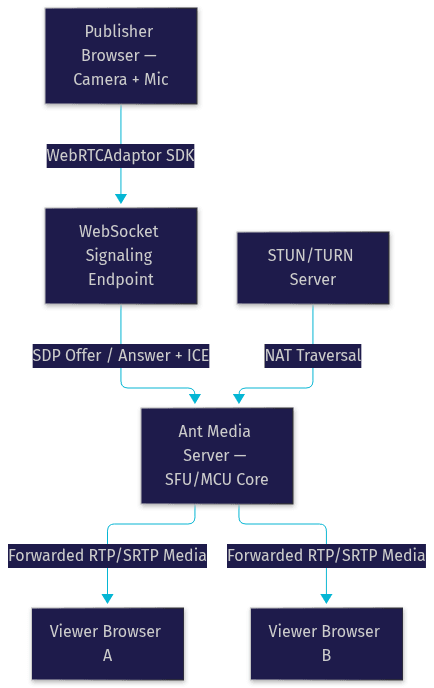
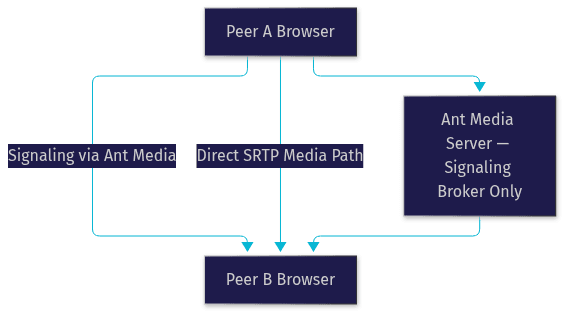
The important architectural distinction: in standard one-to-many mode, media flows through the server (SFU), so the server's CPU and network capacity determine how many concurrent viewers you can serve. In peer-to-peer mode, covered later, the server only brokers the connection and media flows directly between the two endpoints.
Setting Up Ant Media Server for WebRTC
Getting Ant Media WebRTC running starts with the right server foundation. You need a Linux server instance (Ubuntu or CentOS are the common choices), with SSL/TLS certificates installed because browsers only grant camera and microphone access on secure origins. Ant Media's default HTTPS port is 5443, while 5080 serves plain HTTP and is fine for internal testing only.
After installing the server, you enable WebRTC from the web panel in the admin console. The Community Edition includes WebRTC out of the box; Enterprise Editions add ultra-low-latency enhancements, adaptive bitrate improvements, and hardware encoding support.
The step most first-time deployers get wrong is NAT traversal. If your server sits behind a NAT or cloud firewall, you must configure the server's public IP in the network settings and set up a TURN server so that participants on restrictive networks can still relay media. Without a working STUN/TURN setup, ICE negotiation fails silently and you get black video with no obvious error. Open the required UDP port range for media flow in your firewall rules, not just the TCP signaling ports.
Publishing Ant Media WebRTC Streams
Publishing is the process of sending your camera and microphone media to the server. The browser captures media through its native media APIs, and the WebRTCAdaptor SDK handles everything else: creating the peer connection, negotiating with the server, and managing the stream lifecycle.
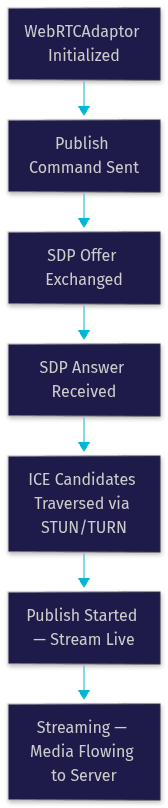
The publish lifecycle follows a clear sequence. First the adaptor initializes and opens the WebSocket connection to the server. Then the publish command is sent, which triggers SDP offer and answer exchange over the signaling channel. ICE candidates are gathered and exchanged until a usable media path is established. Finally the stream goes live, and the adaptor fires a publish-started event your application can listen for to update the UI.
For screen sharing, the same adaptor publishes a stream whose video track comes from the browser's screen-capture API instead of the camera. For audio-only publishing, you simply request an audio-only media stream, which dramatically reduces bandwidth and server load, a common pattern for radio-style broadcasts and voice rooms.
Media Constraints and Quality Settings
Quality configuration happens at publish time through media constraints. You choose a target resolution (720p is a sensible default for interactive use cases, 1080p for premium content), a frame rate (30 fps for smooth motion, 24 or lower to save bandwidth), and whether to enable echo cancellation and noise suppression on the audio track.
Ant Media's adaptive bitrate capability (strongest in Enterprise Edition) monitors viewer network conditions and adjusts stream quality dynamically. If you expect viewers on mobile networks, publish at a higher source quality and let the server's adaptive layer handle downscaling rather than forcing everyone onto a single low bitrate.
Playing Ant Media WebRTC Streams
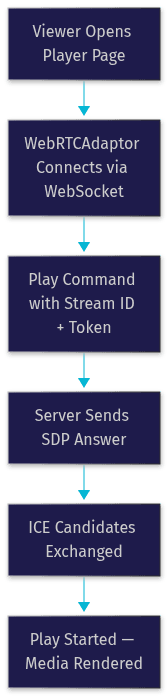
Playback uses the same WebRTCAdaptor, pointed at the same WebSocket endpoint, but in play mode instead of publish mode. Your application provides the stream ID of the live stream, and optionally a token if the stream is protected, plus any metadata you want the server to associate with the session.
The playback flow mirrors publishing in reverse: the adaptor connects, sends the play command for a given stream ID, the server responds with SDP, ICE completes, and media starts flowing to the viewer. Your application listens for the play-started event to hide any loading spinner and the play-finished event to handle stream end or reconnection.
Token authentication deserves emphasis. Ant Media supports one-time tokens and stream-based access control via its REST API, which is how you lock streams to paying subscribers or authenticated users. Without it, anyone who knows your stream ID can watch.
Multi-Track and Conference Playback
Ant Media supports multi-track conferencing, where a single stream ID can carry a main track plus sub-tracks from other participants. This is the foundation for webinars and multi-participant layouts: each participant's audio and video arrives as a separate sub-track, so your client application can render each participant independently, apply custom layouts, and mute individual audio tracks without server-side re-encoding.
Advanced Ant Media WebRTC Features
Beyond basic publish and play, Ant Media WebRTC supports several advanced capabilities that separate it from a minimal signaling server.
Peer-to-Peer Mode
In P2P mode, Ant Media acts purely as a signaling broker. The server helps the two endpoints exchange SDP and ICE candidates, but once the connection is established, media flows directly between the two browsers. This eliminates server CPU cost entirely for the session and delivers the lowest possible latency, but it only works well for one-to-one scenarios like consultations or interviews, since each additional participant multiplies the upload load on every endpoint.
Multi-Track Conferences
For group calls, Ant Media's conference mode lets multiple participants publish into a shared room, with the server mixing or forwarding tracks depending on your configuration. Enterprise Edition adds an MCU-style mixing option that composites participants into a single stream, useful when most viewers are on constrained devices.
Screen Sharing and Virtual Backgrounds
Because the WebRTCAdaptor accepts any browser media track, you can publish processed video: screen captures, canvas-rendered content, or camera video with virtual backgrounds applied client-side before it ever reaches the server. The server treats these as ordinary video tracks.
Data Channels
WebRTC data channels let you send chat messages, poll results, or control commands over the same connection as the media, with delivery guarantees you control. Ant Media relays data channel messages between session participants, which is how live shopping platforms synchronize product cards with the video feed.
Best Practices for Production Ant Media WebRTC Deployments
Production deployments fail for predictable reasons, and most of them are avoidable with planning.
Security first. Serve everything over HTTPS, enable token-based stream access, and restrict the REST API with proper credentials. Define firewall rules that expose only the signaling port and the UDP media range you actually need. Never leave the admin panel on default credentials.
Scaling. Ant Media supports cluster mode with load balancing across multiple server nodes. Enterprise Edition adds auto-scaling so nodes spin up as viewer counts grow. Monitor key metrics: CPU per stream, bandwidth per node, and concurrent viewer counts, all exposed through the server's REST API and dashboard.
Performance tuning. Cap publish bitrates to what your use case actually needs (2 to 3 Mbps covers most 720p interactive streams). Use hardware encoding where available, since transcoding is the primary CPU cost at scale. Track end-to-end latency continuously; if it creeps above one second, you usually have a network path or TURN relay problem.
Common Ant Media WebRTC Issues and Troubleshooting
The four problems you'll hit most often:
ICE negotiation failures show up as a connection that never completes. Check that the server's public IP is configured, the UDP media ports are open in the firewall, and your TURN server credentials are correct. A quick test from a different network isolates whether it's a NAT issue.
Token validation errors appear when the token's stream ID, expiry, or type doesn't match the request. Regenerate the token with matching parameters via the REST API.
Browser permission problems happen when the page isn't served over HTTPS or the user denied camera access. The adaptor reports the failure, but the fix is on the page origin, not the server.
Latency spikes usually trace back to TURN relaying (media taking a geographically long path), server CPU saturation during transcoding, or viewer-side network congestion. Compare server-side metrics with client-side stats to localize the bottleneck.
Ant Media WebRTC vs Other WebRTC Solutions
Ant Media is one option in a crowded field. Here's how it stacks up against the most common alternatives developers evaluate.
| Solution | Typical Latency | Deployment | SDK Breadth | Best For |
|---|---|---|---|---|
| Ant Media | Sub-500ms (ultra-low-latency mode) | Self-hosted or Ant Media Cloud | JavaScript, Android, iOS SDKs | On-premise control, live shopping, one-to-many streaming |
| Janus | Sub-500ms | Self-hosted (open source) | Generic WebRTC API, plugin-based | Custom builds by experienced WebRTC teams |
| LiveKit | Sub-500ms | Self-hosted or cloud | JS, Go, React Native, Unity, Unreal | Multi-participant calling and real-time apps |
| Wowza | ~1s to 3s (LL-HLS focus) | Self-hosted or cloud | Broad but streaming-centric | RTMP/HLS-centric broadcast workflows |
Choose Ant Media when you need on-premise control, sub-300ms latency for one-to-many interactive streaming, and a managed SDK rather than raw protocol plumbing. Choose Janus when you have deep WebRTC expertise and want maximum control. Choose LiveKit when your use case is multi-party rooms rather than broadcast. Choose a fully managed API platform like VideoSDK when you'd rather not operate media servers at all and want video calling, interactive live streaming, and AI voice agents from a single SDK across ten-plus platforms.
Definitions Glossary
Ant Media Server: A self-hosted streaming server that supports WebRTC, RTMP, HLS, and CMAF, available in open-source Community and commercial Enterprise Editions.
WebRTCAdaptor: Ant Media's JavaScript SDK that wraps native browser WebRTC APIs to handle publishing, playback, and signaling with the server.
SFU (Selective Forwarding Unit): A media server architecture that forwards audio and video packets between participants without re-encoding them, scaling better than MCU mixing.
STUN/TURN: Network protocols that let WebRTC discover public addresses (STUN) and relay media through restrictive NATs and firewalls (TURN).
ICE Candidate: A potential network path discovered during WebRTC connection setup; both endpoints exchange candidates until a usable route is found.
Multi-Track Streaming: Ant Media's mechanism for carrying a main track plus participant sub-tracks under one stream ID, enabling conference-style playback.
Key Takeaways
- Ant Media WebRTC delivers sub-500ms latency through an SFU architecture with WebSocket-based signaling, making it well suited to live shopping, telehealth, and interactive broadcasts.
- Publishing and playback both use the WebRTCAdaptor SDK, following a lifecycle of initialization, SDP exchange, ICE traversal, and streaming events your application can hook into.
- Correct STUN/TURN configuration and open UDP media ports are the difference between a working deployment and silent black video.
- Advanced features include P2P mode (server as signaling broker only), multi-track conferences, screen sharing, and data channels for chat and control messages.
- Ant Media wins on on-premise control and one-to-many ultra-low-latency streaming; LiveKit suits multi-party rooms, and managed platforms like VideoSDK suit teams that want embedded calling without operating media servers.
Conclusion
Ant Media WebRTC is a capable self-hosted stack for teams that need ultra-low-latency streaming with full infrastructure control. The architecture is straightforward once you understand the signaling-versus-media split, and the failure modes (ICE, tokens, permissions) are all diagnosable with the right checklist. If operating your own media servers isn't the trade you want to make, VideoSDK offers video calling, live streaming, and AI voice agents as managed APIs with a free tier to get started. What are you building with Ant Media WebRTC or VideoSDK? Drop a comment, I'd love to hear which latency-sensitive use case you're working on.
Free $20 Balance for AI Voice Agents & Video Calls
FAQ